Yes! You can use AI to fill out Bi-Annual Reporting Form Part 2
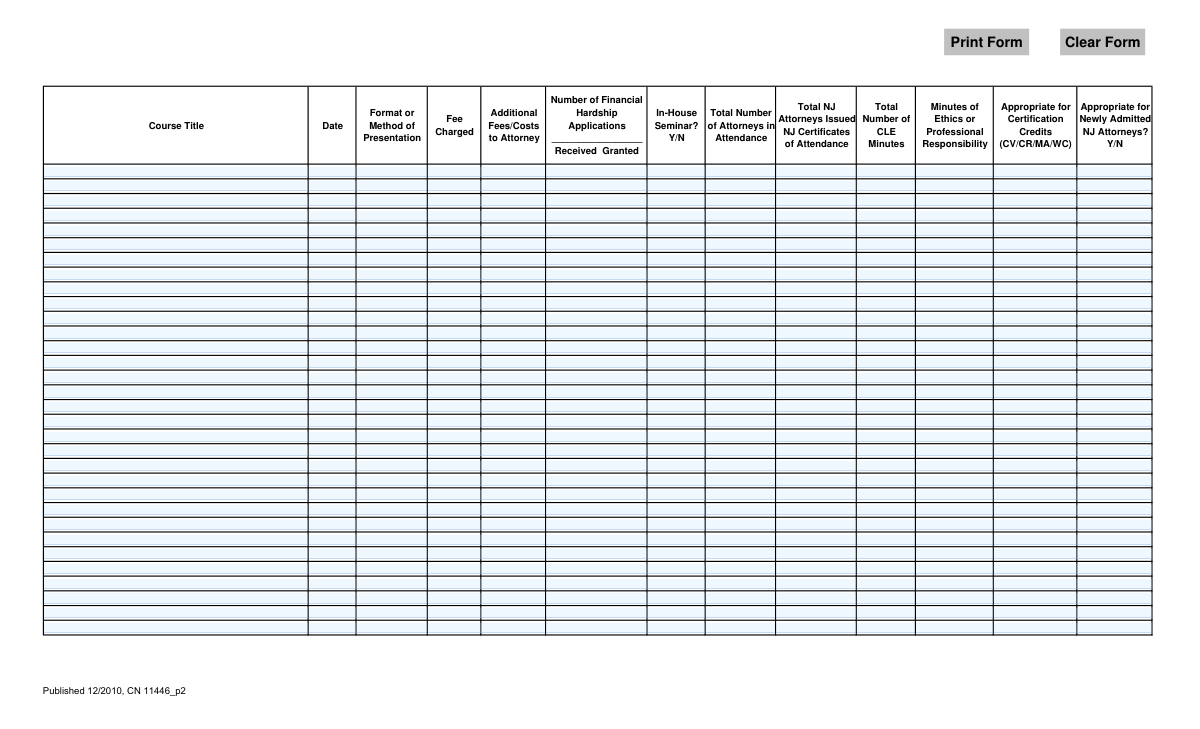
This form is a detailed log for Continuing Legal Education (CLE) providers in New Jersey to report on the courses they have conducted. It requires specific information for each course, including title, date, format, fees, attendance numbers, and the allocation of CLE minutes, particularly for ethics and professional responsibility. Compiling this data is essential for providers to maintain their accreditation and for the state to track attorneys' compliance with their educational requirements. Today, this form can be filled out quickly and accurately using AI-powered services like Instafill.ai, which can also convert non-fillable PDF versions into interactive fillable forms.
CN 11446_p2 is part of the
New Jersey forms category on Instafill.
Our AI automatically handles information lookup, data retrieval, formatting, and form filling.
It takes less than a minute to fill out CN 11446_p2 using our AI form filling.
Securely upload your data. Information is encrypted in transit and deleted immediately after the form is filled out.
Form specifications
| Form name: | Bi-Annual Reporting Form Part 2 |
| Number of fields: | 418 |
| Number of pages: | 1 |
| Language: | English |
Instafill Demo: How to fill out PDF forms in seconds with AI
How to Fill Out CN 11446_p2 Online for Free in 2026
Are you looking to fill out a CN 11446_P2 form online quickly and accurately? Instafill.ai offers the #1 AI-powered PDF filling software of 2026, allowing you to complete your CN 11446_P2 form in just 37 seconds or less.
Follow these steps to fill out your CN 11446_P2 form online using Instafill.ai:
- 1 Navigate to Instafill.ai and upload or select the Bi-Annual Reporting Form Part 2.
- 2 For each course provided during the reporting period, begin filling out a new row on the form.
- 3 Enter the course title, date, presentation method, and any fees charged to attendees.
- 4 Input data regarding financial hardship applications, whether it was an in-house seminar, and total attorney attendance.
- 5 Specify the number of New Jersey attorneys who received certificates of attendance and the total CLE minutes awarded.
- 6 Detail the minutes dedicated to ethics or professional responsibility and indicate if the course is appropriate for certified or newly admitted NJ attorneys.
- 7 Review all entered information across all rows for accuracy before saving, printing, or submitting the completed report.
Our AI-powered system ensures each field is filled out correctly, reducing errors and saving you time.
Why Choose Instafill.ai for Your Fillable CN 11446_p2 Form?
Speed
Complete your CN 11446_p2 in as little as 37 seconds.
Up-to-Date
Always use the latest 2026 CN 11446_p2 form version.
Cost-effective
No need to hire expensive lawyers.
Accuracy
Our AI performs 10 compliance checks to ensure your form is error-free.
Security
Your personal information is protected with bank-level encryption.
Frequently Asked Questions About Form CN 11446_p2
This form is used by Continuing Legal Education (CLE) providers to report detailed information about each course offered to New Jersey attorneys during a specific reporting period.
Accredited providers of New Jersey CLE courses are required to complete and submit this form as part of their bi-annual reporting obligations to the NJ Board on Continuing Legal Education.
In this column, you should describe how the course was delivered to attendees. Common examples include 'Live In-Person Seminar,' 'Live Webinar,' or 'On-Demand Online Course.'
For each course, you must enter two numbers in the 'Number of Financial Hardship Applications' column: the total number of applications you received, and the total number that were granted.
These refer to specific NJ attorney certification credits: Civil Trial Law (CV), Criminal Trial Law (CR), Matrimonial Law (MA), and Workers’ Compensation Law (WC). Indicate if your course was appropriate for any of these credits.
A course is appropriate for newly admitted attorneys if it covers topics specified by the Board for lawyers in their first compliance period. You must answer 'Y' (Yes) or 'N' (No) based on the course content's eligibility.
The first column is for all attorneys who attended, regardless of jurisdiction. The second column is specifically for the number of attorneys who were issued a New Jersey Certificate of Attendance for CLE credit.
You should report the total duration of actual instruction time in minutes, excluding breaks, opening remarks, or keynote speeches. Separately list the portion of those minutes that were dedicated to ethics or professional responsibility.
If you have more courses to report than space allows, you should make copies of this page, fill them out with the additional course information, and submit all pages together.
This form should be submitted to the New Jersey Board on Continuing Legal Education. Please consult the Board's official website for the correct mailing address, submission deadlines, and any associated forms.
Yes, you can use AI-powered services like Instafill.ai to help complete this form. These tools can auto-fill repetitive information accurately, saving you time when reporting on many courses.
To fill this form online, upload the PDF to the Instafill.ai platform. The AI will make all the fields interactive, allowing you to easily type in your information and download the completed document.
If you have a non-fillable PDF, you can use a service like Instafill.ai. It can convert flat PDFs into interactive, fillable forms that you can complete on your computer.
Compliance CN 11446_p2
Validation Checks by Instafill.ai
1
Row Completeness Check
This validation ensures that if any data is entered into a row, the 'Course Title' and 'Date' fields for that row are also filled. This is crucial for preventing incomplete or orphaned records that lack the basic identifying information of a course. If this validation fails, the user will be prompted to either complete the required fields or clear the incomplete row.
2
Date Format and Validity
This check verifies that the value entered in the 'Date' field is a valid date, formatted correctly (e.g., MM/DD/YYYY), and falls within the relevant bi-annual reporting period. It prevents the submission of nonsensical dates or dates outside the reporting scope, ensuring data accuracy for auditing and compliance. A failed validation would require the user to correct the date to a valid entry within the allowed range.
3
Attorney Count Consistency
This validation ensures that the 'Total NJ Attorneys Issued NJ Certificates of Attendance' is not greater than the 'Total Number of Attorneys in Attendance'. This is a logical check to maintain data integrity, as the subset (NJ attorneys) cannot be larger than the total group. If this check fails, it indicates a data entry error that must be corrected before submission.
4
CLE and Ethics Minutes Consistency
This check verifies that the 'Minutes of Ethics or Professional Responsibility' is less than or equal to the 'Total Number of CLE Minutes'. It is logically impossible for the ethics portion of a course to be longer than the entire course duration. This validation prevents erroneous credit reporting, and a failure would require the user to amend the minute counts to be logically consistent.
5
Financial Hardship Application Logic
This validation checks that the number of financial hardship applications 'Granted' is not greater than the number of applications 'Received'. The 'Number of Financial Hardship Applications Received Granted' field must be parsed into two numbers for this check. This rule ensures the data is logical and accurate, and a failure would signal a data entry mistake that needs correction.
6
Numeric Fields Must Be Non-Negative Integers
This check ensures that all fields representing counts of people or units of time are valid, non-negative integers. This applies to fields like 'Total Number of Attorneys', 'Total NJ Attorneys', 'Total Number of CLE Minutes', and the financial hardship counts. This prevents the entry of text, decimals, or negative numbers where they are not appropriate, ensuring clean data for reporting. An error would be flagged for any invalid entry.
7
Fee and Cost Format Validation
This validation confirms that the 'Fee Charged' and 'Additional Fees/Costs to Attorney' fields contain valid, non-negative monetary values. The system should accept numbers, optional currency symbols, and decimal points, but reject text or negative values. This ensures financial data is recorded accurately and can be used for calculations or reporting. A failed validation would require the user to re-enter the value in a proper currency format.
8
Binary Field (Y/N) Format
This check ensures that fields designated for a 'Y/N' response, such as 'In-House Seminar?' and 'Appropriate for Newly Admitted NJ Attorneys?', only contain 'Y' or 'N' (or 'Yes'/'No'). This maintains data consistency and simplifies processing by avoiding ambiguous answers like 'maybe' or 'unknown'. If an invalid value is entered, the system should reject it and prompt the user for a valid 'Y' or 'N' input.
9
Certification Credit Code Validation
This validation examines the 'Appropriate for Certification Credits' field to ensure it only contains approved codes (CV, CR, MA, WC) or is left blank. The check can allow for comma or space-separated values but should flag any unapproved abbreviations. This is important for ensuring attorneys receive the correct type of specialized credit. A failure would require the user to correct the entry to use only the specified codes.
10
Duplicate Course Entry Detection
This validation scans all entered rows to check for duplicates based on the combination of 'Course Title' and 'Date'. Submitting the same course multiple times can lead to inflated reporting and processing errors. If a duplicate entry is detected, the system should issue a warning to the user, allowing them to review and remove the redundant row.
11
Total Attorneys Prerequisite
This is a logical check ensuring that if a value greater than zero is entered for 'Total NJ Attorneys', the 'Total Number of Attorneys in Attendance' field must also contain a value and be greater than or equal to the NJ attorney count. This prevents the illogical situation where NJ attendees are recorded without a corresponding total attendance figure. A failure would prompt the user to provide the total attendance number.
12
Total CLE Minutes Prerequisite
This validation ensures that if 'Minutes of Ethics or Professional Responsibility' is greater than zero, the 'Total Number of CLE Minutes' field must also be filled out with a non-zero value. It is impossible to have ethics minutes without having a total course duration. This check prevents incomplete or illogical credit reporting, and a failure would require the user to enter the total CLE minutes for the course.
Common Mistakes in Completing CN 11446_p2
The field for 'Number of Financial Hardship Applications' combines 'Received' and 'Granted' into one space, leading users to enter data ambiguously (e.g., '5/4', '5 and 4'). This happens due to poor form design, making the submitted data difficult to parse and potentially unusable for statistical tracking. To avoid this, use a clear and consistent format like 'Received: X / Granted: Y' in the space provided, and double-check that the 'Granted' number does not exceed the 'Received' number.
A frequent error is misreporting the 'Total Number of CLE Minutes' and the 'Minutes of Ethics or Professional Responsibility'. Users sometimes add the ethics minutes to the total course time instead of understanding that ethics minutes are a component of the total. This leads to inflated credit hours and compliance issues. Always ensure the ethics minutes are included within the total minute count, not in addition to it.
Users often enter dates in various formats (e.g., MM-DD-YY, Month D, YYYY, DD/MM/YYYY) because the form does not specify one. This inconsistency can cause data entry errors and processing delays for the reporting agency. To prevent this, adopt a standard format like MM/DD/YYYY for all entries to ensure clarity and uniformity across the report.
People may mistakenly enter the same number for 'Total Number of Attorneys in Attendance' and 'Total NJ Attorneys' even when out-of-state attorneys were present. This logical error, where the subset (NJ Attorneys) cannot be larger than the total, skews reporting data for the state bar. Carefully verify attendance records to ensure the count of NJ attorneys is accurate and is less than or equal to the total number of attendees.
For fields like 'In-House Seminar?' and 'Appropriate for Newly Admitted NJ Attorneys?', users often write 'Yes' or 'No' instead of the specified 'Y' or 'N'. This deviation from the required format creates inconsistent data that requires manual correction. To ensure compliance and smooth processing, strictly adhere to using the single letters 'Y' or 'N' as instructed on the form.
The 'Format or Method of Presentation' field is often filled with generic terms like 'Webinar' or 'Online'. These descriptions lack the specificity required by the board (e.g., 'Live Webcast' vs. 'On-Demand Video'), which can affect how credits are categorized and approved. Always use the official terminology provided by the NJ CLE board to accurately describe the course delivery method.
Since the form is a non-fillable PDF, users must print and complete it by hand, often resulting in illegible handwriting or data written outside the designated lines. This can lead to transcription errors, processing delays, or outright rejection of the form. To avoid this, it is best to use a tool like Instafill.ai that can convert flat PDFs into fillable forms, allowing you to type entries clearly and accurately.
In the 'Appropriate for Certification Credits' field, filers may guess the codes (CV/CR/MA/WC) or write out a description, not knowing what the acronyms represent. This mistake can cause a course to be misclassified, preventing attorneys from receiving proper specialized credits. Before filling, consult the reporting agency's guidelines to understand each code and apply only the correct ones for the course.
Users frequently leave numeric fields like 'Fee Charged' or 'Minutes of Ethics' blank when the value is zero, assuming a blank is interpreted as zero. However, a blank field is ambiguous and could also mean the information was missed, potentially halting the review process. Always enter '0' or '$0.00' in numeric fields to explicitly state the value and avoid confusion. AI-powered tools like Instafill.ai can help enforce such data validation rules automatically.
Saved over 80 hours a year
“I was never sure if my IRS forms like W-9 were filled correctly. Now, I can complete the forms accurately without any external help.”
Kevin Martin Green
Your data stays secure with advanced protection from Instafill and our subprocessors

Robust compliance program
Transparent business model
You’re not the product. You always know where your data is and what it is processed for.
ISO 27001, HIPAA, and GDPR
Our subprocesses adhere to multiple compliance standards, including but not limited to ISO 27001, HIPAA, and GDPR.
Security & privacy by design
We consider security and privacy from the initial design phase of any new service or functionality. It’s not an afterthought, it’s built-in, including support for two-factor authentication (2FA) to further protect your account.
Fill out CN 11446_p2 with Instafill.ai
Worried about filling PDFs wrong? Instafill securely fills bi-annual-reporting-form-part-2 forms, ensuring each field is accurate.