
Instafill.ai
7 days free
AI form filling · 63 fields · 5 pages · done in seconds

Yes! You can use AI to fill out Certification and Request to Register/Enforce Out-of-State Custody/Parenting Time/Visitation Order

Don't type 63 fields by hand. Tell our AI about yourself, or upload a document you already have, and it fills every field in seconds. You check it, then download, print or sign.
7 days free, then $19.99/month · Cancel anytime
AI fills it, no typingEncrypted, never used to train AICancel in two clicks
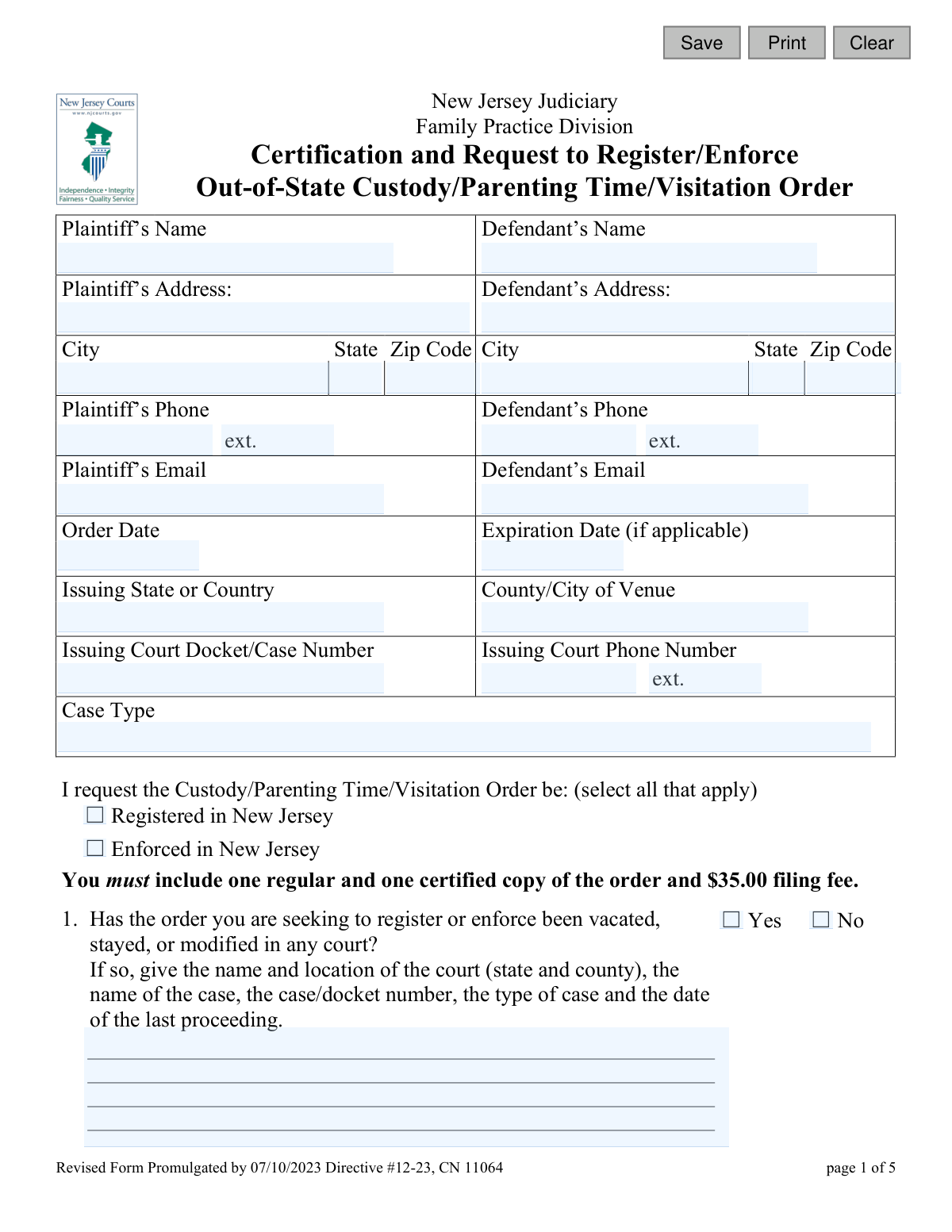
Certification and Request to Register/Enforce Out-of-State Custody/Parenting Time/Visitation Order, page 1
Basic · 43/100Form Complexity Index

The AI does the filling. You just check it.

No typing into boxes, nothing to install.

Tell the AI about youAnswer a few questions in plain words, or upload a document you already have. That is all the typing there is.
AI fills every field in secondsIt puts each answer in the right box on every page, checkboxes included.
Check it and downloadReview every field, change anything, then download, print or sign the PDF.

What this form asks for

The AI fills all of it, from your answers or your documents.

The Certification and Request to Register/Enforce Out-of-State Custody/Parenting Time/Visitation Order (CN 11064) is a legal document filed with the New Jersey Superior Court. Its purpose is to make a custody or visitation order from another state or country legally recognized and enforceable within New Jersey. This is essential for parents who need the New Jersey court system to uphold the terms of an existing out-of-state order. Today, this form can be filled out quickly and accurately using AI-powered services like Instafill.ai, which can also convert non-fillable PDF versions into interactive fillable forms.
Fillable fields63
Pages5
Form Complexity IndexBasic, 43/100

The AI checks your answers before you download

13 checks built for this form, so a wrong date or a missing answer is caught before anyone else sees it.

Ensures Request Purpose is Selected

This check verifies that the user has selected at least one of the checkboxes for 'Registered in New Jersey' or 'Enforced in New Jersey'. It is critical to know the purpose of the filing. If neither is selected, the form submission should be blocked with a message prompting the user to specify their request.

Validates Order Date is Not in the Future

This validation ensures the 'Order Date' (orderDt) is a valid date that is not in the future. An out-of-state order must have been issued in the past or on the current day. This prevents typographical errors and ensures the logical integrity of the legal document being registered.

Verifies Expiration Date Logic

If an 'Expiration Date' (expireDt) is provided, this check ensures it is a valid date that occurs on or after the 'Order Date' (orderDt). An order cannot expire before it is issued. This maintains chronological consistency and prevents logical errors in the filing.

Requires Explanation for Modified Orders (Question 1)

This is a conditional validation. If the user answers 'Yes' to question 1 ('Has the order... been vacated, stayed, or modified'), the corresponding text area (q1Desc) must not be empty. This ensures that crucial context about the order's history is provided to the court, which is essential for making an informed decision.

Requires Explanation for Other Pending Matters (Question 2)

This check enforces that if a user selects 'Yes' for question 2 ('Are there any other matters pending'), they must provide details in the associated text field (q2Desc). This information is vital for the court to understand the full legal landscape and avoid conflicting rulings or jurisdictional issues.

Validates Plaintiff and Defendant Phone Number Format

This validation ensures that the phone number fields for both the Plaintiff (plaPh) and Defendant (defPh) adhere to a standard format, such as a 10-digit number. Proper formatting is necessary for system processing and ensures the court has reliable contact information. An invalid format would trigger an error message.

And 7 more checks
  • Validates Plaintiff and Defendant Email Address Format
  • Ensures Completeness of Party Information
  • Ensures Completeness of Original Order Details
  • Validates Child's Address Confidentiality Logic (Question 6)
  • Verifies Consistency of Certifying Name
  • Validates Signature Date Chronology
  • Validates ZIP Code Format

Let AI fill out your CN 11064

No typing. Every field filled in seconds, checked, ready to sign.

7 days free, then $19.99/month · Cancel anytime

How to Fill Out CN 11064 Online for Free in 2026

What the AI walks you through.

  1. Navigate to Instafill.ai and upload or select the 'Certification and Request to Register/Enforce Out-of-State Custody/Parenting Time/Visitation Order' form.
  2. Enter the personal information for the Plaintiff and Defendant, including names, addresses, and contact details.
  3. Provide specific details about the out-of-state order, such as the issuing state, court, docket number, and date of the order.
  4. Use the AI-assisted interface to accurately answer the series of questions about the order's history, any pending court matters, and your previous participation in custody proceedings.
  5. Fill in the required information about the children involved, including their residential history for the last five years, and the address of the adverse party.
  6. Carefully review all entered information for accuracy, then complete the final certification section by providing your name, the county, and the date.
  7. Electronically sign the document, download the completed form, and prepare it for filing with the court along with the required copies of the original order and the filing fee.

Common Mistakes in Completing CN 11064

The ones the AI is built to catch.

Forgetting to Include Required Attachments and Filing Fee
Users often overlook the instruction to include one regular and one certified copy of the out-of-state order, along with the $35.00 filing fee. This happens due to haste or not reading the instructions carefully just below the registration/enforcement checkboxes. Submitting the form without these items will result in an immediate rejection by the court clerk, causing significant delays in the registration or enforcement process.
Entering an Incorrect Docket or Case Number
A simple typographical error in the Docket/Case Number field is a frequent mistake that can have major consequences. This unique identifier is essential for the New Jersey court to locate and verify the original out-of-state order. An incorrect number will lead to processing delays or rejection of the filing, as court staff will be unable to confirm the order's validity. Always double-check this number against the certified copy of the order you are submitting.
Answering 'Yes' Without Providing Required Details
Many questions on the form (e.g., 1, 2, 5, 8) require a detailed explanation in a text box if the user checks 'Yes'. A common error is to check 'Yes' but leave the corresponding description box empty or incomplete. This forces the court to issue a deficiency notice requesting the missing information, halting the case until a complete response is provided. To avoid this, gather all relevant case numbers, court locations, and dates for any related proceedings before you start filling out the form.
Providing an Incomplete 5-Year Address History for the Child(ren)
Question 6(d) asks for the places the child(ren) have lived for the last five years, a requirement under the Uniform Child Custody Jurisdiction and Enforcement Act (UCCJEA). People often provide only the last one or two addresses, failing to cover the full five-year period. This omission can raise jurisdictional questions and delay the case. It is crucial to list every address, the dates of residence, and the names of the adults the child lived with for the entire five-year window.
Failing to Specify the Complete Issuing Court Details
When filling in the 'Issuing Court' and 'County/City of Venue' fields, users sometimes provide vague information like 'Family Court' or just the state. This is insufficient for court staff to identify the specific judicial body that issued the order. The full, formal name of the court (e.g., 'Superior Court of California, County of Los Angeles') is required to prevent delays and ensure the filing is processed correctly.
Forgetting to Sign and Date the Certification
The certification on the final page is a sworn statement, and an unsigned or undated form is legally invalid. People often complete all the detailed questions and forget this final, critical step in their rush to finish. An unsigned form will be returned by the court, and the filing date will be delayed until a properly signed version is received, potentially impacting the timeliness of enforcement actions.
Providing Incomplete or Outdated Party Information
Failing to provide a complete and current address for the other party (the Defendant) is a critical error. This information is necessary for the court to properly serve legal notices regarding the registration and enforcement of the order. Using an old address can cause service to fail, bringing the entire legal process to a standstill until a valid address is provided.
Incorrectly Completing the Certification Statement
The fill-in-the-blank paragraph in the Certification section is often completed incorrectly. Users may forget to write their name, the county where they are filing, the name of the original issuing court, or the date the order was issued. Each of these details is a required part of the sworn statement, and omissions can lead to the form being considered deficient. To avoid this, carefully read the paragraph and fill in each blank with the precise information requested.
Using Ambiguous Abbreviations or Illegible Handwriting
When filling out the form by hand, users may use non-standard abbreviations for courts or write illegibly, making it difficult for court staff to interpret the information. This can lead to data entry errors on the court's side or a rejection of the form altogether. Using a tool like Instafill.ai can convert this non-fillable PDF into a fillable version, ensuring all entries are typed, clear, and legible, thereby preventing these issues.
Including Irrelevant or Emotional Information in Factual Sections
In open-ended sections like Question 10 ('Please include any facts...'), filers sometimes include emotional appeals or a lengthy narrative of grievances rather than concise, relevant facts. While the background is important, the court needs specific, fact-based information pertinent to the legal standard for registering or enforcing an order. Sticking to objective facts strengthens the legal argument and prevents the core request from being obscured. AI-powered tools like Instafill.ai can help structure responses to be more factual and legally effective.

Frequently Asked Questions About CN 11064


Is it really free for 7 days?
Yes. You pay $0 today. Cancel before Nov 5 and you are never charged. Keep it, and it is $19.99 a month for 5 fills of your CN 11064.
Can I fill other forms too?
This plan is for your CN 11064: your own AI agent fills it as often as 5 times a month. To fill other forms and upload your own, choose a Professional plan from your account.
How do I cancel?
From your account, in two clicks, any time. No email, no call.
How does the AI fill out CN 11064?
You answer a few questions in plain words, or upload a document you already have. The AI reads what you give it and puts each answer into the right field of CN 11064, on every page, in seconds. It checks the answers against the form's own rules, and you review and change anything before you download, print or sign.
What happens to my information?
It is encrypted in transit and at rest, and it is never used to train AI.
How complex is CN 11064 to fill out?
CN 11064 has a Form Complexity Index of 43 out of 100, in the basic tier: 63 fillable fields across 5 pages. Instafill.ai's AI fills it in under a minute, with every field there for you to review before you download.
What is the purpose of this form?
This form is used to ask the New Jersey courts to officially recognize (register) and/or enforce a custody, visitation, or parenting time order that was issued by a court in another state or country.
Who needs to fill out this form?
You should complete this form if you have a valid custody or parenting time order from outside of New Jersey and you need the New Jersey court system to uphold its terms, typically because one of the parties or the child now resides in New Jersey.
What documents do I need to submit with this form?
You must include one regular copy and one certified copy of your out-of-state order. You also need to pay a $35.00 filing fee.
What's the difference between 'Registering' and 'Enforcing' an order?
Registering an order makes it officially recognized as a valid order in New Jersey. Enforcing an order is asking the court to take action because the other party is not following the terms of the order. You can request to do both at the same time.
Why does the form ask about other pending court cases?
The court needs to know about any other legal proceedings, such as for domestic violence, protective orders, or adoption, to get a complete picture of the situation and ensure there are no conflicting court orders.
Why do I have to list where my child has lived for the last five years?
This information is required to help the court determine its jurisdiction under the Uniform Child Custody Jurisdiction and Enforcement Act (UCCJEA). It helps establish the child's 'home state' and ensures the case is heard in the proper court.
What if I don't know the other party's current address?
You must provide the most recent address you have for the other party. If you cannot locate them, you should detail the efforts you made to find them in question 10 or consult with court staff for guidance on how to proceed with serving them.
Can I keep my child's address confidential?
Yes, if there is a domestic violence restraining order or other protective order in place, you can indicate this in question 6(a). The court has procedures to protect confidential information in such cases.
What happens if my original order was changed or modified?
You must disclose any modifications in question 1 and submit the most recent, valid court order. Registering an outdated or modified order can cause significant legal issues.
Where do I file this form?
You file this form with the New Jersey Superior Court, Chancery Division, Family Part in the appropriate county, which is typically where the child resides or where enforcement is needed.
What am I agreeing to when I sign the certification at the end?
By signing the certification, you are swearing under penalty of punishment that the information you provided is true and that the attached court order is a true and current copy. Providing false information can have serious legal consequences.
Can AI tools help me fill out this form?
Yes, services like Instafill.ai use AI to help you accurately auto-fill form fields from your saved information, which can save time and help prevent common errors.
How can I use Instafill.ai to complete this form online?
Simply upload the form's PDF to the Instafill.ai platform. The AI will identify the fields, and you can answer simple questions to have the tool populate the form for you, which you can then download, print, and file.
The PDF version of this form I found is not fillable. What can I do?
You can use a service like Instafill.ai, which can convert flat, non-fillable PDFs into interactive, fillable forms. Just upload your PDF, and the platform will make it easy to complete online.
Encrypted in transit and at restNever used to train AIDelete your forms any time

Get your CN 11064 filled out by AI

$0 today. Cancel before Nov 5 and you pay nothing.

7 days free, then $19.99/month · Cancel anytime