
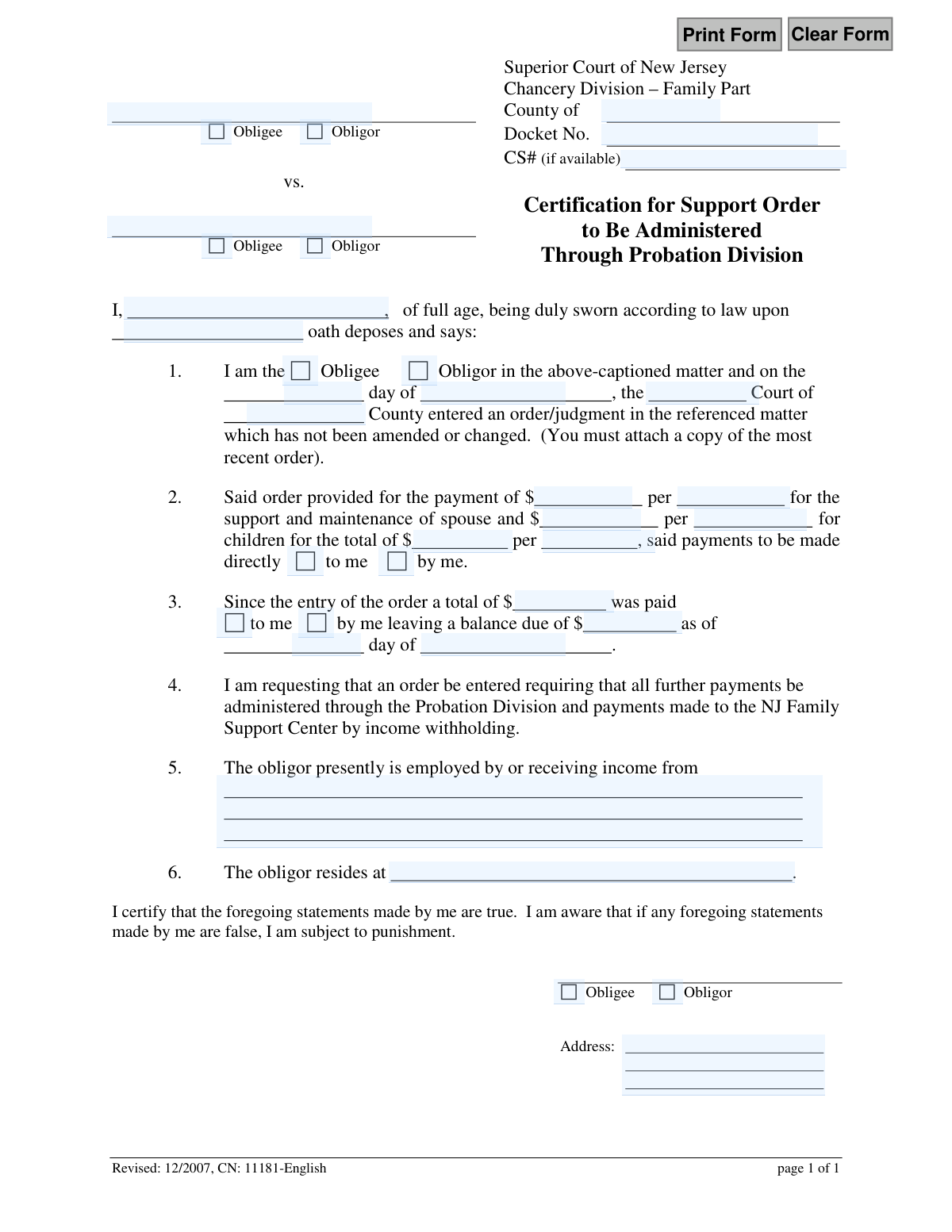
Yes! You can use AI to fill out Certification for Support Order to be Administered Through Probation Division
Don't type 38 fields by hand. Tell our AI about yourself, or upload a document you already have, and it fills every field in seconds. You check it, then download, print or sign.
The AI does the filling. You just check it.
No typing into boxes, nothing to install.
What this form asks for
The AI fills all of it, from your answers or your documents.
The AI checks your answers before you download
14 checks built for this form, so a wrong date or a missing answer is caught before anyone else sees it.
This check verifies that the 'DocketNum' field is not empty and conforms to the standard New Jersey Family Part docket number format (e.g., FM-XX-YYYYYY-ZZ). The docket number is a critical unique identifier for the case, and an incorrect or missing number will prevent the form from being correctly filed and associated with the existing court record. If validation fails, the user should be prompted to enter a valid docket number.
This validation ensures that both the Obligee name ('Party1NameFull') and the Obligor name ('Party2NameFull') fields are filled in. These names are fundamental to identifying the parties involved in the support order. Failure to provide both names makes the certification ambiguous and legally insufficient, leading to rejection of the filing.
This check validates that the name of the person signing the certification ('PartyNameFull') matches either the Obligee or Obligor name entered at the top of the form. It also ensures that the corresponding role checkbox ('PartyCkbx1' for Obligee or 'PartyCkbx2' for Obligor) is selected and consistent with the name. This is crucial for establishing the filer's legal standing and preventing fraudulent or mistaken filings.
This validation checks that the date of the original court order, constructed from 'DtDay1' and 'DtMonth1', represents a real calendar date that occurred in the past. A future or invalid date would be logically impossible for an existing order. This ensures the referenced order is legitimate and provides a correct timeline for calculating arrears.
This check performs a mathematical validation to ensure that the sum of the spousal support amount ('PaymentAmt1') and the child support amount ('PaymentAmt2') equals the 'Total' support amount ('PaymentAmt3'). This prevents simple arithmetic errors that could lead to incorrect enforcement actions. If the amounts do not add up, the form is considered inconsistent and must be corrected.
This validation confirms that the payment frequency specified for spousal support ('PaymentTimeframe1'), child support ('PaymentTimeframe2'), and the total support ('PaymentTimeframe3') are all identical (e.g., all are 'per week' or 'per month'). Inconsistent timeframes make the order ambiguous and unenforceable. The system should enforce that all three fields have the same value.
And 8 more checks
- Validates 'Balance Due As Of' Date Logic
- Requires Obligor's Employer or Income Source
- Requires Obligor's Residential Address
- Validates Signature Block Role Consistency
- Ensures Filer's Address is Complete
- Validates Balance Due is a Non-Negative Value
- Verifies County of Court is Specified
- Confirms Payment Direction Checkbox Selection
Let AI fill out your CN 11181
No typing. Every field filled in seconds, checked, ready to sign.
How to Fill Out CN 11181 Online for Free in 2026
What the AI walks you through.
- Navigate to Instafill.ai and upload or select the 'Certification for Support Order to be Administered Through Probation Division' form.
- Provide the case details, including the New Jersey County, Docket Number, and CS# if available.
- Identify yourself as the Obligee or Obligor and input the date and county of the original support order.
- Detail the payment amounts for spousal and child support, the payment frequency, and calculate any outstanding balance.
- Enter the obligor's current employer and residence information to facilitate the request for income withholding.
- Review all the information auto-filled by the AI for accuracy and completeness.
- Certify the statements are true, then download, print, and sign the completed form to be filed with the court.
Common Mistakes in Completing CN 11181
The ones the AI is built to catch.
Confusing 'Obligee' and 'Obligor' Roles
Failing to Attach the Most Recent Court Order
Miscalculating the Balance Due (Arrears)
Providing Incomplete Obligor Information
Entering Inconsistent Payment Details
Omitting the Docket Number or Case ID
Forgetting to Specify the County
Submitting an Illegible Hand-Written Form
Contradictory Checkbox Selections
Frequently Asked Questions About CN 11181
Is it really free for 7 days?
Can I fill other forms too?
How do I cancel?
How does the AI fill out CN 11181?
What happens to my information?
How complex is CN 11181 to fill out?
What is the purpose of the 'Certification for Support Order to be Administered Through Probation Division' form?
Who should fill out this form?
What is the difference between an 'obligee' and an 'obligor'?
What document must I attach when submitting this form?
How do I calculate the 'balance due' in section 3?
What if I don't know the obligor's current employer or address?
Where do I find the Docket Number for my case?
What happens after I file this form with the court?
Can the person paying support (the obligor) fill out this form?
Can I use an AI tool to help me complete this form?
How can I fill out this New Jersey support form online?
The PDF of this form I found online is not fillable. What can I do?
What does it mean for payments to be made to the 'NJ Family Support Center'?
Get your CN 11181 filled out by AI
$0 today. Cancel before Nov 5 and you pay nothing.
Other forms like this one
New Jersey forms: State of New Jersey Alternate Benefit Program Withdrawal Request Acknowledgement Receipt, Horizon Blue Cross Blue Shield of New Jersey Applied Behavior Analysis Supplemental Information Form, State of New Jersey Application for Employment (Form DPF-663), New Jersey Judiciary Plea Form (Plea 01), Supplemental Plea Form for Certain Sexual Offenses: Megan’s Law/Parole Supervision for Life/Community Supervision for Life (Plea 05), Financial Questionnaire to Establish Indigency, New Jersey Judiciary Resource Family Information Form, Foreclosure Case Information Statement (FCIS) - Appendix XII-B2, New Jersey Judiciary Records Request Form, Superior Court of New Jersey, Application for Appeal and Order, FL Certification of Requested Background Checks for Kinship Legal Guardianship, Certification of Caregiver as to Knowledge of Identity and/or Location of Parents, FL Order Judgment for Kinship Legal Guardianship, New Jersey Judiciary Certification of Repair and Plea of Guilty, Uniform Summary Support Order (USSO), New Jersey Judiciary Volunteer Application (CN 10293), Application to Take the New Jersey Court Interpreter Oral Examination, New Jersey Judiciary Attorney Fee Arbitration Request, Order to Show Cause with Temporary Restraints Pursuant to Rule 4:52, Tax Court of New Jersey, State Tax Complaint
Let AI fill out your CN 11181
Your trial starts once a card is added. You pay nothing before Nov 5.
Our AI already knows this form, all 38 fields of it. Skip the typing: tell it about yourself, or upload what you have, and it fills the whole form in seconds.
- AI fills every field on the form, checkboxes included
- No typing into boxes: answer a few questions, or upload a document you already have, an old copy of this form, a photo of a document
- The AI checks the answers; you review and change anything before you download
- Download the finished PDF, print it, or sign it online
- Encrypted, and never used to train AI
Cancel before Nov 5 and you pay nothing.
A card is needed to start the trial. Cancel in two clicks from your account.
Terms · Privacy