Yes! You can use AI to fill out Certification in Support of Application for Arrest Warrant - Appendix XI-P

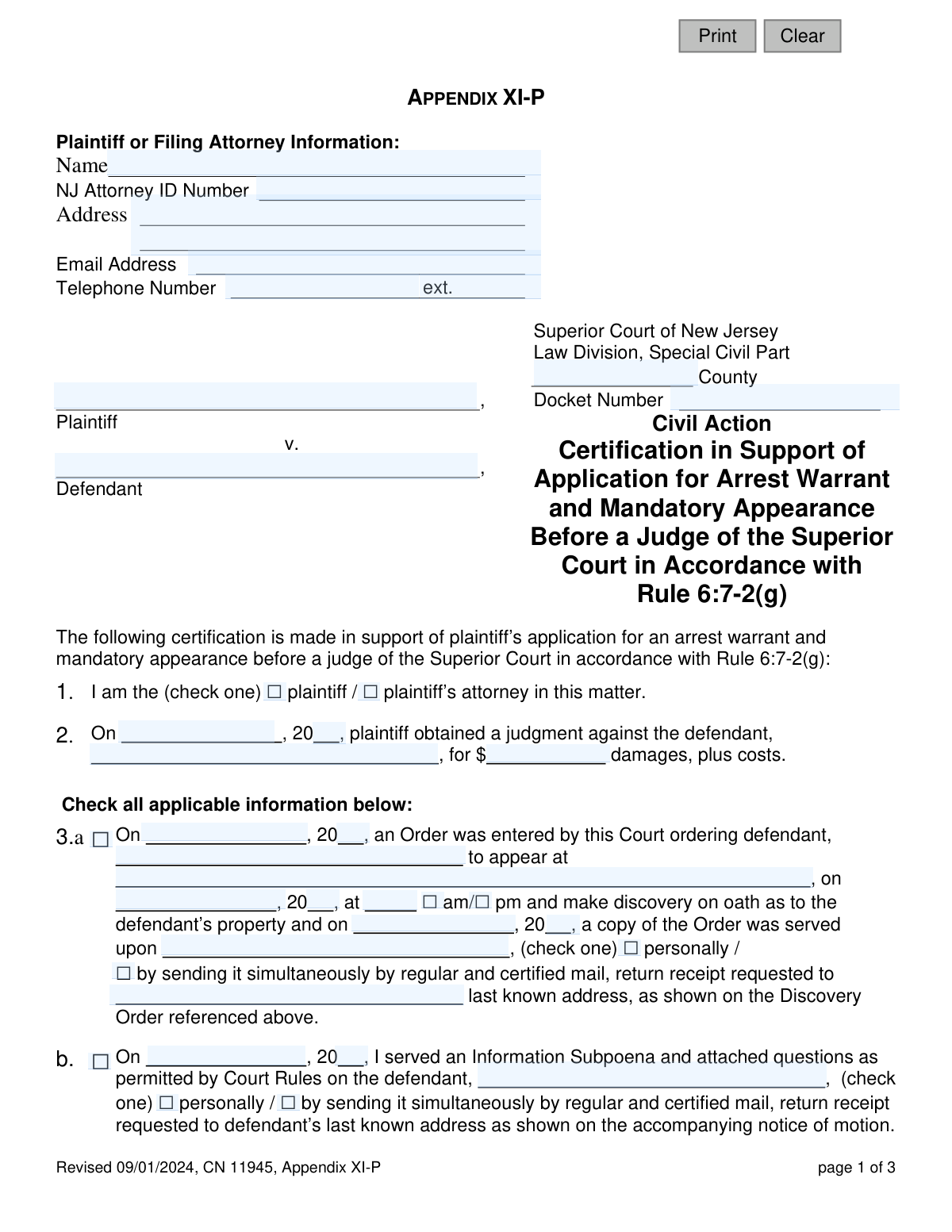
Appendix XI-P is a legal document filed in the Superior Court of New Jersey, Special Civil Part, by a plaintiff or their attorney. It certifies that a defendant has failed to comply with a court order, such as an information subpoena or an order for discovery, despite proper service, and therefore requests the court to issue an arrest warrant. Today, this form can be filled out quickly and accurately using AI-powered services like Instafill.ai, which can also convert non-fillable PDF versions into interactive fillable forms.
Appendix XI-P is part of the New Jersey forms category on Instafill.
Our AI automatically handles information lookup, data retrieval, formatting, and form filling.
It takes less than a minute to fill out Appendix XI-P using our AI form filling.
Securely upload your data. Information is encrypted in transit and deleted immediately after the form is filled out.

Form specifications

Form name: Certification in Support of Application for Arrest Warrant - Appendix XI-P
Number of fields: 61
Number of pages: 1
Language: English
main-image

Instafill Demo: How to fill out PDF forms in seconds with AI

How to Fill Out Appendix XI-P Online for Free in 2026

Are you looking to fill out a APPENDIX XI-P form online quickly and accurately? Instafill.ai offers the #1 AI-powered PDF filling software of 2026, allowing you to complete your APPENDIX XI-P form in just 37 seconds or less.
Follow these steps to fill out your APPENDIX XI-P form online using Instafill.ai:
  1. 1 Navigate to Instafill.ai and upload or select the 'Certification in Support of Application for Arrest Warrant - Appendix XI-P' form.
  2. 2 Provide the plaintiff or filing attorney's information, including name, NJ Attorney ID, address, and contact details.
  3. 3 Enter the specific case details, such as the court county, docket number, and the names of the plaintiff and defendant.
  4. 4 Detail the history of the case by filling in dates and amounts related to the original judgment, court orders, and information subpoenas that the defendant has failed to comply with.
  5. 5 Use the checkboxes to certify the timeline and methods of service for all notices and orders, confirming that the defendant was properly notified.
  6. 6 Review all the information populated by the AI for accuracy, then date and provide your signature to certify the statements made in the document.
  7. 7 Download the completed, signed Appendix XI-P, ready for filing with the appropriate New Jersey court.

Our AI-powered system ensures each field is filled out correctly, reducing errors and saving you time.

Why Choose Instafill.ai for Your Fillable Appendix XI-P Form?

Speed

Complete your Appendix XI-P in as little as 37 seconds.

Up-to-Date

Always use the latest 2026 Appendix XI-P form version.

Cost-effective

No need to hire expensive lawyers.

Accuracy

Our AI performs 10 compliance checks to ensure your form is error-free.

Security

Your personal information is protected with bank-level encryption.

Frequently Asked Questions About Form Appendix XI-P

This form is a certification used to ask the New Jersey Superior Court to issue an arrest warrant for a defendant. It is filed after a defendant has failed to comply with post-judgment discovery orders, such as an Information Subpoena or an Order for Discovery.

The plaintiff who has won a civil judgment or their attorney should fill out this form. It is used when the defendant is not cooperating with the legal process to discover their assets for debt collection.

Before filing, you must have obtained a judgment, served the defendant with a discovery order or information subpoena, and had the defendant fail to comply. You must also have successfully filed a motion to enforce litigant's rights, which the defendant also ignored.

Section 3a is for when the court issued a formal Order for the defendant to appear for discovery. Section 3b is for when you, the plaintiff or attorney, served the defendant with a written Information Subpoena containing questions about their assets.

You will need the judgment date and amount, the docket number, and the specific dates you served various court documents. You must also have details about how each document was served (e.g., personally, certified mail) and the dates of any related court orders.

These sections are critical to prove to the court that you made every valid attempt to notify the defendant at their last known address. The court requires this proof of due diligence before it will consider issuing a drastic measure like an arrest warrant.

Yes, you may still be able to file. As noted in sections 3f, 6, and 9, you can proceed if the mail was not returned with markings like 'Moved, unable to forward' or 'Addressee not known,' which would indicate an invalid address.

This is a court order you obtain after the defendant fails to comply with the initial discovery request. It officially orders the defendant to provide the required information and warns that failure to do so will result in more severe consequences, like an arrest warrant.

According to Section 10, you must wait at least ten days after serving the 'Order to Enforce Litigant’s Rights' on the defendant. You can only file this application if the defendant has still not complied after that period.

The court will review your certification to ensure all procedural steps have been correctly followed. If the judge is satisfied that the defendant has willfully ignored multiple court orders, they may issue a warrant for the defendant's arrest to compel their appearance in court.

By signing the form, you are certifying under penalty of punishment that all the statements you have made are true. Providing willfully false information can lead to serious legal consequences.

Yes, services like Instafill.ai use AI to accurately auto-fill form fields from your case files or other data sources. This can save significant time and help prevent clerical errors.

You can use a service like Instafill.ai to complete this form digitally. Simply upload the form, and the AI-powered platform will help you populate the fields with the correct plaintiff, defendant, and case information quickly and accurately.

If you have a non-fillable or 'flat' PDF, you can upload it to Instafill.ai. The platform's technology can convert it into an interactive, fillable form that you can complete, save, and print.

Compliance Appendix XI-P
Validation Checks by Instafill.ai

1
Party Type Selection Required
Validates that in Section 1, either the 'plaintiff' or 'plaintiff’s attorney' checkbox is selected. This is crucial for identifying the certifier's role in the case and is a required piece of information for the certification. If neither is selected, the form submission should be blocked with a message prompting the user to specify their role.
2
Judgment Date Chronology
Ensures the judgment date entered in Section 2 is a valid, complete date that occurs on or before the current date. A future or invalid date would render the judgment claim invalid for this proceeding. This check prevents data entry errors and ensures the foundational judgment predates the enforcement actions being certified.
3
Action Consistency (Sections 3 & 4)
Verifies that the type of non-compliance checked in Section 4 ('Order' or 'Information Subpoena') is consistent with an action checked in Section 3 (3a for Order, 3b for Subpoena). This logical link is essential for the certification's validity, as one cannot claim non-compliance with an action not taken. An inconsistency would indicate a logical error in the filing.
4
Mail Service Status Required
If service in Section 3a or 3b was conducted by mail, this check ensures that at least one of the subsequent mail status checkboxes (3c, 3d, 3e, or 3f) is selected. This is required to provide the court with necessary details about the success or failure of mail service. Failure to provide this status leaves the service attempt undocumented and the certification incomplete.
5
Returned Mail Explanation
If checkbox 3d ('The regular mail has been returned...') is checked, this validation ensures the corresponding text field explaining the postal notation is not empty. This explanation is critical for the court to assess whether the address is invalid or if there was another reason for the return. An empty field would make the certification incomplete and likely to be rejected.
6
Mutually Exclusive Mail Status
This check confirms that checkboxes 3c ('regular mail has not been returned') and 3d ('regular mail has been returned') are not selected at the same time. These two options are logically contradictory. Allowing both would create an ambiguous and invalid statement about the status of the mail service, requiring user correction.
7
Chronological Date Sequence
Performs a series of checks to ensure all dates are in logical chronological order: Judgment Date (Sec 2) <= Initial Service Date (Sec 3) <= Motion Service Date (Sec 5) <= Enforcement Order Date (Sec 7) <= Enforcement Order Service Date (Sec 8) <= Signature Date. This validation is critical to demonstrate the proper legal process was followed. A date out of sequence invalidates the procedural basis for the arrest warrant application.
8
10-Day Waiting Period Enforcement
Validates that the signature date is at least 10 days after the date the Order to Enforce Litigant’s Rights was served (the date in Section 8). This is a mandatory waiting period specified in Section 10 before an arrest warrant can be requested. The system should calculate the date difference and flag any submission that does not meet this requirement.
9
Consistent Non-Compliance Type
Ensures the type of non-compliance selected in Section 10 ('Information Subpoena' or 'Order for Discovery') is identical to the type selected in Section 4. This cross-check confirms the basis for the enforcement action has remained consistent throughout the document. A mismatch would create ambiguity and could invalidate the certification.
10
Completeness of 'Order to Appear' Details
If checkbox 3a ('Order was entered by this Court ordering defendant...to appear') is selected, this validation ensures the appearance location, date, and time fields are all filled. These details are essential components of the original order and must be documented to prove the defendant was given specific instructions. Missing information would render the certification about the order incomplete.
11
NJ Attorney ID Format
Validates that the 'NJ Attorney ID Number' field matches the expected format for a New Jersey Attorney ID. This ensures that a valid, identifiable attorney is associated with the filing. If the format is incorrect, it could indicate a typo or an invalid entry, prompting the user to correct it before submission.
12
Core Case Identifiers Completeness
This check verifies that the fundamental case identifiers—County, Docket Number, Plaintiff Name, and Defendant Name—are all provided. These fields are the primary keys for linking the certification to the correct case in the court's system. A submission lacking any of this information is unusable and must be rejected.

Common Mistakes in Completing Appendix XI-P

Inconsistent Defendant Name

This error occurs when the defendant's name is spelled differently or abbreviated inconsistently across various sections of the form, such as in Item 2, 3a, and 4. This often happens due to typos or copy-paste errors from different source documents. Inconsistent naming can lead the court to question the identity of the person against whom the warrant is sought, potentially causing the application to be rejected for ambiguity. Using an AI-powered tool like Instafill.ai can prevent this by auto-filling the name consistently across all relevant fields after it's entered once.

Incorrect or Incomplete Dates

The form requires numerous dates for judgments, service, and court orders, and people often enter them in an incorrect format, transpose numbers, or forget to fill in the year. Such errors can invalidate the timeline of events you are certifying, leading to the denial of the warrant application. AI form-filling tools like Instafill.ai can help by validating date formats and ensuring all date fields are completed before submission.

Contradictory Checkbox Selections

Filers may inadvertently check conflicting boxes, such as selecting both 3c ('regular mail has not been returned') and 3d ('regular mail has been returned'). This mistake usually stems from rushing and not reading each option carefully. A logically inconsistent certification is legally defective and will be rejected by the court clerk, requiring a corrected filing and causing significant delays.

Missing Docket Number or County

The Docket Number and County are the primary identifiers for a case within the court system. Omitting this information, or transcribing it incorrectly, means the clerk cannot file the document in the correct case file, resulting in an immediate rejection of the filing. To avoid this, double-check the number against official court documents, or use a tool like Instafill.ai which can save and accurately reuse case information for all related filings.

Failure to Specify Service Method

In items 3a, 3b, 5, and 8, the form requires specifying how a document was served by checking 'personally' or 'by...mail'. Forgetting to check one of these boxes leaves a critical fact uncertified and invalidates the proof of service for that step. The court cannot issue a warrant without proper proof of service, so this omission is a fatal flaw. AI form-fillers can highlight mandatory fields like these checkboxes to ensure they are not missed.

Omitting Required Mail Service Notations

When a filer checks box 3d, indicating that mail was returned, they must also write in the specific notation provided by the U.S. Postal Service. Many people check the box but forget to provide this essential detail, making the certification incomplete. A smart form-filling tool could use conditional logic to make the text box for the notation a required field if box 3d is checked, preventing this oversight.

Inconsistent Basis for Non-Compliance

The application is based on the defendant's failure to comply with either an 'Order for Discovery' or an 'Information Subpoena'. A common error is to select 'Order' in Item 4 but 'Information Subpoena' in Item 10. This inconsistency creates confusion about the legal basis for the warrant and can lead a judge to deny the application. Using a tool that can cross-reference selections within a document can help maintain consistency and prevent such logical errors.

Forgetting to Check AM/PM for Appearance Time

In section 3a, when detailing a court-ordered appearance, there is a specific checkbox for 'am' or 'pm'. This small detail is easily overlooked but is critical for defining the exact terms of the order the defendant allegedly violated. Failing to specify the time of day makes the certification imprecise and could be grounds for denial. AI-powered tools like Instafill.ai can flag incomplete radio button groups to ensure a selection is always made.

Missing Signature or Date

An unsigned or undated certification is legally worthless, as it does not constitute a sworn statement under penalty of perjury. This is a surprisingly common oversight, often happening when filers are rushing to meet a deadline. The court will not act on an unsigned document, and it will be returned, delaying the enforcement of the litigant's rights.

Incorrect NJ Attorney ID Number

This form requires the 'NJ Attorney ID Number' for verification. Attorneys or their staff might mistakenly enter a firm's tax ID, a bar number from another state, or simply leave it blank, causing processing delays. To prevent this, an AI tool like Instafill.ai can securely store and correctly populate the attorney's ID number on all relevant forms, ensuring accuracy every time.

Premature Filing Before a Deadline

Item 10 requires certifying that at least ten days have passed since the Order to Enforce Litigant's Rights was served. Filers sometimes miscalculate this period, failing to properly account for court rules on counting days. Filing the application before the legally required time has elapsed will result in its denial, forcing the filer to wait and start the application process over again.

Failing to Identify Filer's Role in Item 1

The very first item asks the filer to check a box to identify as the 'plaintiff' or 'plaintiff's attorney'. Overlooking this simple step makes the certification ambiguous, as it's unclear who is making the sworn statements, which can lead to the form being returned for clarification. AI form-fillers can ensure this required choice is made by flagging the unanswered question. If the form is a non-fillable PDF, Instafill.ai can also convert it into an interactive, fillable version to make these selections easier.
Saved over 80 hours a year

“I was never sure if my IRS forms like W-9 were filled correctly. Now, I can complete the forms accurately without any external help.”

Kevin Martin Green

Your data stays secure with advanced protection from Instafill and our subprocessors

Robust compliance program

Transparent business model

You’re not the product. You always know where your data is and what it is processed for.

ISO 27001, HIPAA, and GDPR

Our subprocesses adhere to multiple compliance standards, including but not limited to ISO 27001, HIPAA, and GDPR.

Security & privacy by design

We consider security and privacy from the initial design phase of any new service or functionality. It’s not an afterthought, it’s built-in, including support for two-factor authentication (2FA) to further protect your account.

Fill out Appendix XI-P with Instafill.ai

Worried about filling PDFs wrong? Instafill securely fills certification-in-support-of-application-for-arrest-warrant-appendix-xi-p forms, ensuring each field is accurate.