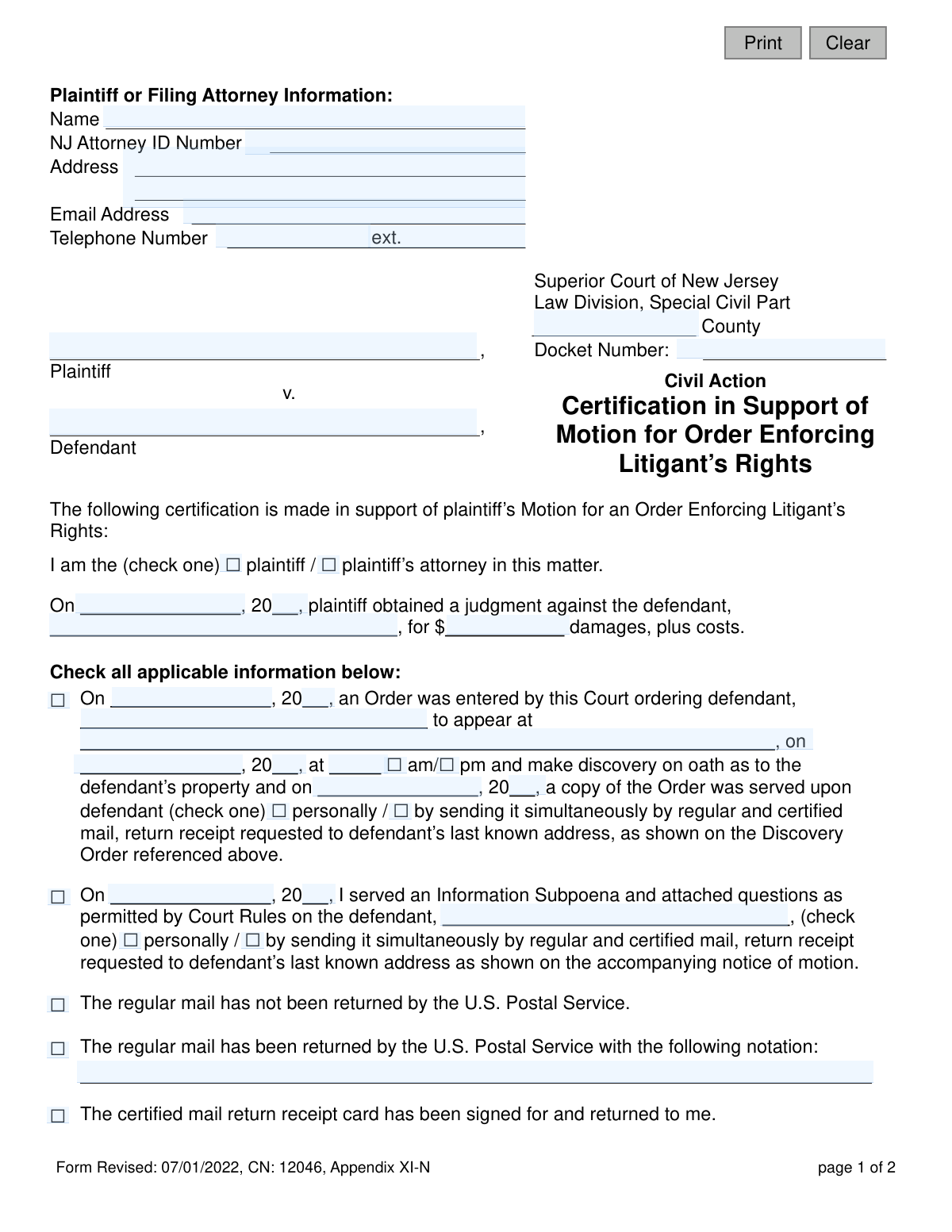
Yes! You can use AI to fill out Certification in Support of Motion for Order Enforcing Litigant’s Rights - Appendix XI-N

The New Jersey Appendix XI-N is a sworn statement filed in the Special Civil Part of the NJ Superior Court by a plaintiff or their attorney. It is used to formally declare that a defendant has failed to comply with a post-judgment court order or an information subpoena, supporting a motion to compel the defendant's compliance. This certification is a critical step in the collections process, providing the court with the necessary facts to enforce the plaintiff's rights as a judgment creditor. Today, this form can be filled out quickly and accurately using AI-powered services like Instafill.ai, which can also convert non-fillable PDF versions into interactive fillable forms.
Appendix XI-N is part of the New Jersey forms category on Instafill.
Our AI automatically handles information lookup, data retrieval, formatting, and form filling.
It takes less than a minute to fill out Appendix XI-N using our AI form filling.
Securely upload your data. Information is encrypted in transit and deleted immediately after the form is filled out.

Form specifications

Form name: Certification in Support of Motion for Order Enforcing Litigant’s Rights - Appendix XI-N
Number of fields: 53
Number of pages: 1
Language: English
main-image

Instafill Demo: How to fill out PDF forms in seconds with AI

How to Fill Out Appendix XI-N Online for Free in 2026

Are you looking to fill out a APPENDIX XI-N form online quickly and accurately? Instafill.ai offers the #1 AI-powered PDF filling software of 2026, allowing you to complete your APPENDIX XI-N form in just 37 seconds or less.
Follow these steps to fill out your APPENDIX XI-N form online using Instafill.ai:
  1. 1 Navigate to Instafill.ai and upload your Appendix XI-N form or select it from their library of official court documents.
  2. 2 Provide the case information, including the New Jersey Superior Court county, docket number, and the full names of the plaintiff and defendant.
  3. 3 Enter the details of the original judgment, including the date it was obtained and the total amount of damages plus costs.
  4. 4 Select the appropriate checkboxes to specify the defendant's non-compliance, whether it was with a court order or an information subpoena, and provide the relevant dates and service details.
  5. 5 Certify the service of the current motion by indicating the date and method of service on the defendant.
  6. 6 Carefully review all entered information for accuracy, then date and electronically sign the certification to attest that the statements are true.
  7. 7 Download the completed, signed form, ready for filing with the court and service on the defendant.

Our AI-powered system ensures each field is filled out correctly, reducing errors and saving you time.

Why Choose Instafill.ai for Your Fillable Appendix XI-N Form?

Speed

Complete your Appendix XI-N in as little as 37 seconds.

Up-to-Date

Always use the latest 2026 Appendix XI-N form version.

Cost-effective

No need to hire expensive lawyers.

Accuracy

Our AI performs 10 compliance checks to ensure your form is error-free.

Security

Your personal information is protected with bank-level encryption.

Frequently Asked Questions About Form Appendix XI-N

This form is used to ask a New Jersey court to force a defendant to comply with a previous court order or discovery request, such as an Information Subpoena, after you have already won a judgment against them. It serves as your sworn statement detailing the defendant's non-compliance.

The plaintiff (the person who won the judgment) or their attorney must complete and sign this form. It is used when a defendant has failed to provide information about their assets as required by a court order or an Information Subpoena.

Before filing, you must have already obtained a judgment against the defendant. You must also have served them with either a court order to appear for discovery or an Information Subpoena, which they have subsequently ignored.

You check 'Order' if the defendant failed to appear for a court-ordered discovery session. You check 'Information Subpoena' if the defendant failed to answer the written questions you sent them after the judgment.

You will need the date the judgment was entered and the total amount of the judgment, including damages and costs. This information is critical for the court to reference the original case.

The form requires you to state how you served the defendant, typically either 'personally' or by 'sending it simultaneously by regular and certified mail, return receipt requested.' You should have records, like a signed certified mail receipt, to back this up.

The form has a specific section for this. If the mail was returned for a reason that does not invalidate the address (e.g., 'unclaimed'), you can still proceed, but you must certify that it wasn't returned for reasons like 'Moved' or 'Insufficient Address'.

You must serve a copy of the completed motion and certification on the defendant. The form requires you to specify the date and method of service, which can be done personally or by sending it via regular and certified mail.

After you file the motion, the court will review it. If granted, the court will issue an 'Order Enforcing Litigant's Rights,' which can compel the defendant to comply and may include penalties for their failure to do so.

You should have your case docket number, the date and amount of the judgment, dates of service for the original order/subpoena and this motion, and proof of service like certified mail receipts. Having this information handy will make the process much smoother.

Yes, services like Instafill.ai use AI to accurately auto-fill form fields from your saved information, which can save you significant time and help prevent errors.

Simply upload the form to the Instafill.ai platform. The AI will identify the fields, and you can then fill them in directly online or use the auto-fill feature to populate your information instantly.

You can use a service like Instafill.ai, which can convert flat, non-fillable PDFs into interactive, fillable forms. This allows you to easily type your information directly onto the form online.

Compliance Appendix XI-N
Validation Checks by Instafill.ai

1
NJ Docket Number Format Validation
Checks that the `docketNum` field follows the standard New Jersey court docket number format, which typically includes a county code, case type, serial number, and year. This is critical for correctly identifying the case file within the court's system. An incorrect format could lead to the motion being rejected or misfiled, causing significant delays.
2
Mandatory Filer Role Selection
Ensures that one of the checkboxes for `partyType` ('plaintiff' or 'plaintiff’s attorney') is selected. This declaration is fundamental to the certification, establishing the filer's standing to bring the motion. Failure to select a role makes the certification incomplete and legally insufficient.
3
Past-Dated Judgment Date
Validates that the judgment date (`jdgmtDt`, `jdgmtYr`) forms a valid calendar date and is not in the future. The motion is based on a pre-existing judgment, so the date must be in the past. An invalid or future date would invalidate the entire premise of the motion.
4
Valid Judgment Amount
Verifies that the `jdgmtAmt` field contains a valid, positive numeric value representing the dollar amount of the judgment. This field must not contain text or negative numbers. Accurate financial data is essential for the court to understand the context of the enforcement action.
5
Basis for Motion Requirement
Confirms that at least one of the primary checkboxes, `formB3a` (for a prior Court Order) or `formB3b` (for an Information Subpoena), is selected. This selection is the core of the motion, explaining which legal instrument the defendant has failed to comply with. Without this, the motion has no basis.
6
Court Order Section Completeness
If the checkbox for a prior Court Order (`formB3a`) is selected, this check ensures all related fields (`discoveryDt`, `appearDt`, `appearLoc`, `discoveryTime`, `orderServedType`) are filled. Incomplete information about the prior order and its service prevents the court from verifying that the defendant was properly notified and failed to comply.
7
Information Subpoena Section Completeness
If the checkbox for an Information Subpoena (`formB3b`) is selected, this validation ensures the associated service date (`infoServedDt`, `infoServedYr`) and service type (`infoServedType`) are provided. This information is required to prove that the subpoena was properly served, which is a prerequisite for an enforcement motion.
8
Logical Date Sequence for Court Order
Performs a logical check to ensure the dates related to the court order are sequential: the Order Entered Date (`discoveryDt`) must be on or before the Order Served Date (`orderServedDt`), which must be before the Appearance Date (`appearDt`). This sequence is legally necessary to prove the defendant had proper notice and opportunity to comply. An illogical sequence would undermine the motion's credibility.
9
Mutually Exclusive Mail Status
Validates that the user has not selected conflicting options for the status of mail service. The checkboxes for 'The regular mail has not been returned' (`formB3c`) and 'The regular mail has been returned' (`formB3d`) are mutually exclusive. Allowing both to be checked would create a logical contradiction in the certification.
10
Required Postal Service Notation
If the checkbox `formB3d` is selected, indicating that the regular mail was returned by the U.S. Postal Service, this validation makes the `postalNotify` text field mandatory. The filer must provide the specific notation from the postal service to explain why the mail was returned, which is crucial evidence regarding the validity of the defendant's address.
11
Non-Compliance Type Consistency
Ensures the selection in the `nonomplyType` field ('Order' or 'Information Subpoena') is consistent with the basis for the motion selected earlier (`formB3a` or `formB3b`). For example, if the filer checked the box for a Court Order, they must also select 'Order' as the item of non-compliance. This maintains logical consistency throughout the document.
12
Motion Service Information Completeness
Verifies that all fields related to the service of the current motion (`motionServedDt`, `motionServedName`, `motionServedType`) are completed. Proper service of the motion itself is a due process requirement. Missing information could lead to the motion being denied or postponed until service can be proven.
13
Conditional Motion Service Address
If the service type for the motion (`motionServedType`) is 'by sending them simultaneously by regular and certified mail', this check requires the `motionServedAddr` field to be filled. The address is essential for mail service, and its omission would invalidate the claim that service was effected.
14
NJ Attorney ID Format
If the filer is an attorney, this check validates that the `attyId` field contains a number that conforms to the New Jersey Attorney ID format. This helps verify the attorney's credentials and ensures they are in good standing. An invalid ID could call the legitimacy of the filing into question.
15
Mandatory and Valid Signature Date
Confirms that the signature date (`sigDtB`) is provided and is a valid calendar date that is not in the future. A dated signature is required to attest to the truthfulness of the certification as of a specific day. An undated or future-dated form is legally invalid.

Common Mistakes in Completing Appendix XI-N

Missing or Incorrect Docket Number

Users often enter an incomplete or inaccurate docket number, or forget to specify the county. The docket number is the court's primary identifier for the case, and any error will prevent the motion from being filed correctly, leading to its rejection and delaying the enforcement process. Always double-check the docket number against official court documents for accuracy.

Failure to Select Certifier's Role

A common oversight is neglecting to check the box indicating whether the person filing is the 'plaintiff' or the 'plaintiff’s attorney'. This simple omission makes the certification legally ambiguous, as the court needs to know who is attesting to the facts. This error will almost certainly cause the motion to be rejected, requiring a corrected version to be resubmitted.

Inconsistent Information Between Sections

Filers may indicate the defendant failed to comply with an 'Order' but then fill out the section detailing the service of an 'Information Subpoena,' or vice-versa. This internal contradiction confuses the basis for the motion and demonstrates a lack of attention to detail. The court may deny the motion due to the unclear grounds, forcing the filer to start over.

Contradictory Mail Service Selections

Users get confused by the multiple mail service checkboxes and select conflicting options, such as checking both 'The regular mail has not been returned' and 'The regular mail has been returned'. This undermines the proof of service, which is critical for the motion's success, and can lead a judge to deny the motion for insufficient evidence of proper service. Carefully review mail returns and select only the one applicable option.

Omitting Key Dates or Using Incomplete Dates

Leaving date fields blank or only partially filling them out, such as writing 'July 1' but omitting the year, is a frequent mistake. The form requires specific dates for the judgment, service of the prior order, and service of the current motion. Missing or incomplete dates make it impossible for the court to verify the timeline of events, which is essential for granting the motion and will result in its denial.

Forgetting to Specify the Non-Compliance Item

After detailing the service of an order or subpoena, the filer often forgets to check the final box stating that the 'Defendant has failed to comply with the (check one) ☐ Order / ☐ Information Subpoena.' This is the ultimate declaration of non-compliance that the motion is based on. Without this explicit statement, the motion lacks a clear cause of action and will be denied.

Incomplete Service Details for the Current Motion

Filers frequently fail to completely fill out the date, name, address, and method of service for the current motion being filed. The court requires proof that the defendant has been properly notified of this new legal action. Omitting this information will lead to the motion being rejected for improper service, delaying the entire enforcement process.

Missing Signature or Certification Date

Forgetting to sign and date the certification at the bottom of the form is a classic and fatal error. An unsigned or undated certification is legally invalid, as it lacks the filer's sworn statement that the information is true. This guarantees the motion will be rejected by the court clerk, requiring a complete refiling.

Illegible Handwriting on a Printed Form

When a form is only available as a non-fillable PDF, users may fill it out by hand with handwriting that is difficult to read. Court clerks must be able to clearly read all names, dates, and addresses, and an illegible form may be returned as unprocessed. To avoid this, AI-powered tools like Instafill.ai can convert flat PDFs into fillable forms, allowing you to type directly into the fields for maximum clarity.

Inaccurate Judgment Amount

Entering the incorrect judgment amount, often due to a typo or misreading the original court order, is a significant error. The amount listed must precisely match the official judgment, as this figure is the basis for the enforcement action. Any discrepancy can lead to the motion being questioned or denied, requiring correction and resubmission.

Failing to Specify Appearance Location and Time

When enforcing an 'Order to Appear', filers sometimes neglect to write in the specific location, date, and time the defendant was ordered to appear. This information is the factual basis for the non-compliance claim. Without these details, the court cannot determine if the defendant actually failed to appear as ordered, and the motion will be denied for being unsubstantiated.
Saved over 80 hours a year

“I was never sure if my IRS forms like W-9 were filled correctly. Now, I can complete the forms accurately without any external help.”

Kevin Martin Green

Your data stays secure with advanced protection from Instafill and our subprocessors

Robust compliance program

Transparent business model

You’re not the product. You always know where your data is and what it is processed for.

ISO 27001, HIPAA, and GDPR

Our subprocesses adhere to multiple compliance standards, including but not limited to ISO 27001, HIPAA, and GDPR.

Security & privacy by design

We consider security and privacy from the initial design phase of any new service or functionality. It’s not an afterthought, it’s built-in, including support for two-factor authentication (2FA) to further protect your account.

Fill out Appendix XI-N with Instafill.ai

Worried about filling PDFs wrong? Instafill securely fills certification-in-support-of-motion-for-order-enforcing-litigants-rights-appendix-xi-n forms, ensuring each field is accurate.