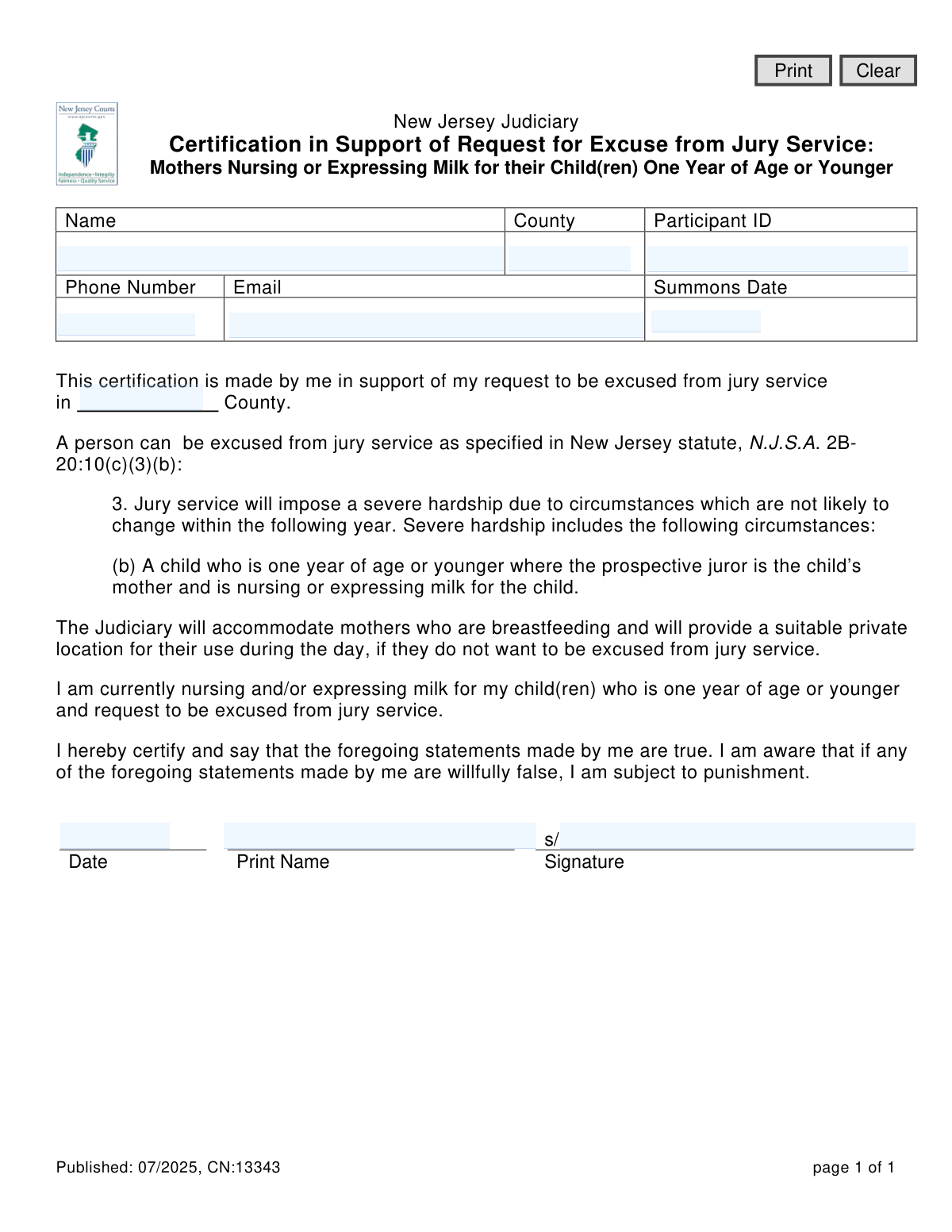
Yes! You can use AI to fill out Certification in Support of Request for Excuse from Jury Service: Mothers Nursing or Expressing Milk for their Child(ren) One Year of Age or Younger

This New Jersey Judiciary form, CN 13343, allows a mother who is nursing or expressing milk for a child one year old or younger to certify this fact and request an excuse from jury service due to severe hardship, as permitted by state law. It provides a formal way to claim this specific exemption, ensuring the request is properly documented and considered by the court. Today, this form can be filled out quickly and accurately using AI-powered services like Instafill.ai, which can also convert non-fillable PDF versions into interactive fillable forms.
NJ Judiciary CN 13343 is part of the New Jersey forms category on Instafill.
Our AI automatically handles information lookup, data retrieval, formatting, and form filling.
It takes less than a minute to fill out NJ Judiciary CN 13343 using our AI form filling.
Securely upload your data. Information is encrypted in transit and deleted immediately after the form is filled out.

Form specifications

Form name: Certification in Support of Request for Excuse from Jury Service: Mothers Nursing or Expressing Milk for their Child(ren) One Year of Age or Younger
Number of fields: 12
Number of pages: 1
Language: English
main-image

Instafill Demo: How to fill out PDF forms in seconds with AI

How to Fill Out NJ Judiciary CN 13343 Online for Free in 2026

Are you looking to fill out a NJ JUDICIARY CN 13343 form online quickly and accurately? Instafill.ai offers the #1 AI-powered PDF filling software of 2026, allowing you to complete your NJ JUDICIARY CN 13343 form in just 37 seconds or less.
Follow these steps to fill out your NJ JUDICIARY CN 13343 form online using Instafill.ai:
  1. 1 Navigate to Instafill.ai and upload or select the 'Certification in Support of Request for Excuse from Jury Service' form.
  2. 2 Provide your personal details, including your full name, county, participant ID, phone number, and email address.
  3. 3 Enter the date of your jury summons and specify the county where you are summoned for jury service.
  4. 4 Review the certification statement confirming you are nursing or expressing milk for a child one year of age or younger and are requesting to be excused.
  5. 5 Use the AI tool to digitally sign and date the form, certifying that the information provided is true and accurate.
  6. 6 Download, print, or electronically submit the completed form as instructed by the New Jersey Judiciary.

Our AI-powered system ensures each field is filled out correctly, reducing errors and saving you time.

Why Choose Instafill.ai for Your Fillable NJ Judiciary CN 13343 Form?

Speed

Complete your NJ Judiciary CN 13343 in as little as 37 seconds.

Up-to-Date

Always use the latest 2026 NJ Judiciary CN 13343 form version.

Cost-effective

No need to hire expensive lawyers.

Accuracy

Our AI performs 10 compliance checks to ensure your form is error-free.

Security

Your personal information is protected with bank-level encryption.

Frequently Asked Questions About Form NJ Judiciary CN 13343

This form is used to request an excuse from jury service in New Jersey if you are a mother currently nursing or expressing milk for a child who is one year of age or younger.

You are eligible if you are a mother with a child one year old or younger and you are actively nursing or expressing milk for that child. This situation is legally recognized as a 'severe hardship' that qualifies for an excuse from jury service.

You will need your full name, Participant ID, phone number, email address, and the summons date from your jury summons. You must also specify the county where you are summoned for jury service.

Your Participant ID and Summons Date are both printed on the official jury duty summons you received in the mail from the New Jersey Judiciary.

You are not required to be excused. The Judiciary will provide accommodations for you, including a suitable private location to nurse or express milk during the day.

No, the form does not require a doctor's note or other documentation. Your signature on the certification, attesting that the information is true, is considered sufficient.

After completing and signing the form, you should submit it according to the instructions provided with your jury summons. This typically involves mailing it to the Jury Management Office or uploading it via an online portal.

The Jury Management Office will notify you of their decision, usually by mail or email. If you do not receive a response as your summons date approaches, you should contact the office directly.

By signing the form, you are certifying that your statements are true. If you are found to have willfully made false statements, you are subject to punishment under the law.

No, this specific certification is strictly for mothers with children one year of age or younger. You may need to request a postponement or an excuse for a different hardship reason by contacting the Jury Management Office.

Yes, services like Instafill.ai use AI to accurately auto-fill form fields with your saved information, which can save you time and help prevent errors.

You can upload the form to the Instafill.ai platform, where the AI will identify all the fields. You can then click to fill them with your saved profile information, sign electronically, and download the completed document for submission.

If you have a non-fillable PDF, you can use a service like Instafill.ai to convert it into an interactive, fillable form. This allows you to type your information directly into the fields before printing or submitting it.

Compliance NJ Judiciary CN 13343
Validation Checks by Instafill.ai

1
Ensures Juror Name is Provided
This check verifies that the 'Name' field ('nameExcused') at the top of the form is not empty. The name is a primary identifier for the person requesting the excuse, and its absence would make it impossible to process the request. If this field is left blank, the form submission should be rejected with an error message prompting the user to enter their full name.
2
Validates Participant ID Format and Completeness
This validation ensures the 'Participant ID' field ('partIDexcused') is filled out and conforms to the expected format (e.g., a specific number of digits). The Participant ID is the unique key used to identify the juror in the judiciary's system. An invalid or missing ID would prevent the system from locating the correct summons record, thus making the excuse request impossible to link and process.
3
Verifies Phone Number Format
This check validates that the 'Phone Number' field ('phoneExcused') contains a properly formatted 10-digit US phone number. Correct contact information is crucial for the jury office to communicate with the individual regarding the status of their request. If the format is incorrect, the submission should fail, asking the user to provide a valid phone number.
4
Validates Email Address Format
This validation ensures the 'Email' field ('emailExcused') contains a string that follows the standard email address format (e.g., '[email protected]'). Email is a primary method for sending official notifications about the excuse request. An invalid email address would lead to communication failures, so the form should not be accepted until a valid format is provided.
5
Confirms Summons Date is a Valid Future Date
This check verifies that the 'Summons Date' ('summonsDate') is a valid calendar date and that it occurs in the future. A person cannot request an excuse for a jury summons that has already passed. This logical check prevents data entry errors and ensures the request is relevant and timely, rejecting submissions with past or invalid dates.
6
Ensures County Fields are Consistent and Complete
This validation checks that both county fields ('cntyExcused' and 'cntyExcusedJury') are filled out and that they contain the same value. A juror is summoned for service in a specific county, and the certification should be filed for that same county. Mismatched or empty county fields indicate a data entry error and would cause confusion, so the form should be rejected until the counties are present and identical.
7
Validates Certification Date Logic
This check ensures the 'Date' field ('dtFull') at the bottom of the form is a valid date and is on or before the 'Summons Date'. It is illogical to sign a certification for an excuse after the jury service date has passed. This validation prevents erroneous submissions and ensures the certification was made in a timely manner relative to the summons.
8
Requires Printed Name for Certification
This validation confirms that the 'Print Name' field ('namePrinted') accompanying the signature is not empty. The printed name legibly confirms the identity of the person signing the certification, which is a legal document. An absent printed name makes the signature difficult to verify, so the form is considered incomplete without it.
9
Verifies Signature is Present
This check ensures that the 'Signature' field ('nameSignature') has been completed. The signature is a legal attestation that the statements made in the certification are true. An unsigned form is legally invalid and cannot be processed, so the submission must be blocked until a signature is provided.
10
Cross-Checks Juror Name for Consistency
This validation compares the name entered at the top of the form ('nameExcused') with the name printed at the bottom ('namePrinted'). The names should be identical to ensure the person identified as the juror is the same person certifying the request. A mismatch could indicate an error or that someone is filling out the form on behalf of another without authorization.
11
Requires at Least One Contact Method
This check ensures that either the 'Phone Number' field or the 'Email' field (or both) are filled out. While both are requested, this rule enforces that there is at least one reliable way for the jury office to contact the individual. If both fields are empty, the form submission should be rejected, as it would be impossible to communicate the decision on the excuse request.
12
Cross-References Participant ID with Jury System
This validation performs a backend check to confirm that the provided 'Participant ID' exists in the jury management system and is associated with an active summons. This is a critical integrity check to prevent submissions based on invalid IDs or for summons that are not active. If the ID is not found, the submission should be rejected with an error indicating the Participant ID is not recognized.

Common Mistakes in Completing NJ Judiciary CN 13343

Inconsistent or Missing County Information

The form asks for the county in two separate places: the header and the main body text. Applicants often fill out one but miss the other, or enter conflicting information. This can cause processing delays or rejection as the court needs to verify the jurisdiction correctly. To avoid this, carefully review the entire form and ensure both county fields are filled out identically, matching the county on the jury summons.

Incorrect or Missing Participant ID

The Participant ID is a unique number from the jury summons used to identify the prospective juror. Transcribing this number incorrectly or omitting it is a frequent error that leads to the court being unable to process the excuse request. This results in the request being denied and the juror still being expected to appear. Double-check the Participant ID on your summons and enter it carefully into the designated field.

Confusing Summons Date with Signing Date

The form has two date fields: 'Summons Date' in the header and 'Date' in the signature block. A common mistake is to enter the current date (the signing date) in the 'Summons Date' field. The 'Summons Date' must be the date you are required to report for jury duty, as listed on your summons. Incorrectly filling this can lead to confusion and delays in processing the excuse.

Applying for an Ineligible Reason

This certification is exclusively for mothers nursing or expressing milk for a child one year of age or younger. People sometimes mistakenly use this form to request an excuse for other childcare hardships, such as having a toddler or lacking daycare, which are not covered by this specific statute. Using this form for an invalid reason will result in an automatic denial of the request.

Missing Signature or Printed Name

The certification requires both a printed name and a legal signature to be valid. Forgetting to sign the form or failing to print the name legibly are common oversights that invalidate the entire request. An unsigned certification is not legally binding and will be rejected by the court, requiring you to appear for service.

Illegible Handwriting on a Printed Form

When this form is printed and filled out by hand, illegible handwriting can make it impossible for court staff to read critical information like the name, Participant ID, or contact details. This leads to processing failures and the inability to contact the applicant for clarification, effectively voiding the request. If the form is a non-fillable PDF, AI-powered tools like Instafill.ai can convert it into a fillable version, allowing you to type directly into the form to ensure perfect legibility.

Invalid or Typographical Email Address

Applicants often make typos when entering their email address (e.g., 'gmal.com' instead of 'gmail.com') or provide an address they rarely check. Since the court may use email to communicate the status of the excuse request, an incorrect email can lead to missed notifications. This could result in the applicant unknowingly being required to appear for jury duty. AI form-filling tools can help by validating email formats to catch common errors.

Using a Nickname Instead of a Legal Name

The name on the certification must exactly match the legal name on the jury summons and official records. Using a nickname, a shortened name, or a married name that hasn't been legally updated can cause a mismatch in the system. This discrepancy can lead to the court being unable to locate the juror's record, causing the excuse request to be rejected.

Submitting an Outdated Form Version

The form indicates a publication date ('Published: 07/2025'), suggesting it may be updated periodically. An applicant might find and use an older version of the form found through a search engine, which may no longer be valid or may reference outdated statutes. This can lead to an automatic rejection. Always ensure you are using the most current version of the form, preferably obtained directly from the official New Jersey Judiciary website.
Saved over 80 hours a year

“I was never sure if my IRS forms like W-9 were filled correctly. Now, I can complete the forms accurately without any external help.”

Kevin Martin Green

Your data stays secure with advanced protection from Instafill and our subprocessors

Robust compliance program

Transparent business model

You’re not the product. You always know where your data is and what it is processed for.

ISO 27001, HIPAA, and GDPR

Our subprocesses adhere to multiple compliance standards, including but not limited to ISO 27001, HIPAA, and GDPR.

Security & privacy by design

We consider security and privacy from the initial design phase of any new service or functionality. It’s not an afterthought, it’s built-in, including support for two-factor authentication (2FA) to further protect your account.

Fill out NJ Judiciary CN 13343 with Instafill.ai

Worried about filling PDFs wrong? Instafill securely fills certification-in-support-of-request-for-excuse-from-jury-service-mothers-nursing-or-expressing-milk-for-their-children forms, ensuring each field is accurate.