Yes! You can use AI to fill out Certification of Diligent Search

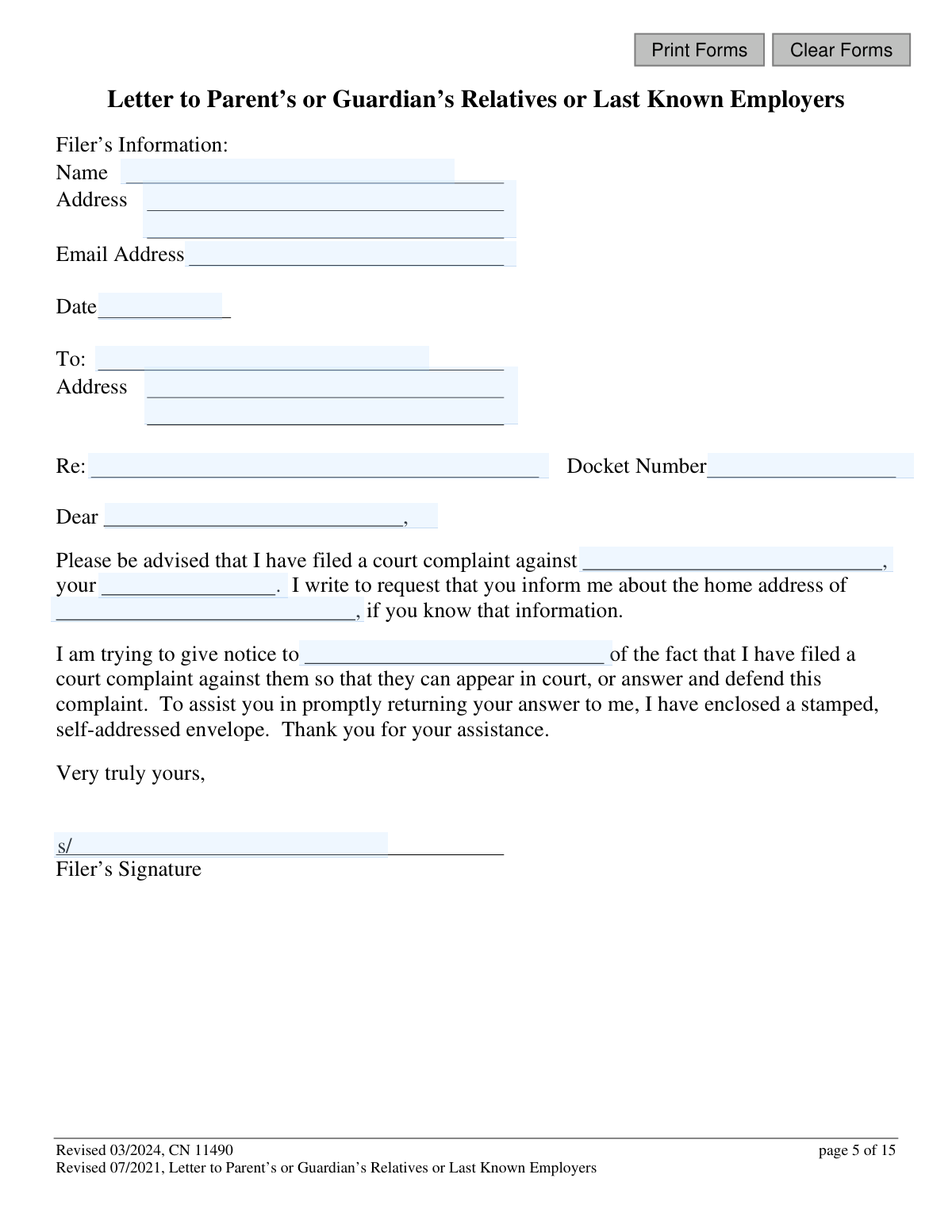
The Certification of Diligent Search is a form required by the Superior Court of New Jersey, Family Part, for Non-Dissolution (FD) cases when a filer cannot locate the opposing party to serve them with court documents. It demonstrates to the court that you have made a serious, good-faith effort to find the person's address by contacting relatives, government agencies like the MVC and USPS, and military locators. Today, this form and its accompanying letters can be filled out quickly and accurately using AI-powered services like Instafill.ai, which can also convert non-fillable PDF versions into interactive fillable forms.
CN 11490 is part of the New Jersey forms category on Instafill.
Our AI automatically handles information lookup, data retrieval, formatting, and form filling.
It takes less than a minute to fill out CN 11490 using our AI form filling.
Securely upload your data. Information is encrypted in transit and deleted immediately after the form is filled out.

Form specifications

Form name: Certification of Diligent Search
Number of fields: 152
Number of pages: 1
Language: English
main-image

Instafill Demo: How to fill out PDF forms in seconds with AI

How to Fill Out CN 11490 Online for Free in 2026

Are you looking to fill out a CN 11490 form online quickly and accurately? Instafill.ai offers the #1 AI-powered PDF filling software of 2026, allowing you to complete your CN 11490 form in just 37 seconds or less.
Follow these steps to fill out your CN 11490 form online using Instafill.ai:
  1. 1 Navigate to Instafill.ai and upload or select the Certification of Diligent Search kit.
  2. 2 Use the AI assistant to automatically populate your personal information, the other party's name, and the court case details across the main certification form and all included letters.
  3. 3 Document each search attempt in the designated sections of the certification form, detailing who you contacted (relatives, employers, MVC, USPS, military) and the results of each inquiry.
  4. 4 Review all the information entered by the AI across the various forms and letters for accuracy and completeness.
  5. 5 Gather copies of all letters sent and any responses received, as these must be submitted as evidence along with your certification.
  6. 6 Electronically or manually sign and date the completed Certification of Diligent Search form.
  7. 7 Download the entire completed packet, including the certification, letters, and supporting documents, to file with the Superior Court of New Jersey.

Our AI-powered system ensures each field is filled out correctly, reducing errors and saving you time.

Why Choose Instafill.ai for Your Fillable CN 11490 Form?

Speed

Complete your CN 11490 in as little as 37 seconds.

Up-to-Date

Always use the latest 2026 CN 11490 form version.

Cost-effective

No need to hire expensive lawyers.

Accuracy

Our AI performs 10 compliance checks to ensure your form is error-free.

Security

Your personal information is protected with bank-level encryption.

Frequently Asked Questions About Form CN 11490

This kit is for individuals in a New Jersey Family Part case (FD docket) who do not have a current address for the opposing party. It provides the forms and instructions needed to prove to the court that you have made a serious effort to locate that person for legal notification.

You need to complete this certification if you are filing a Non-Dissolution (FD) case for matters like custody or child support and you cannot locate the other parent or guardian to serve them with court papers.

You must send inquiry letters or forms to the person's relatives and last known employers, the NJ Motor Vehicle Commission (MVC), the U.S. Department of Defense, and the U.S. Postal Service. You are required to follow up on any information you receive.

You must submit the completed 'Certification of Diligent Search' form, copies of all the letters and forms you sent, and any responses you received. This includes postal receipts and documents from agencies like the MVC.

You must complete the 'Driver History Abstract Application Request' form (DO-21) included in the packet and mail it to the MVC with the required $15 fee. If the person lived in another state, you must contact that state's motor vehicle agency.

You should request a 'Certification of Military Service or Non-Service' from the Defense Manpower Data Center. The packet contains sample letters and addresses for this purpose, as well as for individual military branches if needed.

The process can take several weeks, as you must wait for responses. The MVC notes a turnaround time of 3-4 weeks, and military locator services can take at least four weeks for written requests.

If you have to skip one of the search methods listed in the instructions, you must provide a written explanation to the court detailing why you were unable to complete that specific search.

Yes, some agencies charge for information. For example, the NJ MVC charges $15 for a driver history abstract, and some military locator services may also require a fee.

On this form, you will certify your identity, state the last known address of the person you are seeking, and detail the results of your inquiries to relatives, the post office, the MVC, and the military.

Yes, services like Instafill.ai use AI to accurately auto-fill repetitive information like your name, address, and docket number across all the different letters and forms, saving you time and reducing errors.

Simply upload the 'Certification of Diligent Search Kit' PDF to the Instafill.ai platform. You can then fill your information once, and the AI will automatically populate it into the correct fields on all the necessary forms and letters.

You can use a service like Instafill.ai, which can convert flat, non-fillable PDFs into interactive forms. This allows you to easily type your information directly into the document on your computer.

Compliance CN 11490
Validation Checks by Instafill.ai

1
Validates FD Docket Number Format and Consistency
This check ensures that the docket number entered on all pages (e.g., letters, certification form) begins with 'FD-' and is consistent throughout the document packet. This is crucial for preventing misfiling and rejection by the court clerk, as it links all search efforts to the correct case. If the format is wrong or numbers are inconsistent, the user will be prompted to correct the entry to match the official court-assigned number.
2
Ensures Filer's Information is Complete on All Correspondence
This validation verifies that the 'Filer’s Name' and 'Filer's Address' fields are filled out on all letter templates (pages 5-9). This information is essential for the agencies and relatives to send a response to the correct person and address. A failure to provide this information would render the search attempt unverifiable and would prompt the user to complete the missing fields before the form can be considered complete.
3
Verifies Conditional Logic for MVC Subject Identification
On the DO-21 Driver History Abstract form, this validates that if the 'NJ Driver License Number' in Section B is left blank, then the subject's full Name, Date of Birth, and Address must be provided. This is a firm requirement from the NJMVC to locate the correct individual's record. Failure to provide one of these two sets of identifying information will result in a prompt asking the user to complete the required fields to avoid rejection of the request.
4
Requires Selection and Explanation for MVC Record Purpose
This check ensures the user has both initialed a permitted use in Section D of the DO-21 form and provided a text explanation in the 'Explanation of reason' box. The New Jersey Driver's Privacy Protection Act legally requires a valid, stated reason for accessing personal information. If a reason is not initialed or the explanation is blank, the form is incomplete and the request will be rejected by the MVC.
5
Validates Mutually Exclusive Docket Number on USPS Form
On the USPS Request form (page 13, item 5), this check ensures the user either enters a value in the 'Docket or other identifying number' field OR checks the box for 'Docket or other identifying number has not been issued.' It prevents the user from leaving both blank or filling in both. This logic ensures the form is completed according to USPS requirements for processing legal requests.
6
Ensures Consistent Party Identification on Final Certification
On the 'Certification of Diligent Search' form (pages 14-15), this validates that the party selected in item #1 (plaintiff/defendant) is the same as the party selected in the signature block. This maintains the integrity and clarity of the legal certification, ensuring the person signing is the one making the statements. A mismatch would prompt the user to correct the selection.
7
Validates Date Fields for Correct Format and Plausibility
This check ensures all date fields (e.g., 'Date', 'Date of Birth', 'lastDt') are entered in a valid format like MM/DD/YYYY. It also verifies that signature dates are not in the future and the 'date last seen' is in the past. This prevents data entry errors and ensures the timeline of events is logical for the court record. An invalid or implausible date would trigger an error message with the expected format.
8
Verifies Mandatory Signature and Date on Final Certification
This validation confirms that the 'Signature' and 'Date' fields on the final certification page (page 15) are not empty. A signed and dated certification is a legal requirement to attest to the truthfulness of the statements made under penalty of perjury. Failure to complete these fields would block submission and display a prominent message that a signature and date are mandatory.
9
Checks for Completion of Search Result Narratives
This validation checks that the 'Result of search' text areas (items 4, 5, 6, 7, and 8 on pages 14-15) are not empty. The purpose of the form is to certify that searches were performed and to report the results to the court. Leaving these blank defeats the purpose of the certification; a warning would appear if any of these fields are left empty, prompting the user to describe the outcome of each search attempt.
10
Validates Last Known Address is Provided
This check ensures that the 'last known address' field in item #3 of the 'Certification of Diligent Search' (page 14) is not empty. This address is the starting point for the diligent search and is a critical piece of information for the court to review the filer's efforts. If the field is empty, the system will prompt the user to enter the last known address of the party being sought.
11
Validates Email Address Format
This check scans all fields intended for an email address (e.g., 'filerEmail', 'plaEmail', 'defEmail') and verifies they follow a standard email format (e.g., [email protected]). This is important for ensuring any electronic communication or case notifications from the court are deliverable. An invalid format would trigger an error, asking the user to re-enter the address correctly.
12
Ensures Requester Capacity is Specified on USPS Form
This validation verifies that field #1, 'Capacity of requester,' on the USPS form (page 13) is filled out (e.g., 'process server', 'attorney', 'party representing self'). The USPS requires this information to determine if the requester is authorized to receive address information for legal process. An empty field would result in a prompt for the user to specify their role in the legal proceeding.
13
Verifies Party Names are Entered on Certification
This check ensures the 'Plaintiff' and 'Defendant' name fields at the top of the Certification of Diligent Search form (page 14) are not empty. These names define the parties of the case and are essential for court identification and record-keeping. If either name is missing, the user will be prompted to enter the full names as they appear on the court complaint.

Common Mistakes in Completing CN 11490

Failing to Conduct a Complete Search

Filers often skip required inquiries, such as to the military or a specific agency, believing it's irrelevant. The court requires a comprehensive effort, and any omissions must be explicitly justified. Failing to contact all listed entities can lead the court to deem the search not 'diligent,' resulting in rejection of the certification and significant delays in the case.

Forgetting to Attach Proof of Inquiries

A frequent error is failing to attach copies of all sent letters, agency forms, and any responses received to the final certification. These documents are not just for your records; they are mandatory evidence for the court. Without this proof, a judge cannot verify your efforts, and the certification will be considered incomplete and rejected.

Incorrectly Filling Out the MVC DO-21 Form

The Driver History Abstract Request (DO-21) is complex and often filled out incorrectly, such as by failing to initial the correct 'Permitted Use' (e.g., #4 for court proceedings) or omitting the docket number. This causes the NJ Motor Vehicle Commission to reject the request, halting a critical part of the search. To avoid this, carefully read all instructions, especially Section D, and ensure all supporting details are provided.

Using Improper Mailing Methods

The instructions specify sending letters to relatives and employers by both regular and certified mail with a return receipt, but filers often use only one method to save time or money. The certified mail return receipt is crucial evidence for the court that your inquiry was delivered. Not following this two-part mailing process can invalidate that step of your search in the eyes of the judge.

Entering an Inconsistent Docket Number

The case docket number must be written on numerous documents, including the sample letters and the final certification form. People make typos or write the number from memory, leading to inconsistencies across the packet. This can cause confusion for agencies and the court clerk, potentially leading to your filing being misrouted or rejected. Using a tool like Instafill.ai can help ensure consistency by auto-populating the correct docket number across all forms in the packet.

Providing Vague 'Result of Search' Descriptions

On the final certification form, filers often write unhelpful summaries like 'no response' or 'could not find' in the 'Result of search' fields. The court needs specific details to assess your diligence, such as dates of contact, the method used, and the specific information provided or not provided. Be descriptive, for example: 'Certified mail receipt signed and returned on 04/15/2024; no further correspondence received.'

Forgetting the Signature and Date on the Certification

Overlooking the final signature and date on the 'Certification of Diligent Search' form is a simple but critical mistake. An unsigned or undated certification is legally invalid and will be immediately rejected by the court clerk, bringing your case to a standstill. Always perform a final check for all signature fields before submitting your packet.

Submitting Incorrect Fees or Payee Information

The packet requires separate payments to different agencies, like the MVC and various military branches, each with a specific fee and payee name. Filers may send a single check or make it payable to the wrong entity. This guarantees the agency will return the request unprocessed, causing weeks or months of delay. Carefully verify the correct fee amount and payee for each individual request before mailing.

Using Outdated Forms or Agency Addresses

Court forms, agency addresses, and required fees change over time, but filers may use an old version of the packet they previously downloaded or were given. This can lead to requests being sent to the wrong place or the court rejecting a filing made on an obsolete form. To prevent this, always download the most current version of the packet directly from the njcourts.gov website right before you begin filling it out.

Omitting the Self-Addressed Stamped Envelope (SASE)

The instructions advise enclosing a self-addressed, stamped envelope (SASE) with each inquiry to encourage a reply, but this small step is easily forgotten. While it seems minor, agencies and individuals are far less likely to respond without a SASE, making your search less effective. This can result in fewer leads and a weaker certification, so treat the SASE as a required component of every letter you send.
Saved over 80 hours a year

“I was never sure if my IRS forms like W-9 were filled correctly. Now, I can complete the forms accurately without any external help.”

Kevin Martin Green

Your data stays secure with advanced protection from Instafill and our subprocessors

Robust compliance program

Transparent business model

You’re not the product. You always know where your data is and what it is processed for.

ISO 27001, HIPAA, and GDPR

Our subprocesses adhere to multiple compliance standards, including but not limited to ISO 27001, HIPAA, and GDPR.

Security & privacy by design

We consider security and privacy from the initial design phase of any new service or functionality. It’s not an afterthought, it’s built-in, including support for two-factor authentication (2FA) to further protect your account.

Fill out CN 11490 with Instafill.ai

Worried about filling PDFs wrong? Instafill securely fills certification-of-diligent-search forms, ensuring each field is accurate.