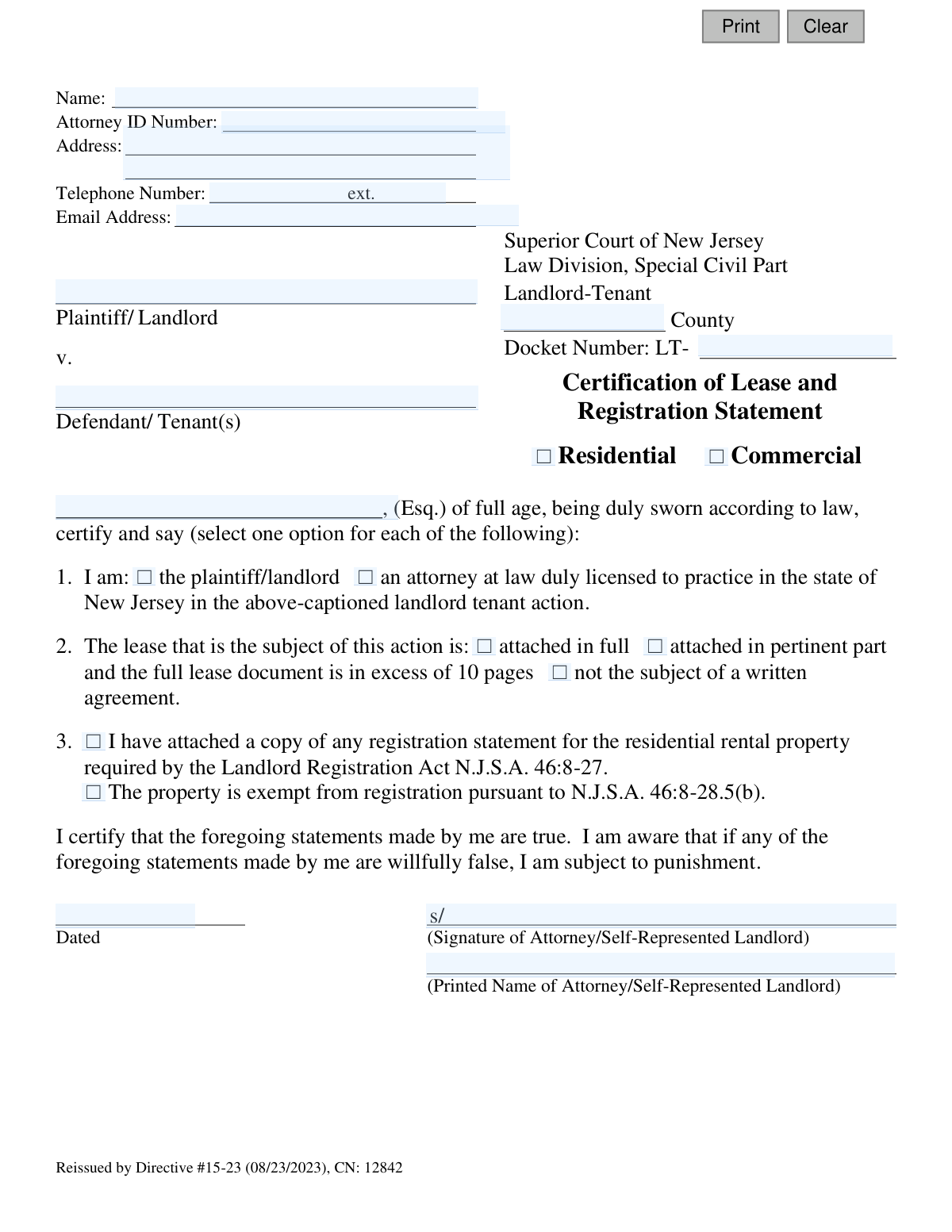
Yes! You can use AI to fill out Certification of Lease and Registration Statement

This form is a legal certification required by the Superior Court of New Jersey, Law Division, Special Civil Part for landlord-tenant cases. It is used by the landlord or their attorney to attest to the status of the lease agreement and to confirm compliance with the Landlord Registration Act. Completing this form accurately is a crucial step in eviction proceedings. Today, this form can be filled out quickly and accurately using AI-powered services like Instafill.ai, which can also convert non-fillable PDF versions into interactive fillable forms.
CN 12842 is part of the New Jersey forms category on Instafill.
Our AI automatically handles information lookup, data retrieval, formatting, and form filling.
It takes less than a minute to fill out CN 12842 using our AI form filling.
Securely upload your data. Information is encrypted in transit and deleted immediately after the form is filled out.

Form specifications

Form name: Certification of Lease and Registration Statement
Number of fields: 25
Number of pages: 1
Language: English
main-image

Instafill Demo: How to fill out PDF forms in seconds with AI

How to Fill Out CN 12842 Online for Free in 2026

Are you looking to fill out a CN 12842 form online quickly and accurately? Instafill.ai offers the #1 AI-powered PDF filling software of 2026, allowing you to complete your CN 12842 form in just 37 seconds or less.
Follow these steps to fill out your CN 12842 form online using Instafill.ai:
  1. 1 Navigate to Instafill.ai and upload or select the New Jersey Certification of Lease and Registration Statement form.
  2. 2 Use the AI-powered tool to automatically populate your personal details, such as name, attorney ID, address, and contact information.
  3. 3 Enter the specific case details, including the county, docket number, and the names of the plaintiff (landlord) and defendant (tenant).
  4. 4 Select the appropriate checkboxes to certify your role (landlord or attorney), the status of the lease (attached in full, in part, or no written agreement), and compliance with the Landlord Registration Act.
  5. 5 Review all the information entered by the AI and your manual selections to ensure accuracy and completeness.
  6. 6 Digitally sign and date the form in the designated fields to certify that the statements made are true.
  7. 7 Download, print, or electronically file the completed certification as required by the court for your landlord-tenant case.

Our AI-powered system ensures each field is filled out correctly, reducing errors and saving you time.

Why Choose Instafill.ai for Your Fillable CN 12842 Form?

Speed

Complete your CN 12842 in as little as 37 seconds.

Up-to-Date

Always use the latest 2026 CN 12842 form version.

Cost-effective

No need to hire expensive lawyers.

Accuracy

Our AI performs 10 compliance checks to ensure your form is error-free.

Security

Your personal information is protected with bank-level encryption.

Frequently Asked Questions About Form CN 12842

This form is used in New Jersey Landlord-Tenant court to certify the status of the lease and confirm the rental property is properly registered with the municipality. It must be filed by the landlord or their attorney when initiating an eviction action.

The landlord (plaintiff) or the landlord's attorney must complete and sign this form. Section 1 requires you to check a box indicating whether you are the landlord or their legal representative.

It is a document proving your residential rental property is registered with the municipality as required by the Landlord Registration Act. You must attach a copy of this statement unless your property is legally exempt.

In section 2 of the form, you should check the box that says 'not the subject of a written agreement.' This informs the court that your agreement with the tenant is verbal.

No, if your lease exceeds 10 pages, section 2 allows you to attach only the 'pertinent part' of the document. This should include key sections like the parties' names, lease term, rent amount, and any clauses relevant to the case.

Certain properties, like owner-occupied buildings with two or fewer rental units, are not required to register under the Landlord Registration Act. If this applies to you, check the exemption box in section 3.

The Docket Number is assigned by the court to identify your case. If you are filing this form with an initial complaint, the court clerk will assign one; otherwise, it can be found on any prior court notices for this case.

No, the Attorney ID Number field is only for licensed attorneys. If you are the landlord representing yourself (also known as 'pro se'), you should leave this field blank.

This form must be filed with the Superior Court of New Jersey, Special Civil Part, in the county where the rental property is located. It is typically submitted with the initial eviction complaint.

By signing the form, you certify that the statements are true under penalty of law. Willfully providing false information can lead to punishment, which may include fines or the dismissal of your case.

Yes, services like Instafill.ai use AI to accurately auto-fill form fields from your saved information. This can save you significant time and help prevent errors, especially if you file these forms often.

Simply upload the PDF to the Instafill.ai platform. The AI will make the form interactive, allowing you to quickly fill in all the required information, save your progress, and download the completed document.

You can use a service like Instafill.ai to solve this problem. Upload the non-fillable or 'flat' PDF, and their technology will convert it into an interactive, fillable form that you can complete and sign digitally.

Compliance CN 12842
Validation Checks by Instafill.ai

1
Valid New Jersey Docket Number Format
Checks that the Docket Number field follows the required format for Landlord-Tenant cases, which is 'LT-' followed by a numeric identifier. This ensures the document is correctly associated with a specific court case, preventing filing errors and delays. A failed validation would return an error prompting the user to correct the number before submission.
2
Mandatory Party Type Selection
Verifies that the user has selected exactly one option for their role in the case: either 'plaintiff/landlord' or 'attorney'. This selection is critical as it determines which subsequent fields are required, such as the Attorney ID number. If no selection or multiple selections are made, the form submission should be blocked until corrected.
3
Conditional Attorney ID Requirement and Format
This validation ensures the Attorney ID Number field is completed if the user identifies as an 'attorney'. The ID must be a valid, properly formatted New Jersey Attorney ID. This is crucial for verifying the attorney's credentials and standing with the bar, and failure to provide a valid ID when required will prevent form submission.
4
Valid New Jersey County Selection
Validates that the County field contains one of the 21 official counties in New Jersey. Filing in the correct county is a jurisdictional requirement for the court to hear the case. An invalid or missing county name would result in an error and require the user to select from a valid list.
5
Exclusive Property Type Declaration
Ensures that exactly one property type, either 'Residential' or 'Commercial', is selected. This distinction is fundamental as different laws and regulations govern residential and commercial tenancies. The form cannot be processed without this clear and singular declaration.
6
Logical Validation of Landlord Registration Statement
This check is conditional based on the property type. If 'Residential' is selected, the user must select one of the two options regarding the Landlord Registration Statement. This check is disabled or bypassed if 'Commercial' is selected, as the registration requirement typically does not apply, preventing errors and ensuring compliance.
7
Lease Agreement Status Declaration
Verifies that the user has selected one and only one option to describe the lease agreement's status (attached in full, in part, or not written). This information is essential for the court to understand the evidentiary basis of the landlord-tenant dispute. The submission will be rejected if this required choice is not made.
8
Valid and Non-Future Signature Date
Checks the 'Dated' field to confirm it contains a validly formatted date that is not in the future. A certification cannot be dated for a future time, as it attests to facts true as of the signature date. This validation upholds the integrity of the legal certification process.
9
Completeness of Litigant Names
Ensures that both the 'Plaintiff/Landlord' name and the 'Defendant/Tenant(s)' name fields are not empty. These fields are fundamental to identifying the parties involved in the legal action. A submission with missing party information is incomplete and cannot be filed with the court.
10
Signature Name and Printed Name Consistency
Validates that the printed name provided next to the signature line is not empty and corresponds to the filer. The system should check that this name matches the attorney's name if filed by an attorney, or the landlord's name if self-represented. This confirms the identity of the person certifying the document's truthfulness.
11
Valid Email Address Format
This check ensures the Email Address field contains a string that conforms to the standard email address format (e.g., '[email protected]'). A valid email is crucial for official court communications, notices, and service of documents. An invalid format would trigger an error, requiring the user to correct the entry before proceeding.
12
Completeness of Filer's Contact Information
Verifies that the filer's full address and telephone number are provided and are not empty. This contact information is mandatory for the court and opposing parties to communicate with the filer. A failure to provide this information would render the filing incomplete and result in its rejection.

Common Mistakes in Completing CN 12842

Incomplete or Incorrect Filer Contact Information

Filers, especially self-represented landlords, often leave the top section (Name, Address, Phone, Email) incomplete or provide incorrect details. This happens due to oversight or uncertainty, such as not having an Attorney ID. Missing information can prevent the court from sending crucial notices, causing significant delays or even dismissal. Always double-check that every field is filled accurately; if a field like 'Attorney ID Number' does not apply, write 'N/A' or 'Pro Se'.

Incorrect Docket Number Formatting

The docket number must be entered precisely as it appears on court documents, including the 'LT-' prefix. People often omit the prefix, add extra spaces, or transpose numbers, leading to the document being misfiled or rejected. This delays the case and requires refiling. To avoid this, carefully copy the exact docket number from a prior court notice or the initial complaint.

Using Incorrect Legal Names for Plaintiff/Defendant

Filers may use informal names or abbreviations for the landlord (Plaintiff) or tenant (Defendant) instead of their full legal names as listed on the lease. For example, using 'My Rental LLC' instead of the full registered name 'My Rental Properties, LLC'. This can create legal challenges regarding the identity of the parties and may complicate the enforcement of a judgment. Always use the complete, official names of all parties as they appear on the signed lease agreement.

Selecting the Wrong Property Type

Mistakenly checking 'Residential' for a commercial property, or vice-versa, is a critical error. This often occurs with mixed-use properties or when the filer is unfamiliar with the legal distinctions. The property type dictates which statutes apply, and an incorrect selection can lead to the immediate dismissal of the case for non-compliance with the proper legal framework. Carefully verify the property's legal use before making a selection.

Mismatched Lease Attachment Certification

A common mistake is a discrepancy between the checkbox selected and the documents actually attached. For instance, checking the box for 'attached in full' while only providing a single page, or checking 'not the subject of a written agreement' when a written lease does exist. This inconsistency will likely cause the court clerk to reject the filing for being incomplete or inaccurate, halting the legal process. Before signing, physically verify that your attachments match the option you have certified.

Improper Certification of Landlord Registration

Landlords frequently misunderstand the requirements of the Landlord Registration Act (N.J.S.A. 46:8-27), a prerequisite for filing an eviction. They may incorrectly claim an exemption, which only applies to owner-occupied properties with two or fewer rental units, or forget to attach the registration statement. Failure to comply with this statute is a jurisdictional defect and will result in the dismissal of the eviction complaint. Landlords must attach their municipal registration statement unless they are certain they meet the narrow exemption criteria.

Forgetting to Sign or Date the Form

Forgetting to sign and date the certification is one of the most common and easily avoidable errors. An unsigned or undated form is legally invalid and will be immediately rejected by the court clerk, as it represents an unsworn statement. This requires the filer to correct and resubmit the entire package. To prevent this, make it a final step to review the signature and date lines before submission. AI-powered tools like Instafill.ai can highlight required signature fields to ensure they are not missed.

Printed Name Does Not Match Signature

The form requires both a signature and a printed name, and they must clearly correspond to the same individual. Sometimes the signature is illegible and the printed name is either missing or does not match, creating ambiguity about who certified the document. This can cause processing delays while the court clerk attempts to verify the filer's identity. Always ensure the printed name is clear, legible, and is the full name of the person who signed the document.

Failing to Attach Required Lease or Registration Documents

Even if the checkboxes are filled correctly, filers often simply forget to include the physical attachments for the lease and/or the landlord registration statement. This oversight results in an incomplete filing that will be rejected by the court, forcing the landlord to start the process over. To avoid this, create a checklist and physically collate all required documents—the certification, the lease, and the registration statement—before submitting the package to the court.

Using an Outdated Version of the Form

Court forms are periodically updated, as indicated by the 'Reissued by Directive' date on this form. Using an old version can lead to rejection because it may lack newly required fields or certifications. This mistake happens when filers use a saved local copy instead of downloading the latest version from the official source. Always obtain the form directly from the NJ Courts website before each use to ensure you are complying with the most current directives.

Illegible Handwriting on a Manually Filled Form

When the form is filled out by hand, illegible handwriting in critical fields like names, addresses, and docket numbers can lead to data entry errors by court staff. This can cause notices to be sent to the wrong address or the filing to be associated with the wrong case, leading to significant delays. To prevent this, print clearly in block letters. Better yet, use a tool like Instafill.ai, which can convert flat, non-fillable PDFs into digital forms that can be typed into for perfect legibility.
Saved over 80 hours a year

ā€œI was never sure if my IRS forms like W-9 were filled correctly. Now, I can complete the forms accurately without any external help.ā€

Kevin Martin Green

Your data stays secure with advanced protection from Instafill and our subprocessors

Robust compliance program

Transparent business model

You’re not the product. You always know where your data is and what it is processed for.

ISO 27001, HIPAA, and GDPR

Our subprocesses adhere to multiple compliance standards, including but not limited to ISO 27001, HIPAA, and GDPR.

Security & privacy by design

We consider security and privacy from the initial design phase of any new service or functionality. It’s not an afterthought, it’s built-in, including support for two-factor authentication (2FA) to further protect your account.

Fill out CN 12842 with Instafill.ai

Worried about filling PDFs wrong? Instafill securely fills certification-of-lease-and-registration-statement forms, ensuring each field is accurate.