Yes! You can use AI to fill out Certification Regarding Appearance as a Multijurisdictional Practitioner
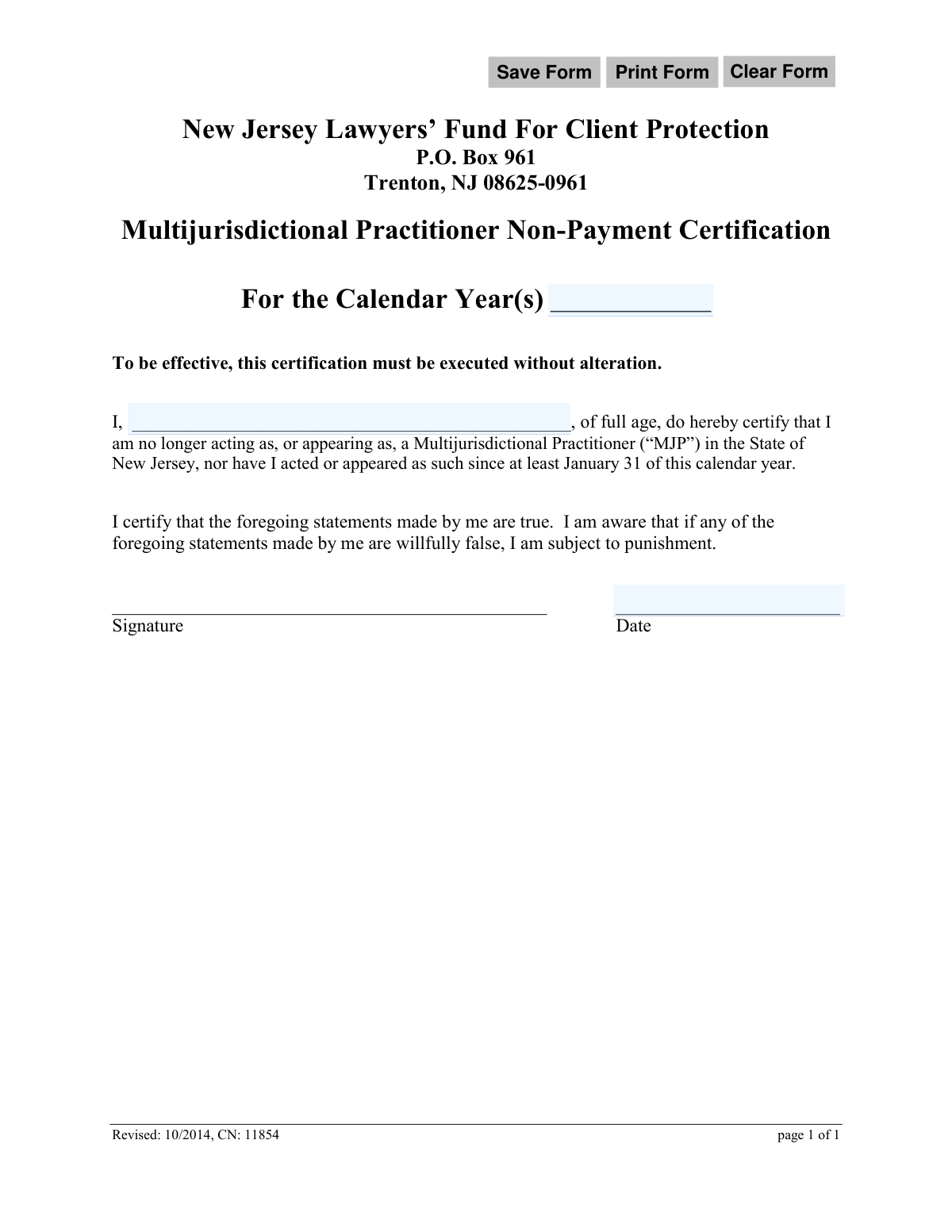
The Certification Regarding Appearance as a Multijurisdictional Practitioner (CN 11854) is a legal document submitted to the New Jersey Lawyers’ Fund For Client Protection. It serves as a formal declaration by an attorney that they have ceased practicing or appearing in New Jersey under the state's multijurisdictional practice rules. This certification is crucial for maintaining compliance and formally ending associated obligations. Today, this form can be filled out quickly and accurately using AI-powered services like Instafill.ai, which can also convert non-fillable PDF versions into interactive fillable forms.
CN 11854 is part of the
New Jersey forms category on Instafill.
Our AI automatically handles information lookup, data retrieval, formatting, and form filling.
It takes less than a minute to fill out CN 11854 using our AI form filling.
Securely upload your data. Information is encrypted in transit and deleted immediately after the form is filled out.
Form specifications
| Form name: | Certification Regarding Appearance as a Multijurisdictional Practitioner |
| Number of fields: | 6 |
| Number of pages: | 1 |
| Language: | English |
Instafill Demo: How to fill out PDF forms in seconds with AI
How to Fill Out CN 11854 Online for Free in 2026
Are you looking to fill out a CN 11854 form online quickly and accurately? Instafill.ai offers the #1 AI-powered PDF filling software of 2026, allowing you to complete your CN 11854 form in just 37 seconds or less.
Follow these steps to fill out your CN 11854 form online using Instafill.ai:
- 1 Navigate to Instafill.ai and upload the CN 11854 form or select it from their template library.
- 2 Use the AI assistant to identify and fill in the calendar year(s) for which the certification is being made.
- 3 Enter your full name in the designated field to identify yourself as the certifying attorney.
- 4 Carefully review the certification statements to ensure you understand and agree with the declaration.
- 5 Apply your legally binding electronic signature in the signature field.
- 6 Enter the current date to finalize the certification.
- 7 Download, print, or submit the completed form to the New Jersey Lawyers’ Fund For Client Protection as required.
Our AI-powered system ensures each field is filled out correctly, reducing errors and saving you time.
Why Choose Instafill.ai for Your Fillable CN 11854 Form?
Speed
Complete your CN 11854 in as little as 37 seconds.
Up-to-Date
Always use the latest 2026 CN 11854 form version.
Cost-effective
No need to hire expensive lawyers.
Accuracy
Our AI performs 10 compliance checks to ensure your form is error-free.
Security
Your personal information is protected with bank-level encryption.
Frequently Asked Questions About Form CN 11854
This form is used to certify that you are no longer acting as a Multijurisdictional Practitioner (MJP) in New Jersey. It serves as a 'Non-Payment Certification' to inform the NJ Lawyers’ Fund For Client Protection that you are no longer subject to fees associated with MJP status.
This form is for attorneys who were previously registered or appeared as a Multijurisdictional Practitioner in New Jersey but have since ceased all such activity. You should file this if you no longer provide legal services in NJ and wish to be exempt from MJP-related payments.
You must provide the calendar year(s) for the certification, your full name, your signature, and the date of signing. The form must be completed without any alterations to its original text.
You should enter the calendar year or years for which you are certifying your non-payment status. This is typically the current calendar year in which you have ceased your MJP activities.
Mail the completed and signed form to the New Jersey Lawyers’ Fund For Client Protection at P.O. Box 961, Trenton, NJ 08625-0961.
This means you cannot change, add, or delete any of the pre-printed language on the form. You are only permitted to fill in the designated blanks for the year, your name, signature, and date.
You can only sign this form if you have not acted as an MJP 'since at least January 31 of this calendar year.' If your work occurred before that date, you may be eligible; if it was after, you are not.
The form explicitly states that if you willfully make false statements, you are subject to punishment. This can include professional disciplinary action and other legal penalties.
Yes, a physical, handwritten signature is required. After filling out the form, you must print it and sign it before mailing.
Yes, services like Instafill.ai use AI to help you accurately auto-fill form fields like your name and the date. This can save you time and help prevent common mistakes.
Simply upload the form's PDF to the Instafill.ai platform. You can then type your information directly into the interactive fields, and then download the completed form for printing and signing.
You can use a service like Instafill.ai, which can convert flat, non-fillable PDFs into interactive forms. Just upload your document, and the AI will make the fields fillable online.
Compliance CN 11854
Validation Checks by Instafill.ai
1
Certification Year(s) Presence
This check ensures that the 'For the Calendar Year(s)' field, corresponding to 'certYrs', is not empty. This information is critical for identifying the specific period for which the practitioner is certifying their non-MJP status. A submission without this data is incomplete and cannot be processed, as the context of the certification would be unknown.
2
Certification Year(s) Format
Validates that the 'certYrs' field follows an expected format, such as a single year (YYYY), a comma-separated list (YYYY, YYYY), or a range (YYYY-YYYY). This prevents data entry errors and ensures the year information can be correctly parsed and stored by the system. If the format is incorrect, the user should be prompted to correct the entry before submission.
3
Certification Year(s) Logical Value
This check verifies that the year(s) entered in 'certYrs' are logically valid. The year(s) should not be in the future, as one cannot certify for a future period, nor should they be from a period predating the existence of MJP rules. This validation ensures the certification is plausible and relevant to the practitioner's history with the New Jersey Lawyers' Fund.
4
Attorney Name Presence
Ensures the 'attyName' field, where the practitioner enters their full name, is not left blank. The name of the individual making the certification is a fundamental requirement for the document's legal validity. A form submitted without a name is anonymous and therefore has no legal effect.
5
Attorney Name Format
This validation checks that the 'attyName' field contains a value that appears to be a full name, typically consisting of at least two words (first and last name). It should also screen for invalid characters like numbers or excessive symbols to ensure data quality. This helps guarantee that a proper, identifiable name is recorded rather than an initial, a nickname, or erroneous data.
6
Signature Date Presence
Verifies that the 'sigDt' field, representing the date of signing, has been filled out. The date is a critical component of a legal certification, as it establishes when the sworn statement was made. Failure to provide a date renders the timing of the certification ambiguous and may invalidate the document.
7
Signature Date Format
This check ensures the 'sigDt' field is entered in a valid and consistent date format (e.g., MM/DD/YYYY). Enforcing a standard format prevents ambiguity and ensures the date can be correctly interpreted and recorded in the system. An invalid format would trigger an error message requiring the user to correct the entry.
8
Signature Date Cannot Be in the Future
Validates that the date entered in 'sigDt' is not a future date. A legal certification cannot be signed on a future date; it must be dated on or before the day of submission. This check prevents logical impossibilities and ensures the integrity of the legal statement.
9
Signature Date Consistency with Certification Text
This check enforces the logic from the form's text: 'nor have I acted or appeared as such since at least January 31 of this calendar year.' The signature date ('sigDt') must be on or after January 31 of the current calendar year. Signing before this date would create a logical contradiction with the statement being certified, making the submission invalid.
10
Digital Signature Presence
For a digital submission, this validation ensures that a signature has been provided in the designated signature field. The form is a legal certification that is not executed without a signature. This check confirms that the user has completed the final, legally binding step of the submission process.
11
Certification Year Range Validity
If the user enters a range of years in the 'certYrs' field (e.g., '2020-2022'), this check verifies that the start year is less than or equal to the end year. This prevents illogical data entry, such as '2022-2020'. Ensuring a valid range maintains data integrity and logical consistency.
12
Form Integrity Check
Based on the clause 'this certification must be executed without alteration,' this validation performs a check to ensure the static legal text of the form has not been modified. This can be done by comparing a hash of the submitted form's text against a master template. This is a critical security and compliance check to ensure the legal validity of the certification is not compromised by unauthorized changes.
Common Mistakes in Completing CN 11854
Attorneys often overlook the 'For the Calendar Year(s)' field, leaving it blank. This happens due to haste or uncertainty about which year to specify. An omission makes the certification invalid because the Fund cannot determine which year's MJP assessment the certification applies to, leading to rejection and continued billing. To avoid this, carefully enter the specific calendar year(s) for which you are certifying non-MJP status.
A serious mistake is signing the certification despite having acted as an MJP in New Jersey after January 31 of the specified calendar year. This may occur from not reading the certification's text carefully. As the form warns, making a willfully false statement is subject to punishment and can lead to severe professional disciplinary action and legal consequences. Before signing, meticulously review your activity to confirm you meet the non-appearance requirement for the entire period.
Some practitioners attempt to modify the form's legal text to add qualifications or exceptions to their statement. The form explicitly states it must be 'executed without alteration' to be effective. Any change, no matter how small, will void the entire certification, causing it to be rejected by the Fund. You must sign the statement exactly as written; if you cannot do so truthfully, you should not submit the form and should contact the Fund for guidance.
When filling the form digitally, users sometimes type their name in the signature line, occasionally using a cursive font, believing this suffices as a signature. However, a legal document requires a valid handwritten or secure electronic signature, and a typed name is typically insufficient. This will lead to the form being rejected as unsigned. To prevent this, print the form and sign it by hand, or use a valid e-signature tool if submitting electronically.
Filers may enter a nickname, initials, or an incomplete version of their legal name in the 'I, _____, of full age' section. This prevents the NJ Lawyers’ Fund from matching the certification to the correct attorney in their database. As a result, the form may be rejected, and the attorney will continue to be listed and billed as an active MJP. Always enter your full legal name exactly as it appears on your official bar records.
Forgetting to sign the document is a simple but critical oversight that immediately invalidates the certification. This often happens when a person is filling out multiple forms and rushes through the process. An unsigned form has no legal effect and will be discarded by the Fund, meaning the attorney's MJP status remains unchanged. Always perform a final review of the form before submission, paying special attention to the signature and date fields.
Users sometimes mistakenly enter their birthdate, the date they ceased MJP practice, or another irrelevant date instead of the current date of signing. This creates ambiguity about when the legal certification was actually executed, which can cause processing delays or rejection. To avoid this, ensure the date entered in the 'Date' field is the actual day you are signing the document. AI-powered tools like Instafill.ai can help by auto-populating the current date in the correct format.
When a fillable PDF is printed and completed by hand, poor handwriting can make the name or year difficult to read. This can lead to data entry errors on the receiving end or cause the form to be rejected outright if key information is indecipherable. For maximum clarity, it is best to type directly into the fillable PDF fields before printing for signature. If the original is a flat PDF, tools like Instafill.ai can convert it into a fillable version to ensure all entries are perfectly legible.
Instead of a specific year, some attorneys enter a range like '2023-2024' or vague text, creating confusion about their certification period. This ambiguity forces the Fund's staff to seek clarification, delaying the process. The certification is typically for a single, specific calendar year's assessment. To avoid this, enter only the single, relevant calendar year (e.g., '2024') unless you have been explicitly instructed to certify for multiple years.
A common digital-era mistake is to save a filled version of the form but accidentally attach the original blank file to the submission email. This user error results in the Fund receiving a useless document, while the sender believes they have complied. This leads to non-processing and continued MJP billing. Always double-check the attachment before sending and use a clear file name for your completed form, such as 'YourName_MJP_Cert_2024_Completed.pdf'.
Saved over 80 hours a year
“I was never sure if my IRS forms like W-9 were filled correctly. Now, I can complete the forms accurately without any external help.”
Kevin Martin Green
Your data stays secure with advanced protection from Instafill and our subprocessors

Robust compliance program
Transparent business model
You’re not the product. You always know where your data is and what it is processed for.
ISO 27001, HIPAA, and GDPR
Our subprocesses adhere to multiple compliance standards, including but not limited to ISO 27001, HIPAA, and GDPR.
Security & privacy by design
We consider security and privacy from the initial design phase of any new service or functionality. It’s not an afterthought, it’s built-in, including support for two-factor authentication (2FA) to further protect your account.
Fill out CN 11854 with Instafill.ai
Worried about filling PDFs wrong? Instafill securely fills certification-regarding-appearance-as-a-multijurisdictional-practitioner forms, ensuring each field is accurate.