Yes! You can use AI to fill out Certification that Submission Contains No Confidential Information or Confidential Personal Identifiers
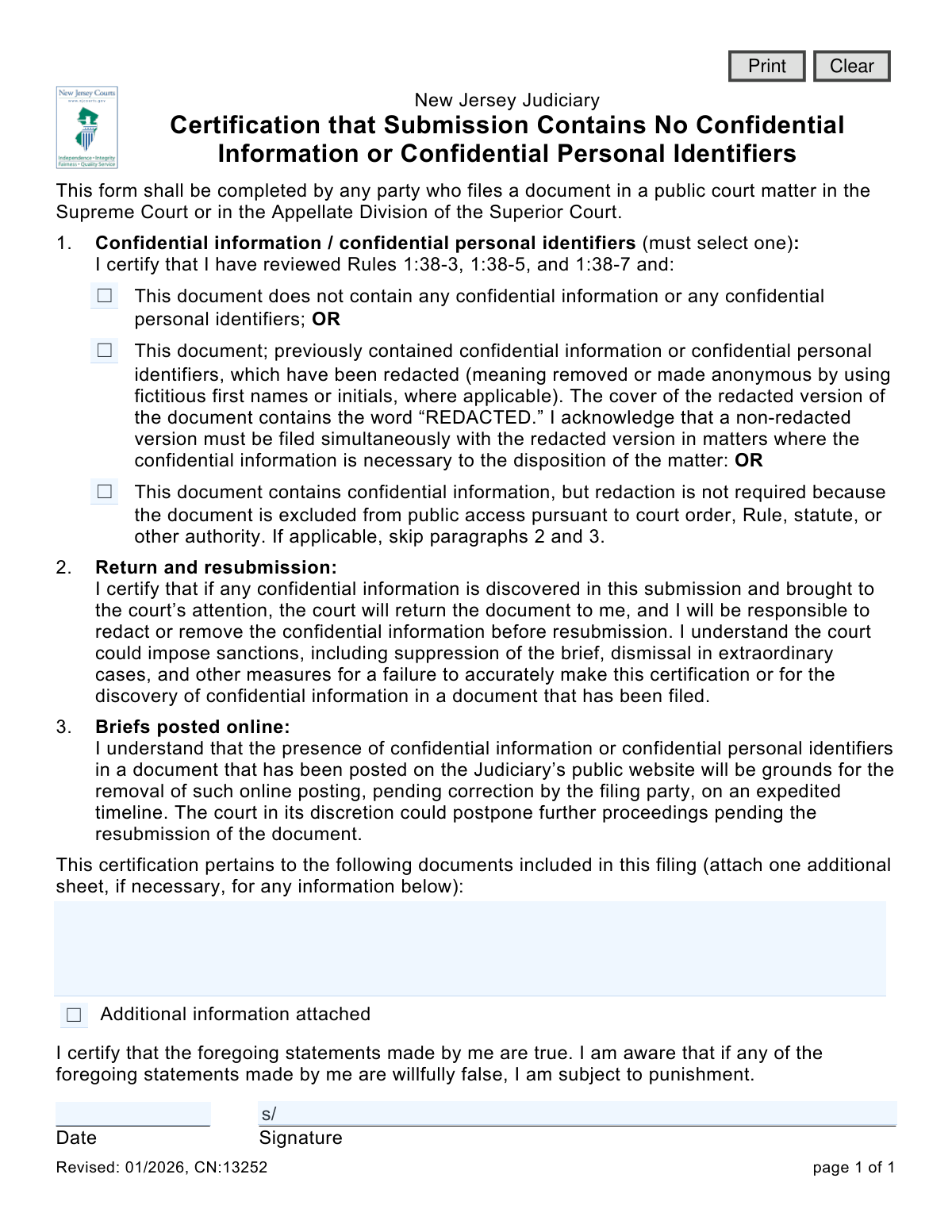
This form is a mandatory certification for any party filing a document in a public matter with the New Jersey Supreme Court or the Appellate Division of the Superior Court. It serves to confirm that the filer has reviewed court rules and that their submission either contains no confidential information, has been properly redacted, or is exempt from public access rules. Today, this form can be filled out quickly and accurately using AI-powered services like Instafill.ai, which can also convert non-fillable PDF versions into interactive fillable forms.
CN:13252 is part of the
New Jersey forms category on Instafill.
Our AI automatically handles information lookup, data retrieval, formatting, and form filling.
It takes less than a minute to fill out CN:13252 using our AI form filling.
Securely upload your data. Information is encrypted in transit and deleted immediately after the form is filled out.
Form specifications
| Form name: | Certification that Submission Contains No Confidential Information or Confidential Personal Identifiers |
| Number of fields: | 9 |
| Number of pages: | 1 |
| Language: | English |
Instafill Demo: How to fill out PDF forms in seconds with AI
How to Fill Out CN:13252 Online for Free in 2026
Are you looking to fill out a CN:13252 form online quickly and accurately? Instafill.ai offers the #1 AI-powered PDF filling software of 2026, allowing you to complete your CN:13252 form in just 37 seconds or less.
Follow these steps to fill out your CN:13252 form online using Instafill.ai:
- 1 Navigate to Instafill.ai and upload or select the 'Certification that Submission Contains No Confidential Information' form.
- 2 Use the AI assistant to automatically detect and fill in the current date.
- 3 In Section 1, review the options and select the checkbox that accurately describes the status of confidential information in your submitted documents (none, redacted, or exempt).
- 4 List the titles of all documents included in your filing to which this certification applies. Check the box if you are attaching an additional sheet.
- 5 Carefully read the certifications in paragraphs 2 and 3 regarding the consequences of non-compliance.
- 6 Digitally sign and date the form in the designated fields to certify the truthfulness of your statements.
- 7 Download, print, or securely submit the completed certification along with your primary court filing.
Our AI-powered system ensures each field is filled out correctly, reducing errors and saving you time.
Why Choose Instafill.ai for Your Fillable CN:13252 Form?
Speed
Complete your CN:13252 in as little as 37 seconds.
Up-to-Date
Always use the latest 2026 CN:13252 form version.
Cost-effective
No need to hire expensive lawyers.
Accuracy
Our AI performs 10 compliance checks to ensure your form is error-free.
Security
Your personal information is protected with bank-level encryption.
Frequently Asked Questions About Form CN:13252
This form is used to certify to the New Jersey Judiciary that the documents you are filing do not contain confidential information or personal identifiers, or that such information has been properly removed (redacted).
Any party who files a document in a public court matter with the New Jersey Supreme Court or the Appellate Division of the Superior Court must complete and submit this form with their filing.
Select the first box if your document is completely free of confidential information. Choose the second if you have redacted information, and select the third if the document contains confidential data but is exempt from public access by a court order or rule.
Redacting means removing or obscuring confidential information. If you redact a document, you must mark its cover with the word 'REDACTED' and simultaneously file a non-redacted version if the court needs that information.
The court will return the document to you, and you will be responsible for redacting the information and resubmitting it. Failure to do so accurately can lead to sanctions, including dismissal of your case in extraordinary situations.
You must list all the documents included in your filing that this certification applies to, such as your brief, appendix, or motion. If you run out of space, you can attach an additional sheet.
The form refers to New Jersey Court Rules 1:38-3, 1:38-5, and 1:38-7 for official definitions, which typically include Social Security numbers, financial account numbers, and names of minors.
The online posting will be removed, and you will be required to provide a corrected, redacted version on an expedited timeline. The court may also postpone proceedings until the corrected document is resubmitted.
Yes, services like Instafill.ai use AI to auto-fill form fields accurately and save time. This can help ensure consistency and reduce errors across your court documents.
To fill this form online, upload the PDF to Instafill.ai. The platform will make the document interactive, allowing you to type directly into the fields, check the appropriate boxes, and add your signature before downloading.
If you have a non-fillable or 'flat' PDF, you can use a tool like Instafill.ai. Simply upload the file, and the service will convert it into an interactive, fillable form that you can complete on your computer.
By signing, you are certifying under penalty of punishment that your statements are true. Willfully providing false information on a legal certification is a serious offense with potential legal consequences.
This form must be completed and submitted as part of the same package as the documents it pertains to, such as your brief or motion.
Compliance CN:13252
Validation Checks by Instafill.ai
1
Exclusive Selection for Confidential Information Status
This validation ensures that the user has selected exactly one of the three options in section 1 regarding confidential information. The form explicitly states 'must select one', making this a mandatory choice to define the document's confidentiality status. If zero or more than one option is selected, the submission will be blocked until a single, valid choice is made.
2
Mandatory Signature Field
This check verifies that the signature field ('sigCertPii') has been completed. A signature is required to certify the truthfulness of the statements, making it legally binding. A submission without a signature is invalid and will be rejected until the certification is properly signed.
3
Mandatory Signature Date
This validation confirms that the 'Date' field ('sigCertPiiDt') next to the signature is not empty. The date is a critical component of a legal certification, as it establishes when the attestation was made. The form cannot be submitted without a date, as it would render the signature incomplete.
4
Valid Signature Date Format
This check ensures the value entered in the 'Date' field is in a valid date format (e.g., MM/DD/YYYY) and represents a real calendar day. An improperly formatted or non-existent date can cause processing errors and call the document's legal validity into question. The user will be prompted to correct the format before the submission can proceed.
5
Signature Date Plausibility
This validation checks that the signature date is not set in the future or an unreasonably distant past. A future date is logically impossible for a certification being made in the present, indicating a user error. This check prevents the submission of a legally questionable document and requires the user to enter a date that is on or before the current day.
6
Document List Provision
This validation ensures that the filer has specified which documents the certification applies to. It checks that either the text area listing the documents is filled out or the 'Additional information attached' checkbox is selected. If both are empty, the certification is ambiguous and the submission will be rejected for being incomplete.
7
Attachment Requirement for 'Additional Information' Check
This check is triggered if the 'Additional information attached' checkbox is selected. It verifies that at least one file has been uploaded as an attachment to the form. This prevents a situation where the filer indicates an attachment exists but fails to provide it, which would result in an incomplete record. If the box is checked without an attachment, the system will block submission and prompt the user.
8
Simultaneous Filing of Non-Redacted Version
If the user selects the option certifying that the document has been redacted, this validation confirms that a corresponding non-redacted version is also included in the submission package. This is required by court rule to ensure the court has access to all necessary information. Failure to provide the non-redacted version simultaneously will result in an incomplete filing and rejection.
9
Redacted Document Naming Convention
When the user certifies that a document has been redacted, this check verifies that the filename of the associated document contains the word 'REDACTED'. This is a procedural requirement to help court clerks easily identify and handle the redacted public version of the document correctly. A submission may be flagged for manual review or rejected if the filename does not comply.
10
Current Form Version Check
This validation verifies that the submitted form is the current version, based on its revision number (CN:13252). Using an outdated form can lead to non-compliance with the latest court rules and procedures. If an obsolete form version is detected, the system should reject the submission and instruct the user to download and complete the current one.
11
Scan for PII in Document List Field
This validation performs a pattern-based scan on the free-text area where documents are listed to detect potential confidential personal identifiers (e.g., SSN or driver's license numbers). This acts as a safeguard to prevent filers from accidentally including sensitive data in a non-confidential part of the form. If a potential identifier is found, the system should warn the user and ask for confirmation before proceeding.
12
Logical Consistency for 'Excluded from Public Access' Selection
This validation applies if the user selects the third option, stating the document is 'excluded from public access'. While the form instructs the user to skip paragraphs 2 and 3, the system should still require the signature and date, as the certification itself is still necessary. This check ensures that even when this option is chosen, the core signature and date requirements for a valid submission are met.
Common Mistakes in Completing CN:13252
Users often overlook the mandatory checkbox selection in Section 1, leaving all three options blank. This is a critical error because the primary purpose of the form is to make one of these three certifications. An unselected form is incomplete and will be rejected by the court clerk, delaying the entire filing.
A filer may hastily check the first box, certifying that the document contains no confidential information, without thoroughly reviewing it against the definitions in Rules 1:38-3, 1:38-5, and 1:38-7. This can lead to the inadvertent public disclosure of sensitive data like social security numbers or medical records. The consequences can include sanctions from the court and the need for expedited removal and resubmission.
When selecting the second option for redacted documents, filers frequently make procedural errors. Common mistakes include forgetting to write 'REDACTED' on the cover of the document or failing to simultaneously file the required non-redacted version. This leads to an incomplete filing, which will be returned by the court for correction, causing significant delays.
The form requires the filer to list all documents covered by the certification, but this section is often left blank. A certification that does not specify which documents it applies to is ambiguous and legally insufficient. This oversight will result in the form being rejected and require the filer to resubmit the entire package.
An unsigned certification is legally invalid and holds no weight. This is one of the most common and easily avoidable mistakes, often happening when a filer is rushing to complete their package. The court will not accept an unsigned form, leading to the rejection of the associated documents until a properly executed certification is provided.
Similar to a missing signature, a missing date can render the certification invalid or cause processing delays. The date establishes when the certification was made, which is crucial for the legal record. To avoid this, filers should always fill in the date field at the same time they sign the document.
When listing the documents, filers sometimes use generic descriptions like 'Brief' or 'Appendix' without providing specific titles, dates, or other identifiers. This ambiguity can create confusion about the scope of the certification. Filers should use precise titles as they appear on the documents themselves to ensure clarity for the court.
Filers may attach a separate sheet listing documents but forget to check the corresponding box on the form, causing the attachment to be overlooked. Conversely, they might check the box without attaching the sheet, causing confusion and delays as clerks search for a non-existent page. It is crucial to ensure the checkbox status accurately reflects whether an additional sheet is included.
The form explicitly references New Jersey Court Rules 1:38-3, 1:38-5, and 1:38-7, which define confidential personal identifiers and other sensitive information. Many filers fail to read or fully understand these rules, leading them to make an incorrect certification in Section 1. This fundamental misunderstanding is the root cause of many substantive errors and can be avoided by carefully reviewing the cited rules before filling out the form.
Often, filers receive this form as a flat, non-fillable PDF, leading them to print, handwrite, and then scan it, which can result in poor legibility and data entry errors. This manual process is inefficient and prone to mistakes like missed fields or illegible handwriting. AI-powered tools like Instafill.ai can convert such non-fillable PDFs into interactive, fillable forms, ensuring all fields are completed clearly and accurately before submission.
Saved over 80 hours a year
“I was never sure if my IRS forms like W-9 were filled correctly. Now, I can complete the forms accurately without any external help.”
Kevin Martin Green
Your data stays secure with advanced protection from Instafill and our subprocessors

Robust compliance program
Transparent business model
You’re not the product. You always know where your data is and what it is processed for.
ISO 27001, HIPAA, and GDPR
Our subprocesses adhere to multiple compliance standards, including but not limited to ISO 27001, HIPAA, and GDPR.
Security & privacy by design
We consider security and privacy from the initial design phase of any new service or functionality. It’s not an afterthought, it’s built-in, including support for two-factor authentication (2FA) to further protect your account.
Fill out CN:13252 with Instafill.ai
Worried about filling PDFs wrong? Instafill securely fills certification-that-submission-contains-no-confidential-information-or-confidential-personal-identifiers forms, ensuring each field is accurate.