Yes! You can use AI to fill out Condominium Schedule (CN 10336-English)
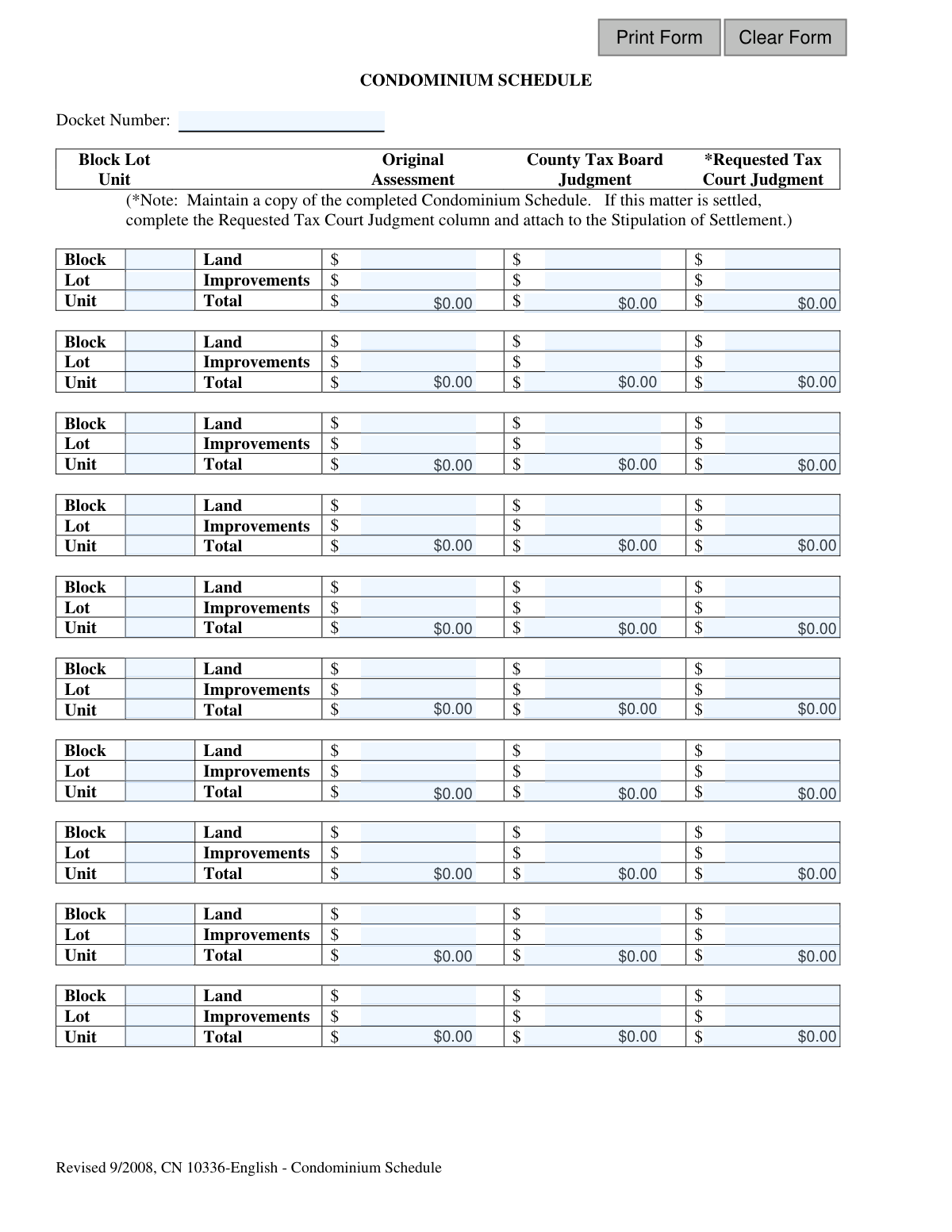
The Condominium Schedule is a supplemental form used in legal or tax appeal cases to detail property information for multiple condominium units. It systematically records the block, lot, and unit numbers, along with their original tax assessments, county tax board judgments, and requested tax court judgments for both land and improvements. Today, this form can be filled out quickly and accurately using AI-powered services like Instafill.ai, which can also convert non-fillable PDF versions into interactive fillable forms.
CN 10336 is part of the
New Jersey forms category on Instafill.
Our AI automatically handles information lookup, data retrieval, formatting, and form filling.
It takes less than a minute to fill out CN 10336 using our AI form filling.
Securely upload your data. Information is encrypted in transit and deleted immediately after the form is filled out.
Form specifications
| Form name: | Condominium Schedule (CN 10336-English) |
| Number of fields: | 123 |
| Number of pages: | 1 |
| Language: | English |
Instafill Demo: How to fill out PDF forms in seconds with AI
How to Fill Out CN 10336 Online for Free in 2026
Are you looking to fill out a CN 10336 form online quickly and accurately? Instafill.ai offers the #1 AI-powered PDF filling software of 2026, allowing you to complete your CN 10336 form in just 37 seconds or less.
Follow these steps to fill out your CN 10336 form online using Instafill.ai:
- 1 Navigate to Instafill.ai and upload or select the Condominium Schedule form.
- 2 Enter the case Docket Number in the designated field at the top of the schedule.
- 3 For each condominium unit involved, input its specific Block, Lot, and Unit number in the corresponding rows.
- 4 Fill in the columns for 'Original Assessment', 'County Tax Board Judgment', and 'Requested Tax Court Judgment' for each unit, providing separate values for Land and Improvements.
- 5 Allow the AI to automatically calculate the 'Total' for each assessment category, ensuring accuracy and saving time.
- 6 Carefully review all the entered property identifiers and financial figures to ensure they are correct before finalizing.
- 7 Download, print, or securely share the completed Condominium Schedule for submission with your case file or Stipulation of Settlement.
Our AI-powered system ensures each field is filled out correctly, reducing errors and saving you time.
Why Choose Instafill.ai for Your Fillable CN 10336 Form?
Speed
Complete your CN 10336 in as little as 37 seconds.
Up-to-Date
Always use the latest 2026 CN 10336 form version.
Cost-effective
No need to hire expensive lawyers.
Accuracy
Our AI performs 10 compliance checks to ensure your form is error-free.
Security
Your personal information is protected with bank-level encryption.
Frequently Asked Questions About Form CN 10336
This form is used to list multiple condominium units involved in a single property tax appeal. It documents the original assessed values, any adjustments made by the County Tax Board, and the final values agreed upon in a settlement for the Tax Court.
This schedule is typically completed by the property owner, their attorney, or a tax professional who is filing a tax appeal or settling a case involving multiple condominium units.
You will need the case Docket Number, the Block, Lot, and Unit numbers for each condominium, and the detailed assessment values for both land and improvements from the original assessment and the County Tax Board judgment.
The Docket Number is assigned by the Tax Court when your appeal is filed. It should be on all official correspondence you have received from the court regarding your case.
'Original Assessment' is the initial value set by the local tax assessor. 'County Tax Board Judgment' is the value determined after an appeal to the county board. 'Requested Tax Court Judgment' is the proposed or final settlement value for your Tax Court appeal.
You should only complete the 'Requested Tax Court Judgment' column when a settlement has been reached in your tax appeal case. This completed form is then attached to your Stipulation of Settlement.
'Land' refers to the assessed value of the land portion attributed to your unit, while 'Improvements' refers to the value of the building and structures on that land. The 'Total' is the sum of these two values.
If your appeal includes more than 10 units, you will need to use additional copies of the Condominium Schedule form to list all properties involved. Ensure the Docket Number is correctly entered on every page.
The form instructions state that it should be attached to the Stipulation of Settlement, which is then filed with the Tax Court as part of your case settlement. Do not submit it as a standalone document unless otherwise directed.
Yes, services like Instafill.ai use AI to accurately auto-fill form fields from your saved data, which can save you significant time and reduce errors when dealing with repetitive information across multiple units.
You can use Instafill.ai to fill this form online. Simply upload the PDF, and the platform will make it interactive, allowing you to easily type in your information and save or print the completed document.
If you have a non-fillable or 'flat' PDF, you can upload it to a service like Instafill.ai. Their technology can convert it into an interactive, fillable form that you can complete on your computer.
Yes, you should provide all the required information for each unit listed, including the Block, Lot, Unit, and the relevant assessment values. The 'Requested Tax Court Judgment' column is only filled out upon settlement.
Compliance CN 10336
Validation Checks by Instafill.ai
1
Docket Number Presence
Ensures the 'Docket Number' field is not empty. The Docket Number is a critical identifier that links the schedule to a specific legal case, and its absence renders the document unusable for official filing. A failed validation should prevent form submission until a value is provided.
2
Docket Number Format Validation
Validates that the 'Docket Number' adheres to the jurisdiction's required format, which may be numeric, alphanumeric, or include hyphens. An incorrectly formatted number can lead to filing rejections or misrouting of the document, so this check prevents processing delays by ensuring the identifier is valid.
3
Minimum Unit Entry Requirement
Verifies that at least one condominium unit row is completely filled out on the schedule. Submitting a blank or mostly empty schedule is typically an error and serves no purpose. This check ensures the form contains meaningful data before it can be submitted.
4
Condominium Unit Identifier Completeness
For any row containing financial data, this check ensures the corresponding 'Block', 'Lot', and 'Unit' fields are all populated. These identifiers are essential for uniquely identifying the property parcel. Failure to provide them makes the associated assessment values ambiguous and invalid.
5
Duplicate Unit Entry Prevention
Scans all entered rows to ensure that no two rows have the identical combination of 'Block', 'Lot', and 'Unit'. Duplicate entries for the same property create ambiguity and can lead to incorrect total calculations and legal disputes. The system should flag duplicates and require correction.
6
Monetary Field Format
Confirms that all assessment and judgment fields (e.g., 'OrigAssmtLand1', 'ReqAssmtTtl1') contain only valid numeric currency values. Entering non-numeric text like 'N/A' or alphabetic characters would cause calculation errors and data corruption. This validation enforces a clean, computable dataset.
7
Non-Negative Assessment Value Check
Ensures that all monetary values entered for Land, Improvements, and Totals are zero or greater. A negative property or tax assessment value is logically impossible and indicates a severe data entry error. The system must reject negative values to maintain data integrity.
8
Original Assessment Summation Logic
For each unit row, this check validates that the 'Total' Original Assessment is exactly equal to the sum of the 'Land' and 'Improvements' values. This maintains the mathematical integrity of the baseline assessment data. If the sum is incorrect, the form should be considered invalid until the arithmetic is corrected.
9
Tax Board Judgment Summation Logic
For each unit row with data, this check validates that the 'Total' County Tax Board Judgment is the sum of its 'Land' and 'Improvements' components. This consistency is vital for accurate legal records. A mismatch indicates a data entry error that must be fixed before the form can be processed.
10
Requested Judgment Summation Logic
For each unit row with data, this check ensures the 'Total' Requested Tax Court Judgment equals the sum of its 'Land' and 'Improvements' values. As this figure represents the official relief sought in a legal proceeding, its internal mathematical consistency is paramount. An error here could undermine the entire filing.
11
Original Assessment Presence for Entered Units
If a row is used to specify a unit (Block, Lot, and Unit are filled), this check requires that the 'Original County Tax Board Assessment' values are also provided. The original assessment serves as the necessary baseline for any appeal or judgment. Without it, the requested changes lack context and the record is incomplete.
12
Block and Lot Consistency Warning
Checks if the 'Block' and 'Lot' numbers are the same across all entered unit rows. Since a condominium schedule typically lists units from a single property, differing Block or Lot numbers may indicate a typo. The system should issue a non-blocking warning, allowing the user to confirm if the variation is intentional before final submission.
Common Mistakes in Completing CN 10336
Users often enter the Docket Number with typos, transpose digits, or leave it blank entirely. This number is the primary identifier linking the schedule to a specific legal case, and any error can cause the document to be misfiled or rejected. To avoid this, double-check the number against official court documents before submission.
A frequent mistake is incorrectly calculating the 'Total' assessment for a unit. The 'Total' value in each row must be the exact sum of the 'Land' and 'Improvements' values for that same column. Discrepancies, often due to manual calculation or typos, will lead to the form being flagged as inaccurate and returned for correction, delaying the entire process.
The form requires precise entry of Block, Lot, and Unit identifiers for each property. It is very common for users to accidentally swap the Block and Lot numbers or make transcription errors due to the similarity of these numeric codes. Such an error associates the financial data with the wrong property, creating significant legal and processing complications.
Users may misinterpret the column headers and enter data in the wrong place, such as putting 'Original Assessment' figures into the 'County Tax Board Judgment' column. This often happens when working quickly through the dense grid of fields. This mistake fundamentally invalidates the data and will likely cause an immediate rejection of the filing.
On this repetitive form, it's easy to lose one's place and enter a unit's assessment values on the wrong row, misaligning them with the correct Block and Lot numbers. This results in incorrect data being attributed to a property, undermining the integrity of the entire schedule. To prevent this, carefully verify that each line of financial data corresponds to the property identifiers on the same line.
The footnote specifies this column is for use when a matter is settled and attached to a Stipulation of Settlement. A common error is either filling it out prematurely when no settlement exists, or forgetting to complete it when submitting a settlement. This leads to confusion or an incomplete settlement package, causing rejection and delays.
Users are often unsure whether to include dollar signs ($), commas, or decimal points in the financial fields. While the form has pre-printed dollar signs, entering them again can cause data validation errors in digital systems. This ambiguity leads to inconsistent entries that may be unreadable by automated systems, requiring manual correction.
Leaving the 'Land' or 'Improvements' fields blank, even if one of the values is zero, is a common oversight. Both fields are typically required to calculate the total, and missing data makes the entry for that unit incomplete. This can halt processing, as the reviewing body cannot validate the total assessment provided.
If the form is only available as a non-fillable PDF, users may print and complete it by hand. Given the small boxes and density of numbers, handwriting can easily become illegible, leading to data entry errors by the receiving clerk or rejection of the form. AI-powered tools like Instafill.ai can convert such non-fillable PDFs into fillable forms, ensuring all entries are typed and legible.
With so many numerical fields, simple typos are extremely common when manually copying data from source documents like tax records or prior judgments. A single incorrect digit in an assessment value can invalidate the entry and misrepresent the financial information. Using a tool like Instafill.ai can help prevent these errors by automatically populating and validating data, ensuring accuracy and consistency.
Saved over 80 hours a year
“I was never sure if my IRS forms like W-9 were filled correctly. Now, I can complete the forms accurately without any external help.”
Kevin Martin Green
Your data stays secure with advanced protection from Instafill and our subprocessors

Robust compliance program
Transparent business model
You’re not the product. You always know where your data is and what it is processed for.
ISO 27001, HIPAA, and GDPR
Our subprocesses adhere to multiple compliance standards, including but not limited to ISO 27001, HIPAA, and GDPR.
Security & privacy by design
We consider security and privacy from the initial design phase of any new service or functionality. It’s not an afterthought, it’s built-in, including support for two-factor authentication (2FA) to further protect your account.
Fill out CN 10336 with Instafill.ai
Worried about filling PDFs wrong? Instafill securely fills condominium-schedule-cn-10336-english forms, ensuring each field is accurate.