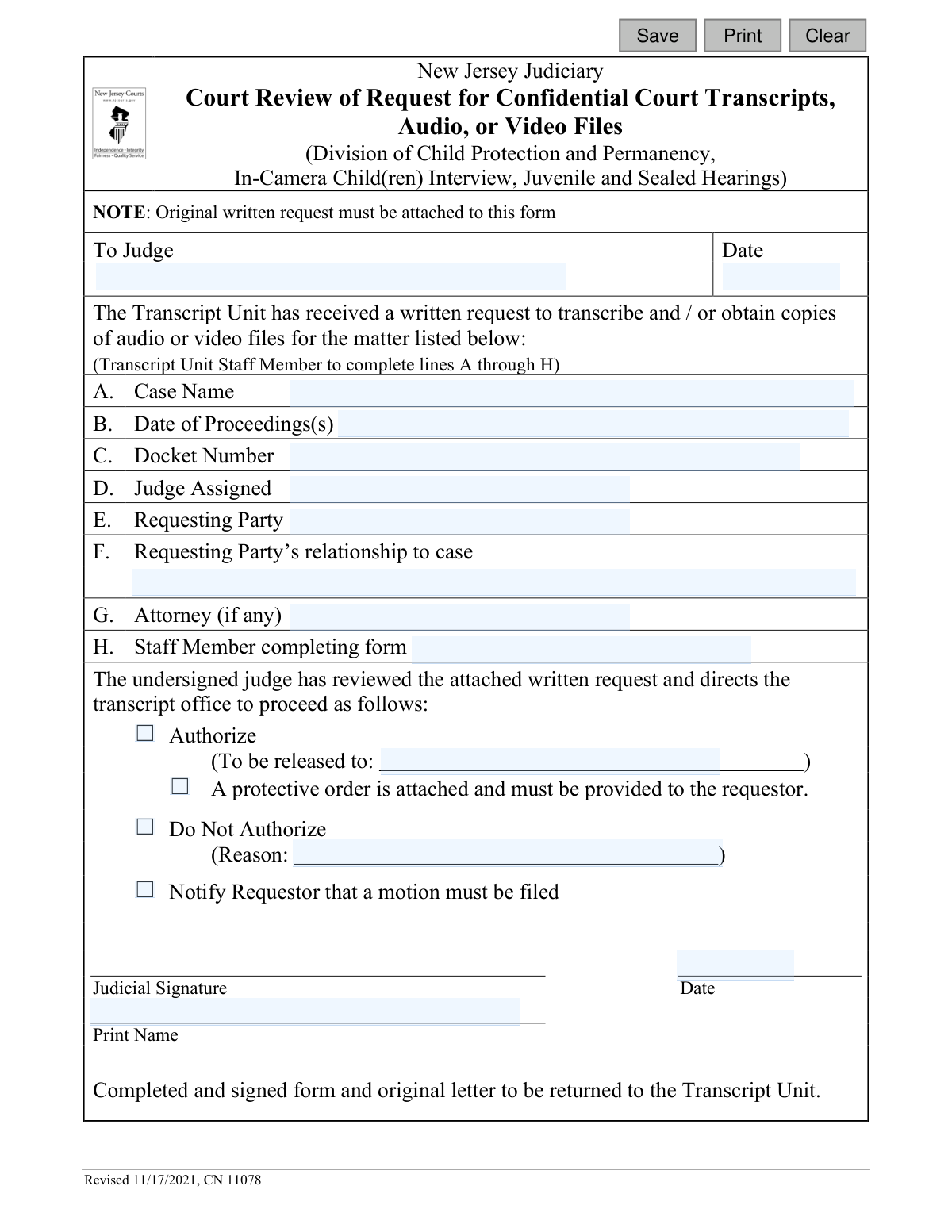
Yes! You can use AI to fill out Court Review of Request for Confidential Court Transcripts, Audio, or Video Files (Division of Child Protection and Permanency, In-Camera Child(ren) Interview, Juvenile and Sealed Hearings)
Form CN 11078 is a New Jersey Judiciary document used by judges to review and rule on written requests for sensitive court records, such as transcripts from child protection cases, juvenile hearings, or other sealed proceedings. It serves as the official record of the court's decision to either authorize or deny the release of these confidential materials. Today, this form can be filled out quickly and accurately using AI-powered services like Instafill.ai, which can also convert non-fillable PDF versions into interactive fillable forms.
CN 11078 is part of the
New Jersey forms category on Instafill.
Our AI automatically handles information lookup, data retrieval, formatting, and form filling.
It takes less than a minute to fill out CN 11078 using our AI form filling.
Securely upload your data. Information is encrypted in transit and deleted immediately after the form is filled out.
Form specifications
| Form name: | Court Review of Request for Confidential Court Transcripts, Audio, or Video Files (Division of Child Protection and Permanency, In-Camera Child(ren) Interview, Juvenile and Sealed Hearings) |
| Number of fields: | 21 |
| Number of pages: | 1 |
| Language: | English |
Instafill Demo: How to fill out PDF forms in seconds with AI
How to Fill Out CN 11078 Online for Free in 2026
Are you looking to fill out a CN 11078 form online quickly and accurately? Instafill.ai offers the #1 AI-powered PDF filling software of 2026, allowing you to complete your CN 11078 form in just 37 seconds or less.
Follow these steps to fill out your CN 11078 form online using Instafill.ai:
- 1 Navigate to Instafill.ai and upload or select the CN 11078 form.
- 2 As a Transcript Unit staff member, use the AI assistant to accurately input the case name, date of proceedings, docket number, and assigned judge.
- 3 Enter the details of the requesting party, their relationship to the case, and their attorney's name if applicable.
- 4 Present the partially completed form and the original written request to the reviewing judge.
- 5 The judge will then complete their section, indicating whether to authorize or deny the request, provide a reason if necessary, and apply their judicial signature.
- 6 Review the entire form to ensure all sections are completed accurately and the judge's decision is clearly marked.
- 7 Securely save, print, and return the completed and signed form to the Transcript Unit as instructed.
Our AI-powered system ensures each field is filled out correctly, reducing errors and saving you time.
Why Choose Instafill.ai for Your Fillable CN 11078 Form?
Speed
Complete your CN 11078 in as little as 37 seconds.
Up-to-Date
Always use the latest 2026 CN 11078 form version.
Cost-effective
No need to hire expensive lawyers.
Accuracy
Our AI performs 10 compliance checks to ensure your form is error-free.
Security
Your personal information is protected with bank-level encryption.
Frequently Asked Questions About Form CN 11078
This form is an internal court document used by a New Jersey judge to approve or deny a request for confidential court records. It is completed by the court's Transcript Unit after a person submits a written request for sensitive materials like DCPP records or juvenile hearing transcripts.
No, you do not fill out this specific form. The court's Transcript Unit staff completes this form to get a judge's decision after you have submitted your own initial written request for the records.
You must begin by submitting a formal written request to the court's Transcript Unit. Your written request will then be attached to this form (CN 11078) for a judge's review.
Your request should clearly state the case name, docket number, the date(s) of the proceedings you need, your name, and your relationship to the case. Providing complete and accurate information is essential for the court to process your request.
This form is used for requests involving highly sensitive and confidential records. This includes transcripts, audio, or video from Division of Child Protection and Permanency (DCPP) cases, in-camera interviews with children, and sealed juvenile hearings.
A judge can authorize the release of the records, deny the request with a stated reason, or require you to file a formal motion with the court to argue why you should receive the records.
This means your simple written request is not enough, and you must now file a formal legal document (a motion) with the court. In the motion, you will need to provide a legal argument explaining why you are entitled to access the confidential records.
A protective order is a court order that sets strict rules on how you can use, share, and handle the confidential information you receive. It is meant to protect the privacy and safety of the people involved in the case, especially minors.
Your relationship to the case (e.g., parent, attorney, party to the case) is critical because it helps the judge determine if you have a legal right to access these highly confidential records. Access is strictly limited to protect the privacy of those involved.
A staff member from the court's Transcript Unit is responsible for filling out sections A through H. They gather this information from your initial written request and the official court file.
Yes, while this specific form is for internal court use, AI services like Instafill.ai can help you prepare your initial written request letter. These tools can help ensure your letter is formatted correctly and includes all the necessary information, saving you time and effort.
You can use Instafill.ai to help draft and format your formal written request letter to the Transcript Unit. The service uses AI to help you accurately fill in details like case numbers and dates, ensuring your request is clear and complete.
If you have a flat, non-fillable PDF, you can use a service like Instafill.ai to make it interactive. Simply upload the document, and the platform will convert it into a fillable form that you can easily complete, save, and print.
The form does not specify a timeline, as the processing time can vary depending on the judge's availability and the complexity of the request. You can contact the Transcript Unit for status updates after submitting your initial written request.
Compliance CN 11078
Validation Checks by Instafill.ai
1
Validates the 'To Judge' Date Format and Plausibility
This check ensures the 'reqDt' field contains a valid date, preferably in MM/DD/YYYY format. It also verifies that the date is not in the future or unreasonably far in the past. This is important for accurately tracking when the request was submitted for judicial review, and an invalid date would corrupt the timeline of the request.
2
Validates the 'Date of Proceeding(s)' Format and Plausibility
This validation confirms that the 'proceedingDts' field contains one or more valid dates in a standard format. Crucially, it checks that these dates are in the past, as a proceeding cannot have occurred in the future. Correct dates are essential for locating the specific confidential records requested; an error here would lead to the wrong file being pulled or no file being found at all.
3
Validates the Docket Number Format
This check ensures the 'docketNum' field adheres to the specific format required by the New Jersey Judiciary. This format is a critical unique identifier for the case within the court's record-keeping system. A malformed docket number will cause lookup failures and prevent the system from associating the request with the correct case file.
4
Ensures Completeness of Transcript Unit Section
This validation verifies that all required fields in the staff-completed section (A-H) are filled out, specifically 'caseName', 'proceedingDts', 'docketNum', 'jdgAssign', 'reqName', 'reqRelate', and 'staffName'. The 'attyName' field is considered optional. This ensures the judge receives a complete packet of information, which is necessary to make an informed and timely decision.
5
Validates Exclusive Selection of Judicial Action
This check ensures that the judge selects only one of the three possible actions: 'Authorize', 'Do Not Authorize', or 'Notify Requestor that a motion must be filed'. The system should prevent the selection of multiple, contradictory directives. This is critical for providing clear, unambiguous instructions to the Transcript Unit, as conflicting choices would make the order impossible to execute.
6
Conditionally Requires Releasee Name upon Authorization
If the 'Authorize' checkbox ('authRelease') is selected, this validation mandates that the 'relName' field ('To be released to:') must be completed. It is vital to specify exactly who is permitted to receive the confidential materials to prevent unauthorized disclosure. An authorization without a specified recipient is incomplete and poses a security risk.
7
Conditionally Requires Reason for Non-Authorization
If the 'Do Not Authorize' checkbox is selected, this validation requires that the 'relReason' field is filled out. Providing a justification for the denial is essential for the official record and for procedural transparency. This information is crucial if the decision is ever appealed or reviewed, as it documents the legal or procedural basis for the judge's action.
8
Validates Judicial Signature Date Format and Logic
This check ensures the 'sigJdgDt' field is a valid date and performs a logical comparison to verify it is on or after the 'reqDt' (the date the form was sent to the judge). A signature date preceding the request date is a logical impossibility and indicates a data entry error. This validation maintains the integrity and chronological accuracy of the review process.
9
Ensures Transcript Unit Staff Member is Identified
This validation confirms that the 'staffName' field is not empty. Identifying the staff member who prepared the form is a key accountability measure. It allows for quick follow-up to clarify any ambiguities or correct errors in the initial request information, ensuring a smooth workflow.
10
Validates Completeness of Requesting Party Information
This check ensures that both the 'reqName' (Requesting Party) and 'reqRelate' (Requesting Party’s relationship to case) fields are filled out. The judge cannot assess the merits of the request without knowing who is asking for the records and what their legal standing is in the matter. Missing this information would halt the review process.
11
Validates Logical Dependency of Protective Order Checkbox
This validation ensures the 'PoAttach' checkbox ('A protective order is attached...') can only be selected if the 'Authorize' action is also chosen. It is illogical to issue a protective order for a request that is being denied or deferred. This check prevents contradictory instructions and ensures the form's directives are coherent.
12
Ensures a Judicial Decision is Made
This validation confirms that at least one of the three judicial action checkboxes ('Authorize', 'Do Not Authorize', 'Notify Requestor') has been selected before the form is finalized. A form lacking a decision is incomplete and fails to resolve the request. This check prevents the form from being returned to the Transcript Unit in an unresolved state.
13
Validates Completeness of Judicial Signature Section
This check verifies that both the 'sigJdgName' (Print Name) and 'sigJdgDt' (Date) fields are completed once the judge makes a decision. The printed name clarifies the signature, and the date records when the decision was officially made. Both elements are required for the form to serve as a valid judicial order.
Common Mistakes in Completing CN 11078
This form is a cover sheet for a judge's review, not the request itself. The most common and critical error is failing to attach the detailed original request letter, which will lead to immediate rejection and significant processing delays. To avoid this, always confirm that your original written request is securely attached to this form before it is submitted to the judge by the Transcript Unit.
The form explicitly states that lines A through H are to be completed by a 'Transcript Unit Staff Member'. A requesting party who fills out this section themselves can cause confusion, processing errors, and the return of the form. Requestors should only submit their original written request to the Transcript Unit and allow court staff to properly complete this internal review document.
The case name, which staff transcribes from the original request, must be precise and match court records exactly. Using abbreviations, misspellings, or partial names (e.g., 'Smith case' instead of 'In the Matter of the Smith Children') makes it difficult or impossible for staff to locate the correct file, leading to denial. Always use the full, official case name as it appears on other court documents.
The docket number is the unique case identifier and is essential for locating the correct file. Transposing numbers or omitting required prefixes/suffixes (e.g., 'FN', 'FG') will cause the request to fail. This information must be copied exactly from official court filings to ensure accuracy. AI-powered form filling tools like Instafill.ai can help validate data formats to prevent such critical entry errors.
A request for a transcript must specify the exact date(s) of the hearing(s). Providing incorrect dates or a vague range like 'sometime in May 2021' forces staff to guess or return the request for clarification, causing significant delays. Before submitting your request, consult case documents to confirm the precise date(s) of the proceeding(s) you need.
To access confidential records, the judge must understand the requestor's legal standing. Vague descriptions like 'family member' or 'involved party' are insufficient and will likely lead to denial. The relationship must be stated with legal precision on the original request (e.g., 'Defendant,' 'Maternal Aunt with Party Status,' 'Court-Appointed Guardian') to establish a right to access.
This document is a 'Court Review' form used internally, not the application for a transcript. A person who finds this form and submits it as their request will have it rejected because the actual detailed request is missing. The correct process is to first draft a formal written request letter and submit it to the court's Transcript Unit.
Court staff must accurately transfer information from your original written request onto this official review form. If your request is handwritten and illegible, staff may misinterpret case names, docket numbers, or dates, leading to critical errors and rejection. It is highly recommended to type your request; if using a non-fillable PDF form, tools like Instafill.ai can convert it into a fillable version to ensure clarity.
This form is used for highly sensitive records, including those from juvenile or sealed hearings. A simple request for these transcripts is not enough; the original written request must include a compelling legal justification for why access is necessary and permissible under court rules. Without a strong, detailed reason, the judge is very likely to deny the request.
If a party is represented by counsel, all communications and releases should typically go through their attorney. Failing to list the attorney's full name and contact information on the original request can cause procedural confusion and delays. The court may need to verify the request with the attorney, and missing information hinders this vital step.
This form is an internal document routed from the Transcript Unit to a judge. A requesting party should not send their request or this form directly to the judge's chambers. Doing so bypasses required procedures and will result in the request being returned or lost, causing major delays. The correct procedure is to submit a written request directly to the court's Transcript Unit.
Saved over 80 hours a year
“I was never sure if my IRS forms like W-9 were filled correctly. Now, I can complete the forms accurately without any external help.”
Kevin Martin Green
Your data stays secure with advanced protection from Instafill and our subprocessors

Robust compliance program
Transparent business model
You’re not the product. You always know where your data is and what it is processed for.
ISO 27001, HIPAA, and GDPR
Our subprocesses adhere to multiple compliance standards, including but not limited to ISO 27001, HIPAA, and GDPR.
Security & privacy by design
We consider security and privacy from the initial design phase of any new service or functionality. It’s not an afterthought, it’s built-in, including support for two-factor authentication (2FA) to further protect your account.
Fill out CN 11078 with Instafill.ai
Worried about filling PDFs wrong? Instafill securely fills court-review-of-request-for-confidential-court-transcripts-audio-or-video-files-division-of-child-protection-and forms, ensuring each field is accurate.