Yes! You can use AI to fill out EAP - Subscriber Agreement, Terms and Conditions of Access to and Participation in New Jersey Judiciary Electronic Applications

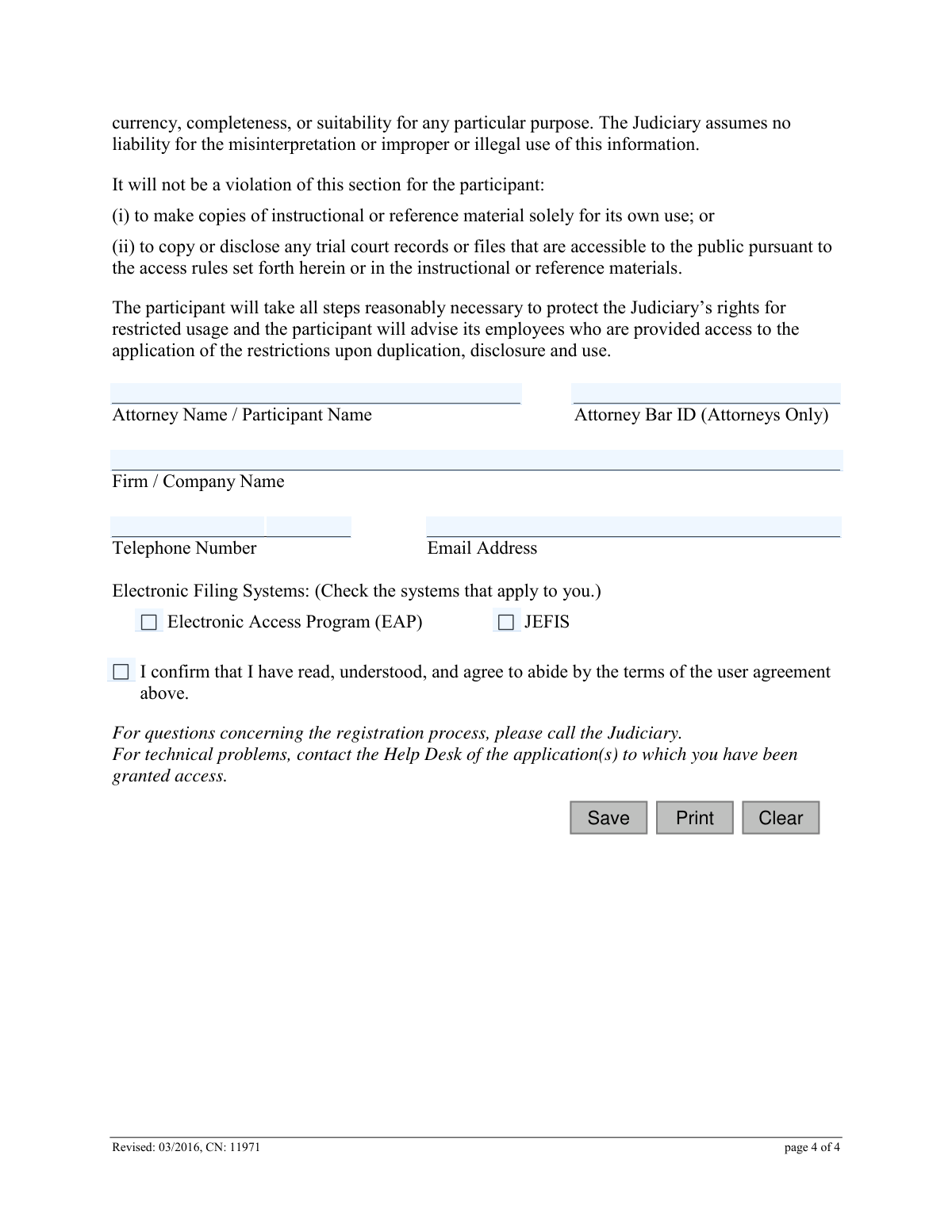
The EAP - Subscriber Agreement is a mandatory contract for individuals, particularly attorneys, seeking access to the New Jersey Judiciary's electronic applications, including eCourts, JEFIS, and the Electronic Access Program (EAP). This document outlines the terms, conditions, user obligations, and security protocols for participating in the state's electronic court systems. Today, this form can be filled out quickly and accurately using AI-powered services like Instafill.ai, which can also convert non-fillable PDF versions into interactive fillable forms.
EAP - Subscriber Agreement (CN 11971) is part of the New Jersey forms category on Instafill.
Our AI automatically handles information lookup, data retrieval, formatting, and form filling.
It takes less than a minute to fill out EAP - Subscriber Agreement (CN 11971) using our AI form filling.
Securely upload your data. Information is encrypted in transit and deleted immediately after the form is filled out.

Form specifications

Form name: EAP - Subscriber Agreement, Terms and Conditions of Access to and Participation in New Jersey Judiciary Electronic Applications
Number of fields: 12
Number of pages: 1
Language: English
main-image

Instafill Demo: How to fill out PDF forms in seconds with AI

How to Fill Out EAP - Subscriber Agreement (CN 11971) Online for Free in 2026

Are you looking to fill out a EAP - SUBSCRIBER AGREEMENT (CN 11971) form online quickly and accurately? Instafill.ai offers the #1 AI-powered PDF filling software of 2026, allowing you to complete your EAP - SUBSCRIBER AGREEMENT (CN 11971) form in just 37 seconds or less.
Follow these steps to fill out your EAP - SUBSCRIBER AGREEMENT (CN 11971) form online using Instafill.ai:
  1. 1 Navigate to Instafill.ai and upload or select the EAP - Subscriber Agreement form.
  2. 2 Allow the AI to process the document and identify the fillable fields for your review.
  3. 3 Enter your full name (or Attorney Name) and, if applicable, your Attorney Bar ID and Firm/Company Name.
  4. 4 Provide your current contact information, including your telephone number and email address.
  5. 5 Indicate the electronic filing systems you require access to by checking the appropriate boxes (e.g., EAP, JEFIS).
  6. 6 Carefully read the terms and conditions, then check the confirmation box to signify your understanding and agreement.
  7. 7 Review all the information you have entered for accuracy, then save, print, or submit the completed agreement as required.

Our AI-powered system ensures each field is filled out correctly, reducing errors and saving you time.

Why Choose Instafill.ai for Your Fillable EAP - Subscriber Agreement (CN 11971) Form?

Speed

Complete your EAP - Subscriber Agreement (CN 11971) in as little as 37 seconds.

Up-to-Date

Always use the latest 2026 EAP - Subscriber Agreement (CN 11971) form version.

Cost-effective

No need to hire expensive lawyers.

Accuracy

Our AI performs 10 compliance checks to ensure your form is error-free.

Security

Your personal information is protected with bank-level encryption.

Frequently Asked Questions About Form EAP - Subscriber Agreement (CN 11971)

This agreement outlines the terms and conditions you must accept to gain access to and use the New Jersey Judiciary's electronic applications, such as eCourts and JEFIS, for filing and viewing court documents.

Any individual, including attorneys and their staff, who wishes to register for and use the New Jersey Judiciary's electronic systems for filing or accessing court records must complete this agreement.

You will need to provide your full name, firm or company name, telephone number, and email address. If you are an attorney, you must also include your Attorney Bar ID.

Your participation and access begin immediately after you complete the online registration process and are assigned a user ID and initial password.

Generally, once you are enrolled, you cannot terminate your participation. The agreement specifies that termination by a participant is only possible under specific circumstances, while the Judiciary can terminate your access for rule violations.

Yes, attorney participants are personally responsible for all use of their logon identification and password. Any document filed using your credentials is presumed to have been authorized by you.

You must notify the Judiciary immediately if you believe your login ID or password is being used by an unauthorized person. The Judiciary may suspend your access without prior notice to protect the system.

No, uninterrupted access is not guaranteed. The system may be temporarily unavailable due to maintenance, security measures, or other technical issues.

If you are a participating attorney who ceases to practice New Jersey law, you are required to notify the Clerk of the appropriate Court(s) immediately.

As a participant, you are responsible for redacting confidential personal identifiers from all data and images you submit, in accordance with Rule 1:38, to protect sensitive information.

You are responsible for immediately notifying the Judiciary of any changes to your contact information, which can typically be done by updating your profile on the Judiciary website.

Yes, services like Instafill.ai use AI to auto-fill form fields accurately and save time. This can help you complete your information like name, firm, and contact details quickly and without errors.

You can upload the EAP Subscriber Agreement to Instafill.ai, which will make the document interactive. You can then type your information directly into the fields, save, and print the completed form.

If you have a non-fillable or 'flat' PDF, you can use a service like Instafill.ai. It can convert the document into an interactive, fillable form so you can easily type in your information.

Compliance EAP - Subscriber Agreement (CN 11971)
Validation Checks by Instafill.ai

1
Ensures Participant Name is Provided
This check verifies that the 'Attorney Name / Participant Name' field is not empty. This field is mandatory for identifying the individual entering into the agreement. If the form is submitted with this field blank, an error will be displayed prompting the user to enter their full name.
2
Validates Email Address Format
This check ensures that the value entered in the 'Email Address' field conforms to a standard email format (e.g., '[email protected]'). Proper email format is critical for communication and electronic service of court documents as outlined in the agreement. An invalid format will prevent form submission and require the user to correct the entry.
3
Ensures Email Address is Provided
This validation confirms that the 'Email Address' field is not left blank. Since participation involves electronic service and communication, a valid email address is a mandatory requirement for registration. Failure to provide an email address will block the submission of the agreement.
4
Validates US Phone Number Format
This check verifies that the 'Telephone Number' field contains a valid 10-digit phone number, accommodating common formats like (XXX) XXX-XXXX or XXX-XXX-XXXX. A valid contact number is essential for communication from the Judiciary. If the format is incorrect, the user will be prompted to re-enter the number correctly.
5
Ensures Firm or Company Name is Provided
This check ensures the 'Firm / Company Name' field is not empty. This information is crucial for identifying the professional affiliation of the participant, especially for attorneys. Submitting the form without this information would result in an incomplete registration and will be rejected.
6
Validates Attorney Bar ID Format
This validation applies if a value is entered into the 'Attorney Bar ID' field, ensuring it matches the specific format for New Jersey attorney identification numbers. Correctly formatted Bar IDs are essential for verifying an attorney's credentials and standing. An incorrectly formatted ID will trigger an error, as it cannot be processed for verification.
7
Requires Selection of an Electronic Filing System
This check ensures that the user has selected at least one checkbox under 'Electronic Filing Systems' (either EAP or JEFIS). The purpose of the agreement is to gain access to one of these systems, so a selection is mandatory. If no system is checked, the form cannot be submitted, and the user will be instructed to choose an application.
8
Mandatory Agreement Confirmation
This validation requires that the 'I confirm that I have read, understood, and agree...' checkbox is ticked. This is a legally binding step confirming the user's consent to the terms and conditions. The form submission will be blocked until the user explicitly agrees by checking this box.
9
Conditional Requirement for Firm Name
This is a logical check that makes the 'Firm / Company Name' field mandatory if the 'Attorney Bar ID' field has been filled out. It is presumed that a practicing attorney is associated with a firm or is a sole practitioner, making this information essential for identification. If a Bar ID is entered without a corresponding firm name, an error will be shown.
10
Validates Phone Extension is Numeric
This check ensures that if a value is entered into the phone extension field, it consists only of numeric digits. Alphanumeric characters are not valid for a phone extension and could cause issues with automated dialing systems. An invalid entry will prompt the user to enter numbers only.
11
Backend Check for Unique Email Address
Upon submission, this validation checks the Judiciary's database to ensure the provided email address is not already associated with an existing account. This prevents duplicate registrations and ensures each user profile is unique. If the email is already in use, the system will inform the user and may provide account recovery options.
12
Backend Verification of Attorney Bar ID
This server-side check validates the submitted 'Attorney Bar ID' against the official New Jersey Judiciary database of attorneys. The check confirms that the ID is valid, active, and corresponds to the name provided on the form. A mismatch or invalid ID will result in the rejection of the registration pending correction or clarification.

Common Mistakes in Completing EAP - Subscriber Agreement (CN 11971)

Entering an Incomplete or Incorrect Participant Name

Users often enter a nickname, initials, or an incomplete version of their name instead of their full legal name. As this is a binding legal agreement, the name must match official records, such as a state bar registration. An incorrect name can lead to failed identity verification, rejection of the application, and significant delays in accessing the Judiciary's electronic systems.

Incorrect or Mismatched Attorney Bar ID

Attorneys may accidentally enter their Bar ID with a typo, omit required prefixes, or provide an ID that doesn't match the name on the application (e.g., due to a name change). Non-attorneys also sometimes mistakenly fill this field, which is marked 'Attorneys Only'. This error leads to immediate rejection as the system cannot verify the attorney's standing, halting the registration process until corrected information is submitted.

Using Abbreviations for Firm/Company Name

Applicants frequently use informal abbreviations or acronyms (e.g., 'S&C' instead of 'Smith & Cromwell LLP') for their firm or company name. This creates ambiguity and can cause problems with system records, billing, and associating the user with the correct entity. Always use the full, official, and registered name of the organization to ensure proper processing and avoid administrative delays.

Providing a Typo-Ridden or Personal Email Address

This agreement grants consent for electronic service of legal documents, yet users often make typos or provide a personal email instead of a professional one. This is a critical error, as it means they will not receive login details, court notices, or time-sensitive case documents. To avoid missing crucial legal communications, applicants must double-check the spelling and use a primary, professional email address that is monitored daily. AI-powered form fillers like Instafill.ai can help by suggesting corrections for common email domain typos.

Forgetting the Confirmation of Agreement Checkbox

Overlooking the final checkbox to confirm agreement with the terms is a simple but common mistake that renders the entire submission invalid. The application cannot be processed without this explicit consent. This oversight forces the Judiciary to reject the form, requiring the user to resubmit and delaying their access to the electronic filing systems.

Incorrect Selection of Electronic Systems

Users who are unfamiliar with the Judiciary's platforms may not know whether to select 'EAP,' 'JEFIS,' or both, leading them to guess or select none at all. Selecting the wrong system results in not having access to the required tools, while selecting none makes the application incomplete. Applicants should verify which system they need for their work before filling out the form to prevent delays and the need for follow-up requests.

Omitting the Phone Number Extension

Many users provide a main office phone number but forget to include their direct extension in the designated field. This seemingly small omission can make it very difficult for Judiciary staff to contact them regarding their application or other urgent matters. Calls get lost at the main switchboard, leading to communication delays and frustration for both parties.

Misunderstanding of 'Participant' Role

An administrative assistant or paralegal filling out the form on behalf of an attorney may incorrectly enter their own name as the 'Participant.' The agreement is legally binding on the named individual, who is then personally responsible for all actions under that account. This mistake creates an account for the wrong person, leading to serious security and compliance issues that require a full re-application.

Failure to Read and Understand User Obligations

Many users check the agreement box without reading the terms, thus failing to understand their ongoing responsibilities, such as redacting confidential information and immediately updating their contact information. This is not just a form-filling error but a procedural one with legal consequences, as misuse or failure to comply can lead to account termination or even referral to the Office of Attorney Ethics. Users must treat this as a binding contract.

Submitting a Poorly Scanned, Non-Fillable PDF

Users may print the form, fill it out by hand, and then scan it, resulting in a low-quality, non-searchable document. Illegible handwriting can lead to data entry errors on the Judiciary's end, such as a misspelled name or incorrect Bar ID. To avoid this, users should always fill out the form electronically. If only a flat PDF is available, tools like Instafill.ai can convert it into a fillable version to ensure all entries are clear and accurate.
Saved over 80 hours a year

“I was never sure if my IRS forms like W-9 were filled correctly. Now, I can complete the forms accurately without any external help.”

Kevin Martin Green

Your data stays secure with advanced protection from Instafill and our subprocessors

Robust compliance program

Transparent business model

You’re not the product. You always know where your data is and what it is processed for.

ISO 27001, HIPAA, and GDPR

Our subprocesses adhere to multiple compliance standards, including but not limited to ISO 27001, HIPAA, and GDPR.

Security & privacy by design

We consider security and privacy from the initial design phase of any new service or functionality. It’s not an afterthought, it’s built-in, including support for two-factor authentication (2FA) to further protect your account.

Fill out EAP - Subscriber Agreement (CN 11971) with Instafill.ai

Worried about filling PDFs wrong? Instafill securely fills eap-subscriber-agreement-terms-and-conditions-of-access-to-and-participation-in-new-jersey-judiciary-electronic forms, ensuring each field is accurate.