Yes! You can use AI to fill out Form 4-17a, Financial Disclosure Affidavit (Short Form)

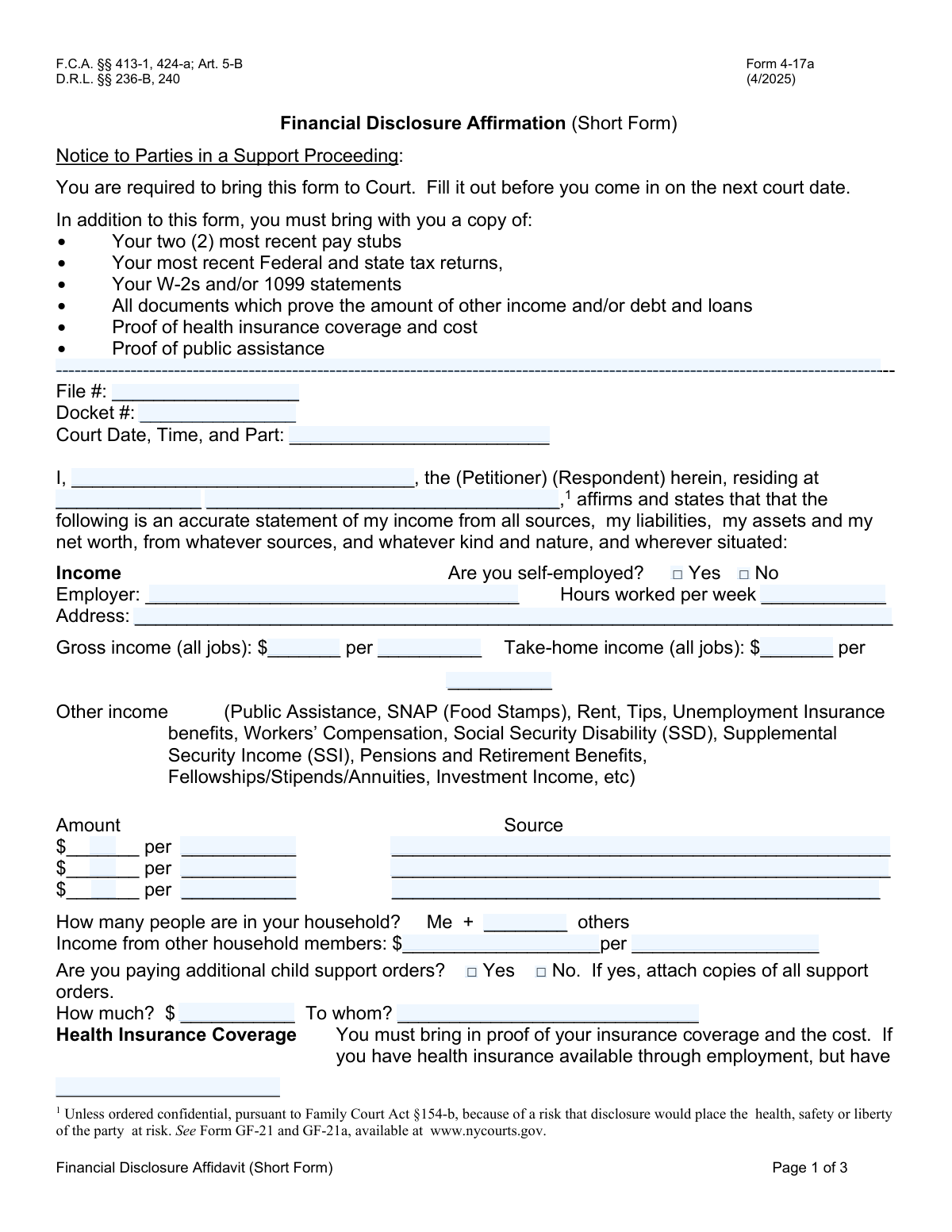
New York Form 4-17a, the Financial Disclosure Affidavit (Short Form), is a legal document required in family court support proceedings. It mandates the disclosure of an individual's complete financial situation, including income, assets, liabilities, and expenses, to help the court make fair decisions on support matters. Today, this form can be filled out quickly and accurately using AI-powered services like Instafill.ai, which can also convert non-fillable PDF versions into interactive fillable forms.
Form 4-17a is part of the ERM forms category on Instafill.
Form 4-17a has a complex Form Complexity Index of 71/100 — 114 fillable fields across 3 pages. Instafill’s AI completes it accurately in under a minute.

Form specifications

Form name: Form 4-17a, Financial Disclosure Affidavit (Short Form)
Number of fields: 114
Number of pages: 3
FCI: Complex (71/100)
Field instructions: Form 4-17a Instructions
Language: English
Our AI automatically handles information lookup, data retrieval, formatting, and form filling.
It takes less than a minute to fill out Form 4-17a using our AI form filling.
Securely upload your data. Information is encrypted in transit and deleted immediately after the form is filled out.
Preview of Form 4-17a, Financial Disclosure Affidavit (Short Form)

Instafill Demo: How to fill out PDF forms in seconds with AI

How to Fill Out Form 4-17a Online for Free in 2026

Are you looking to fill out a FORM 4-17A form online quickly and accurately? Instafill.ai offers the #1 AI-powered PDF filling software of 2026, allowing you to complete your FORM 4-17A form in just 37 seconds or less.
Follow these steps to fill out your FORM 4-17A form online using Instafill.ai:
  1. 1 Navigate to Instafill.ai and upload or select Form 4-17a, the Financial Disclosure Affidavit.
  2. 2 Enter your personal details and case information, including your name, address, file number, and docket number.
  3. 3 Provide comprehensive information about your income from all sources, such as employment, public assistance, and investments.
  4. 4 List all your assets, including bank account balances, vehicles, real estate, and other valuable property.
  5. 5 Detail your monthly expenses, covering categories like housing, utilities, insurance, transportation, and food.
  6. 6 Disclose any outstanding loans and debts, specifying the creditor, balance, and payment schedule.
  7. 7 Carefully review all entered information for accuracy, then sign and date the affidavit under penalty of perjury before submitting it to the court.

Our AI-powered system ensures each field is filled out correctly, reducing errors and saving you time.

Why Choose Instafill.ai for Your Fillable Form 4-17a Form?

Speed

Complete your Form 4-17a in as little as 37 seconds.

Up-to-Date

Always use the latest 2026 Form 4-17a form version.

Cost-effective

No need to hire expensive lawyers.

Accuracy

Our AI performs 10 compliance checks to ensure your form is error-free.

Security

Your personal information is protected with bank-level encryption.

Frequently Asked Questions About Form 4-17a

Form 4-17a has a Form Complexity Index of 71 out of 100, placing it in the complex complexity tier. This score is calculated deterministically from the form’s own structure using Instafill’s published Form Complexity Index methodology, so it can be reproduced and independently verified — it is not a subjective estimate.

For Form 4-17a specifically, the score reflects 114 fillable fields across 3 pages, grouped into 41 sections, and 33 conditional fields that only apply depending on earlier answers, 3 tables or repeating lists. The number of fields is the largest factor in the base score (weighted 36%), followed by how difficult those fields are to complete based on their type, where free-text and signature fields count for more than simple checkboxes (26%). The number of pages that actually contain fields (15%), the amount of conditional “fill-only-if” logic (16%), and how many sections the form is divided into (7%) account for the rest of the base. On top of that base, the index adds points for tables and repeating lists, bundled instruction pages, and dense page layouts — capturing difficulty the base alone can miss.

In practical terms, a complex score means the form is demanding, with many fields, multiple pages and branching rules that are easy to get wrong. Instafill removes that effort entirely: our AI reads your information, maps each value to the correct field — including the conditional ones — and completes Form 4-17a accurately in under a minute, with every field available for you to review before you download. See exactly how the Form Complexity Index is calculated.

This form is used in court support proceedings to provide a sworn statement of your income, assets, liabilities, and net worth. It helps the court make informed decisions regarding financial support obligations.

Both the Petitioner and the Respondent in a support proceeding are required to complete this form and bring it with them to their court date.

You must bring your two most recent pay stubs, recent federal and state tax returns with W-2s or 1099s, proof of other income and debts, and proof of health insurance coverage and its cost.

Gross income is your total pay from all jobs before any taxes or other deductions are taken out. Take-home income is the net amount you actually receive after all deductions.

This section is for any income outside of your regular employment, such as Public Assistance, SNAP, tips, unemployment benefits, Social Security (SSD/SSI), or investment income.

Yes, the form requires you to state the number of other people in your household and provide the total income from those other household members.

You are still required to bring proof of the available coverage and its cost for both an individual and a family plan, even if you have not signed up for it.

You need to convert all expenses to a monthly average. For a weekly bill, multiply the amount by 4.33; for an annual bill, divide the amount by 12.

The form states you can include an additional page if you need more room. Be sure to clearly label the information and attach the extra page(s) to your affidavit.

By signing, you are legally swearing that all information provided is true and complete. Intentionally providing false information can result in legal penalties, including fines or imprisonment.

Yes, services like Instafill.ai use AI to help you accurately auto-fill form fields from your saved information, which can save time and help prevent errors.

You can upload the PDF of Form 4-17a to the Instafill.ai platform. The service will make the document fillable online, allowing you to type in your information, save it, and download the completed form.

You can use a service like Instafill.ai, which can convert flat, non-fillable PDFs into interactive, fillable forms. Simply upload your document to the platform to begin filling it out on your computer.

Compliance Form 4-17a
Validation Checks by Instafill.ai

1
Ensures Affiant's Name and Signature are Provided
This validation checks that the 'Affiant Name' and 'Signature' fields are not empty. The name and signature are critical for the legal validity of the affidavit, as they identify the person making the sworn statement and confirm their affirmation. Failure to provide a name and signature would render the document legally unenforceable and require the user to complete these fields before submission.
2
Validates Affirmation Date is Complete and Logical
This check ensures that the day, month, and year of the affirmation are all provided and form a valid, non-future date. An incomplete, invalid, or future date can call into question when the financial statement was sworn to, which is critical for establishing the timeliness of the information. A failed validation would require the user to enter a complete and correct date before proceeding.
3
Verifies Gross Income Exceeds Take-Home Income
This validation compares the 'Gross Income' and 'Take-home income' fields to ensure the gross amount is greater than or equal to the take-home amount. Since take-home pay is derived from gross pay after taxes and other deductions, it cannot be higher. An illogical entry indicates a data entry error and would require correction to ensure the financial statement is accurate and credible.
4
Ensures Conditional Child Support Details are Complete
This check verifies that if the user checks 'Yes' for 'Are you paying additional child support orders?', then the 'How much?' and 'To whom?' fields are also filled out. This information is essential for the court to accurately calculate any new support obligations. If the details are missing despite the 'Yes' selection, the form is considered incomplete and prevents a full financial assessment.
5
Requires Employer Information if Not Self-Employed
This validation ensures that if the 'No' box is checked for 'Are you self-employed?', the 'Employer' and 'Employer Address' fields are filled in. This information is necessary for the court to verify employment and income for support calculations. A failure would prompt the user to provide their employer's details or correct their self-employment status.
6
Requires Insurance Plan Details When Coverage is Indicated
This validation ensures that if any health insurance coverage type (e.g., 'Through my job', 'Privately purchased') is selected, the 'Insurance Plan Name' and 'Policy #' fields are completed. These details are necessary to verify the existence and specifics of the health insurance policy, which is a key component of a support order. Missing details would require the user to provide the plan information or deselect the coverage type.
7
Validates 'Other Household Members' is a Non-Negative Integer
This check ensures that the value entered for 'Number of Other Household Members' is a whole number (integer) of zero or greater. This number is used to understand the affiant's household composition and potential expenses. An invalid entry like a negative number, a fraction, or text would be rejected, requiring the user to input a valid numerical digit.
8
Ensures Automobile Year is a Valid 4-Digit Year
This validation checks that the 'Automobile: Year' field contains a 4-digit number that represents a plausible manufacturing year, for example, between 1900 and the current year plus one. This ensures the data is realistic and helps in accurately assessing the vehicle's value. An invalid entry like '98' or '2050' would be flagged for correction.
9
Validates Income and Cost Frequencies are Specified
This check verifies that for every income or cost field where a monetary amount is entered (e.g., 'Gross income', 'Health insurance cost'), the corresponding period (e.g., 'per week', 'per month') is also selected. Without the frequency, the monetary amount is ambiguous and cannot be used for standardized calculations. A failure would prompt the user to select a time period for each entered amount.
10
Verifies Total Monthly Expenses Matches Sum of Itemized Expenses
This validation calculates the sum of all individual monthly expense fields (Rent, Utilities, Insurance, etc.) and compares it to the value entered in the 'Total' expenses field. This check ensures mathematical accuracy and internal consistency in the reported financial data. A mismatch would indicate a calculation error by the user, requiring them to review and correct their expense entries or the total.
11
Cross-Validates Owned Property with Related Expenses
This validation checks for consistency if a 'House/Apt Owned' is listed as an asset. It verifies that the 'Rent or mortgage' and 'Home/Fire' insurance fields under 'Expenses' are also filled out, as owning property typically involves these costs. A failure to list these expenses when a property is owned would trigger a review to ensure all financial obligations are reported.
12
Requires Description for 'Other' Expense Fields
This check ensures that if a monetary value is entered into an 'Other' expense field (e.g., 'Other Utilities Amount', 'Other Insurance Amount'), the corresponding description field is also filled out. This provides necessary context and justification for the expense, which is crucial for a complete financial review. An amount without a description would be flagged as incomplete.
13
Ensures Completeness of Loan and Debt Information
This validation verifies that for each loan entry, if a 'Balance' is provided, the 'Owed to', 'For', 'Payment', and payment frequency (monthly/weekly) fields are also completed. Incomplete loan information prevents a proper assessment of the affiant's liabilities and debt service obligations. The system would require all fields in a loan section to be filled if any one of them is used.
14
Validates Presence of Case Identification Numbers
This check ensures that the 'File #' and 'Docket #' fields are filled out. These numbers are essential for correctly associating the financial affidavit with the specific legal case it pertains to in the court's filing system. Submitting a form without these identifiers could lead to significant processing delays or misfiling of the document.

Common Mistakes in Completing Form 4-17a

Confusing Gross Income with Take-Home Pay

Filers frequently enter their net (take-home) pay in the gross income field, or vice-versa. Gross income is your total earnings before any deductions, while take-home pay is what you receive after taxes and other withholdings. Providing incorrect figures can delay court proceedings, as the court needs both numbers to make accurate financial assessments. Always refer to your pay stub, which clearly lists both gross and net pay, to ensure you enter the correct amounts in the corresponding fields.

Inconsistent Income Reporting Frequency

People often enter their paycheck amount without specifying the correct pay period (e.g., weekly, bi-weekly, monthly) or fail to convert it to a consistent unit. This leads to a significant miscalculation of their annual or monthly income, which can directly impact support calculations. To avoid this, carefully check your pay stubs for the pay period and use that information to accurately fill in both the amount and the frequency (e.g., '$1,000 per week').

Failing to Bring Required Supporting Documentation

The form explicitly requires you to bring recent pay stubs, tax returns, W-2s, and proof of insurance and debts to court. A common and critical error is arriving with a completed affidavit but without these essential documents. This can result in your case being postponed, causing significant delays and potentially additional legal fees. To prevent this, create a checklist of all required documents listed on the first page and gather them well in advance of your court date.

Omitting or Underreporting 'Other Income'

This form requires disclosure of all income, including sources beyond a primary job, such as public assistance, tips, unemployment benefits, or investment income. People often forget or intentionally omit these additional sources, which can be considered perjury and lead to severe legal penalties. It is crucial to meticulously list every source of income, no matter how small or infrequent, to provide a true and accurate financial picture to the court.

Incorrectly Calculating Monthly Expenses

The expenses section specifically asks for monthly costs, but people often enter figures based on different timeframes, such as a weekly food budget or a semi-annual car insurance premium. This leads to an inaccurate calculation of total monthly expenses, which can weaken your financial position in court. To avoid this, convert all expenses to a monthly average (e.g., multiply weekly costs by 4.33 or divide annual costs by 12) before entering them on the form.

Providing Vague or Incomplete Asset and Debt Information

When listing assets and debts, filers often provide incomplete information, such as writing 'car loan' without listing the lender, the total balance owed, and the monthly payment amount. This lack of detail forces the court to request more information, causing delays. To avoid this, gather all your recent statements for bank accounts, loans, and credit cards to ensure you can accurately fill in every required detail, including institution names, balances, and payment terms.

Neglecting Detailed Health Insurance Information

The health insurance section requires specific details, including the plan name, policy number, and the cost for both individual and family plans. A frequent mistake is simply checking a box (e.g., 'Through my job') without filling in these crucial follow-up details. Furthermore, the form requires you to provide the cost of available insurance even if you are not enrolled, which is often overlooked and can be critical in determining support obligations.

Miscalculating the 'Total Monthly Expenses'

The form requires you to manually sum all your listed monthly expenses into a single 'Total' field. Simple arithmetic errors are very common here, leading to a total that doesn't match the individual expense entries. This inconsistency can undermine your credibility and force the court to scrutinize your entire financial statement. Use a calculator to carefully add up all expense figures twice to ensure the total is accurate before writing it on the form.

Ignoring Conditional Information Requirements

Several sections on the form require additional information or documentation only if a specific condition is met, such as providing copies of other child support orders if you check 'Yes'. A common mistake is to answer the initial question but fail to provide the necessary follow-up details or attachments. This incomplete submission requires the court to seek clarification, delaying the proceedings. AI-powered form filling tools like Instafill.ai can help by dynamically showing or hiding these conditional fields based on your answers, preventing you from missing them.

Submitting an Unsigned or Undated Affidavit

Forgetting to sign and date the affirmation on the final page is a simple but critical error that renders the entire document invalid. The signature and date certify under penalty of perjury that the information provided is true. An unsigned form will be rejected by the court, leading to mandatory refiling and delays. Always double-check the last page to ensure you have signed, printed your name, and entered the current date before submitting the form.

Leaving Applicable Fields Blank

When a particular income, asset, or expense category does not apply, people often leave the field blank. This creates ambiguity for the court, which may wonder if the information was forgotten or intentionally omitted. To ensure clarity, you should explicitly enter '$0' for monetary fields or 'N/A' (Not Applicable) for text fields that do not apply to your situation. If the form is a non-fillable PDF, tools like Instafill.ai can convert it into a fillable version, making it easier to enter this information clearly in every field.
Saved over 80 hours a year

“I was never sure if my IRS forms like W-9 were filled correctly. Now, I can complete the forms accurately without any external help.”

Kevin Martin Green

Your data stays secure with advanced protection from Instafill and our subprocessors

Robust compliance program

Transparent business model

You’re not the product. You always know where your data is and what it is processed for.

ISO 27001, HIPAA, and GDPR

Our subprocesses adhere to multiple compliance standards, including but not limited to ISO 27001, HIPAA, and GDPR.

Security & privacy by design

We consider security and privacy from the initial design phase of any new service or functionality. It’s not an afterthought, it’s built-in, including support for two-factor authentication (2FA) to further protect your account.

Fill out Form 4-17a with Instafill.ai

Worried about filling PDFs wrong? Instafill securely fills form-4-17a-financial-disclosure-affidavit-short-form forms, ensuring each field is accurate.

Related forms by category

ERM forms REQUEST FOR OWNERSHIP INFORMATION—ERM-14 FORM, Form I-90, Application to Replace Permanent Resident Card, Form I-485, Application to Register Permanent Residence, Form SS-8, Determination of Worker Status, Form CMS-1763, Request for Termination of Medicare Coverage, Form CMS-1763, Request for Termination, Form I-212, Application for Permission to Reapply, Form I-192, Application for Advance Permission to Enter as a Nonimmigrant, Form W-8IMY (Rev. October 2021), Certificate of Foreign Intermediary, Foreign Flow-Through Entity, or Certain U.S. Branches for United States Tax Withholding and Reporting, Form SS-8 (Rev. December 2023), Determination of Worker Status for Purposes of Federal Employment Taxes and Income Tax Withholding, County of Louisa Department of Community Development – New Non-Residential Building Permit Package, Application Schedule 1: Designer Information (City of Toronto Building Permit Application), HR-Pol-Rec&Res-04 Employment Application Form (Recruitment of Permanent Employees), Fauquier County Department of Community Development – Building Trades Permit or Amendment to Existing Permit Application (Residential or Commercial), Belastingdienst VPB 075 – Verzoek fiscale eenheid Vennootschapsbelasting (Deel A – Gegevens moedermaatschappij), ROTC Cadet Academic Plan / Degree and Credit Hour Worksheet (Student Identification, Term-by-Term Courses, GPA Summary, and Completion Certification), Health Assessment – Ontario Health atHome (Fixing Long-Term Care Act, 2021) (Form 4768-69E), Health Assessment - Ontario Health atHome (Fixing Long-Term Care Act, 2021) — Form 4768-69E, Washington Single-Family Property Term Lease & Security Deposit Receipt (WA Single-Family Lease) | Revised 10/08/2025, Application for Mechanical Permit · + 53 more →