
Instafill.ai
7 days free
AI form filling · 179 fields · 5 pages · done in seconds

Yes! You can use AI to fill out Form 540NR, California Nonresident Tax Return (2022)

Don't type 179 fields by hand. Tell our AI about yourself, or upload your W-2 or last year's return, and it fills every field in seconds. You check it, then download, print or sign.
7 days free, then $19.99/month · Cancel anytime
AI fills it, no typingEncrypted, never used to train AICancel in two clicks
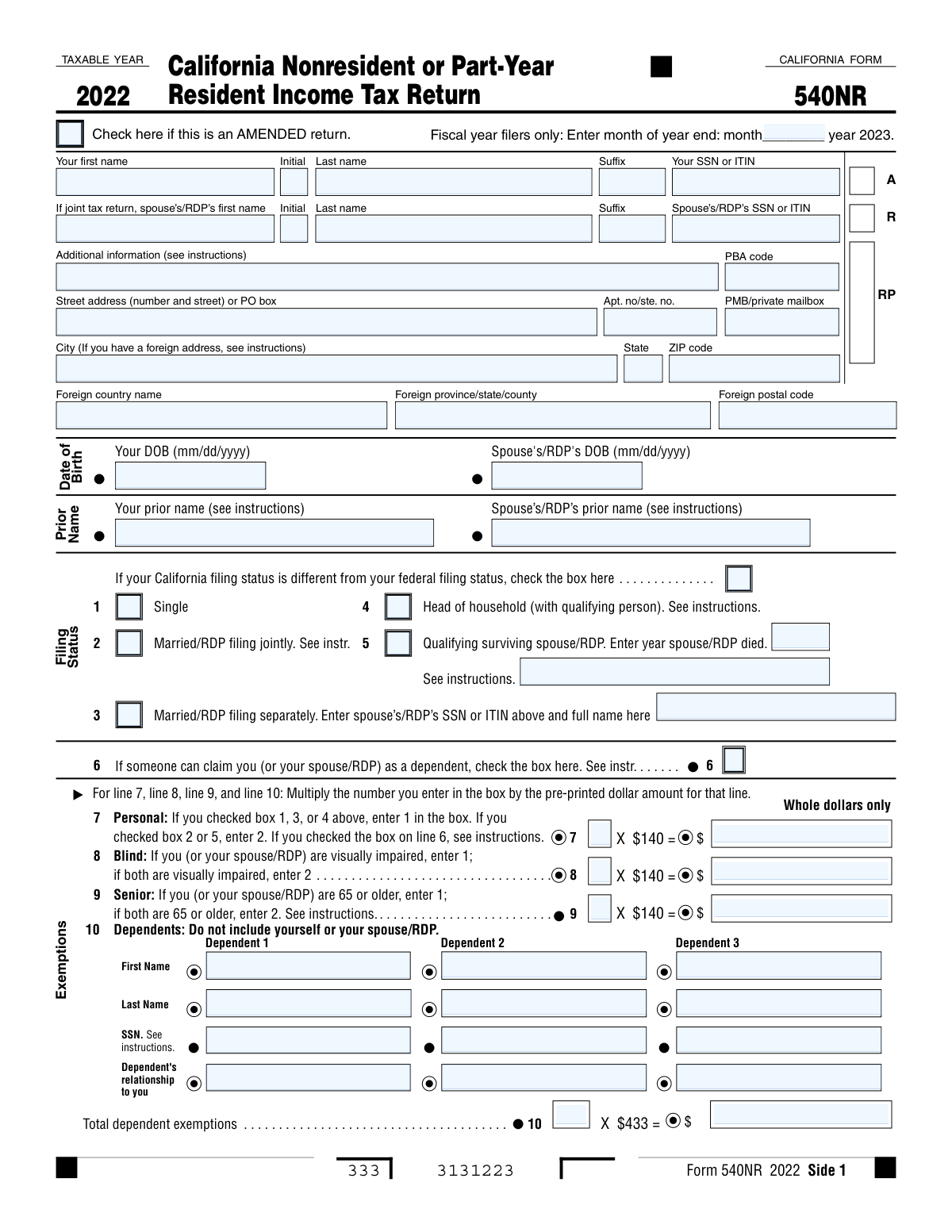
Form 540NR, California Nonresident Tax Return (2022), page 1
Complex · 66/100Form Complexity Index

The AI does the filling. You just check it.

No typing into boxes, nothing to install.

Tell the AI about youAnswer a few questions in plain words, or upload your W-2 or last year's return. That is all the typing there is.
AI fills every field in secondsIt puts each answer in the right box on every page, checkboxes included.
Check it and downloadReview every field, change anything, then download, print or sign the PDF.

What this form asks for

The AI fills all of it, from your answers or your documents.

Form 540NR, California Nonresident or Part-Year Resident Income Tax Return, is used to report income earned in California by individuals who are not full-time residents. It is important to fill out this form to ensure accurate tax reporting and compliance with state tax regulations.
Fillable fields179
Pages5
Sections27
Form Complexity IndexComplex, 66/100

The AI checks your answers before you download

15 checks built for this form, so a wrong date or a missing answer is caught before anyone else sees it.

Ensures all monetary values are entered in whole dollars only, without cents.

The software ensures that all monetary values entered into the California Nonresident Tax Return form are in whole dollars, omitting any cents. It rounds off any cents to the nearest whole dollar as per the form's requirements. This validation helps prevent errors that could arise from including cents, as the form does not accommodate decimal values. The software also alerts the user if any monetary field contains non-numeric characters, ensuring the accuracy of the financial information provided.

Confirms that the California filing status is checked if it differs from the federal status.

The software confirms that the taxpayer's California filing status is appropriately checked on the form, especially if it differs from their federal filing status. It cross-references the information provided with the federal tax return data to ensure consistency where applicable. If a discrepancy is detected, the software prompts the user to verify and correct the filing status. This check is crucial as the filing status can affect tax calculations and eligibility for certain credits and deductions.

Verifies that the number of personal, blind, senior, and dependent exemptions is correctly calculated and entered.

The software verifies the accuracy of the number of exemptions claimed for personal, blind, senior, and dependents on the California Nonresident Tax Return. It calculates the total number of exemptions based on the information provided by the taxpayer and ensures that the number entered in the form matches the calculated value. The software also checks for common errors, such as claiming more exemptions than eligible or duplicating entries, to ensure the taxpayer receives the correct exemption amount.

Checks that the Social Security Number (SSN) or Individual Taxpayer Identification Number (ITIN) and relationship for each dependent are included.

The software checks that each dependent listed on the California Nonresident Tax Return has a corresponding Social Security Number (SSN) or Individual Taxpayer Identification Number (ITIN) and their relationship to the taxpayer is clearly stated. It validates the format of the SSN or ITIN to ensure it conforms to the standard numbering system. If any dependent's information is missing or incorrectly formatted, the software alerts the user to provide the necessary details to comply with tax regulations.

Validates the entry of taxpayer's name, SSN or ITIN, address, and date of birth in the designated areas.

The software validates the entry of the taxpayer's personal information, including their full name, Social Security Number (SSN) or Individual Taxpayer Identification Number (ITIN), address, and date of birth, ensuring that each piece of information is placed in the correct field on the California Nonresident Tax Return form. It checks for any missing or incomplete data and verifies that the SSN or ITIN is in the correct format. The software also confirms that the address provided matches the standard postal format, and the date of birth is in the correct date format.

Joint Filing Information Inclusion

Ensures that when the California Nonresident Tax Return is filed jointly, the spouse's or Registered Domestic Partner's (RDP's) personal information is accurately included. This check involves confirming the presence of the spouse's/RDP's full name, social security number, and any other required identifying information. It also verifies that both parties' income and deductions are properly reported and combined on the tax return. The system cross-references the provided details with the relevant sections of the form to ensure completeness and accuracy.

And 9 more checks
  • Amended Return and Fiscal Year Specification
  • Accurate Income Reporting
  • Income and Tax Calculations
  • Credit Claims and Calculations
  • Ensures the correct calculation of net tax liability
  • Verifies the reporting of any other taxes owed
  • Confirms the inclusion of California income tax withheld and other payments
  • Calculates and validates the total amount owed
  • Ensures the correct indication of refund amount

Let AI fill out your Form 540NR

No typing. Every field filled in seconds, checked, ready to sign.

7 days free, then $19.99/month · Cancel anytime

How to Fill Out Form 540NR Online for Free in 2026

What the AI walks you through.

  1. Visit instafill.ai site and select Form 540NR.
  2. Enter your personal information and filing status.
  3. Fill in income and exemption details.
  4. Complete tax calculations and credits.
  5. Sign and date the form electronically.
  6. Check for accuracy and submit the form.

Common Mistakes in Completing Form 540NR

The ones the AI is built to catch.

Entering amounts in fractions or decimals instead of whole dollars
California Nonresident Tax Return requires all amounts to be entered in whole dollars only. Failing to adhere to this instruction may result in calculation errors and potential discrepancies. To avoid this mistake, double-check all entries to ensure they are in whole dollars before submitting the form.
Selecting incorrect California filing status
California Nonresident Tax Return requires filers to select the appropriate filing status based on their individual circumstances. Selecting an incorrect filing status may result in incorrect tax calculations and potential penalties. To avoid this mistake, carefully review the instructions and select the filing status that applies to the filer's situation.
Neglecting to calculate personal, blind, senior, and dependent exemptions
California Nonresident Tax Return requires filers to calculate and enter their personal, blind, senior, and dependent exemptions. Failing to do so may result in overpayment or underpayment of taxes. To avoid this mistake, carefully review the instructions and calculate the appropriate exemptions before submitting the form.
Leaving Social Security Numbers, relationships of dependents, or other required information blank
California Nonresident Tax Return requires filers to enter their Social Security Numbers, relationships of dependents, and other required information. Failing to provide this information may result in processing delays or potential penalties. To avoid this mistake, ensure all required information is entered accurately and completely before submitting the form.
Entering incorrect name, SSN or ITIN, address, or date of birth
California Nonresident Tax Return requires filers to enter their correct name, Social Security Number or Individual Taxpayer Identification Number, address, and date of birth. Entering incorrect information may result in processing delays or potential penalties. To avoid this mistake, ensure all entries are accurate and up-to-date before submitting the form.
Failing to include spouse or RDP's information when filing jointly
California Nonresident Tax Return form (540NR) requires both spouses or Registered Domestic Partners (RDPs) to report their individual income and withholding information if they are filing a joint return. Neglecting to include the necessary details from the other partner may lead to incorrect calculations and potential penalties. To avoid this mistake, ensure both partners provide their complete and accurate information before submitting the form.
Not checking the box for an amended return if applicable
Taxpayers may need to file an amended California Nonresident Tax Return (540NR-A) due to errors or changes in circumstances. Failing to check the box indicating an amended return and submitting a new form instead may result in processing delays or incorrect calculations. To prevent this mistake, carefully review the instructions and determine if an amended return is necessary before filing.
Reporting incorrect total California wages, federal AGI, or California adjustments from Schedule CA (540NR)
California Nonresident Tax Return requires accurate reporting of total California wages, federal Adjusted Gross Income (AGI), and California adjustments from Schedule CA (540NR). Incorrect reporting of these figures may lead to overpaying or underpaying taxes, and potentially triggering an audit. To avoid this mistake, double-check all figures against pay stubs, W-2s, and other relevant documents before submitting the form.
Calculating incorrect adjusted gross income, taxable income, or tax before credits
Calculating incorrect adjusted gross income, taxable income, or tax before credits on the California Nonresident Tax Return (540NR) may result in significant errors and potential penalties. Miscalculations can occur due to incorrect reporting of income, deductions, or credits. To prevent this mistake, carefully follow the instructions and use a calculator to double-check all calculations before submitting the form.
Claiming incorrect or incomplete credits
California Nonresident Tax Return offers various credits, such as joint custody head of household, dependent parent, senior head of household, and child and dependent care expenses. Failing to claim the correct credits or providing incomplete information may result in missed opportunities for tax savings or potential penalties. To avoid this mistake, review the instructions and eligibility requirements for each credit carefully and ensure all necessary documentation is provided.
Incorrectly calculating total credits and subtracting from tax to determine net tax liability
California Nonresident Tax Return form (TR-205) requires taxpayers to calculate their total credits and subtract them from their total tax liability to determine their net tax liability. Failure to accurately perform these calculations can result in an incorrect tax payment or refund. To avoid this mistake, taxpayers should double-check their calculations and ensure they have included all applicable credits. It is also recommended to use tax preparation software or consult a tax professional for assistance.
Reporting incorrect other taxes owed, such as alternative minimum tax or mental health services tax
California Nonresident Tax Return form (TR-205) requires taxpayers to report any other taxes owed, such as alternative minimum tax or mental health services tax. Failure to accurately report these taxes can result in penalties and interest. To avoid this mistake, taxpayers should carefully review the instructions for reporting other taxes and ensure they have included all applicable taxes. It is also recommended to consult a tax professional for assistance if unsure.
Failing to include California income tax withheld, estimated tax payments, and any other payments or credits
California Nonresident Tax Return form (TR-205) requires taxpayers to report all California income tax withheld, estimated tax payments, and any other payments or credits. Failure to include these amounts can result in an incorrect tax payment or refund. To avoid this mistake, taxpayers should gather all necessary documentation and carefully review the instructions for reporting these amounts. It is also recommended to use tax preparation software or consult a tax professional for assistance.
Calculating incorrect total amount owed, including penalties or interest
California Nonresident Tax Return form (TR-205) requires taxpayers to calculate their total amount owed, including any penalties or interest. Failure to accurately calculate this amount can result in an incorrect tax payment or refund. To avoid this mistake, taxpayers should carefully review the instructions for calculating the total amount owed and use a calculator or tax preparation software to double-check their calculations. It is also recommended to consult a tax professional for assistance if unsure.
Failing to provide direct deposit information if requesting a refund
California Nonresident Tax Return form (TR-205) allows taxpayers to request a refund and requires them to provide direct deposit information if they wish to receive their refund electronically. Failure to provide this information can result in a delayed refund. To avoid this mistake, taxpayers should carefully review the instructions for providing direct deposit information and ensure they have included all necessary details. It is also recommended to double-check this information for accuracy.
Neglecting to sign and date the return
California Nonresident Tax Return forms require both the taxpayer and their spouse (if filing jointly) to sign and date the return. Failure to do so may result in processing delays or even rejection of the form. To avoid this mistake, ensure all required signatures and dates are provided before submitting the form. It is also recommended to review the form carefully to ensure all other required information is complete and accurate before signing.
Omitting paid preparer's information and signature (if applicable)
If a taxpayer has used the assistance of a paid tax preparer to complete their California Nonresident Tax Return, they are required to provide the preparer's name, signature, and their preparer tax identification number (PTIN). Failure to do so may result in processing delays or even rejection of the form. To avoid this mistake, ensure all required preparer information is provided before submitting the form. It is also recommended to double-check the preparer's information for accuracy.
Forgetting to authorize a third party to discuss the return with the Franchise Tax Board
Taxpayers may wish to authorize a third party, such as a spouse or accountant, to discuss their California Nonresident Tax Return with the Franchise Tax Board. Failure to provide this authorization may result in delays or denial of access to important information. To avoid this mistake, ensure the appropriate authorization is provided on the form before submitting it. It is also recommended to review the authorization carefully to ensure all desired access is granted.
Neglecting to attach a copy of the complete federal return
California Nonresident Tax Return forms require taxpayers to attach a copy of their complete federal return. Failure to do so may result in processing delays or even rejection of the form. To avoid this mistake, ensure a complete copy of the federal return is attached before submitting the form. It is also recommended to review the attached federal return carefully to ensure all required information is included and accurate.
Mailing the form to the incorrect address
California Nonresident Tax Return forms must be mailed to the correct address to ensure timely processing. Failure to do so may result in processing delays or even rejection of the form. To avoid this mistake, ensure the correct mailing address is used when submitting the form. It is also recommended to double-check the address for accuracy and to allow sufficient time for mailing to ensure timely submission.

Frequently Asked Questions About Form 540NR


Is it really free for 7 days?
Yes. You pay $0 today. Cancel before Nov 19 and you are never charged. Keep it, and it is $19.99 a month for 5 fills of your Form 540NR.
Can I fill other forms too?
This plan is for your Form 540NR: your own AI agent fills it as often as 5 times a month. To fill other forms and upload your own, choose a Professional plan from your account.
How do I cancel?
From your account, in two clicks, any time. No email, no call.
How does the AI fill out Form 540NR?
You answer a few questions in plain words, or upload your W-2 or last year's return. The AI reads what you give it and puts each answer into the right field of Form 540NR, on every page, in seconds. It checks the answers against the form's own rules, and you review and change anything before you download, print or sign.
What happens to my information?
It is encrypted in transit and at rest, and it is never used to train AI.
How complex is Form 540NR to fill out?
Form 540NR has a Form Complexity Index of 66 out of 100, in the complex tier: 179 fillable fields across 5 pages. Instafill.ai's AI fills it in under a minute, with every field there for you to review before you download.
What is the California Nonresident Tax Return (Form 540NR) used for?
The California Nonresident Tax Return (Form 540NR) is used by nonresidents and part-year residents of California to report their California-source income and calculate their California state income tax liability.
Who needs to file a California Nonresident Tax Return?
Nonresidents and part-year residents of California who have California-source income are required to file a California Nonresident Tax Return (Form 540NR).
What is the difference between a California resident and a nonresident for tax purposes?
A California resident is an individual who meets the state's domicile requirements, while a nonresident is an individual who does not meet those requirements but has California-source income.
What types of income are considered California-source income?
California-source income includes income from sources within the state, such as wages, salaries, and tips, as well as income from California real property and certain business activities.
What is the deadline for filing a California Nonresident Tax Return?
The deadline for filing a California Nonresident Tax Return (Form 540NR) is April 15 of the year following the taxable year, unless an extension is obtained.
What are the filing status options for the California Nonresident Tax Return?
The California Nonresident Tax Return offers several filing status options, including Single, Married/RDP filing jointly, Married/RDP filing separately, Head of household, and Qualifying widow(er) with dependent child.
What are the exemptions and deductions available on the California Nonresident Tax Return?
The California Nonresident Tax Return allows for certain exemptions and deductions, such as personal exemptions, blind and senior exemptions, and dependents' exemptions. Additionally, there are various adjustments, additions, and credits that can affect your taxable income.
What is the difference between federal Adjusted Gross Income (AGI) and California Adjusted Gross Income (CA AGI)?
Federal Adjusted Gross Income (AGI) is calculated according to the rules of the Internal Revenue Code, while California Adjusted Gross Income (CA AGI) is calculated based on the rules of the California Franchise Tax Board. Differences may include the inclusion or exclusion of certain types of income and deductions.
What are the various tax rates and tax tables used to calculate California income tax?
California income tax is calculated using various tax rates and tax tables, including the Tax Rate Schedule, Tax Table, and FTB 3800. The tax rate and taxable income determine the amount of tax owed.
What are the various credits available on the California Nonresident Tax Return?
The California Nonresident Tax Return offers several credits, such as the Credit for joint custody head of household, Credit for dependent parent, Credit for senior head of household, Nonrefundable Child and Dependent Care Expenses Credit, and various special credits.
What are the voluntary tax contribution funds available on the California Nonresident Tax Return?
The California Nonresident Tax Return provides taxpayers with the opportunity to contribute to several voluntary tax funds. These funds include the California Seniors Special Fund, which supports programs and services for senior citizens in California. Another voluntary contribution is the Alzheimer’s Disease and Related Dementia Voluntary Tax Contribution Fund, which helps to fund research, education, and care services for individuals affected by Alzheimer's disease and related dementias. Taxpayers may also choose to contribute to other funds for specific causes.
What is the deadline for filing the California Nonresident Tax Return?
The deadline for filing the California Nonresident Tax Return is April 15th of each year, unless it falls on a weekend or a legal holiday. In such cases, the deadline is extended to the next business day.
Who is required to file the California Nonresident Tax Return?
California Nonresident Tax Returns must be filed by individuals who are not California residents but have California-sourced income, such as income from wages, salaries, or commissions, or income from California real property. Nonresident aliens, estates, and trusts are also required to file if they have California-sourced income.
What information is required on the California Nonresident Tax Return?
The California Nonresident Tax Return requires taxpayers to provide their personal information, including their name, address, and Social Security Number or Individual Taxpayer Identification Number. They must also report their California-sourced income, deductions, and tax credits. Additionally, they may be required to provide information about their residency status and any dependents.
Encrypted in transit and at restNever used to train AIDelete your forms any time

Get your Form 540NR filled out by AI

$0 today. Cancel before Nov 19 and you pay nothing.

7 days free, then $19.99/month · Cancel anytime