
Yes! You can use AI to fill out Form DE 4, Employee’s Withholding Allowance Certificate (Rev. 56)
Don't type 51 fields by hand. Tell our AI about yourself, or upload a document you already have, and it fills every field in seconds. You check it, then download, print or sign.
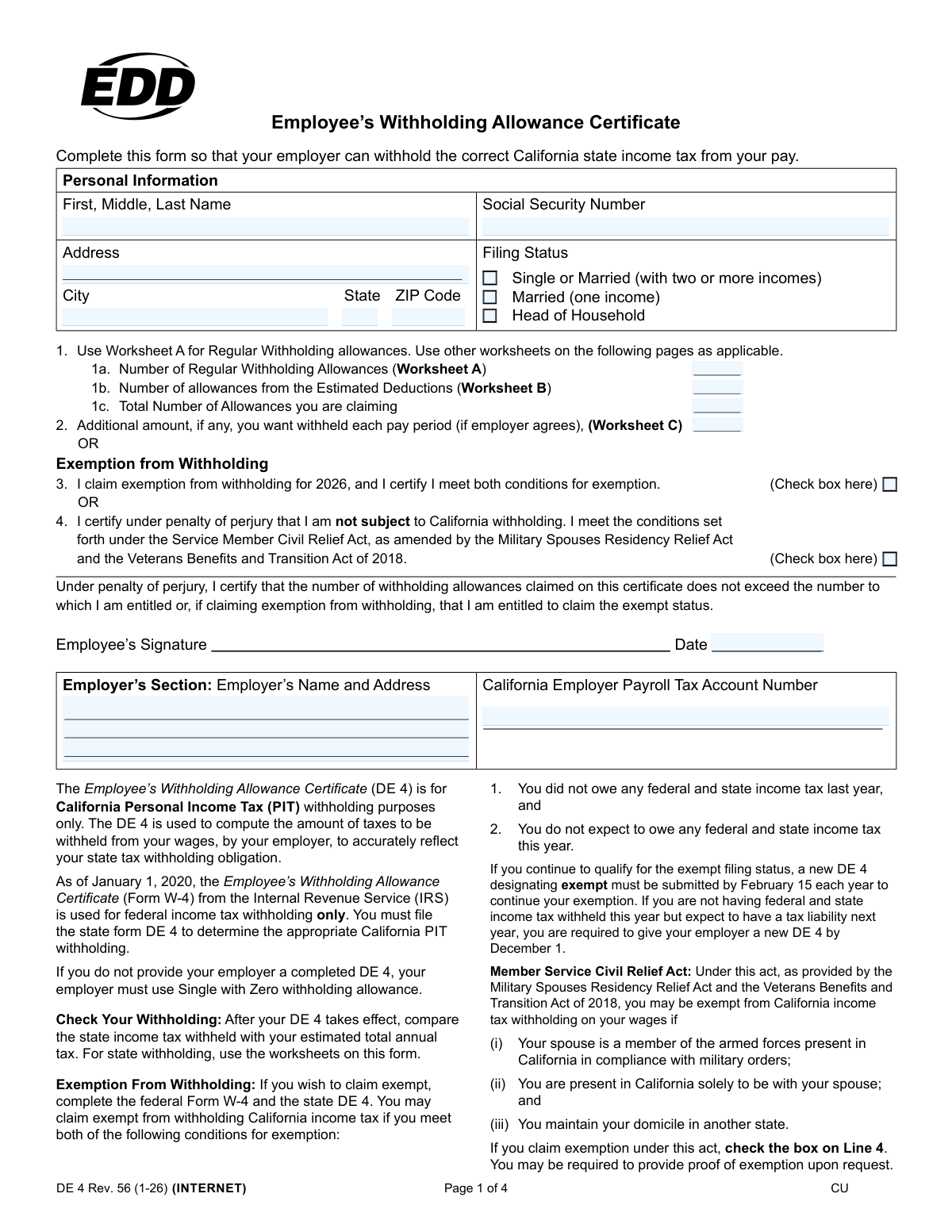
The AI does the filling. You just check it.
No typing into boxes, nothing to install.
What this form asks for
The AI fills all of it, from your answers or your documents.
The AI checks your answers before you download
14 checks built for this form, so a wrong date or a missing answer is caught before anyone else sees it.
This check verifies that the Social Security Number (SSN) field contains a 9-digit number, optionally formatted as XXX-XX-XXXX. It is crucial for correctly identifying the employee for tax reporting to state agencies. A failure in this validation would prevent the form from being processed, as the SSN is a primary identifier for payroll and tax purposes.
This validation ensures that the employee has selected exactly one filing status from the available options: 'Single or Married (with two or more incomes)', 'Married (one income)', or 'Head of Household'. Selecting more than one or none at all would lead to incorrect tax calculations. If this check fails, the form should be returned to the user with an error message requiring them to select a single status.
This check confirms that an employee cannot claim both withholding allowances (a value greater than zero in Line 1c) and an exemption from withholding (by checking the box on Line 3 or Line 4). These are mutually exclusive options for determining tax withholding. If an employee attempts to do both, the system should flag an error, as this represents a logical contradiction in their tax declaration.
This validation verifies that the value entered in Line 1c ('Total Number of Allowances') is the mathematical sum of the values from Line 1a ('Regular Withholding Allowances') and Line 1b ('Estimated Deductions'). This ensures the total claim is calculated correctly before being used by the payroll system. An incorrect total would lead to improper tax withholding from the employee's pay.
This check validates the arithmetic on Worksheet A, ensuring that the total on Line F is the correct sum of the allowances entered on lines (A) through (E). This internal worksheet consistency is vital because the result is used on the main form. A miscalculation here would carry forward and result in an incorrect number of regular allowances being claimed.
This validation ensures that the total number of allowances calculated on Worksheet A, Line F, is the same value that is entered on Line 1a of the main form. This cross-references the worksheet with the final declaration, preventing manual data entry errors. If the values do not match, the employee's regular allowances will be misstated, affecting their tax withholding.
And 8 more checks
- Worksheet B to Form Line 1b Data Consistency
- Mutually Exclusive Exemption Types (Line 3 vs. Line 4)
- Completeness of Personal Information
- Date Field Presence and Validity
- Employer Payroll Tax Account Number Format
- Head of Household and Spouse Allowance Contradiction
- Additional Withholding Amount Format
- Worksheet C to Form Line 2 Data Consistency
Let AI fill out your DE 4
No typing. Every field filled in seconds, checked, ready to sign.
How to Fill Out DE 4 Online for Free in 2026
What the AI walks you through.
- Navigate to Instafill.ai and upload your DE 4 form, or select it from the platform's library of official documents.
- Use the AI assistant to automatically populate your personal information, including your full name, Social Security Number, and address.
- Select your appropriate filing status (Single, Married, or Head of Household) based on your personal circumstances.
- Complete the integrated worksheets (A, B, and C) with AI-powered guidance to accurately calculate your total withholding allowances and determine if any additional tax should be withheld.
- Transfer the calculated totals from the worksheets to the corresponding lines on the main form, or allow the AI to do it for you.
- Carefully review all entered information for accuracy, then electronically sign and date the certificate to certify its correctness.
- Download the completed, signed DE 4 form and submit it directly to your employer's payroll or HR department.
Common Mistakes in Completing DE 4
The ones the AI is built to catch.
Using Federal W-4 Rules for the State DE 4 Form
Selecting the Wrong Filing Status for Married Couples
Duplicating Allowances Across Multiple Jobs
Improperly Claiming Exemption from Withholding
Estimating Allowances Instead of Using Worksheets
Forgetting to Sign and Date the Form
Making Calculation Errors on Worksheet B
Entering an Incorrect Social Security Number
Failing to Submit a Completed DE 4 Form
Incorrectly Transferring Totals from Worksheets
Frequently Asked Questions About DE 4
Is it really free for 7 days?
Can I fill other forms too?
How do I cancel?
How does the AI fill out DE 4?
What happens to my information?
How complex is DE 4 to fill out?
What is the purpose of the California DE 4 form?
Do I need to fill out a DE 4 if I already completed a federal W-4 form?
What happens if I don't submit a DE 4 form to my employer?
How do I choose a filing status if I'm married and my spouse also works?
How do I calculate the number of allowances to claim on Line 1a?
When should I use Worksheet B for Estimated Deductions?
Who is eligible to claim an exemption from withholding on Line 3?
I am a military spouse living in California. Do I need to have state taxes withheld?
My spouse and I both have jobs. How should we claim our allowances?
What is the purpose of Line 2, 'Additional amount, if any, you want withheld'?
Can AI tools help me fill out the DE 4 form?
How can I fill out the DE 4 form online?
The DE 4 PDF I downloaded from the state website is not fillable. What can I do?
Get your DE 4 filled out by AI
$0 today. Cancel before Nov 20 and you pay nothing.
Other forms like this one
California tax forms: Form FTB 3514, California Earned Income Tax Credit, Form 540 2EZ, California Resident Tax Return, California Department of Tax and Fee Administration Form CDTFA-230, General Resale Certificate, Form 540NR, California Nonresident Tax Return (2022), Form 540NR, California Nonresident Tax Return (2023), Form 540, California Resident Income Tax Return (2023), Form 540, California Resident Income Tax Return (2024)
state tax forms: Form W-2, Wage and Tax Statement, Form W-8IMY (Rev. October 2021), Certificate of Foreign Intermediary, Foreign Flow-Through Entity, or Certain U.S. Branches for United States Tax Withholding and Reporting, Form W-2, Wage and Tax Statement (2025), Dealer’s Heavy Equipment Inventory Tax Statement (Form 50-266), Form W-8BEN-E, Certificate of Status of Beneficial Owner for United States Tax Withholding and Reporting (Entities), Colorado Form DR 0026, Tax Statement for Leased Motor Vehicle, Form W-2, Wage and Tax Statement, Form 706-NA, United States Estate (and Generation-Skipping Transfer) Tax Return Estate of Nonresident Not a Citizen of the United States, Form W-2, Wage and Tax Statement, Form 1310, Statement of Person Claiming Refund Due a Deceased Taxpayer, Form ST-120, New York State and Local Sales and Use Tax Resale Certificate, Form 1120-REIT, U.S. Income Tax Return for Real Estate Investment Trusts, State of Michigan, Form MC 52, Request and Writ for Garnishment (Income Tax Refund/Credit), Tax Court of New Jersey, State Tax Complaint, State Tax Case Information Statement (CIS-State), Form CN 10328, State Tax Complaint Packet, Tax Court of New Jersey Case Information Statement - Correction of Error in Assessment, Form 1041, U.S. Income Tax Return for Estates and Trusts (2023), Form 1041, U.S. Income Tax Return for Estates and Trusts (2025), Form 3911, Taxpayer Statement Regarding Refund (Rev. 10-2022)
payroll forms: Form WH-347, Payroll for Contractors, NJ Department of Labor & Workforce Development Form MW-562, Payroll Certification for Public Works Projects (Contractor and Subcontractor’s Weekly and Final Certification), Davis-Bacon and Related Acts Weekly Certified Payroll Form (Form WH-347), Form WH-347, Davis-Bacon and Related Acts Weekly Certified Payroll Form, Form F11182, Direct Deposit Authorization, Form W-2, Wage and Tax Statement, Standard Form 1187, Request for Payroll Deductions for Labor Organization Dues
employee forms: Form 1099-NEC, Nonemployee Compensation, Form W-4, Employee's Withholding Certificate, Form CA-1, Federal Employee's Notice of Traumatic Injury, Form 5884-A, Employee Retention Credit, Form 1099-NEC, Nonemployee Compensation, Form 1099-NEC, Nonemployee Compensation, Form 1099-NEC, Nonemployee Compensation, HR-Pol-Rec&Res-04 Employment Application Form (Recruitment of Permanent Employees), Commonwealth of Massachusetts Department of Industrial Accidents Form 110, Employee’s Claim, Commonwealth of Massachusetts Department of Industrial Accidents (DIA) Form 110, Employee’s Claim, Form 1099-NEC, Nonemployee Compensation, WTIA 401(k) Plan Rollover Contribution Employee Certification, BNSF Investment and Retirement Plan [401(k) Plan for Salaried Employees], Form 5500, Annual Return/Report of Employee Benefit Plan, Form 5500, Annual Return/Report of Employee Benefit Plan, The Principal Pension Plan Summary Plan Description: Cash Balance Formula for Employees and Individual Field, The Principal Pension Plan Summary Plan Description: Traditional and Cash Balance Formulas for Employees and Individual Field, Sensus USA Inc. 401(k) Plan Summary Plan Description (For Non-Union Employees), Paychex Retirement Services Employee Rollover Form, Employee’s Frequently Asked Questions: Leave of Absence
withholding forms: Excess Withdrawal Request and Form W-4R, Withholding Certificate for Nonperiodic Payments and Eligible Rollover Distributions, Form W-4, Employee's Withholding Certificate, Form 593, Real Estate Withholding, Form 8288, U.S. Withholding Tax Return, Form I-589, Application for Asylum and for Withholding of Removal, Form W-4P, Withholding Certificate, Form W-8IMY (Rev. October 2021), Certificate of Foreign Intermediary, Foreign Flow-Through Entity, or Certain U.S. Branches for United States Tax Withholding and Reporting, Form W-8BEN-E, Certificate of Status of Beneficial Owner for United States Tax Withholding and Reporting (Entities), Form W-4P (2026), Withholding Certificate for Periodic Pension or Annuity Payments, Form 8288, U.S. Withholding Tax Return for Certain Dispositions by Foreign Persons, Form W-4V, Voluntary Withholding Request, Arizona Form A1-QRT, Arizona Quarterly Withholding Tax Return, Form DE 4, Employee's Withholding Allowance Certificate, Form DE 4, Employee’s Withholding Allowance Certificate (Rev. 53), Form SS-8, Determination of Worker Status, Form W-8BEN-E, Certificate of Status of Beneficial Owner
employee withholding forms: Form W-4, Employee's Withholding Certificate, Form DE 4, Employee's Withholding Allowance Certificate, Form DE 4, Employee’s Withholding Allowance Certificate (Rev. 53)
EDD forms: Uniform Residential Loan Application (Freddie Mac Form 65 / Fannie Mae Form 1003), Uniform Underwriting and Transmittal Summary (Fannie Mae Form 1008 / Freddie Mac Form 1077), Uniform Residential Loan Application (Freddie Mac Form 65 / Fannie Mae Form 1003), Uniform Residential Appraisal Report (Fannie Mae Form 1004 / Freddie Mac Form 70), Uniform Residential Loan Application (Fannie Mae Form 1003 / Freddie Mac Form 65), Uniform Residential Loan Application, Fannie Mae Form 1003 / Freddie Mac Form 65, Fannie Mae Form 1073 / Freddie Mac Form 465, Individual Condominium Unit Appraisal Report
Let AI fill out your DE 4
Your trial starts once a card is added. You pay nothing before Nov 20.
Your bank declined that card, so the trial did not start and nothing was charged. Please try another card.
Our AI already knows this form, all 51 fields of it. Skip the typing: tell it about yourself, or upload what you have, and it fills the whole form in seconds.
- AI fills every field on all 4 pages, checkboxes included
- No typing into boxes: answer a few questions, or upload a document you already have, an old copy of this form, a photo of a document
- The AI checks the answers; you review and change anything before you download
- Download the finished PDF, print it, or sign it online
- Encrypted, and never used to train AI
Cancel before Nov 20 and you pay nothing.
A card is needed to start the trial. We check it with a $19.99 hold that is released right away. Cancel in two clicks from your account.
Terms · Privacy