
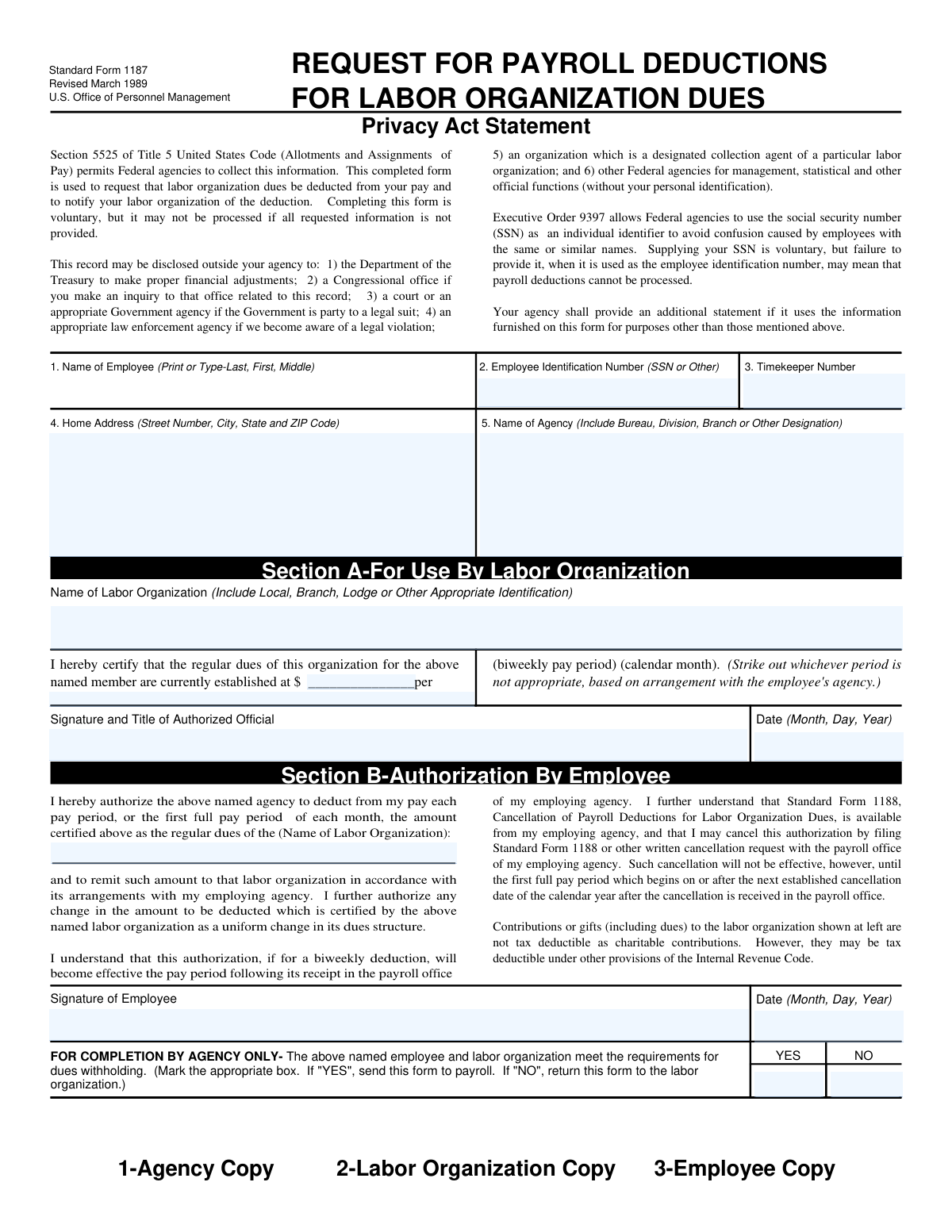
Yes! You can use AI to fill out Standard Form 1187, Request for Payroll Deductions for Labor Organization Dues
Don't type 14 fields by hand. Tell our AI about yourself, or upload a document you already have, and it fills every field in seconds. You check it, then download, print or sign.
The AI does the filling. You just check it.
No typing into boxes, nothing to install.
What this form asks for
The AI fills all of it, from your answers or your documents.
The AI checks your answers before you download
12 checks built for this form, so a wrong date or a missing answer is caught before anyone else sees it.
This check verifies that the 'Regular Dues Amount' entered by the labor organization in Section A is identical to the 'Regular Dues Amount' entered by the employee in Section B. This is critical to ensure the employee is authorizing the exact amount certified by the labor organization. If the amounts do not match, the form is considered invalid and cannot be processed, as there is a discrepancy in the authorized deduction amount.
Validates that the 'Employee Signature Date' in Section B is on or after the 'Date of Signature' from the authorized official in Section A. This sequence is important because the employee should only authorize the deduction after the labor organization has officially certified the dues amount. A form where the employee's signature predates the organization's certification is logically inconsistent and should be rejected for correction.
This check validates the format of the 'Employee Identification Number'. If a Social Security Number (SSN) is provided, it must conform to the ###-##-#### structure. Proper formatting is essential for matching the employee to the correct payroll record and avoiding identification errors. Failure to provide a correctly formatted ID could result in the inability to process the payroll deduction.
Ensures that all required fields within Section A are filled out by the labor organization, including the organization's name, dues amount, pay period, and the authorized official's signature and date. This section serves as the official certification from the union, and incomplete information makes the request invalid. An incomplete Section A will cause the form to be returned to the labor organization for completion before it can be forwarded to the employee or agency.
Verifies that the employee has completed all necessary fields in Section B, including the dues amount, their signature, and the date of signature. The employee's explicit authorization is a legal requirement for deducting funds from their pay. If any part of Section B is missing, the authorization is incomplete and the deduction cannot be legally processed.
This validation confirms that the 'Regular Dues Amount' in both Section A and Section B is a valid, positive numerical value, typically in a currency format (e.g., 25.50). The check prevents non-numeric characters or negative values from being entered, which would cause calculation errors in the payroll system. An invalid format will halt processing and require correction.
And 6 more checks
- Agency Certification Exclusivity
- Home Address Structure Validation
- Dues Pay Period Selection
- Date Field Format and Validity
- Agency Name Specificity Check
- Employee Name Format
Let AI fill out your SF 1187
No typing. Every field filled in seconds, checked, ready to sign.
How to Fill Out SF 1187 Online for Free in 2026
What the AI walks you through.
- Navigate to Instafill.ai and upload or select the SF 1187 form.
- Allow the labor organization representative to complete Section A, providing the employee's details, the organization's name, and the certified dues amount.
- As the employee, complete Section B by providing your signature and the date to authorize the payroll deduction.
- Use the AI-powered tool to ensure all personal and agency information, such as your Employee ID/SSN and home address, is entered accurately.
- Review the entire form for completeness and accuracy before the labor organization submits it to your employing agency's payroll office.
- Once the agency completes its certification, download and save a final copy for your records and share it with the labor organization.
Common Mistakes in Completing SF 1187
The ones the AI is built to catch.
Incorrect Employee Name Format
Using an Abbreviated or Incomplete Agency Name
Entering an Incorrect Employee Identification Number
Omitting Specific Labor Organization Identifiers
Failure to Specify the Dues Pay Period
Missing Required Signatures or Dates
Illegible Handwriting on a Printed Form
Omitting the Timekeeper Number
Certifying an Outdated Dues Amount
Incomplete Home Address
Frequently Asked Questions About SF 1187
Is it really free for 7 days?
Can I fill other forms too?
How do I cancel?
How does the AI fill out SF 1187?
What happens to my information?
How complex is SF 1187 to fill out?
What is the purpose of Standard Form 1187?
Who needs to fill out this form?
Do I have to provide my Social Security Number (SSN)?
Where do I find my Timekeeper Number?
What happens if my union dues change?
Where do I submit the completed SF 1187?
When will the payroll deductions start?
How do I cancel these payroll deductions?
Are my union dues tax-deductible?
Who completes Section A of the form?
What is the 'Agency Certification' section for?
Can AI tools help me fill out Form 1187?
How can I use Instafill.ai to complete this form online?
What should I do if my copy of the SF 1187 is not a fillable PDF?
Get your SF 1187 filled out by AI
$0 today. Cancel before Nov 5 and you pay nothing.
Other forms like this one
payroll forms: Form WH-347, Payroll for Contractors, NJ Department of Labor & Workforce Development Form MW-562, Payroll Certification for Public Works Projects (Contractor and Subcontractor’s Weekly and Final Certification), Davis-Bacon and Related Acts Weekly Certified Payroll Form (Form WH-347), Form WH-347, Davis-Bacon and Related Acts Weekly Certified Payroll Form, Form F11182, Direct Deposit Authorization, Form W-2, Wage and Tax Statement, Form DE 4, Employee’s Withholding Allowance Certificate (Rev. 56)
labor forms: NJ Department of Labor & Workforce Development Form MW-562, Payroll Certification for Public Works Projects (Contractor and Subcontractor’s Weekly and Final Certification), New York State Department of Labor (NYSDOL) Division of Labor Standards Complaint Form (LS 223), New York State Department of Labor, Division of Labor Standards Complaint Form (LS 223), ENVIRONMENTAL MONITORING LABORATORY, LLC Employment Application, Alberta Precision Laboratories General Laboratory Requisition (Form 21302), Massachusetts Collaborative — CT/CTA/MRI/MRA Prior Authorization Form, Form CMS-209, CLIA Laboratory Survey Report Form, Notice to Employee (Labor Code section 2810.5), Form CA-17, Duty Status Report
Let AI fill out your SF 1187
Your trial starts once a card is added. You pay nothing before Nov 5.
Our AI already knows this form, all 14 fields of it. Skip the typing: tell it about yourself, or upload what you have, and it fills the whole form in seconds.
- AI fills every field on the form, checkboxes included
- No typing into boxes: answer a few questions, or upload a document you already have, an old copy of this form, a photo of a document
- The AI checks the answers; you review and change anything before you download
- Download the finished PDF, print it, or sign it online
- Encrypted, and never used to train AI
Cancel before Nov 5 and you pay nothing.
A card is needed to start the trial. Cancel in two clicks from your account.
Terms · Privacy