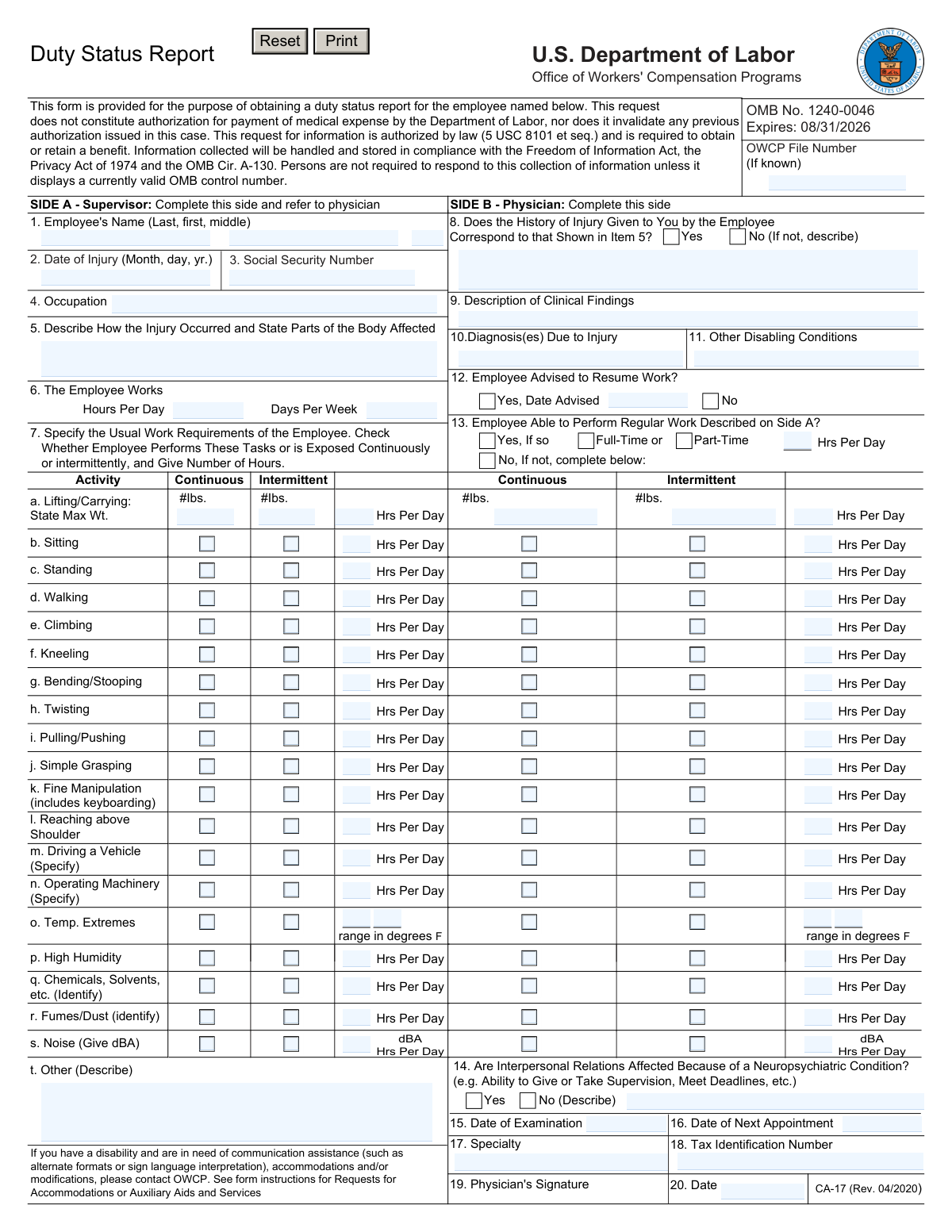
Yes! You can use AI to fill out Form CA-17, Duty Status Report (U.S. Department of Labor, Office of Workers' Compensation Programs)
Form CA-17 is an OWCP Duty Status Report used in FECA workers’ compensation claims to communicate an employee’s job demands (from the supervisor) and the treating physician’s medical findings, diagnosis, and work capacity/restrictions. The supervisor completes Side A to describe the employee’s usual work requirements and injury details, then the physician completes Side B to indicate whether the employee can return to regular or modified duty and under what limitations. It is important because it supports timely return-to-work planning and helps OWCP and the employing agency determine appropriate duty assignments and benefit eligibility. The form also includes required identifiers (e.g., OWCP file number, SSN/TIN) and certifications to ensure accurate reporting.
Our AI automatically handles information lookup, data retrieval, formatting, and form filling.
It takes less than a minute to fill out CA-17 using our AI form filling.
Securely upload your data. Information is encrypted in transit and deleted immediately after the form is filled out.
Form specifications
| Form name: | Form CA-17, Duty Status Report (U.S. Department of Labor, Office of Workers' Compensation Programs) |
| Number of pages: | 3 |
| Filled form examples: | Form CA-17 Examples |
| Language: | English |
Instafill Demo: filling out a legal form in seconds
How to Fill Out CA-17 Online for Free in 2026
Are you looking to fill out a CA-17 form online quickly and accurately? Instafill.ai offers the #1 AI-powered PDF filling software of 2026, allowing you to complete your CA-17 form in just 37 seconds or less.
Follow these steps to fill out your CA-17 form online using Instafill.ai:
- 1 Enter the OWCP File Number (if known) and identify the employee (name, date of injury, SSN, occupation).
- 2 As the supervisor, complete Side A by describing how the injury occurred and the body parts affected (Item 5), plus the employee’s normal work schedule (Item 6).
- 3 Detail the employee’s usual job requirements on Side A (Item 7), checking continuous vs. intermittent tasks/exposures and entering weights, hours per day, and any specifics (e.g., driving/operating machinery, chemicals, noise level).
- 4 Send the partially completed form to the treating physician/medical facility to complete Side B, including whether the injury history matches, clinical findings, diagnoses, and any other disabling conditions (Items 8–11).
- 5 Have the physician indicate work status and restrictions (Items 12–14), including whether the employee can perform regular work, and if not, whether full-time/part-time and hours per day.
- 6 Ensure the physician completes administrative fields (exam date, next appointment, specialty, tax identification number) and signs/dates the certification (Items 15–20).
- 7 Submit the original and required copies to the employing agency and OWCP as instructed (including the OWCP mailing address), and retain a copy for records to avoid delays or interruption of income.
Our AI-powered system ensures each field is filled out correctly, reducing errors and saving you time.
Why Choose Instafill.ai for Your Fillable CA-17 Form?
Speed
Complete your CA-17 in as little as 37 seconds.
Up-to-Date
Always use the latest 2026 CA-17 form version.
Cost-effective
No need to hire expensive lawyers.
Accuracy
Our AI performs 10 compliance checks to ensure your form is error-free.
Security
Your personal information is protected with bank-level encryption.
Frequently Asked Questions About Form CA-17
The CA-17 is used to document an injured employee’s current medical work restrictions and ability to work. It helps the employing agency and OWCP determine appropriate duty status and return-to-work options under FECA.
The supervisor (employing agency) completes Side A and then gives the form to the physician. The physician completes Side B, signs it, and returns it to the employing agency.
If you know the OWCP File Number, enter it in the top right corner. If it is not known, you can still complete the form, but providing it helps OWCP match the report to the correct case.
No. The form specifically states that the request does not constitute authorization for payment of medical expenses and does not invalidate any prior authorization in the case.
Side A requests the employee’s name, date of injury, Social Security Number, occupation, how the injury occurred and body parts affected, and the employee’s work schedule (hours per day/days per week). This information supports accurate duty and restriction decisions.
Check whether each activity/exposure is performed continuously or intermittently and list the number of hours per day. For lifting/carrying, include the maximum weight, and for exposures (e.g., chemicals, noise), provide the requested details such as identifiers, temperature range, or dBA when applicable.
The physician should mark “No” in Item 8 and describe how the history provided by the employee differs from what is shown in Item 5. This helps clarify discrepancies for OWCP and the employing agency.
The physician must document clinical findings, diagnosis(es) due to the injury, any other disabling conditions, and whether the employee can resume work and perform regular duties. The physician should also specify full-time/part-time capability and hours per day if regular work cannot be performed.
The instructions state the physician should sign and return Side B to the employing agency within 2 days. This is to help prevent interruption of the employee’s income.
The original report is sent to OWCP/DFELHWC-FECA at PO Box 8311, London, KY 40742-8311. A copy should also be sent as instructed, and the employing agency should keep a copy for its records.
Yes. The Privacy Act Statement indicates disclosure of the SSN or TIN on this form is mandatory and is used for identification and other purposes authorized by law.
Failure to disclose requested information may delay claim processing or payment of benefits, or result in an unfavorable decision or reduced benefits. Completing all applicable fields helps avoid delays.
By signing, the physician certifies the statements on the CA-17 are true, complete, and correct to the best of their knowledge. The certification also warns that knowingly false or misleading statements may lead to criminal prosecution.
OWCP can provide communication assistance, accommodations, or modifications (such as alternate formats or sign language interpretation). The employee should contact OWCP or their claims examiner to request these services.
The Public Burden Statement estimates an average of about 5 minutes per response. Actual time may vary depending on how detailed the job requirements and medical findings are.
Compliance CA-17
Validation Checks by Instafill.ai
1
OWCP File Number format and allowed characters (if provided)
Validates that the OWCP File Number, when entered, matches the expected OWCP/FECA file number pattern (e.g., alphanumeric with optional separators) and contains no illegal characters. This prevents misrouting of documents and failed case matching in downstream OWCP systems. If the value fails validation, the submission should be blocked or the field flagged for correction, and the user prompted with the accepted format examples.
2
Employee name completeness and character validation
Ensures Item 1 (Employee’s Name) includes at minimum a last name and first name, with middle name/initial optional, and rejects numeric-only or symbol-heavy entries. This is important for identity matching and to reduce duplicate claim records. If validation fails, require correction and prevent submission until a minimally complete, human-name-like value is provided.
3
Date of Injury is a valid date and not in the future
Checks Item 2 (Date of Injury) is a real calendar date in MM/DD/YYYY (or system-approved) format and is not later than today. A future injury date is logically inconsistent and can break eligibility and timeline calculations. If invalid, the system should reject the date and require a corrected entry before submission.
4
Employee Social Security Number (SSN) required and valid
Validates Item 3 (Social Security Number) is present (mandatory per the Privacy Act statement) and matches SSN formatting rules (9 digits, allowing hyphens), and rejects known invalid patterns (e.g., 000-00-0000, 123-45-6789 if treated as test data, or all zeros in any group). This is critical for claimant identification, benefit administration, and debt collection processes. If validation fails, block submission and display a clear error indicating the SSN is required and must be valid.
5
Occupation field required and minimum content quality
Ensures Item 4 (Occupation) is not blank and contains a meaningful job title (e.g., at least 2–3 words/characters, not just 'N/A' or a single letter). Occupation is used to interpret the physical requirements and determine appropriate duty restrictions. If it fails, prompt the supervisor to provide a specific occupation before allowing submission.
6
Injury narrative required and body parts referenced
Validates Item 5 (Describe How the Injury Occurred and State Parts of the Body Affected) is completed and includes both mechanism/context and at least one body part (e.g., shoulder, back, wrist). This supports medical causation review and ensures the physician can assess consistency with reported history. If missing or too short, the system should require additional detail and prevent submission.
7
Work schedule numeric validation (Hours per Day / Days per Week)
Checks Item 6 values are numeric and within reasonable bounds (e.g., Hours per Day > 0 and ≤ 24; Days per Week between 1 and 7). This prevents impossible schedules and supports correct interpretation of duty capacity and restrictions. If out of range or non-numeric, flag the fields and require correction.
8
Usual work requirements: hours-per-day range and consistency
For each activity in Item 7, validates that Hrs Per Day is numeric, non-negative, and does not exceed the employee’s Hours per Day from Item 6. This ensures the physical demand profile is internally consistent and usable for return-to-work decisions. If any activity hours exceed the daily schedule or are invalid, the system should flag the specific line item(s) and require correction.
9
Usual work requirements: Continuous vs Intermittent selection rules
Validates that for each Item 7 activity, the Continuous/Intermittent indicator follows the form’s intent (e.g., at least one selected when hours are provided; not both selected unless explicitly allowed by business rules). This prevents ambiguous exposure/task frequency data that can mislead medical restrictions. If inconsistent, require the user to choose the appropriate frequency or clear the hours.
10
Lifting/Carrying maximum weight fields are numeric and plausible
Validates Item 7a max weight entries (in pounds) are numeric, non-negative, and within plausible human/workplace limits (e.g., 0–300 lbs, configurable). It also checks that if lifting/carrying hours are provided, at least one max weight value is provided. If invalid or missing when required, flag the lifting/carrying row and require correction to avoid unusable duty requirement data.
11
Environmental exposure fields: temperature range and noise dBA validation
Checks that temperature extremes (Item 7o) are provided as a valid numeric range (e.g., low ≤ high, both within plausible Fahrenheit bounds) and that noise exposure (Item 7s) dBA is numeric and within a reasonable range (e.g., 0–140). These values are used to evaluate restrictions and safety compliance. If invalid, the system should reject the entry and request corrected numeric values/range formatting.
12
Conditional detail required when 'Specify/Identify/Other' is used
Validates that when the form includes 'Specify' or 'Identify' prompts (e.g., driving a vehicle, operating machinery, chemicals/solvents, fumes/dust, other), the corresponding description text is not blank if hours are entered or the activity is marked continuous/intermittent. This ensures the physician and agency understand the exact exposure/task. If missing, flag the specific line and require a description before submission.
13
History correspondence (Item 8) requires explanation when 'No' is selected
Ensures Item 8 has a Yes/No selection, and if 'No' is selected, the 'If not, describe' narrative is required and meets a minimum length threshold. This is important for documenting discrepancies between employee-reported history and supervisor-provided injury description. If the explanation is missing, block submission and prompt for the discrepancy details.
14
Physician work status logic: resume work vs regular work capability
Validates logical consistency across Items 12 and 13: if the employee is advised to resume work (Item 12 = Yes), then Item 13 should indicate whether regular work is possible; if regular work is 'No', the restricted schedule (Full-Time/Part-Time and Hrs Per Day) must be completed. This prevents contradictory determinations that can cause improper return-to-work actions. If inconsistent, the system should require the physician to reconcile the answers and complete the missing dependent fields.
15
Examination and appointment dates: valid sequence and not in the future (as applicable)
Checks Item 15 (Date of Examination) is a valid date and not after the signature date (Item 20), and that Item 16 (Date of Next Appointment), if provided, is on or after the examination date. This supports accurate medical timeline tracking and prevents impossible scheduling. If the date order is invalid, flag the relevant date fields and require correction.
16
Physician identity and certification completeness (Specialty, TIN, Signature, Date)
Validates that Items 17 (Specialty), 18 (Tax Identification Number), 19 (Physician’s Signature), and 20 (Date) are completed, and that the TIN matches an acceptable format (typically 9 digits, allowing hyphens). These fields are essential for provider identification, certification, and auditability of the medical opinion. If any are missing or malformed, the submission should be rejected because the report is not properly certified.
Common Mistakes in Completing CA-17
People often skip the OWCP File Number because it says “(If known)” or they confuse it with an agency case number. When the file number is missing or incorrect, OWCP and the employing agency may have trouble matching the CA-17 to the correct claim, which can delay return-to-work decisions and benefits processing. If the number is known, enter it exactly as shown on OWCP correspondence; if unknown, confirm with the claims examiner or employing agency before submitting.
A common error is entering a nickname, transposed digits in the SSN, or omitting the middle initial even though other claim documents include it. Mismatched identifiers can cause misfiling, privacy issues, and delays in associating the duty status report with the correct claimant. Always use the employee’s legal name (Last, First, Middle) and carefully verify the SSN digit-by-digit against official records before sending.
Dates are frequently entered in different formats (e.g., 1/6/26 vs. 06/01/2026) or the Date of Injury conflicts with the medical history and exam timeline. Conflicting or unclear dates can trigger follow-up requests and may affect eligibility determinations and the timing of return-to-work actions. Use the requested Month/Day/Year format consistently and cross-check that Items 2, 15, 16, 12 (date advised), and 20 align logically.
Supervisors often write brief statements like “hurt back at work” without mechanism, location, and specific body parts. Vague descriptions make it harder for the physician to confirm correspondence (Item 8) and for OWCP to evaluate work restrictions tied to the accepted condition. Include a clear mechanism (e.g., lifted 45-lb box from floor to waist), the event date/time context, and specific body parts (e.g., right shoulder, lumbar spine).
People frequently leave Item 6 blank, enter a range, or list the employee’s “typical” schedule rather than the actual schedule at the time of injury. An inaccurate schedule can lead to incorrect assumptions about duty capacity, availability of modified work, and wage-loss calculations. Enter the actual hours per day and days per week the employee works (or is expected to work) and update it if the schedule has changed.
Item 7 is often filled out with checkmarks only, without specifying hours per day, or “continuous” is checked for tasks that are actually occasional. Incomplete exposure/task data prevents the physician from making precise restrictions and can result in overly broad limitations or disputes about job demands. For each relevant activity, check continuous or intermittent and provide realistic hours per day (and weights where requested) based on the actual job.
Common mistakes include writing “light/medium/heavy” instead of pounds, leaving temperature ranges blank, or listing “noise” without dBA. Missing or incorrect units reduce the usefulness of the form for medical decision-making and can cause the physician to return the form for clarification. Use the form’s requested units: pounds for lifting/carrying, degrees Fahrenheit for temperature extremes, dBA for noise, and identify specific chemicals/solvents/fumes rather than generic terms.
Physicians sometimes circle “No” without describing discrepancies (Item 8), or they mark the employee unable to work without specifying full-time/part-time and hours per day (Item 13). Missing explanations can lead to OWCP or the employing agency rejecting the report as incomplete, delaying modified duty placement and potentially interrupting income. Ensure every yes/no question is answered and provide the requested narrative details whenever “No” (or “Yes” with conditions) requires clarification.
A frequent issue is listing symptoms (e.g., “pain”) instead of diagnoses, or mixing unrelated conditions without separating “due to injury” from “other disabling conditions.” This can create confusion about what restrictions are attributable to the accepted injury versus non-work-related issues, affecting return-to-work decisions and claim adjudication. Provide objective clinical findings (exam/imaging results), list specific diagnoses due to the injury, and separately document other conditions in Item 11.
Forms are often submitted without the physician’s specialty, TIN, signature, or the signature date, especially when office staff completes the form. Unsigned or undated medical opinions may be treated as invalid, and missing identifiers can delay verification and processing. Before submission, confirm Items 17–20 are complete, the physician personally signs, and the signature date matches the completion timeline.
People commonly mail the completed form to the wrong address, send it to the “comments” address, or fail to provide the required copy to OWCP while returning the original to the employing agency. Delayed return (the instructions specify within 2 days) can interrupt income and slow modified duty placement. Follow the instructions exactly: supervisor completes Side A, physician completes Side B and returns to the employing agency promptly, and the employing agency sends a copy to OWCP at the listed PO Box.
Saved over 80 hours a year
“I was never sure if my IRS forms like W-9 were filled correctly. Now, I can complete the forms accurately without any external help.”
Kevin Martin Green
Your data stays secure with advanced protection from Instafill and our subprocessors
Robust compliance program
Transparent business model
You’re not the product. You always know where your data is and what it is processed for.
ISO 27001, HIPAA, and GDPR
Our subprocesses adhere to multiple compliance standards, including but not limited to ISO 27001, HIPAA, and GDPR.
Security & privacy by design
We consider security and privacy from the initial design phase of any new service or functionality. It’s not an afterthought, it’s built-in, including support for two-factor authentication (2FA) to further protect your account.
Fill out CA-17 with Instafill.ai
Worried about filling PDFs wrong? Instafill securely fills duty-status-report-us-department-of-labor forms, ensuring each field is accurate.