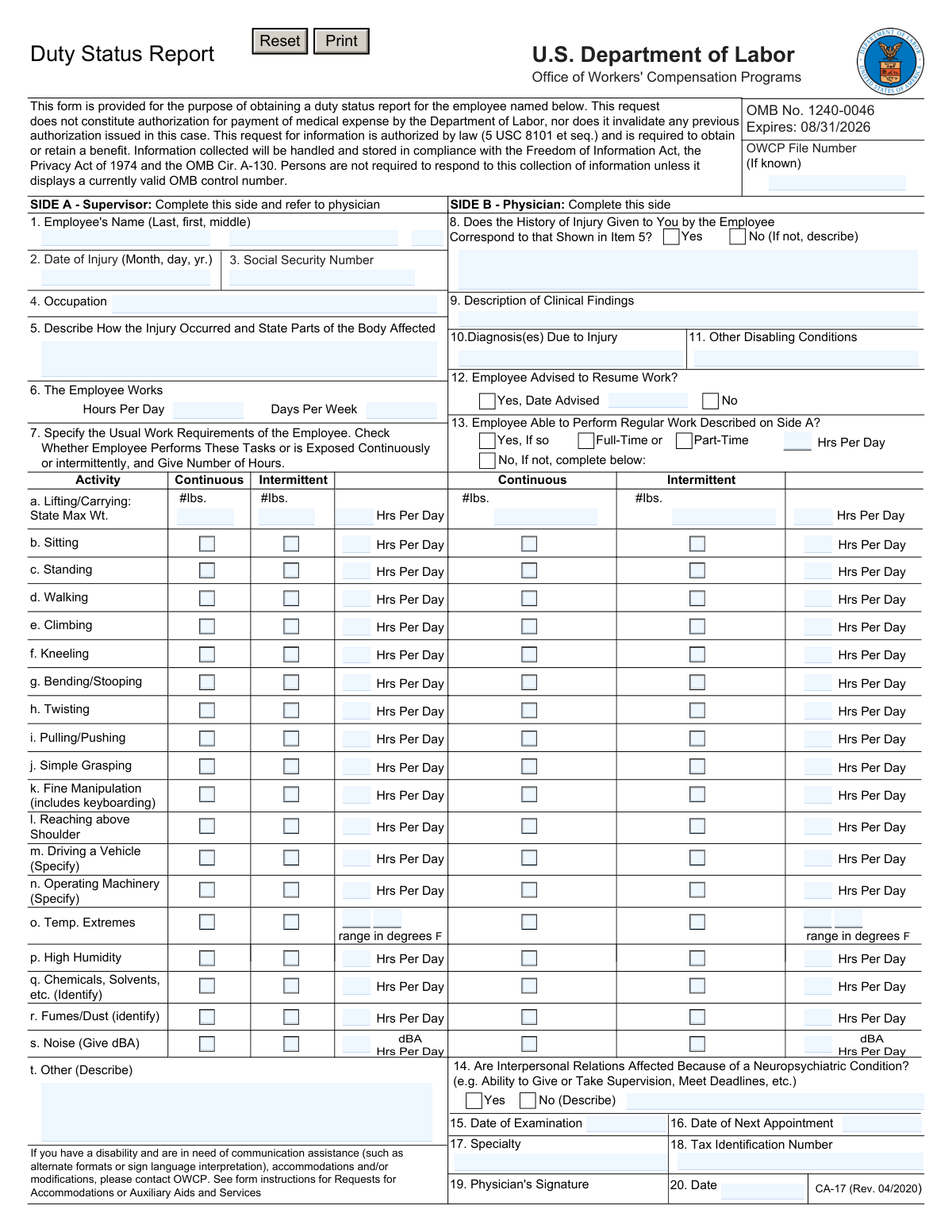
Yes! You can use AI to fill out Form CA-17, Duty Status Report (U.S. Department of Labor, Office of Workers' Compensation Programs)

Form CA-17, Duty Status Report, is an OWCP/Department of Labor form used to communicate an injured federal employee’s duty requirements (completed by the supervisor) and the physician’s findings, diagnosis, and work limitations (completed by the treating provider). It helps OWCP and the employing agency determine whether the employee can return to regular duty, needs modified duty, or has restrictions that affect work scheduling and tasks. Accurate completion is important to support benefit eligibility and avoid delays or interruptions in income and case management. Today, this form can be filled out quickly and accurately using AI-powered services like Instafill.ai, which can also convert non-fillable PDF versions into interactive fillable forms.
Our AI automatically handles information lookup, data retrieval, formatting, and form filling.
It takes less than a minute to fill out CA-17 using our AI form filling.
Securely upload your data. Information is encrypted in transit and deleted immediately after the form is filled out.

Form specifications

Form name: Form CA-17, Duty Status Report (U.S. Department of Labor, Office of Workers' Compensation Programs)
Number of pages: 2
Language: English
Categories: workers compensation forms, employment forms, DOL forms, OWCP forms, labor forms
main-image

Instafill Demo: filling out a legal form in seconds

How to Fill Out CA-17 Online for Free in 2026

Are you looking to fill out a CA-17 form online quickly and accurately? Instafill.ai offers the #1 AI-powered PDF filling software of 2026, allowing you to complete your CA-17 form in just 37 seconds or less.
Follow these steps to fill out your CA-17 form online using Instafill.ai:
  1. 1 Go to Instafill.ai and upload the CA-17 Duty Status Report PDF (or select it from the form library).
  2. 2 Let the AI detect and map the form fields (OWCP file number, employee identifiers, injury details, and Side A/Side B sections).
  3. 3 Complete Side A (Supervisor): enter employee name, date of injury, SSN, occupation, injury description, work schedule, and usual work requirements/exposures with hours and weights.
  4. 4 Share or route the form to the physician (Side B) through Instafill.ai, or continue by entering the physician-provided information (history match, clinical findings, diagnoses, disabling conditions, and functional capacity limits).
  5. 5 Answer return-to-work questions (resume work date, ability to perform regular work, full-time/part-time and hours per day, neuropsychiatric/interpersonal impacts if applicable) and enter exam/next appointment dates.
  6. 6 Add physician details (name/address, specialty, tax identification number), apply e-signature where permitted, and run Instafill.ai validation checks for missing fields and date/format issues.
  7. 7 Download the completed form and send the original/copies to the employing agency and OWCP address as instructed, keeping a copy for your records.

Our AI-powered system ensures each field is filled out correctly, reducing errors and saving you time.

Why Choose Instafill.ai for Your Fillable CA-17 Form?

Speed

Complete your CA-17 in as little as 37 seconds.

Up-to-Date

Always use the latest 2026 CA-17 form version.

Cost-effective

No need to hire expensive lawyers.

Accuracy

Our AI performs 10 compliance checks to ensure your form is error-free.

Security

Your personal information is protected with bank-level encryption.

Frequently Asked Questions About Form CA-17

The CA-17 is used to document an injured employee’s duty status and work limitations so the employing agency and OWCP can evaluate return-to-work options and benefits eligibility under FECA.

Side A is completed by the employee’s supervisor (employing agency) and then given to the treating physician. Side B must be completed and signed by the physician.

No. The form specifically states that the request does not authorize payment of medical expenses and does not invalidate any prior authorization already issued in the case.

If you don’t know it, leave it blank or enter it only if known. If available, adding the OWCP file number helps OWCP match the report to the correct claim.

Yes. The Privacy Act statement indicates disclosure of the claimant’s SSN and the physician’s TIN is mandatory, and missing information can delay processing or affect benefits.

List the employee’s typical job demands by checking whether each activity is continuous or intermittent and entering the hours per day (and weights, dBA, temperature range, or exposures where requested). Include details for items like driving/operating machinery and identify chemicals, fumes, or other exposures.

The physician should document objective clinical findings, provide diagnosis(es) due to the injury, and list any other disabling conditions that may affect work capacity. Clear, specific medical detail helps avoid delays or follow-up requests.

Item 12 indicates whether the employee was advised to resume work and, if yes, the date advised. Item 13 states whether the employee can perform the regular work described on Side A; if not, the physician should specify full-time or part-time and the hours per day the employee can work.

The instructions state the physician should complete Side B, sign, and return it to the employing agency within 2 days to help prevent interruption of the employee’s income.

The original report is sent to the Office of Workers’ Compensation Programs (OWCP/DFELHWC-FECA), PO Box 8311, London, KY 40742-8311. A copy should be sent to the OWCP address noted and/or retained/sent per the employing agency’s instructions.

Missing or incomplete information can delay claim processing or benefit payments, and the physician certification warns that knowingly false or misleading statements may lead to criminal prosecution.

Yes. The form states that if you have a disability, you can request accommodations such as alternate formats or sign language interpretation by contacting OWCP or your OWCP claims examiner.

Yes. AI form-filling services like Instafill.ai can help auto-fill form fields from your provided information, reduce manual typing, and save time—while you still review for accuracy before submission.

Upload the CA-17 PDF to Instafill.ai, provide the relevant details (employee info, injury description, work requirements, and physician details), and let the AI map and populate the fields. Then review each entry, download the completed PDF, and obtain the physician’s signature where required.

If the PDF isn’t fillable, Instafill.ai can convert a flat, non-fillable PDF into an interactive fillable form so fields can be typed and completed more easily before printing/signing and submitting.

Compliance CA-17
Validation Checks by Instafill.ai

1
Validates OWCP File Number format (if provided)
Checks that the OWCP File Number is either blank (since it is marked 'If known') or matches the expected OWCP file number pattern used by the agency (e.g., allowed length/characters, no illegal symbols). This prevents misrouting the report to the wrong claim and reduces manual reconciliation. If the value is present but fails format rules, the submission should be rejected or flagged for correction before routing.
2
Ensures Employee Name fields are complete and properly structured
Verifies that employee last name and first name are present and contain only valid name characters (letters, hyphen, apostrophe, spaces) and are not placeholder text (e.g., 'N/A', 'Unknown'). Middle name should be optional but, if provided, must follow the same character rules. If validation fails, the form should not be accepted because the employee cannot be reliably identified for the case.
3
Validates Date of Injury (MM/DD/YYYY) and plausibility
Confirms the date of injury is a real calendar date in MM/DD/YYYY format and is not in the future. Optionally, it should not be unreasonably old relative to the claim context (e.g., earlier than a configured cutoff) to catch data entry errors like wrong year. If invalid, the submission should be blocked because injury date drives eligibility timelines and medical/work status interpretation.
4
Validates Employee Social Security Number (SSN) format and disallowed values
Checks SSN is present (the form indicates SSN disclosure is mandatory) and matches a valid 9-digit format (with or without dashes), and rejects known invalid patterns (e.g., 000-00-0000, 123-45-6789, all same digits). This reduces identity mismatches and downstream payment/benefit processing errors. If validation fails, the form should be rejected and the user prompted to correct the SSN.
5
Ensures Occupation is provided and not generic/blank
Validates that the occupation field is completed and contains meaningful text (minimum length, not only whitespace, not 'N/A'). Occupation is needed to interpret the work requirements and determine whether restrictions align with job duties. If missing or invalid, the submission should be flagged as incomplete and returned for completion.
6
Requires Injury Description and Body Parts Affected to be sufficiently detailed
Checks that the narrative describing how the injury occurred and the body parts affected is present and meets a minimum content threshold (e.g., minimum characters/words) to avoid empty or non-informative entries. This information is essential for medical causation review and for comparing the physician’s history response to the supervisor’s account. If insufficient, the form should be rejected or routed to a correction workflow.
7
Validates Work Schedule numeric ranges (Hours per Day / Days per Week)
Ensures hours per day and days per week are numeric and within reasonable bounds (e.g., hours per day > 0 and ≀ 24; days per week > 0 and ≀ 7). This prevents impossible schedules that would invalidate the interpretation of task-hours and restrictions. If out of range or non-numeric, the submission should be blocked and the user prompted to correct the values.
8
Validates task selection logic: Continuous vs Intermittent must be consistent per activity
For each activity row (e.g., sitting, standing, walking), checks that the user does not select both 'Continuous' and 'Intermittent' simultaneously unless the form design explicitly allows it. If neither is selected but hours are entered, or if a selection is made with no hours, the entry is inconsistent. On failure, the system should require correction to ensure the work requirement/restriction is interpretable.
9
Validates Hours-per-Day entries for each activity against daily work hours
Checks that each activity’s 'Hrs Per Day' is numeric, non-negative, and does not exceed the employee’s total hours per day. Optionally, the sum of all activity hours should not exceed total hours per day by more than a configurable tolerance (since activities can overlap, but extreme totals indicate data entry errors). If invalid, the form should be flagged for review or rejected depending on policy.
10
Validates Lifting/Carrying weights and required pairing with hours
Ensures lifting/carrying maximum weights (continuous and intermittent) are numeric, non-negative, and within a reasonable upper bound (to catch typos like 5000 lbs). If a weight is entered, corresponding hours per day should be provided, and vice versa. If validation fails, the system should prompt for correction because lifting limits are central to duty status determinations.
11
Validates environmental exposure details when selected (temperature range, chemicals/fumes/noise identifiers)
If temperature extremes are checked, requires a valid temperature range in degrees F (e.g., '32-90') with min ≀ max and plausible bounds. If chemicals or fumes/dust are checked, requires an identifier/description of the substance; if noise is checked, requires a numeric dBA value within plausible limits. If missing or malformed, the submission should be rejected or flagged because exposure details affect accommodation and safety decisions.
12
Validates Physician Injury History correspondence (Item 8) and requires explanation when 'No'
Ensures exactly one option (Yes/No) is selected for whether the employee’s history corresponds to Item 5. If 'No' is selected, a descriptive explanation must be provided to document the discrepancy. If this logic fails, the form should be returned for completion because discrepancies are medically and legally significant.
13
Requires Clinical Findings and Diagnosis when physician side is completed
Validates that Item 9 (clinical findings) and Item 10 (diagnosis due to injury) are not blank and meet minimum detail requirements when Side B is submitted. These fields support the medical basis for restrictions and return-to-work decisions. If missing, the submission should be rejected as medically incomplete.
14
Validates Return-to-Work decision logic (Items 12 and 13) including hours and full/part-time
Ensures the 'Employee Advised to Resume Work?' question has exactly one selection and, if 'Yes', requires a valid 'Date Advised' in MM/DD/YYYY format. For 'Employee Able to Perform Regular Work?' if 'No' is selected, requires full-time/part-time selection and a valid hours-per-day value; if 'Yes' is selected, those restriction fields should be empty to avoid conflicting instructions. If inconsistent, the system should block submission because it creates ambiguous work status guidance.
15
Validates Neuropsychiatric condition impact (Item 14) and requires description when 'Yes'
Checks that exactly one option (Yes/No) is selected for whether interpersonal relations are affected due to a neuropsychiatric condition. If 'Yes' is selected, requires a narrative description of the impact (e.g., supervision, deadlines) to support workplace accommodations. If validation fails, the form should be flagged as incomplete because the employer cannot act on an unsupported 'Yes' response.
16
Validates physician dates sequence (Examination, Next Appointment, Signature, and Date Advised)
Ensures all physician dates are valid MM/DD/YYYY dates and follow logical ordering: signature date should be on/after examination date; next appointment date should be on/after examination date; date advised to resume work should not precede the examination date (unless policy allows). This prevents timeline contradictions that can undermine the credibility and usability of the report. If sequencing fails, the submission should be rejected or routed for manual review.
17
Validates Physician identity fields: name/address completeness, specialty, and Tax Identification Number (TIN) format
Checks that physician name and address fields (street, city, state, ZIP) are complete and ZIP is valid (5-digit or ZIP+4). Validates specialty is present and TIN is present and matches expected format (typically 9 digits for EIN/SSN used as TIN), rejecting obvious invalid values. If validation fails, the form should be blocked because OWCP requires reliable provider identification for case management and compliance.

Common Mistakes in Completing CA-17

Leaving the OWCP File Number blank or entering the wrong claim number

People often skip the OWCP File Number because it’s “if known,” or they enter an agency case number instead of the OWCP claim number. This can cause misrouting, delays in matching the CA-17 to the correct case, and interruptions in benefits processing. If the OWCP number is unknown, confirm with the claims examiner or employing agency before submission; AI tools like Instafill.ai can also flag missing identifiers and ensure the number is placed in the correct field.

Using the wrong date format or inconsistent dates (injury, exam, signature, return-to-work)

A very common error is entering dates as DD/MM/YYYY, writing text dates (e.g., “Jan 5”), or creating inconsistencies (exam date after signature date, return-to-work date before exam date). Incorrect or conflicting dates can trigger follow-up requests and delay return-to-work decisions. Always use MM/DD/YYYY exactly as required and double-check the timeline; Instafill.ai can automatically format dates and validate that they are logically consistent.

Incomplete employee identification (name fields, SSN) or transposed SSN digits

Because the form splits the employee name into last/first/middle and requires SSN, people frequently omit the middle name, enter nicknames, or mistype/transposed SSN digits. This can prevent OWCP or the employing agency from correctly matching the report to the employee’s claim and may delay pay/benefit actions. Use the employee’s legal name as it appears on official records and carefully verify the SSN; Instafill.ai can reduce typos by reusing verified profile data and validating SSN length/format.

Vague or incomplete injury description and body parts affected (Item 5)

Supervisors often write short statements like “hurt back at work” without describing the mechanism (lift, slip, repetitive motion) and the specific body parts (e.g., “lumbar strain, right shoulder”). Vague descriptions make it harder for the physician to confirm history (Item 8) and for OWCP to understand work limitations, leading to clarification requests. Include what happened, when/where, and all affected areas; Instafill.ai can prompt for missing details and standardize the narrative structure.

Work schedule errors (hours per day/days per week don’t match reality or are left blank)

People frequently enter the employee’s “typical” schedule incorrectly (e.g., 8 hours/day but 6 days/week for a 40-hour job) or leave one of the fields blank. This can distort duty capacity calculations and complicate return-to-work planning. Confirm the employee’s actual tour of duty and enter both fields; Instafill.ai can flag mismatches (e.g., unusually high weekly totals) and require completion of both schedule fields.

Misunderstanding “continuous” vs “intermittent” and failing to provide hours per day for each activity (Item 7)

A frequent mistake is checking both continuous and intermittent for the same activity, checking neither, or forgetting to enter the number of hours per day. This creates ambiguity about the job’s physical demands and can lead to an unusable duty status report. For each activity, select the single best fit (continuous or intermittent) and provide realistic hours/day; Instafill.ai can enforce one-of-two selections and require hours where needed.

Incorrect weight entries for lifting/carrying (missing max weight, wrong units, or swapped continuous/intermittent)

Users often enter kilograms instead of pounds, leave the “State Max Wt.” blank, or accidentally swap the continuous and intermittent weight limits. Incorrect weight limits can result in unsafe duty assignments or rejection by the employing agency/OWCP for clarification. Always enter pounds (lbs) and ensure continuous limits are typically lower than intermittent limits; Instafill.ai can validate units, detect improbable values, and highlight swapped entries.

Not specifying required details for driving/operating machinery/chemicals/fumes/noise/temperature fields

Fields like “Driving a Vehicle (Specify),” “Operating Machinery (Specify),” “Chemicals/Solvents (Identify),” “Fumes/Dust (Identify),” “Noise (Give dBA),” and “Temp. Extremes (range in degrees F)” are often left generic or blank. Missing specifics prevents accurate medical restrictions and can delay approval of modified duty. Provide concrete details (vehicle type, machine name, chemical names, dBA level, temperature range); Instafill.ai can prompt for required “specify/identify” text when those exposures are selected.

Side A/Side B role confusion (supervisor fills physician sections or physician doesn’t complete Side B fully)

Because the form is split, it’s common for supervisors to accidentally fill physician-only items (diagnosis, clinical findings) or for physicians to return the form without completing the functional capacity grid and key yes/no questions. Incomplete or role-mismatched entries can cause the employing agency to reject the form and request a redo, delaying return-to-work and benefits decisions. Follow the instructions: supervisor completes Side A and refers to the physician for Side B; Instafill.ai can guide completion by role and prevent editing of the wrong sections.

Missing physician identifiers and signature details (specialty, TIN, signature date, address)

Physicians frequently omit specialty, tax identification number (TIN), office address, or forget to date the signature, especially when rushed to return the form within 2 days. Missing identifiers can lead to verification issues, processing delays, and requests for corrected documentation. Ensure all provider identity fields are complete and the signature/date are present; Instafill.ai can auto-fill provider profile data and validate that required signature/date fields are not blank.

Inconsistent work capability answers (resume work vs regular work ability vs hours/day)

A common inconsistency is marking the employee “advised to resume work” but also indicating they cannot perform regular work without specifying full-time/part-time and hours/day, or leaving the hours/day blank. These contradictions create uncertainty about restrictions and can delay modified duty offers or OWCP decisions. Make sure Items 12 and 13 align and, if “No” to regular work, complete the full-time/part-time and hours/day fields; Instafill.ai can run cross-field checks to catch contradictions before submission.
Saved over 80 hours a year

“I was never sure if my IRS forms like W-9 were filled correctly. Now, I can complete the forms accurately without any external help.”

Kevin Martin Green

Your data stays secure with advanced protection from Instafill and our subprocessors

Robust compliance program

Transparent business model

You’re not the product. You always know where your data is and what it is processed for.

ISO 27001, HIPAA, and GDPR

Our subprocesses adhere to multiple compliance standards, including but not limited to ISO 27001, HIPAA, and GDPR.

Security & privacy by design

We consider security and privacy from the initial design phase of any new service or functionality. It’s not an afterthought, it’s built-in, including support for two-factor authentication (2FA) to further protect your account.

Fill out CA-17 with Instafill.ai

Worried about filling PDFs wrong? Instafill securely fills form-ca-17-duty-status-report-us-department-of-labor-office-of-workers-compensation-programs forms, ensuring each field is accurate.