
Instafill.ai
7 days free
AI form filling · 180 fields · 6 pages · done in seconds

Yes! You can use AI to fill out Form 540, California Resident Income Tax Return (2023)

Don't type 180 fields by hand. Tell our AI about yourself, or upload your W-2 or last year's return, and it fills every field in seconds. You check it, then download, print or sign.
7 days free, then $19.99/month · Cancel anytime
AI fills it, no typingEncrypted, never used to train AICancel in two clicks
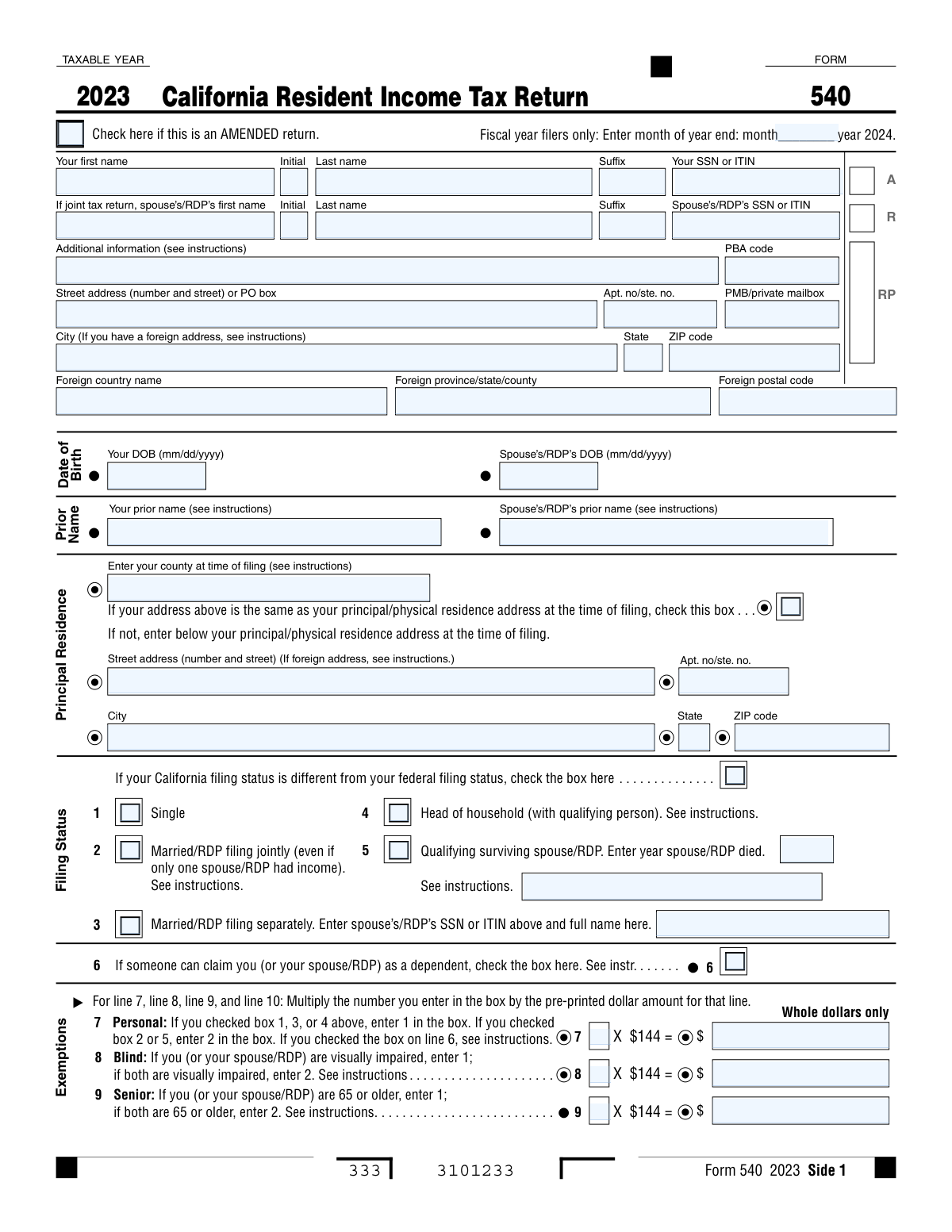
Form 540, California Resident Income Tax Return (2023), page 1
Complex · 64/100Form Complexity Index

The AI does the filling. You just check it.

No typing into boxes, nothing to install.

Tell the AI about youAnswer a few questions in plain words, or upload your W-2 or last year's return. That is all the typing there is.
AI fills every field in secondsIt puts each answer in the right box on every page, checkboxes included.
Check it and downloadReview every field, change anything, then download, print or sign the PDF.

What this form asks for

The AI fills all of it, from your answers or your documents.

Form 540, California Resident Income Tax Return, is used by California residents to report their income and calculate their state tax obligations. Completing this form is crucial for ensuring accurate tax reporting and compliance with state laws.
Fillable fields180
Pages6
Sections26
Form Complexity IndexComplex, 64/100

The AI checks your answers before you download

19 checks built for this form, so a wrong date or a missing answer is caught before anyone else sees it.

Ensures that the taxpayer's full name and suffix are correctly entered and match legal documents

The system ensures that the taxpayer's full name and any suffix are entered as they appear on legal documents. It cross-references the provided information with official databases to confirm the accuracy of the name and suffix. This validation is crucial to maintain consistency with the taxpayer's identity records and to prevent any discrepancies that may arise during the tax filing process. The system also alerts the user if any mismatches are detected.

Confirms that the taxpayer's SSN or ITIN is valid and accurately inputted

The system confirms the validity of the taxpayer's Social Security Number (SSN) or Individual Taxpayer Identification Number (ITIN). It checks the format and the numerical sequence to ensure that the SSN or ITIN conforms to the official standards. The system also verifies that the number is accurately inputted without any typographical errors. This step is essential to prevent identity theft and to ensure proper tax reporting and processing.

Verifies that the spouse's/RDP's full name and suffix, if applicable, are correctly entered if filing jointly

When filing jointly, the system verifies the spouse's or Registered Domestic Partner's (RDP's) full name and suffix. It ensures that the information is entered correctly and matches the spouse's or RDP's legal documents. This verification is important for joint filings to accurately represent both parties on the tax return. The system also checks for any inconsistencies and prompts the user to correct them if necessary.

Checks that the spouse's/RDP's SSN or ITIN is valid and accurately inputted if filing jointly

For joint tax returns, the system checks the validity and accuracy of the spouse's or RDP's SSN or ITIN. It ensures that the number provided follows the correct format and is free from errors. This check is crucial for the integrity of the tax return and to ensure that both individuals are correctly identified in the tax system. The system also helps to prevent potential issues with tax credits, deductions, and liabilities associated with joint filings.

Validates the completeness and accuracy of the taxpayer's address

The system validates the taxpayer's address for completeness and accuracy. It checks the street address or P.O. box, apartment or suite number, PMB, city, state, and ZIP code, as well as any foreign address details if applicable. This validation ensures that all correspondence and tax documents can be delivered to the correct location. The system also helps to prevent delays or misplacements of important tax-related communications.

Confirms the selection of the correct filing status and that it matches the taxpayer's situation

The AI ensures that the taxpayer has selected the appropriate filing status on the California Resident Income Tax Return form. It cross-references the taxpayer's marital status, living arrangements, and any dependents to confirm that the chosen status is accurate. The AI also checks for consistency between state and federal filing statuses, if applicable, and alerts the user to any discrepancies that may affect tax calculations or benefits.

And 13 more checks
  • Verifies the accuracy of the principal residence information, including street address, apartment number, state, ZIP code, and county
  • Ensures that the taxpayer's and spouse's/RDP's dates of birth are correctly entered
  • Checks for the correct entry of any prior names as instructed
  • Validates that the box indicating if someone can claim the taxpayer or spouse/RDP as a dependent is correctly checked
  • Confirms that the fiscal year filers have entered the correct month and year end if applicable
  • Verifies the correct calculation of exemptions and the accurate multiplication by the pre-printed dollar amount
  • Ensures that state wages, federal adjusted gross income, and California adjustments are correctly entered from the respective forms and schedules
  • Checks the correct calculation of California adjusted gross income, tax, exemption credits, taxable income, total tax, and nonrefundable credits
  • Validates the entry of California itemized deductions or standard deduction, special credits, total payments, use tax, other taxes, interest, penalties, and refund or amount due
  • Review for Accuracy and Completeness
  • Third-Party Designee Information
  • Permission to Discuss Tax Return
  • Attachment of Required Schedules or Documentation

Let AI fill out your Form 540

No typing. Every field filled in seconds, checked, ready to sign.

7 days free, then $19.99/month · Cancel anytime

How to Fill Out Form 540 Online for Free in 2026

What the AI walks you through.

  1. Visit instafill.ai site and select Form 540.
  2. Enter personal information and filing status.
  3. Fill in income and exemption details.
  4. Complete tax calculations and credits.
  5. Sign and date the form electronically.
  6. Check for accuracy and submit the form.

Common Mistakes in Completing Form 540

The ones the AI is built to catch.

Incorrect or Incomplete Name Information
Failure to provide accurate and complete name information can lead to processing delays or even rejection of the tax return. Ensure that all names are spelled correctly and all required name fields are filled out completely. This includes your name, your spouse's name (if filing jointly), and the name of any Responsible Party for a business return. To avoid this mistake, double-check all name fields before submitting the return.
Failing to Provide Valid SSN or ITIN for Yourself and Your Spouse/RDP
Providing incorrect or incomplete Social Security Numbers (SSNs) or Individual Taxpayer Identification Numbers (ITINs) can result in processing delays or even rejection of the tax return. It is essential to ensure that all SSNs and ITINs are provided accurately and completely for yourself, your spouse, and any Responsible Party for a business return. To avoid this mistake, double-check all SSN and ITIN fields before submitting the return and make sure to obtain correct numbers if necessary. If you or your spouse do not have a SSN, you can apply for an ITIN through the IRS.
Misreporting Address Details, Including City, State, or ZIP Code
Misreporting address details, including city, state, or ZIP code, can lead to processing delays or even rejection of the tax return. It is crucial to ensure that all address fields are filled out accurately and completely, including your mailing address and any other required address fields. To avoid this mistake, double-check all address fields before submitting the return and make sure to use the correct city, state, and ZIP code for each address.
Forgetting to Check the Box for an Amended Return if Applicable
Failure to check the box indicating that the return is an amended return, if applicable, can result in the processing of an incorrect return. It is essential to ensure that you check the appropriate box if you are filing an amended return. To avoid this mistake, double-check the return type before submitting it and make sure to check the box for an amended return if necessary.
Incorrectly Calculating Exemptions or Entering the Wrong Dollar Amount
Incorrectly calculating exemptions or entering the wrong dollar amount can result in overpaying or underpaying taxes. It is crucial to ensure that all exemption calculations and dollar amounts are entered correctly. To avoid this mistake, double-check all exemption calculations and dollar amounts before submitting the return and make sure to use the correct figures based on your tax situation.
Failing to report all state wages on line 12
California Resident Income Tax Return form requires reporting of all state wages and compensation received during the tax year. Neglecting to include all wages from all employers may result in underreported income and potential penalties. To avoid this mistake, double-check the accuracy of the wage information reported to each employer and ensure that all W-2 forms are accounted for. It is also recommended to keep records of all income sources for reference.
Miscalculating California adjustments on lines 14 and 16
California adjustments on lines 14 and 16 of the California Resident Income Tax Return form can be complex, and errors in calculation may lead to incorrect tax liability. Carefully review the instructions for each adjustment and ensure that all required information is entered correctly. It is also recommended to use a calculator or tax software to double-check calculations and catch any potential errors.
Entering incorrect or incomplete dependent information
Entering incorrect or incomplete dependent information on the California Resident Income Tax Return form can lead to underreported or overreported taxable income and potential penalties. Ensure that all required dependent information, including their Social Security numbers, names, and relationship to the taxpayer, is entered accurately and completely. It is also recommended to keep records of dependent information for future reference.
Failing to calculate total credits correctly
California Resident Income Tax Return form offers various credits that can reduce tax liability. Failing to calculate total credits correctly may result in missed opportunities or incorrect tax liability. Carefully review the instructions for each credit and ensure that all required information is entered correctly. It is also recommended to use a calculator or tax software to double-check calculations and catch any potential errors.
Miscalculating taxable income on line 33
Calculating taxable income on line 33 of the California Resident Income Tax Return form can be complex, and errors in calculation may lead to incorrect tax liability. Carefully review the instructions for calculating taxable income and ensure that all required adjustments and deductions are accounted for. It is also recommended to use a calculator or tax software to double-check calculations and catch any potential errors.
Failing to attach required schedules or documentation
One of the most common errors made on the California Resident Income Tax Return is failing to attach all required schedules and documentation. This can result in significant delays in processing your tax return and potential penalties. To avoid this mistake, carefully review the instructions on the tax form and gather all necessary documents before beginning the filing process. Make sure to attach all required schedules and documentation with each section of the tax return. If you are unsure about what documents to attach, consult the instructions or contact the California Franchise Tax Board for clarification.
Providing incorrect or incomplete direct deposit information
Another common mistake is providing incorrect or incomplete direct deposit information. This can result in your refund being delayed or sent to the wrong account. To avoid this mistake, double-check your direct deposit information before submitting your tax return. Make sure to include the correct routing number and account number for your financial institution. If you are unsure about your direct deposit information, contact your financial institution for assistance.
Signing the form late or forgetting to sign it entirely
Failing to sign the California Resident Income Tax Return on time or forgetting to sign it entirely can result in significant delays in processing your tax return. To avoid this mistake, make sure to sign and date the tax form before submitting it. If you are unable to sign the form in person, you may be able to use an electronic signature or power of attorney. Consult the instructions or contact the California Franchise Tax Board for more information.
Failing to provide a valid email address for correspondence
Providing an invalid email address on the California Resident Income Tax Return can result in important tax-related communications being sent to the wrong place or not being received at all. To avoid this mistake, make sure to provide a valid and active email address when filing your tax return. If you do not have an email address, you may be able to provide an alternative contact method, such as a mailing address. Consult the instructions or contact the California Franchise Tax Board for more information.
Using a stapler to attach payments to the form
Using a stapler to attach payments to the California Resident Income Tax Return can cause processing delays and potential damage to the form. Instead, use paper clips or other fasteners that do not penetrate the form. This will help ensure that your tax return is processed efficiently and accurately. If you are unsure about how to attach payments to the form, consult the instructions or contact the California Franchise Tax Board for clarification.
Mail the form to the incorrect address
One of the most common mistakes made when filing the California Resident Income Tax Return is mailing the form to an incorrect address. This can result in significant delays in processing your tax return, leading to potential penalties or missed refunds. To avoid this mistake, double-check the mailing address provided on the form or on the California Franchise Tax Board (FTB) website before mailing your return. Additionally, consider using electronic filing methods, such as CalFile or FreeFile, to ensure timely and accurate processing of your tax return.
Failure to sign the form
Another common mistake is failing to sign the California Resident Income Tax Return. This oversight can result in the rejection of your tax return, requiring you to resubmit the form with a signature. To prevent this mistake, carefully review the instructions on the form and ensure that all required signatures are obtained and included before mailing or submitting the return electronically.
Incorrect or incomplete Social Security numbers
Providing incorrect or incomplete Social Security numbers on the California Resident Income Tax Return can lead to processing delays or even rejection of the return. To avoid this mistake, double-check all Social Security numbers provided on the form for accuracy and completeness. If you are filing a joint return, make sure that both Social Security numbers are included and are accurate.
Failure to report all sources of income
Failing to report all sources of income on the California Resident Income Tax Return is a common mistake that can result in penalties or even an audit. To ensure accurate reporting of all income, carefully review the instructions on the form and gather all necessary documentation, including W-2s, 1099s, and other income statements. If you have any questions or concerns about reporting a particular source of income, consult with a tax professional or the FTB for guidance.

Frequently Asked Questions About Form 540


Is it really free for 7 days?
Yes. You pay $0 today. Cancel before Nov 1 and you are never charged. Keep it, and it is $19.99 a month for 5 fills of your Form 540.
Can I fill other forms too?
This plan is for your Form 540: your own AI agent fills it as often as 5 times a month. To fill other forms and upload your own, choose a Professional plan from your account.
How do I cancel?
From your account, in two clicks, any time. No email, no call.
How does the AI fill out Form 540?
You answer a few questions in plain words, or upload your W-2 or last year's return. The AI reads what you give it and puts each answer into the right field of Form 540, on every page, in seconds. It checks the answers against the form's own rules, and you review and change anything before you download, print or sign.
What happens to my information?
It is encrypted in transit and at rest, and it is never used to train AI.
How complex is Form 540 to fill out?
Form 540 has a Form Complexity Index of 64 out of 100, in the complex tier: 180 fillable fields across 6 pages. Instafill.ai's AI fills it in under a minute, with every field there for you to review before you download.
What is the California Resident Income Tax Return Form 540 used for?
The California Resident Income Tax Return Form 540 is used to file an individual income tax return for California residents. It is used to report income, deductions, and calculate the tax owed to the state of California.
Who is required to file a California Resident Income Tax Return?
California residents and part-year residents are required to file a California Resident Income Tax Return if they meet the minimum filing requirements. This includes individuals who have California sourced income, even if they do not have federal tax filing requirements.
What is the difference between federal and California filing statuses?
Federal and California filing statuses may be different. California has unique filing statuses, such as Head of Household and Qualifying Surviving Spouse/RDP, which may not be available on federal tax returns. If your California filing status is different from your federal filing status, you must check the box on line 15 of the Form 540.
What is the difference between a principal residence and a foreign address?
A principal residence is the primary place of residence where an individual lives most of the time. A foreign address refers to an address outside of the United States. If you have a foreign address, you must follow the instructions on the Form 540 to complete the foreign address section.
What is the difference between a dependent and a qualifying person for Head of Household filing status?
A dependent is an individual who meets the IRS definition of a dependent and is claimed as such on the taxpayer's federal tax return. A qualifying person for Head of Household filing status is an individual who meets the specific requirements for this filing status, which includes having a dependent living with them for more than half the year and providing more than half of the dependent's support.
What is the difference between a standard deduction and itemized deductions?
A standard deduction is a fixed amount that taxpayers can deduct from their taxable income without itemizing their deductions. For California Resident Income Tax Return, the standard deduction amount varies depending on the taxpayer's filing status. Itemized deductions are specific expenses that taxpayers can deduct from their taxable income, such as mortgage interest, state and local taxes, and charitable contributions. Taxpayers can choose to take the standard deduction or itemize their deductions, but they cannot do both in the same tax year.
What is the difference between a taxable income and tax?
Taxable income is the total income that is subject to tax. It is calculated by subtracting deductions and exemptions from total income. For California Resident Income Tax Return, taxable income is used to determine the amount of tax owed. The tax is the amount of money that is owed to the state of California based on the taxable income. The tax is calculated using the tax rates and tax tables provided in the Form 540 instructions.
What is the difference between a tax credit and a tax deduction?
A tax credit is a dollar-for-dollar reduction in the amount of tax owed. For California Resident Income Tax Return, there are various tax credits available, such as the California Earned Income Tax Credit and the Child Tax Credit. A tax deduction is a reduction in the amount of income that is subject to tax. For example, a $1,000 tax deduction would reduce the taxable income by $1,000, resulting in a lower tax liability.
What is the difference between a refund and no amount due?
A refund is a payment made by the state of California to the taxpayer when the amount of tax paid is greater than the amount of tax owed. In other words, if the taxpayer has overpaid their taxes, they will receive a refund. No amount due means that the taxpayer does not owe any additional tax and will receive a refund of any overpaid tax. In this case, the taxpayer does not have to pay any additional tax when filing their California Resident Income Tax Return.
What is the difference between a joint tax return and separate tax returns?
A joint tax return is a tax return filed by married couples or registered domestic partners who have combined income and wish to file their taxes together. Filing jointly can result in lower taxes due to increased deductions and tax credits. Separate tax returns are filed by married couples or registered domestic partners who choose to file their taxes separately. Each taxpayer is responsible for their own tax liability, and they cannot transfer deductions or credits between returns. When filing separately for California Resident Income Tax Return, each taxpayer must complete their own Form 540 and calculate their own tax liability.
What is the difference between a voluntary tax contribution and a mandatory tax?
A voluntary tax contribution is an optional payment made by taxpayers to support specific programs or causes. This is different from a mandatory tax, which is a tax that is required by law and must be paid by all taxpayers who meet the filing requirements.
What is the difference between a penalty and an interest?
A penalty is a fine imposed by the state of California for failing to comply with tax laws, such as filing a tax return on time or paying the tax owed on time. Interest, on the other hand, is the cost of borrowing money, calculated as a percentage of the amount borrowed. In the context of taxes, interest is charged on unpaid taxes and is calculated based on the amount of the tax owed and the length of time it remains unpaid.
What is the difference between a late payment penalty and a late return penalty?
A late payment penalty is a penalty imposed by the state of California for failing to pay the tax owed on time. This penalty is calculated based on the amount of the unpaid tax. A late return penalty, on the other hand, is a penalty imposed by the state of California for failing to file the tax return on time. This penalty is calculated based on the amount of the tax owed and the length of time the return is late.
What is the difference between a refund and a direct deposit?
A refund is a payment made by the state of California to the taxpayer when the amount of tax paid is greater than the amount of tax owed. Taxpayers have the option to receive their refund as a paper check or to have it directly deposited into one or two bank accounts. Direct deposit is an electronic payment made to a bank account, which is a faster and more convenient way to receive a refund.
What is the difference between a voter registration and a third-party designee?
A voter registration is the process of registering to vote in California elections. This is separate from designating a third-party designee, which is an individual or organization authorized to discuss the taxpayer's tax return with the Franchise Tax Board. Taxpayers can choose to allow a third-party designee to discuss their tax return by completing the appropriate section on the Form 540.
Encrypted in transit and at restNever used to train AIDelete your forms any time

Get your Form 540 filled out by AI

$0 today. Cancel before Nov 1 and you pay nothing.

Other forms like this one

California tax forms: Form FTB 3514, California Earned Income Tax Credit, Form 540 2EZ, California Resident Tax Return, California Department of Tax and Fee Administration Form CDTFA-230, General Resale Certificate, Form 540NR, California Nonresident Tax Return (2022), Form 540NR, California Nonresident Tax Return (2023), Form DE 4, Employee’s Withholding Allowance Certificate (Rev. 56), Form 540, California Resident Income Tax Return (2024)

tax forms: W-9, Request for Taxpayer Identification Number and Certification, Form W-2, Wage and Tax Statement, Form 1040-X, Amended U.S. Individual Income Tax Return, Form 130, Taxpayer's Notice to Initiate an Appeal, Form 1040-C, U.S. Departing Alien Income Tax Return, Form 940, Employer’s Annual FUTA Tax Return, Form 720, Quarterly Federal Excise Tax Return, Form 982, Reduction of Tax Attributes, Form 4137, Social Security and Medicare Tax on Unreported Tip Income, Form 911, Request for Taxpayer Advocate Service Assistance, Form 8960, Net Investment Income Tax, Form 8959, Additional Medicare Tax, Form 8919, Uncollected Social Security and Medicare Tax, Form 8801, Credit for Prior Year Minimum Tax, Form 990-T, Exempt Org Business Income Tax Return, Form 945, Annual Return of Withheld Federal Income Tax, Form 5330, Return of Excise Taxes, Form FTB 3514, California Earned Income Tax Credit, Form 100, CA Corp Tax Return, Form 8288, U.S. Withholding Tax Return

income forms: Form SSA-44, Medicare Income-Related Monthly Adjustment Amount - Life-Changing Event, Form 1040-X, Amended U.S. Individual Income Tax Return, Form 1040-C, U.S. Departing Alien Income Tax Return, Form 4137, Social Security and Medicare Tax on Unreported Tip Income, Form 8960, Net Investment Income Tax, Form 1042-S, Foreign Person’s U.S. Income, Form 990-T, Exempt Org Business Income Tax Return, Form 945, Annual Return of Withheld Federal Income Tax, Form 568, LLC Income Return, Form FTB 3514, California Earned Income Tax Credit, Form 1099-INT, Interest Income, Form 1120-S, U.S. Income Tax Return for an S Corporation, Form 1065, U.S. Return of Partnership Income, Form 1040, U.S. Individual Income Tax Return, Form FL-150, Income and Expense Declaration, Form 122A-1, Chapter 7 Statement of Current Monthly Income, Arizona Form 285-I, Individual Income Tax Disclosure/Representation Authorization Form, Form SSA-8000-BK, Application for Supplemental Security Income (SSI), Judicial Council of California Form FL-150, Income and Expense Declaration, Form 1120-S (2025), U.S. Income Tax Return for an S Corporation

income tax forms: Form 1040-X, Amended U.S. Individual Income Tax Return, Form 1040-C, U.S. Departing Alien Income Tax Return, Form 4137, Social Security and Medicare Tax on Unreported Tip Income, Form 8960, Net Investment Income Tax, Form 990-T, Exempt Org Business Income Tax Return, Form 945, Annual Return of Withheld Federal Income Tax, Form FTB 3514, California Earned Income Tax Credit, Form 1120-S, U.S. Income Tax Return for an S Corporation, Form 1040, U.S. Individual Income Tax Return, Arizona Form 285-I, Individual Income Tax Disclosure/Representation Authorization Form, Form 1120-S (2025), U.S. Income Tax Return for an S Corporation, Form 1120 (2025), U.S. Corporation Income Tax Return, 2023 Schedule IL-E/EIC, Illinois Exemption and Earned Income Tax Credit (Illinois Department of Revenue), 2023 Form IL-1040-X, Amended Individual Income Tax Return (Illinois Department of Revenue), Form APL-505, Taxpayer’s Earned Income Tax Credit Protest, Form 1120-H, U.S. Income Tax Return for Homeowners Associations, Form 1040, U.S. Individual Income Tax Return (2025), T2 Corporation Income Tax Return, Form 1040-X, Amended U.S. Individual Income Tax Return, Form TC-40, Utah Individual Income Tax Return

7 days free, then $19.99/month · Cancel anytime