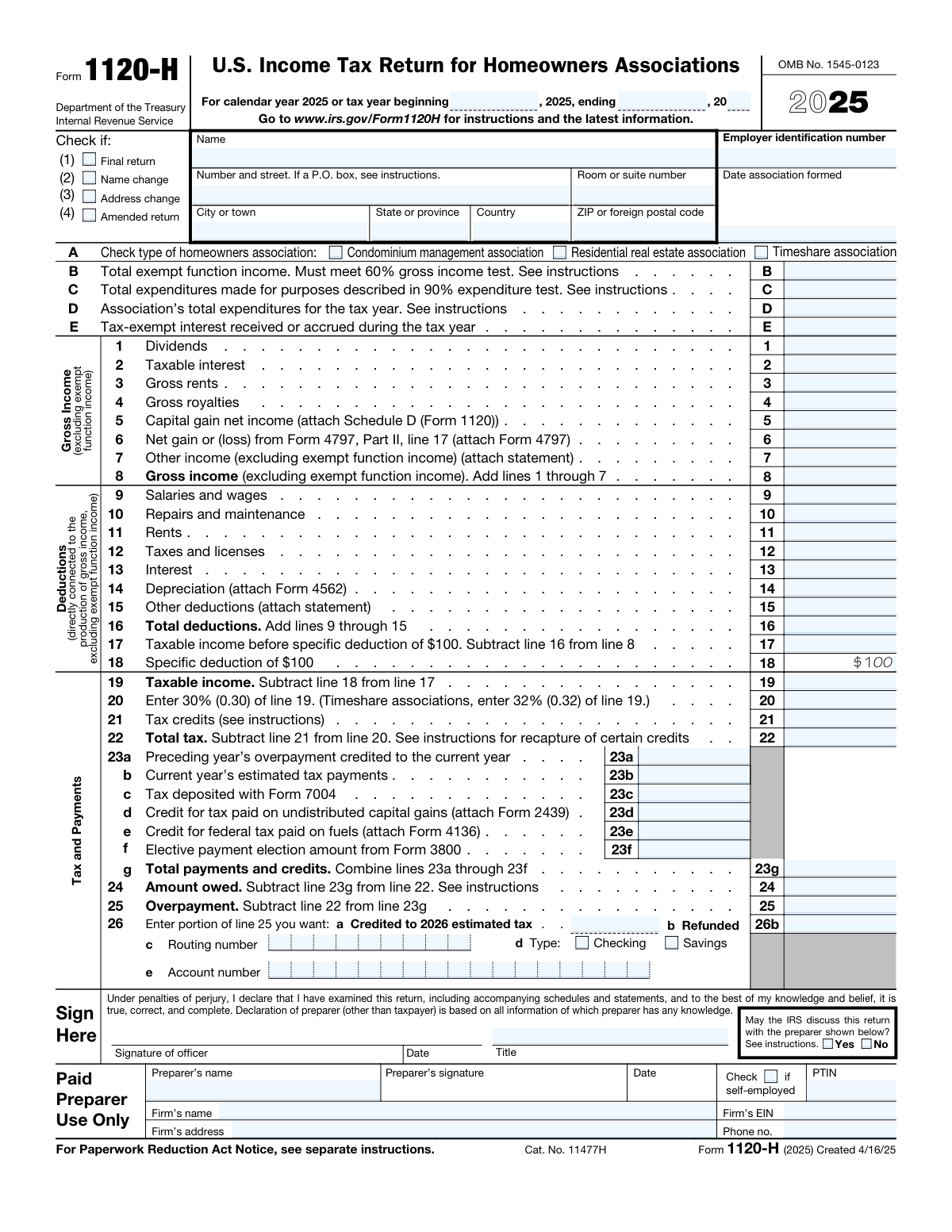
Yes! You can use AI to fill out Form 1120-H, U.S. Income Tax Return for Homeowners Associations

Form 1120-H is an IRS tax return specifically designed for qualifying homeowners associations (HOAs) that elect to take advantage of certain tax benefits under Section 528 of the Internal Revenue Code. It allows eligible associations—condominium management, residential real estate, and timeshare associations—to exclude exempt function income from taxation while reporting and paying tax on non-exempt income at a flat rate of 30% (or 32% for timeshare associations). Filing this form is important because it enables qualifying HOAs to reduce their taxable income by separating member-related exempt income from other taxable income sources. Today, this form can be filled out quickly and accurately using AI-powered services like Instafill.ai, which can also convert non-fillable PDF versions into interactive fillable forms.
Our AI automatically handles information lookup, data retrieval, formatting, and form filling.
It takes less than a minute to fill out 1120-H using our AI form filling.
Securely upload your data. Information is encrypted in transit and deleted immediately after the form is filled out.

Form specifications

Form name: Form 1120-H, U.S. Income Tax Return for Homeowners Associations
Number of pages: 1
Language: English
main-image

Instafill Demo: filling out a legal form in seconds

How to Fill Out 1120-H Online for Free in 2026

Are you looking to fill out a 1120-H form online quickly and accurately? Instafill.ai offers the #1 AI-powered PDF filling software of 2026, allowing you to complete your 1120-H form in just 37 seconds or less.
Follow these steps to fill out your 1120-H form online using Instafill.ai:
  1. 1 Navigate to Instafill.ai and search for or upload Form 1120-H to begin filling it out online using the AI-powered form assistant.
  2. 2 Enter the association's basic identifying information, including the legal name, mailing address, Employer Identification Number (EIN), date formed, tax year dates, and the type of homeowners association (condominium management, residential real estate, or timeshare).
  3. 3 Complete the income qualification section by entering total exempt function income (Line B), total expenditures for the 90% test (Line C), total association expenditures (Line D), and tax-exempt interest received or accrued (Line E).
  4. 4 Report all gross income excluding exempt function income on Lines 1 through 8, including dividends, taxable interest, gross rents, royalties, capital gains, and other income, then enter all directly connected deductions on Lines 9 through 16.
  5. 5 Calculate taxable income by applying the $100 specific deduction (Lines 17–19), compute the tax at 30% or 32% (Line 20), apply any tax credits (Line 21), and determine the total tax owed (Line 22).
  6. 6 Enter all payments and credits on Lines 23a through 23g, then calculate the amount owed (Line 24) or overpayment (Line 25), and indicate how any overpayment should be applied or refunded, including direct deposit banking information if applicable (Line 26).
  7. 7 Review the completed return for accuracy, have an authorized officer sign and date the form, complete the paid preparer section if applicable, and submit the return to the IRS by the applicable deadline.

Our AI-powered system ensures each field is filled out correctly, reducing errors and saving you time.

Why Choose Instafill.ai for Your Fillable 1120-H Form?

Speed

Complete your 1120-H in as little as 37 seconds.

Up-to-Date

Always use the latest 2026 1120-H form version.

Cost-effective

No need to hire expensive lawyers.

Accuracy

Our AI performs 10 compliance checks to ensure your form is error-free.

Security

Your personal information is protected with bank-level encryption.

Frequently Asked Questions About Form 1120-H

Form 1120-H is the U.S. Income Tax Return for Homeowners Associations. It must be filed by qualifying homeowners associations, including condominium management associations, residential real estate associations, and timeshare associations that elect to be treated as tax-exempt organizations under Section 528 of the Internal Revenue Code.

The 60% gross income test requires that at least 60% of the association's gross income come from exempt function income (e.g., member dues, fees, and assessments). The 90% expenditure test requires that at least 90% of the association's total expenditures be used for the acquisition, construction, management, maintenance, and care of association property. Both tests must be met to qualify for the special tax treatment under Form 1120-H.

For most homeowners associations (condominium management and residential real estate associations), the tax rate is 30% of taxable income (Line 19). Timeshare associations are taxed at a higher rate of 32% of taxable income. A specific deduction of $100 is allowed before calculating taxable income.

Exempt function income — such as membership dues, fees, and assessments received from members — is excluded from gross income on this form. Only non-exempt income such as dividends, taxable interest, gross rents, royalties, capital gains, and other non-member income is reported on Lines 1 through 7.

Deductions must be directly connected to the production of gross income (excluding exempt function income) and include salaries and wages, repairs and maintenance, rents, taxes and licenses, interest, depreciation (attach Form 4562), and other deductions (attach a statement). A flat $100 specific deduction is also allowed on Line 18.

Form 1120-H is generally due by the 15th day of the 4th month after the end of the association's tax year (April 15 for calendar-year filers). You can request an automatic 6-month extension by filing Form 7004 before the due date; any tax owed should be deposited with Form 7004 and reported on Line 23c.

If your total payments and credits (Line 23g) exceed your total tax (Line 22), enter the overpayment on Line 25. You can then choose to apply part or all of it as a credit toward your 2026 estimated tax (Line 26a) or receive a refund (Line 26b). If requesting a direct deposit refund, provide your bank routing number (Line 26c), account type (checking or savings, Line 26d), and account number (Line 26e).

At the top of the form, check the appropriate box if this is a Final Return, Name Change, Address Change, or Amended Return. You must also check the type of homeowners association (condominium management, residential real estate, or timeshare) in Section A. These selections help the IRS process your return correctly.

Yes, depending on your situation you may need to attach: Schedule D (Form 1120) for capital gains (Line 5), Form 4797 for gains or losses from property sales (Line 6), Form 4562 for depreciation (Line 14), Form 2439 for credit on undistributed capital gains (Line 23d), Form 4136 for federal fuel tax credits (Line 23e), and Form 3800 for elective payment elections (Line 23f). Statements explaining other income (Line 7) and other deductions (Line 15) should also be attached.

Yes. At the bottom of the form, you can check 'Yes' to authorize the IRS to discuss the return with the paid preparer listed on the form. If you check 'No,' the IRS will not contact your preparer about the return. This authorization does not extend to other tax matters beyond this specific return.

The paid preparer must provide their full name, signature, date, and Preparer Tax Identification Number (PTIN). If the preparer is not self-employed, they must also provide the firm's name, Employer Identification Number (EIN), address, and phone number. Self-employed preparers should check the 'self-employed' checkbox.

Yes! Services like Instafill.ai use AI to automatically fill out Form 1120-H accurately, saving you significant time and reducing the risk of errors. The AI can populate fields such as income, deductions, tax calculations, and association details based on the information you provide.

To fill out Form 1120-H online, visit Instafill.ai and upload your copy of the form. The AI will guide you through each field — from association type and income to deductions and tax payments — and auto-fill the form based on your inputs. Once complete, you can review, download, and submit the finished return.

If your Form 1120-H PDF is not interactive or fillable, Instafill.ai can convert it into a fully interactive fillable form. Simply upload the flat PDF to Instafill.ai, and the platform will transform it so you can type directly into all fields, check boxes, and complete the return digitally without needing to print and handwrite.

The EIN is a nine-digit number assigned by the IRS to identify your homeowners association for tax purposes. If your association already has an EIN, it can be found on prior tax returns or IRS correspondence. If your association does not yet have an EIN, you can apply for one online at IRS.gov using Form SS-4 before filing Form 1120-H.

Compliance 1120-H
Validation Checks by Instafill.ai

1
Ensures exactly one homeowners association type is selected
Validates that one and only one of the three association type checkboxes is selected: Condominium management association, Residential real estate association, or Timeshare association. This selection is critical because it determines the applicable tax rate (30% for condominium and residential associations, 32% for timeshare associations) used on Line 20. If no type is selected or multiple types are selected, the return cannot be correctly processed and the tax computation on Line 20 will be invalid.
2
Ensures the Employer Identification Number (EIN) is in the correct format
Validates that the EIN entered consists of exactly nine digits formatted as XX-XXXXXXX (two digits, a hyphen, and seven digits). The EIN is the primary identifier used by the IRS to associate the return with the correct taxpayer account. An incorrectly formatted or missing EIN will prevent the IRS from processing the return and may result in penalties or misapplication of payments.
3
Ensures the tax year beginning and ending dates are logically consistent
Validates that the tax year beginning date is earlier than the tax year ending date, that the beginning year is 2025, and that the ending date does not exceed 12 months from the beginning date. Homeowners associations must file for a defined tax period, and an illogical or overlapping date range would render the return invalid. If the dates are inconsistent, the IRS cannot determine the correct filing period, which may trigger notices or rejection of the return.
4
Ensures Line 8 equals the sum of Lines 1 through 7
Validates that the value entered on Line 8 (Gross income excluding exempt function income) is mathematically equal to the sum of Lines 1 through 7. This arithmetic check ensures the gross income total is accurately computed before deductions are applied. An incorrect total on Line 8 will cascade errors through Lines 17, 19, 20, and 22, resulting in an incorrect tax liability.
5
Ensures Line 16 equals the sum of Lines 9 through 15
Validates that the value on Line 16 (Total deductions) equals the arithmetic sum of Lines 9 through 15. Accurate totaling of deductions is essential because Line 16 is subtracted from Line 8 to compute taxable income before the specific deduction on Line 17. An incorrect Line 16 will produce an erroneous taxable income figure and ultimately an incorrect tax liability.
6
Ensures Line 17 correctly reflects Line 8 minus Line 16
Validates that Line 17 (Taxable income before specific deduction) equals Line 8 minus Line 16. This intermediate calculation is a required step in the tax computation and must be arithmetically accurate before the $100 specific deduction is applied on Line 18. If Line 17 is incorrect, the final taxable income on Line 19 and the resulting tax on Line 20 will also be incorrect.
7
Ensures Line 19 correctly reflects Line 17 minus the $100 specific deduction
Validates that Line 19 (Taxable income) equals Line 17 minus $100, and that Line 18 is fixed at $100 as required by the form. The $100 specific deduction is a statutory allowance for homeowners associations and must be applied exactly as specified. If Line 19 does not correctly reflect this subtraction, the tax computed on Line 20 will be overstated or understated.
8
Ensures Line 20 applies the correct tax rate based on association type
Validates that Line 20 equals 30% of Line 19 for condominium management or residential real estate associations, or 32% of Line 19 for timeshare associations, consistent with the association type selected in Section A. The applicable tax rate is determined solely by the type of association, and applying the wrong rate will result in an incorrect tax liability. This check cross-references the association type checkbox with the computed value on Line 20.
9
Ensures Line 22 correctly reflects Line 20 minus Line 21
Validates that Line 22 (Total tax) equals Line 20 minus Line 21 (tax credits), and that Line 22 is not a negative number (total tax cannot be less than zero). Tax credits reduce the tax liability but cannot create a negative tax balance on this line. If Line 22 is negative or does not match the arithmetic result, the return will reflect an incorrect tax due amount.
10
Ensures Line 23g equals the sum of Lines 23a through 23f
Validates that Line 23g (Total payments and credits) equals the arithmetic sum of Lines 23a, 23b, 23c, 23d, 23e, and 23f. This total is used to determine whether the association owes additional tax (Line 24) or has an overpayment (Line 25). An incorrect Line 23g will produce errors in both the amount owed and overpayment calculations, potentially resulting in underpayment penalties or incorrect refunds.
11
Ensures Lines 24 and 25 are mutually exclusive and arithmetically correct
Validates that only one of Line 24 (Amount owed) or Line 25 (Overpayment) contains a value greater than zero, and that the populated line correctly reflects the absolute difference between Line 22 and Line 23g. If Line 23g exceeds Line 22, only Line 25 should be populated; if Line 22 exceeds Line 23g, only Line 24 should be populated. Populating both lines or computing the difference incorrectly will result in conflicting payment or refund instructions.
12
Ensures overpayment allocation on Lines 26a and 26b does not exceed Line 25
Validates that the sum of Line 26a (Credited to 2026 estimated tax) and Line 26b (Refunded) equals Line 25 (Overpayment), and that neither line contains a negative value. Lines 26a and 26b represent the disposition of the entire overpayment and must account for the full amount without exceeding it. If the allocation does not match Line 25, the IRS cannot correctly apply the credit or issue the refund.
13
Ensures bank routing and account numbers are provided when a refund is requested
Validates that when Line 26b (Refunded) contains a value greater than zero, the routing number (Line 26c), account type (Line 26d — Checking or Savings), and account number (Line 26e) are all populated and that exactly one account type is selected. The routing number must be exactly nine digits and the account number must contain only numeric characters. Missing or invalid banking information will prevent direct deposit of the refund and may delay processing.
14
Ensures the 60% gross income test is met based on Lines B and D
Validates that the exempt function income reported on Line B is at least 60% of the association's total gross income (exempt function income plus Line 8 gross income), as required by IRC Section 528. Failure to meet the 60% gross income test disqualifies the association from filing Form 1120-H and electing homeowners association tax treatment. If this test is not met, the association must file Form 1120 instead.
15
Ensures the 90% expenditure test is met based on Lines C and D
Validates that the expenditures reported on Line C (made for exempt function purposes) represent at least 90% of the total expenditures reported on Line D for the tax year, as required by IRC Section 528. The 90% expenditure test is a mandatory qualification criterion for homeowners associations electing to file Form 1120-H. If Line C is less than 90% of Line D, the association does not qualify for the preferential tax treatment provided by this form.
16
Ensures the PTIN is in the correct format when a paid preparer is listed
Validates that when a preparer's name is entered, the PTIN field is populated and follows the required format of the letter 'P' followed by exactly eight digits (e.g., P12345678). The PTIN is a mandatory identifier for all paid preparers and is required by IRS regulations for any return prepared for compensation. A missing or incorrectly formatted PTIN may result in preparer penalties and could flag the return for additional scrutiny.

Common Mistakes in Completing 1120-H

Failing to check the correct type of homeowners association

Many filers either leave Section A blank or check the wrong association type (condominium management, residential real estate, or timeshare). This matters significantly because timeshare associations are taxed at 32% instead of 30%, so an incorrect selection directly affects the tax calculation on line 20. Carefully review your association's governing documents to confirm the correct classification before filing. AI-powered tools like Instafill.ai can prompt you to verify this critical selection and flag inconsistencies with the tax rate applied on line 20.

Including exempt function income in gross income lines 1–8

A very common error is reporting total income—including membership dues, assessments, and fees that qualify as exempt function income—on lines 1 through 8. Form 1120-H explicitly requires that only non-exempt-function income be reported in the gross income section; exempt function income belongs only in Line B. Mixing these amounts inflates taxable income and results in an overpayment of tax. Carefully separate all income streams before completing the form, and report exempt function income exclusively on Line B.

Incorrectly calculating or failing the 60% gross income test (Line B)

Associations must ensure that at least 60% of their gross income consists of exempt function income to qualify for the special tax treatment under Section 528. Filers often miscalculate Line B by omitting certain qualifying income or including non-qualifying amounts, causing them to inadvertently fail the test without realizing it. Failing this test means the association cannot use Form 1120-H and must file Form 1120 instead. Always compute the ratio of exempt function income to total gross income before filing, and consult IRS instructions to confirm which income categories qualify.

Failing to meet or verify the 90% expenditure test (Lines C and D)

The 90% expenditure test requires that at least 90% of the association's total expenditures be made for exempt function purposes (acquiring, building, managing, maintaining, or caring for association property). Filers frequently enter amounts on Lines C and D without verifying that the ratio meets the threshold, or they misclassify non-exempt expenditures as exempt. Failing this test disqualifies the association from using Form 1120-H. Carefully categorize all expenditures before completing Lines C and D, and compute the percentage to confirm compliance.

Applying the wrong tax rate for timeshare associations on line 20

Timeshare associations are subject to a 32% tax rate on taxable income, while all other qualifying homeowners associations use 30%. Filers who check 'Timeshare association' in Section A but then apply the 30% rate on line 20—or vice versa—will compute an incorrect tax liability. This error can result in underpayment penalties or an overpayment. Always cross-reference the association type checked in Section A with the rate applied on line 20, and double-check the computation. Tools like Instafill.ai can automatically apply the correct rate based on the association type selected.

Omitting required attachments (Schedule D, Form 4797, Form 4562, Form 2439, Form 4136)

Lines 5, 6, 14, 23d, and 23e each require specific forms to be attached (Schedule D, Form 4797, Form 4562, Form 2439, and Form 4136, respectively). Filers frequently enter amounts on these lines without attaching the corresponding forms, which can trigger IRS correspondence, delays in processing, or disallowance of the claimed amounts. Review the instructions for each line to confirm which attachments are required, and prepare all supporting forms before submitting the return. Instafill.ai can remind you of required attachments based on the fields you complete.

Entering deductions not directly connected to non-exempt income production

Lines 9 through 15 allow only deductions that are directly connected to the production of gross income excluding exempt function income. A common mistake is claiming all association expenses—including those related to exempt function activities—as deductions, which overstates deductions and understates taxable income. The IRS may disallow improperly claimed deductions and assess additional tax and penalties. Carefully allocate expenses between exempt and non-exempt activities, and only report the non-exempt portion on lines 9–15.

Incorrectly entering or omitting the Employer Identification Number (EIN)

Filers sometimes enter their Social Security Number instead of the association's EIN, transpose digits, or leave the EIN field blank entirely. An incorrect or missing EIN can cause the IRS to be unable to match the return to the association's account, leading to processing delays, penalty notices, or misapplied payments. Always use the EIN assigned specifically to the homeowners association (not an individual's SSN), and verify the number against the IRS assignment letter (CP 575). Instafill.ai can validate EIN format automatically to catch transposition errors before submission.

Errors in bank routing and account numbers for direct deposit of refund (Lines 26c–26e)

When requesting a refund via direct deposit, filers frequently enter incorrect routing numbers, account numbers, or fail to select the correct account type (checking vs. savings). An incorrect routing or account number can result in the refund being deposited into the wrong account or returned to the IRS, causing significant delays in receiving funds. Always verify the routing number directly with your bank (not from a deposit slip, which may differ) and double-check the account number digit by digit. Instafill.ai can validate routing number formats to reduce transcription errors.

Failing to complete or sign the paid preparer section correctly

When a paid preparer completes the return, they must provide their full name, signature, PTIN, and—if applicable—the firm's name, EIN, address, and phone number. Filers and preparers often leave the PTIN blank, enter an invalid PTIN format, or omit the firm's EIN when the preparer is not self-employed. An unsigned or incomplete preparer section can render the return technically incomplete and may result in penalties for the preparer. Ensure the PTIN begins with 'P' followed by eight digits, and confirm all firm information is complete if the preparer is not self-employed.

Not checking the amended return box or failing to explain changes when filing an amended return

When correcting a previously filed Form 1120-H, filers sometimes forget to check the 'Amended return' checkbox (4), or they check it but fail to attach a statement explaining what was changed and why. Without the checkbox, the IRS may process the amended return as a duplicate original, creating confusion and potential double-assessment issues. Always check box (4) when filing an amended return and attach a clear explanation of each line item that changed, along with the reason for the correction.

Incorrectly allocating overpayments between credit to 2026 and refund (Lines 26a and 26b)

When an overpayment exists on line 25, filers must allocate it between a credit to 2026 estimated tax (line 26a) and a refund (line 26b), and the two amounts must sum to the total on line 25. A common mistake is entering the full overpayment on both lines, leaving one line blank when an allocation is intended, or having the two amounts not add up to line 25. This results in IRS correspondence to clarify the filer's intent and can delay the refund. Carefully verify that lines 26a and 26b together equal line 25 before submitting the return.
Saved over 80 hours a year

“I was never sure if my IRS forms like W-9 were filled correctly. Now, I can complete the forms accurately without any external help.”

Kevin Martin Green

Your data stays secure with advanced protection from Instafill and our subprocessors

Robust compliance program

Transparent business model

You’re not the product. You always know where your data is and what it is processed for.

ISO 27001, HIPAA, and GDPR

Our subprocesses adhere to multiple compliance standards, including but not limited to ISO 27001, HIPAA, and GDPR.

Security & privacy by design

We consider security and privacy from the initial design phase of any new service or functionality. It’s not an afterthought, it’s built-in, including support for two-factor authentication (2FA) to further protect your account.

Fill out 1120-H with Instafill.ai

Worried about filling PDFs wrong? Instafill securely fills form-1120-h-us-income-tax-return-for-homeowners-associations forms, ensuring each field is accurate.