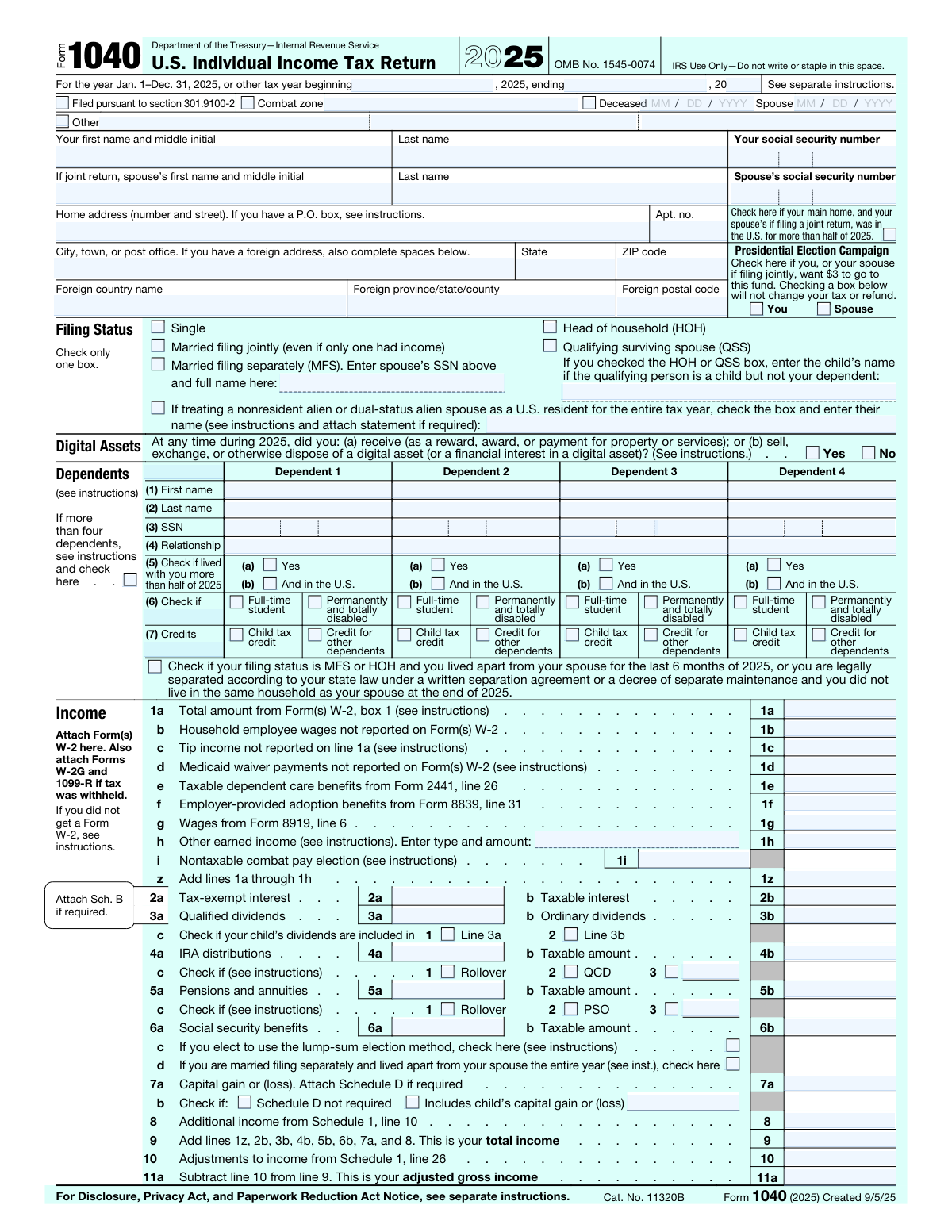
Yes! You can use AI to fill out Form 1040, U.S. Individual Income Tax Return (2025)

Form 1040, the U.S. Individual Income Tax Return, is the primary document used by American taxpayers to report their annual income, claim deductions and credits, and calculate their federal tax liability or refund for the tax year January 1–December 31, 2025. It is required to be filed by most U.S. citizens and resident aliens, and serves as the foundation for the entire federal individual income tax system. The form covers wages, interest, dividends, capital gains, retirement distributions, Social Security benefits, and many other income types, along with adjustments, standard or itemized deductions, and a wide range of tax credits. Today, Form 1040 can be filled out quickly and accurately using AI-powered services like Instafill.ai, which can also convert non-fillable PDF versions into interactive fillable forms.
Our AI automatically handles information lookup, data retrieval, formatting, and form filling.
It takes less than a minute to fill out 1040 using our AI form filling.
Securely upload your data. Information is encrypted in transit and deleted immediately after the form is filled out.

Form specifications

Form name: Form 1040, U.S. Individual Income Tax Return (2025)
Number of pages: 2
Language: English
Categories: tax forms, IRS forms
main-image

Instafill Demo: filling out a legal form in seconds

How to Fill Out 1040 Online for Free in 2026

Are you looking to fill out a 1040 form online quickly and accurately? Instafill.ai offers the #1 AI-powered PDF filling software of 2026, allowing you to complete your 1040 form in just 37 seconds or less.
Follow these steps to fill out your 1040 form online using Instafill.ai:
  1. 1 Navigate to Instafill.ai and search for or upload the 2025 Form 1040 to begin filling it out online.
  2. 2 Enter your personal information, including your name, Social Security number, filing status, home address, and spouse's information if filing jointly.
  3. 3 Complete the Dependents section by providing each dependent's name, SSN, relationship, residency status, and applicable credits or status checkboxes.
  4. 4 Report all income sources on the Income section, including wages from W-2s, interest, dividends, IRA distributions, pensions, Social Security benefits, capital gains, and any other income, then calculate your adjusted gross income.
  5. 5 Calculate your Tax and Credits by entering your standard or itemized deduction, qualified business income deduction, taxable income, tax liability, and any applicable credits such as the child tax credit.
  6. 6 Enter your Payments, including federal income tax withheld from W-2s and 1099s, estimated tax payments, and refundable credits such as the Earned Income Credit and Additional Child Tax Credit, then determine your refund or amount owed.
  7. 7 Review all entries for accuracy, provide direct deposit information if requesting a refund, sign and date the return (and have your spouse sign if filing jointly), and submit or download the completed form.

Our AI-powered system ensures each field is filled out correctly, reducing errors and saving you time.

Why Choose Instafill.ai for Your Fillable 1040 Form?

Speed

Complete your 1040 in as little as 37 seconds.

Up-to-Date

Always use the latest 2026 1040 form version.

Cost-effective

No need to hire expensive lawyers.

Accuracy

Our AI performs 10 compliance checks to ensure your form is error-free.

Security

Your personal information is protected with bank-level encryption.

Frequently Asked Questions About Form 1040

Form 1040 is the U.S. Individual Income Tax Return used by American taxpayers to report their annual income and calculate their federal tax liability or refund. Most U.S. citizens and resident aliens who earned income during the tax year are required to file this form with the IRS.

The 2025 Form 1040 offers five filing statuses: Single, Married Filing Jointly, Married Filing Separately (MFS), Head of Household (HOH), and Qualifying Surviving Spouse (QSS). You must check only one box, and your choice affects your standard deduction amount and tax rates.

For 2025, the standard deduction amounts are: $15,750 for Single or Married Filing Separately filers, $31,500 for Married Filing Jointly or Qualifying Surviving Spouse filers, and $23,625 for Head of Household filers. Additional amounts may apply if you or your spouse are age 65 or older or blind.

You will need Form(s) W-2 from your employer(s), Form(s) 1099 for other income (interest, dividends, retirement distributions, etc.), records of any estimated tax payments made, Social Security numbers for yourself, your spouse, and all dependents, and any applicable schedules (A, B, C, D, etc.). If you have a paid preparer, they will also need their PTIN.

Yes. The 2025 Form 1040 requires you to answer whether at any time during 2025 you received, sold, exchanged, or otherwise disposed of a digital asset or a financial interest in a digital asset. You must check either 'Yes' or 'No' — this question cannot be left blank.

You can list up to four dependents directly on the form by providing each dependent's first and last name, Social Security number, relationship to you, and whether they lived with you for more than half of 2025 and were in the U.S. You must also indicate whether each dependent qualifies for the Child Tax Credit or the Credit for Other Dependents. If you have more than four dependents, check the designated box and attach an additional list.

To receive your refund by direct deposit, complete the routing number and account number fields in the Refund section (lines 35b–35d), and indicate whether the account is checking or savings. If you want to split your refund among multiple accounts, attach Form 8888 and check the box on line 35a.

If line 37 shows an amount you owe, you can pay online at www.irs.gov/Payments, by check, money order, or other IRS-approved payment methods. You may also apply any overpayment from line 34 to your 2026 estimated taxes by entering the desired amount on line 36.

Yes. In the Third Party Designee section, you can authorize another person (such as a tax preparer or family member) to discuss your return with the IRS by checking 'Yes' and providing their name, phone number, and a personal identification number (PIN) they will use to authenticate themselves.

An IP PIN is a six-digit number issued by the IRS to help prevent identity theft and fraudulent tax filings. If the IRS has issued you or your spouse an IP PIN, you must enter it in the designated field in the Sign Here section of Form 1040; failing to include it may delay processing of your return.

Yes — AI-powered services like Instafill.ai can help you accurately auto-fill Form 1040 by guiding you through each field and reducing the risk of errors. These tools save time and help ensure you don't miss important sections like dependent information, income lines, or credits.

To fill out Form 1040 online, visit Instafill.ai, upload or select the 2025 Form 1040, and the AI will walk you through each section — from personal information and income to deductions and credits. Once complete, you can download the filled form, review it, sign it, and submit it to the IRS.

If you have a flat, non-fillable PDF version of Form 1040, Instafill.ai can convert it into an interactive fillable form so you can type directly into the fields. This eliminates the need to print and handwrite your information, making the process faster and more accurate.

This checkbox allows you (and your spouse, if filing jointly) to direct $3 of your federal tax to the Presidential Election Campaign Fund. Checking this box does not increase your tax or reduce your refund — it simply designates how a portion of taxes already owed are allocated.

The standard deadline for filing your 2025 Form 1040 is April 15, 2026. If you need more time, you can request an automatic six-month extension by filing Form 4868, which extends the filing deadline to October 15, 2026 — though any taxes owed are still due by April 15, 2026.

Compliance 1040
Validation Checks by Instafill.ai

1
Taxpayer Social Security Number Format and Completeness
Validates that the taxpayer's Social Security Number (SSN) is exactly nine digits, contains only numeric characters, and follows the standard XXX-XX-XXXX pattern. The SSN must not be all zeros, must not begin with '000', '666', or any number in the 900–999 range, and must not be a known invalid test number. This field is required on every Form 1040 submission; a missing or malformed SSN will cause the IRS to reject the return outright and may delay any refund or trigger identity-verification procedures.
2
Spouse SSN Required When Filing Jointly or Married Filing Separately
Validates that a spouse's Social Security Number is provided whenever the filing status is 'Married filing jointly' or 'Married filing separately (MFS)'. For MFS returns, the spouse's full name must also be entered on the designated line. If the spouse SSN is absent or the name field is blank under these filing statuses, the return is incomplete and the IRS may disallow certain credits or reject the submission entirely.
3
Single Filing Status Selected — No Spouse Information Entered
Validates that when 'Single' is selected as the filing status, no spouse name, spouse SSN, or spouse-specific fields (such as the Presidential Election Campaign spouse checkbox or spouse occupation) are populated. Entering spouse data alongside a Single filing status creates a logical inconsistency that could trigger IRS scrutiny or processing errors. If conflicting data is detected, the system should flag the return for correction before submission.
4
Exactly One Filing Status Selected
Validates that one and only one of the five filing status options — Single, Married Filing Jointly, Married Filing Separately, Head of Household, or Qualifying Surviving Spouse — is checked. The form explicitly instructs filers to 'check only one box.' Selecting zero or multiple statuses renders the return invalid, as the applicable tax rates, standard deduction amounts, and credit eligibility all depend on a single, unambiguous filing status.
5
Head of Household and Qualifying Surviving Spouse Qualifying Child Name
Validates that when the filing status is Head of Household (HOH) or Qualifying Surviving Spouse (QSS) and the qualifying person is a child who is not the taxpayer's dependent, the child's name is entered in the designated field. This name is required to substantiate the filing status claim. If the box is checked but the name field is left blank, the return lacks the information needed to verify eligibility for these preferential filing statuses.
6
Dependent SSN Format Validation
Validates that each dependent's Social Security Number entered across all four dependent rows is exactly nine digits, numeric only, and not a duplicate of the taxpayer's or spouse's SSN. Dependents claimed for the Child Tax Credit must have a valid SSN issued before the return's due date; an invalid or missing dependent SSN will disqualify the child tax credit for that dependent and may trigger an IRS notice. The validation should also check that the three-part SSN segments (first 3, middle 2, last 4 digits) combine to form a complete, non-zero nine-digit number.
7
Dependent 'And in the U.S.' Checkbox Requires 'Lived With You' Checkbox
Validates that for each dependent row, the 'And in the U.S.' checkbox (column 5b) is only checked if the corresponding 'Lived with you more than half of 2025' checkbox (column 5a) is also checked. The form's conditional logic explicitly states that the U.S.-residency sub-checkbox is only applicable when the primary residency checkbox is affirmed. Checking the sub-condition without the parent condition is a logical inconsistency that must be flagged.
8
Child Tax Credit vs. Credit for Other Dependents Mutual Exclusivity per Dependent
Validates that for each dependent, only one of the two credit checkboxes — 'Child tax credit' or 'Credit for other dependents' — is selected, not both simultaneously. A dependent qualifies for one or the other based on age, SSN validity, and relationship criteria; claiming both credits for the same dependent is not permitted under IRS rules. If both boxes are checked for a single dependent, the system should flag the entry and require the filer to select only the applicable credit.
9
Income Line Arithmetic Consistency — Line 1z Equals Sum of Lines 1a Through 1h
Validates that the value entered on Line 1z equals the arithmetic sum of Lines 1a, 1b, 1c, 1d, 1e, 1f, 1g, and 1h. This is a critical cross-field calculation check; an incorrect total on Line 1z will cascade errors through Lines 9, 11a, and ultimately the total tax calculation. Any discrepancy between the entered total and the computed sum should be flagged as a math error requiring correction before submission.
10
Total Income Line 9 Arithmetic Consistency
Validates that Line 9 (Total Income) equals the sum of Lines 1z, 2b, 3b, 4b, 5b, 6b, 7a, and 8, as specified in the form instructions. Line 9 feeds directly into the AGI calculation on Line 11a, and any arithmetic error here will produce an incorrect tax liability. The system should compute the expected total from the individual income lines and compare it to the entered Line 9 value, flagging any mismatch.
11
Qualified Dividends Cannot Exceed Ordinary Dividends
Validates that the amount entered on Line 3a (Qualified Dividends) does not exceed the amount entered on Line 3b (Ordinary Dividends). By definition, qualified dividends are a subset of ordinary dividends; a qualified dividend amount greater than the ordinary dividend total is mathematically impossible and indicates a data entry error. If this condition is violated, the system should alert the filer to review and correct both dividend fields.
12
Taxable IRA Distribution Cannot Exceed Total IRA Distribution
Validates that the taxable amount on Line 4b does not exceed the total IRA distribution amount on Line 4a. The taxable portion is always less than or equal to the gross distribution; an entry where Line 4b is greater than Line 4a indicates a data entry error. Similarly, the taxable amount of pensions and annuities on Line 5b must not exceed the total on Line 5a, and the taxable social security benefits on Line 6b must not exceed the total on Line 6a.
13
Bank Routing Number Format for Direct Deposit
Validates that the bank routing number entered for direct deposit is exactly nine digits, contains only numeric characters, and begins with a digit in the range 0–1 (as required by the Federal Reserve's ABA routing number standard). The routing number must also pass a standard checksum algorithm (weighted sum of digits) to confirm it is a valid, active routing number. An invalid routing number will cause the refund to be rejected by the financial institution and returned to the IRS, significantly delaying the refund.
14
Refund Lines 35a and 36 Must Not Exceed Line 34 Overpayment
Validates that the sum of Line 35a (amount to be refunded) and Line 36 (amount applied to 2026 estimated tax) does not exceed the overpayment amount on Line 34. These two lines represent the disposition of the overpayment, and their combined total must equal Line 34 exactly. If the sum is greater than Line 34, the filer is attempting to allocate more money than was overpaid; if less, the unallocated remainder must be addressed.
15
Paid Preparer PTIN Format Validation
Validates that if the Paid Preparer section is completed, the Preparer Tax Identification Number (PTIN) follows the required IRS format: the letter 'P' followed by exactly eight digits (e.g., P12345678). A PTIN is mandatory for any paid preparer who prepares or assists in preparing a federal tax return for compensation; an absent, blank, or incorrectly formatted PTIN in a completed preparer section violates IRS regulations and may subject the preparer to penalties.
16
Deceased Taxpayer Date of Death Format and Validity
Validates that if the 'Deceased' checkbox is marked, the accompanying date of death is provided in MM/DD/YYYY format, contains a valid calendar date (e.g., month between 01–12, day within the valid range for that month), and falls within the 2025 tax year or a prior year consistent with the return being filed. A missing or invalid date of death when the deceased indicator is checked creates an incomplete record that can delay estate processing and IRS correspondence. The same validation applies to the spouse deceased date field.

Common Mistakes in Completing 1040

Entering an incorrect or mismatched Social Security Number (SSN)

Taxpayers frequently transpose digits or enter an SSN that doesn't match IRS records, either for themselves, their spouse, or their dependents. This is one of the most common and consequential errors on Form 1040, as it can delay processing, trigger an IRS notice, or cause a refund to be held. Always double-check every SSN against the actual Social Security card before submitting. AI-powered tools like Instafill.ai can validate SSN formats and flag mismatches before submission.

Selecting the wrong filing status

Many filers incorrectly choose their filing status — for example, filing as Single when they qualify for Head of Household, or filing Married Filing Separately when Married Filing Jointly would result in a lower tax liability. The wrong filing status can significantly affect your standard deduction, tax bracket, and eligibility for credits like the Earned Income Credit. Carefully review the IRS definitions for each status and, if you checked HOH or QSS, remember to enter the qualifying child's name on the designated line.

Omitting or incorrectly reporting all income sources

Filers often forget to report income beyond their W-2 wages, such as tip income (line 1c), household employee wages (line 1b), Medicaid waiver payments (line 1d), freelance or gig income, interest, dividends, IRA distributions, Social Security benefits, or capital gains. The IRS receives copies of most income documents and will cross-reference them against your return, making omissions easy to detect and potentially resulting in penalties and interest. Gather all Forms W-2, 1099, and other income statements before completing the return, and use tools like Instafill.ai to ensure no income line is accidentally left blank.

Confusing total IRA/pension amounts with taxable amounts

Lines 4a and 5a ask for the total gross distribution from IRAs and pensions, while lines 4b and 5b ask only for the taxable portion — and many filers enter the same number in both fields or leave 4a/5a blank. Entering the full distribution amount as the taxable amount can result in overpaying taxes, while leaving the gross amount blank can trigger IRS inquiries. Use Form 1099-R to determine the correct gross and taxable amounts, and check the rollover or QCD boxes if applicable to avoid double-counting income.

Failing to answer the Digital Assets question

The form requires every filer to check either 'Yes' or 'No' to the digital assets question — it cannot be left blank. Many filers overlook this question entirely, especially those who did not actively trade cryptocurrency but may have received small amounts as rewards or payments. Leaving it blank will cause the return to be flagged as incomplete. Review all financial activity for 2025, including any crypto wallets, NFT transactions, or blockchain-based payments, before answering.

Incorrectly claiming dependents or missing required dependent information

Filers frequently omit a dependent's SSN, enter an incorrect relationship, or fail to check the appropriate boxes for child tax credit versus credit for other dependents. Missing or incorrect SSNs for dependents will disqualify the associated credits, potentially costing hundreds or thousands of dollars. Ensure each dependent's name matches their Social Security card exactly, provide a valid SSN, and correctly indicate whether they lived with you more than half the year and whether they were in the U.S. Instafill.ai can help validate dependent SSN formats and flag incomplete dependent entries.

Entering an incorrect bank routing or account number for direct deposit

A transposed digit in the routing number or account number can cause a refund to be deposited into the wrong account or returned to the IRS, significantly delaying receipt of funds. Many filers confuse the routing number with the account number, or copy numbers from a deposit slip rather than a check (deposit slips sometimes use different numbers). Always verify the 9-digit routing number and full account number directly from a voided check or your bank's official website, and double-check whether you are selecting Checking or Savings correctly.

Failing to claim all eligible deductions and credits

Taxpayers often miss the Earned Income Credit (EIC), Additional Child Tax Credit (ACTC), American Opportunity Credit, or the Qualified Business Income deduction because they are unaware they qualify or forget to complete the required supporting forms (e.g., Schedule 8812, Form 8863, Form 8995). These credits can substantially reduce tax liability or generate a refund, so overlooking them is a costly mistake. Review the eligibility criteria for each credit and deduction, attach all required schedules, and use tools like Instafill.ai to prompt you through applicable credits based on your situation.

Not signing the return or omitting the date and occupation

An unsigned tax return is legally invalid and will be returned by the IRS unprocessed, delaying any refund and potentially triggering late-filing penalties. For joint returns, both spouses must sign and date the return, and both must provide their occupation. Filers who prepare their return digitally sometimes forget to complete the signature section before submitting. Always review the Sign Here section before filing, and if filing jointly, confirm that both signatures, dates, and occupations are present.

Forgetting to enter or incorrectly entering the Identity Protection PIN (IP PIN)

If the IRS has issued an Identity Protection PIN to you or your spouse, it must be entered on the return — omitting it will cause the return to be rejected. Conversely, entering an incorrect or outdated IP PIN (IRS issues a new one each year) will also result in rejection. Many filers are unaware they have an IP PIN or forget to retrieve the current year's PIN from the IRS website before filing. Check your IRS online account or the CP01A notice mailed by the IRS each January to obtain the correct current-year IP PIN.

Incorrectly calculating or omitting estimated tax payments and withholding

Filers often forget to include withholding from Form 1099 (line 25b) or other forms (line 25c), reporting only W-2 withholding on line 25a, which results in an overstated tax liability and a smaller refund than owed. Similarly, estimated tax payments made during 2025 or amounts applied from the 2024 return must be entered on line 26 — omitting these means paying taxes twice. Gather all withholding documents including 1099-R, 1099-G, and 1099-NEC forms, and cross-reference your IRS account transcript to confirm all estimated payments are accounted for.

Using the wrong standard deduction amount or failing to check age/blindness boxes

The standard deduction varies by filing status and increases for taxpayers who are 65 or older (born before January 2, 1961) or blind, but many filers use the base amount without checking the additional boxes on line 12d, resulting in a higher taxable income than necessary. For 2025, the standard deductions are $15,750 (Single/MFS), $31,500 (MFJ/QSS), and $23,625 (HOH), with additional amounts for age and blindness. Carefully check all applicable boxes on lines 12a through 12d and refer to the standard deduction worksheet in the instructions to calculate the correct amount.
Saved over 80 hours a year

“I was never sure if my IRS forms like W-9 were filled correctly. Now, I can complete the forms accurately without any external help.”

Kevin Martin Green

Your data stays secure with advanced protection from Instafill and our subprocessors

Robust compliance program

Transparent business model

You’re not the product. You always know where your data is and what it is processed for.

ISO 27001, HIPAA, and GDPR

Our subprocesses adhere to multiple compliance standards, including but not limited to ISO 27001, HIPAA, and GDPR.

Security & privacy by design

We consider security and privacy from the initial design phase of any new service or functionality. It’s not an afterthought, it’s built-in, including support for two-factor authentication (2FA) to further protect your account.

Fill out 1040 with Instafill.ai

Worried about filling PDFs wrong? Instafill securely fills form-1040-us-individual-income-tax-return-2025 forms, ensuring each field is accurate.