Yes! You can use AI to fill out Form 1120 (2025), U.S. Corporation Income Tax Return
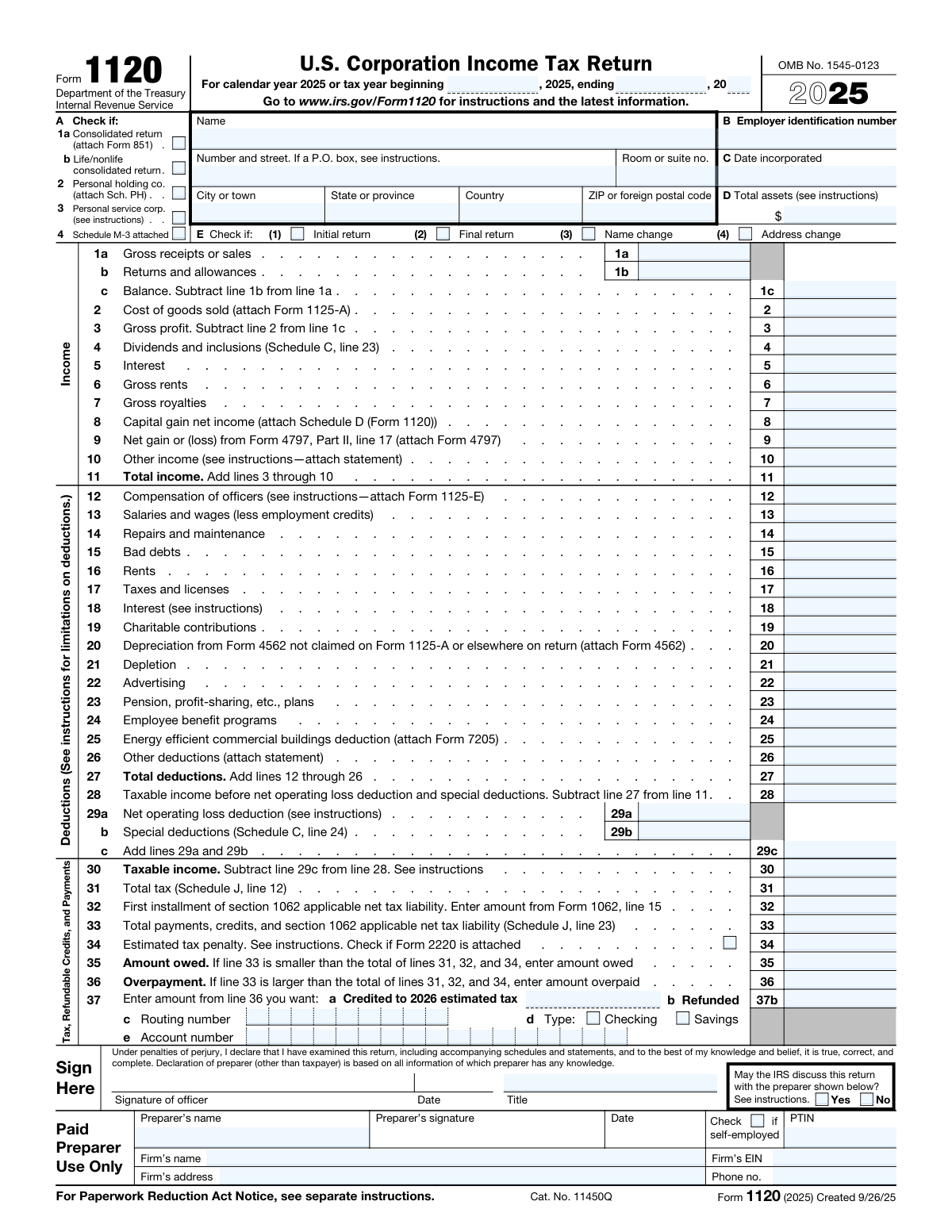
Form 1120 is the primary IRS tax return for U.S. corporations taxed as C corporations, used to calculate and report the corporation’s taxable income and total tax liability for the year. It captures core financial results (income and deductions) and reconciles book income to tax income, along with balance sheet and retained earnings reporting when required. The form also includes schedules for dividends and special deductions (Schedule C), tax computation and payments (Schedule J), and extensive compliance questions (Schedule K) that determine whether additional forms must be attached. Filing an accurate Form 1120 is important to properly compute corporate tax, claim eligible credits/deductions, and avoid penalties for underpayment or missing disclosures.
Our AI automatically handles information lookup, data retrieval, formatting, and form filling.
It takes less than a minute to fill out Form 1120 using our AI form filling.
Securely upload your data. Information is encrypted in transit and deleted immediately after the form is filled out.
Form specifications
| Form name: | Form 1120 (2025), U.S. Corporation Income Tax Return |
| Number of pages: | 6 |
| Filled form examples: | Form Form 1120 Examples |
| Language: | English |
Instafill Demo: filling out a legal form in seconds
How to Fill Out Form 1120 Online for Free in 2026
Are you looking to fill out a FORM 1120 form online quickly and accurately? Instafill.ai offers the #1 AI-powered PDF filling software of 2026, allowing you to complete your FORM 1120 form in just 37 seconds or less.
Follow these steps to fill out your FORM 1120 form online using Instafill.ai:
- 1 Enter corporation identification details: legal name, address, EIN, date incorporated, total assets, and check applicable return boxes (initial/final/name or address change, consolidated return indicators).
- 2 Complete the Income section (lines 1a–11): report gross receipts, returns/allowances, cost of goods sold (attach Form 1125-A if applicable), and other income items such as dividends, interest, rents, royalties, capital gains (Schedule D), and Form 4797 gains/losses.
- 3 Complete the Deductions section (lines 12–27): enter officer compensation (Form 1125-E), wages, repairs, taxes, interest, charitable contributions, depreciation (Form 4562), and other deductions with required statements/attachments.
- 4 Compute taxable income and tax: calculate taxable income (lines 28–30), complete Schedule C for dividends/special deductions (feeds line 4 and line 29b), and complete Schedule J to compute total tax, credits, and payments (feeds line 31 and line 33).
- 5 Finish payments and refund/amount owed: enter estimated tax penalty if applicable (Form 2220), determine amount owed or overpayment (lines 35–36), and provide direct deposit information for refunds or apply overpayment to next year (line 37).
- 6 Answer Schedule K (Other Information) and attach required additional forms: respond to ownership/foreign activity/digital asset and other compliance questions, and attach items triggered (e.g., Schedule G, Form 5472, Form 8991/8990, Form 4626, Schedule O, Schedule UTP).
- 7 Complete financial schedules if required and sign: fill Schedule L (balance sheets), Schedule M-1 (book-to-tax reconciliation), and Schedule M-2 (retained earnings) unless exempt; then complete officer signature/title/date and paid preparer section and review for consistency across schedules and attachments.
Our AI-powered system ensures each field is filled out correctly, reducing errors and saving you time.
Why Choose Instafill.ai for Your Fillable Form 1120 Form?
Speed
Complete your Form 1120 in as little as 37 seconds.
Up-to-Date
Always use the latest 2026 Form 1120 form version.
Cost-effective
No need to hire expensive lawyers.
Accuracy
Our AI performs 10 compliance checks to ensure your form is error-free.
Security
Your personal information is protected with bank-level encryption.
Frequently Asked Questions About Form Form 1120
Form 1120 is the U.S. Corporation Income Tax Return used to report a C corporation’s income, deductions, credits, and tax liability for the tax year. It’s filed with the IRS for calendar year 2025 or a fiscal year that begins in 2025.
Generally, domestic corporations taxed as C corporations must file Form 1120, even if they had no income or were inactive. S corporations typically file Form 1120-S instead, and partnerships file Form 1065.
Enter the calendar year 2025 if you use a calendar year, or enter the beginning and ending dates if you use a fiscal year that begins in 2025. The dates should match the corporation’s tax year used for its books and tax reporting.
You’ll need the corporation’s legal name, address, Employer Identification Number (EIN), date incorporated, and total assets. You also must check any applicable boxes such as initial return, final return, name change, or address change.
Check the consolidated return box if the corporation is filing as part of an affiliated group filing a consolidated federal return. The form indicates you must attach Form 851 (Affiliations Schedule), and additional consolidated return rules may apply.
Total assets generally come from the corporation’s balance sheet at the end of the tax year (Schedule L, line 15, end of year). Use the amount per the instructions, which typically aligns with book assets reported on the return.
Report gross receipts or sales on line 1a and returns and allowances on line 1b, then subtract to get line 1c. If you have inventory or produce/sell goods, report cost of goods sold on line 2 and attach Form 1125-A.
Use these lines for items not specifically listed elsewhere on the form, and attach a statement describing each item and amount. Common examples include miscellaneous income, certain gains, or business expenses that don’t fit another deduction line.
If you claim compensation of officers on line 12, the form instructs you to attach Form 1125-E. This supports the amounts paid to corporate officers and helps substantiate the deduction.
Attachments may include Schedule D (capital gains/losses), Form 4797 (sales of business property), Form 4562 (depreciation), Schedule C (dividends and special deductions), and Schedule J (tax computation). Depending on your answers in Schedule K, you may also need forms like 5471/8992/8993, 1118, 3800, 8990, 8991, 8996, 5472, or 7208.
Total income is computed on line 11, total deductions on line 27, and taxable income before NOL and special deductions on line 28. Then subtract the net operating loss deduction (line 29a) and special deductions (line 29b) to arrive at taxable income on line 30.
Total tax is calculated on Schedule J and carried to page 1, line 31. Payments, credits, and other amounts are also summarized on Schedule J and carried to page 1, line 33 to determine whether you owe (line 35) or have an overpayment (line 36).
If you have an overpayment on line 36, you can choose to credit it to 2026 estimated tax on line 37a or request a refund on line 37b. If requesting direct deposit, provide the routing number, account type, and account number on line 37c–37e.
Not always—Schedule K, question 13 indicates that if total receipts and total assets are both less than $250,000, the corporation generally isn’t required to complete Schedules L, M-1, and M-2. Instead, you report distributions as instructed in that question.
This authorization allows the IRS to contact the paid preparer to discuss the return and resolve certain issues. Answering “Yes” can help the IRS communicate more efficiently, but it doesn’t give the preparer unlimited authority (see the instructions for details).
Compliance Form 1120
Validation Checks by Instafill.ai
1
Tax year period completeness and valid date range
Validate that the tax year beginning date and ending date are both provided and are valid calendar dates. Ensure the ending date is after the beginning date and that the period length is consistent with a typical tax year (generally 12 months unless a short year is indicated by Initial/Final return). If invalid or missing, the return should be rejected because the tax period determines which rules, rates, and limitations apply.
2
Employer Identification Number (EIN) format and presence
Check that the EIN is present and matches the IRS-required format (9 digits, typically displayed as NN-NNNNNNN). Reject EINs with non-numeric characters (other than a hyphen), incorrect length, or obvious placeholders (e.g., 00-0000000). If validation fails, the submission should be blocked because the EIN is the primary taxpayer identifier for processing and matching payments/credits.
3
Corporation name and address completeness (including ZIP/postal code rules)
Ensure the corporation legal name and full mailing address are complete: street (or valid P.O. box per instructions), city, state/province, and ZIP/foreign postal code, plus country when non-U.S. Validate ZIP as 5 digits or ZIP+4 for U.S. addresses and require country for foreign addresses. If incomplete or inconsistent, flag for correction because IRS notices, refunds, and correspondence depend on a deliverable address.
4
Date incorporated validity and logical consistency with tax year
Validate that the Date incorporated is a real date and is not after the end of the tax year. If the corporation incorporated during the tax year, ensure the tax year beginning is not earlier than incorporation unless a predecessor entity explanation is provided (outside this form). If this check fails, the return should be flagged because it can indicate an incorrect filing period or entity mismatch.
5
Total assets (Page 1, line D) numeric and non-negative
Confirm Total assets is provided (when required) and is a non-negative currency amount with no invalid characters. If Schedule L is completed, ensure Total assets agrees to Schedule L, line 15 (end of tax year). If it fails, the return should be rejected or routed to error resolution because total assets drive filing requirements (e.g., Schedule M-3) and must reconcile to the balance sheet.
6
Mutually exclusive return status indicators (Initial/Final/Name change/Address change)
Validate that the checkboxes for Initial return and Final return are not both selected, and that Name change/Address change selections are consistent with provided identifying information. If Final return is selected, require a tax year end date and ensure the entity is not simultaneously indicating an initial filing. If inconsistent, fail validation because these indicators affect IRS account status and correspondence handling.
7
Consolidated return indicators require required attachments
If 'Consolidated return' is checked, require that Form 851 is attached; if 'Life/nonlife consolidated return' is checked, require the appropriate supporting consolidation documentation per instructions. Also ensure consolidated return is not selected in conflict with other entity-type indicators that would make consolidation inapplicable. If missing attachments, the submission should be rejected because consolidated computations and member listings are mandatory for processing.
8
Income section arithmetic integrity (lines 1a–11)
Verify that line 1c equals line 1a minus line 1b, line 3 equals line 1c minus line 2, and line 11 equals the sum of lines 3 through 10. Enforce that returns/allowances (1b) are not negative and do not exceed gross receipts (1a) unless explicitly allowed by system rules (generally should not). If arithmetic fails, block submission because downstream taxable income and tax computations will be incorrect.
9
Deductions section arithmetic integrity (lines 12–28)
Confirm line 27 equals the sum of lines 12 through 26 and line 28 equals line 11 minus line 27. Validate that deduction lines are numeric and generally non-negative (unless the system explicitly supports negative adjustments with statements). If the math does not reconcile, fail validation because taxable income and tax liability will be misstated.
10
NOL and special deductions roll-up consistency (lines 29a–30)
Validate that line 29c equals line 29a plus line 29b and that line 30 equals line 28 minus line 29c. Ensure NOL deduction (29a) is not negative and does not exceed allowable limits per instructions (system should at least prevent 29c from exceeding line 28 unless a loss is permitted to flow). If inconsistent, reject because it directly impacts taxable income and tax due.
11
Tax, payments, and balance due/overpayment consistency (lines 31–37)
Check that Amount owed (line 35) is populated only when line 33 is less than the total of lines 31, 32, and 34, and that Overpayment (line 36) is populated only when line 33 is greater than that total. Ensure line 37 allocations (credited/refunded) do not exceed line 36 and that only valid combinations are selected. If this fails, block submission because it can cause incorrect billing or refund issuance.
12
Refund direct deposit banking validation (routing/account/type)
If a refund is requested (line 37b > 0), require routing number, account number, and account type (checking/savings). Validate routing number as 9 digits with a valid ABA checksum and validate account number length/characters per banking rules (numeric, reasonable length). If invalid, fail validation to prevent misdirected refunds and IRS payment rejections.
13
Schedule C linkage and percentage constraints
If page 1, line 4 (Dividends and inclusions) is non-zero, require Schedule C completion and ensure Schedule C line 23 equals page 1, line 4. Validate that the special deduction percentages used are within allowed values shown (e.g., 50, 65, 100, 23.3, 26.7) and that column (c) equals column (a) multiplied by column (b) where applicable. If mismatched, reject because dividends and DRD calculations must reconcile to taxable income.
14
Schedule J total tax and payments cross-form reconciliation
Ensure Schedule J line 12 equals page 1 line 31, and Schedule J line 23 equals page 1 line 33. Validate that Schedule J line 19 equals the sum of lines 13–18 and that line 21 equals the sum of refundable credits lines 20a–20z. If reconciliation fails, block submission because tax liability and payment totals must match across the return for correct assessment.
15
Schedule K conditional attachments and follow-up fields
For each Schedule K 'Yes' answer that triggers an attachment or additional data, require it: e.g., Q4a/Q4b require Schedule G; Q7 requires owner percentage/country and number of Forms 5472; Q14 requires Schedule UTP; Q22 requires Form 8991; Q24 requires Form 8990; Q25 requires Form 8996; Q29 may require Form 4626; Q28 requires Schedule O; Q30 requires Form 7208. If required attachments or follow-up fields are missing, fail validation because the return is incomplete under IRS rules.
16
Signature block and paid preparer section completeness
Require officer signature, signature date, and title; validate the date is a valid date and not before the tax year end (or unreasonably far in the future). If a paid preparer section is present/indicated, require preparer name, signature, date, PTIN, and firm information (EIN/address/phone) and validate PTIN format. If missing, reject because unsigned returns are not valid filings and preparer identification is required when applicable.
Common Mistakes in Completing Form 1120
Filers often forget to complete the “tax year beginning/ending” line or enter dates that don’t match the corporation’s accounting period (especially for short years, new entities, or final returns). This can cause processing delays, misapplied payments/credits, and notices because the IRS can’t match the return to the correct period. Use the corporation’s official tax year (per books and prior filings) and ensure the beginning and ending dates reflect any short-year situation.
A very common error is entering a legal name, trade name, or punctuation variation that doesn’t match the EIN assignment, or transposing digits in the EIN. The IRS matching system may reject e-filed returns or delay/refuse processing of paper returns, and payments may not post correctly. Copy the name and EIN exactly from the EIN confirmation letter (CP 575) or prior accepted return, and double-check the EIN digit-by-digit.
People frequently omit suite/room numbers, use an outdated address, or format foreign addresses incorrectly (country/foreign postal code fields). This leads to missed IRS correspondence, delayed refunds, and problems verifying identity or responding to notices. Enter the full deliverable mailing address, include unit numbers, and for foreign addresses follow the form’s field order (city/province/country/postal code).
Filers often check “Final return” when the business is merely inactive, forget to check “Initial return” for a first-year filing, or fail to mark name/address change when they updated records elsewhere. Incorrect status flags can trigger IRS follow-up, cause missing future filing reminders, or misroute the return for processing. Only check boxes that truly apply for the tax year and ensure any name change is supported by the proper legal documentation and IRS update process.
Form 1120 lines frequently require attachments (e.g., 1125-A for COGS, 1125-E for officer comp, 4562 for depreciation, Schedule D for capital gains, 4797 for asset sales, Schedule C for dividends, Schedule G for ownership questions, 851 for consolidated returns). Missing attachments commonly results in disallowed deductions/credits, math-error adjustments, or IRS correspondence requesting the missing forms. Before filing, reconcile each line that says “attach” and confirm every required schedule is included and internally consistent with the amounts on page 1.
A frequent mistake is reporting net sales on line 1a and leaving line 1b blank, or mixing sales tax/collected amounts into receipts inconsistently. This distorts total receipts used for multiple thresholds (e.g., Schedule K Q13 small-corp exception, interest limitation tests, other filing requirements) and can create mismatches with books and 1099-K/merchant records. Report gross receipts on 1a, returns/allowances on 1b, and ensure 1c ties to the income statement and accounting method.
Taxpayers often claim COGS on line 2 without completing Form 1125-A, or they deduct purchases both in COGS and again as an expense in “Other deductions.” This can materially overstate deductions and invite examination, and it often causes Schedule L inventory balances not to reconcile. Use 1125-A to compute COGS, ensure beginning/ending inventory tie to Schedule L, and confirm purchases and labor are included only once.
Many filers put all payroll on line 13 and leave line 12 blank, or they report officer pay but don’t attach Form 1125-E with required details. This can lead to IRS questions about reasonable compensation, payroll tax consistency, and related-party issues, and may delay processing. Separate officer compensation on line 12, attach 1125-E, and ensure totals match W-2s and payroll filings.
It’s common to enter depreciation on line 20 but omit Form 4562, or to have accumulated depreciation on Schedule L that doesn’t align with the depreciation claimed. The IRS may disallow or question the deduction, and the balance sheet reconciliation (Schedules L/M-1) can fail. Always attach Form 4562 when required, keep a fixed-asset schedule, and ensure beginning/end asset and accumulated depreciation balances tie to Schedule L.
Filers often apply the wrong dividends-received deduction percentage (50/65/100) or ignore limitations and required categorization (domestic vs. foreign, debt-financed stock, affiliated group rules). This can underpay or overpay tax and commonly triggers IRS adjustments because the DRD is a high-error area. Use Schedule C to classify each dividend type, apply the correct percentage, and follow the limitation rules in the instructions before carrying amounts to page 1 lines 4 and 29b.
People frequently answer “No” to ownership and foreign-related questions because they misunderstand constructive ownership, indirect ownership, or the 25% foreign-owner threshold. Incorrect answers can lead to major penalties for missing information returns (e.g., Form 5472, Schedule G, Forms 5471/8992/8993) even if the income tax is correct. Review cap table and related-party relationships, apply attribution rules, and attach the required forms when any threshold is met.
Refund sections are often completed with transposed routing/account numbers, the wrong account type (checking vs. savings), or conflicting choices between “credited to 2026 estimated tax” and “refunded.” This can delay refunds, cause rejected direct deposits, or misapply funds to the next year. Verify routing/account numbers from a check or bank portal, select only the intended option, and ensure the refund amount on line 37 matches the overpayment on line 36.
Saved over 80 hours a year
“I was never sure if my IRS forms like W-9 were filled correctly. Now, I can complete the forms accurately without any external help.”
Kevin Martin Green
Your data stays secure with advanced protection from Instafill and our subprocessors

Robust compliance program
Transparent business model
You’re not the product. You always know where your data is and what it is processed for.
ISO 27001, HIPAA, and GDPR
Our subprocesses adhere to multiple compliance standards, including but not limited to ISO 27001, HIPAA, and GDPR.
Security & privacy by design
We consider security and privacy from the initial design phase of any new service or functionality. It’s not an afterthought, it’s built-in, including support for two-factor authentication (2FA) to further protect your account.
Fill out Form 1120 with Instafill.ai
Worried about filling PDFs wrong? Instafill securely fills form-1120-2025-us-corporation-income-tax-return forms, ensuring each field is accurate.



