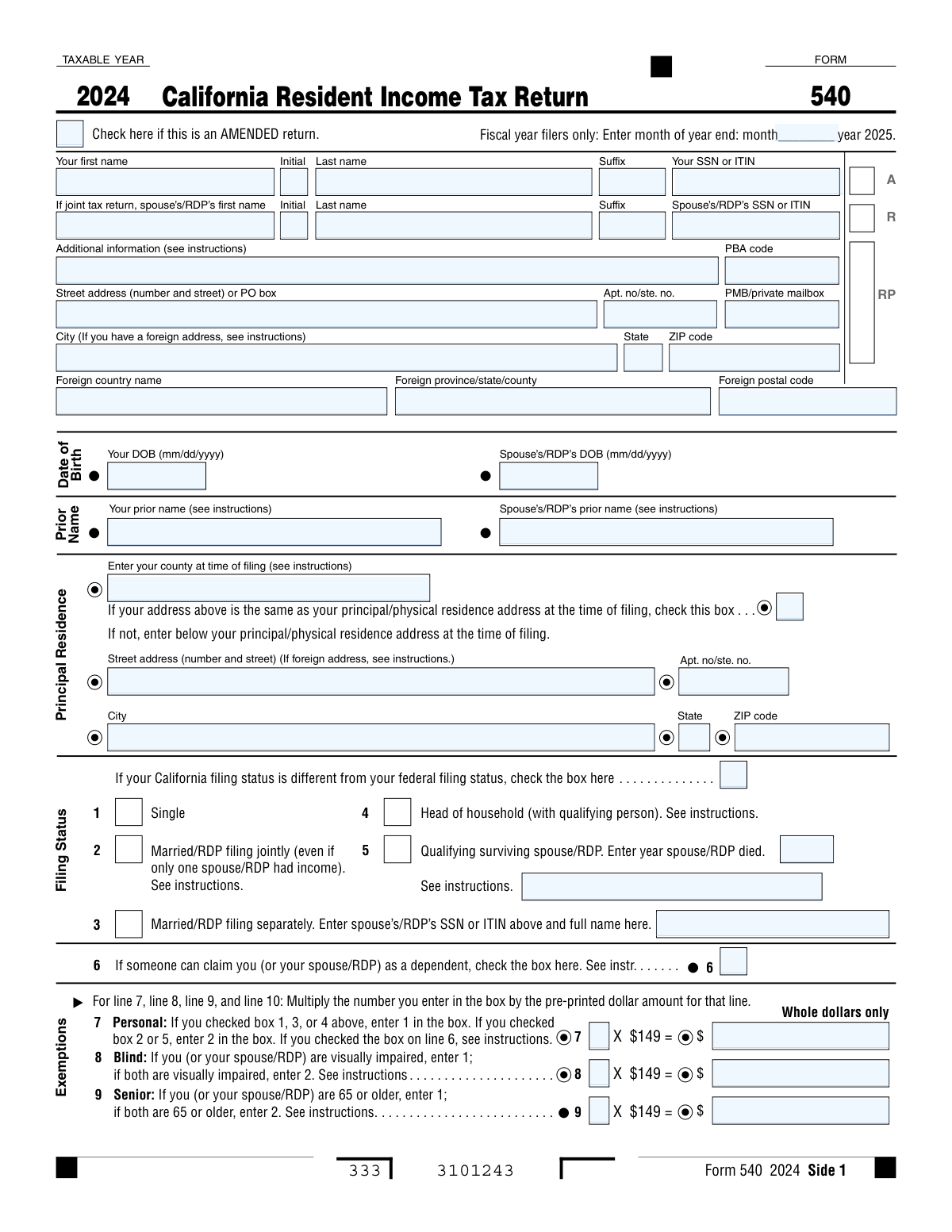
Yes! You can use AI to fill out Form 540, California Resident Income Tax Return (2024)

Form 540 is the primary state income tax form for individuals who were residents of California for the entire tax year. Taxpayers use this form to determine their adjusted gross income, calculate their tax liability based on California's tax rates, claim exemptions and credits, and figure out if they owe additional tax or are due a refund. Today, this form can be filled out quickly and accurately using AI-powered services like Instafill.ai, which can also convert non-fillable PDF versions into interactive fillable forms.
Form 540 is part of the California tax forms and income tax forms categories on Instafill.
Form 540 has a complex Form Complexity Index of 78/100 — 172 fillable fields across 6 pages. Instafill’s AI completes it accurately in under a minute.

Form specifications

Form name: Form 540, California Resident Income Tax Return (2024)
Number of fields: 172
Number of pages: 6
FCI: Complex (78/100)
Language: English
Our AI automatically handles information lookup, data retrieval, formatting, and form filling.
It takes less than a minute to fill out Form 540 using our AI form filling.
Securely upload your data. Information is encrypted in transit and deleted immediately after the form is filled out.
Preview of Form 540, California Resident Income Tax Return (2024)

Instafill Demo: How to fill out PDF forms in seconds with AI

How to Fill Out Form 540 Online for Free in 2026

Are you looking to fill out a FORM 540 form online quickly and accurately? Instafill.ai offers the #1 AI-powered PDF filling software of 2026, allowing you to complete your FORM 540 form in just 37 seconds or less.
Follow these steps to fill out your FORM 540 form online using Instafill.ai:
  1. 1 Navigate to Instafill.ai and upload your Form 540 or select it from the template library.
  2. 2 Provide your personal information, including your name, address, Social Security Number (SSN), and filing status, allowing the AI to populate the relevant fields.
  3. 3 Enter your income details, such as state wages from your W-2 and your federal Adjusted Gross Income (AGI) from Form 1040.
  4. 4 Detail any California-specific adjustments, deductions, and claim exemptions for yourself, your spouse, and any dependents.
  5. 5 Calculate your tax liability and apply any applicable credits, such as the renter's credit or child and dependent care expenses credit.
  6. 6 Report all payments made, including tax withheld and estimated tax payments, to determine your final tax due or the refund you will receive.
  7. 7 Review the completed form for accuracy, provide your electronic signature, and follow the instructions for submission and payment or direct deposit.

Our AI-powered system ensures each field is filled out correctly, reducing errors and saving you time.

Why Choose Instafill.ai for Your Fillable Form 540 Form?

Speed

Complete your Form 540 in as little as 37 seconds.

Up-to-Date

Always use the latest 2026 Form 540 form version.

Cost-effective

No need to hire expensive lawyers.

Accuracy

Our AI performs 10 compliance checks to ensure your form is error-free.

Security

Your personal information is protected with bank-level encryption.

Frequently Asked Questions About Form 540

Form 540 has a Form Complexity Index of 78 out of 100, placing it in the complex complexity tier. This score is calculated deterministically from the form’s own structure using Instafill’s published Form Complexity Index methodology, so it can be reproduced and independently verified — it is not a subjective estimate.

For Form 540 specifically, the score reflects 172 fillable fields across 6 pages, grouped into 50 sections, and 48 conditional fields that only apply depending on earlier answers, 6 tables or repeating lists. The number of fields is the largest factor in the base score (weighted 36%), followed by how difficult those fields are to complete based on their type, where free-text and signature fields count for more than simple checkboxes (26%). The number of pages that actually contain fields (15%), the amount of conditional “fill-only-if” logic (16%), and how many sections the form is divided into (7%) account for the rest of the base. On top of that base, the index adds points for tables and repeating lists, bundled instruction pages, and dense page layouts — capturing difficulty the base alone can miss.

In practical terms, a complex score means the form is demanding, with many fields, multiple pages and branching rules that are easy to get wrong. Instafill removes that effort entirely: our AI reads your information, maps each value to the correct field — including the conditional ones — and completes Form 540 accurately in under a minute, with every field available for you to review before you download. See exactly how the Form Complexity Index is calculated.

Form 540 is the California Resident Income Tax Return. You must file this form if you are a California resident for the entire year and are required to file a state tax return.

You will need your Social Security Number (SSN) or ITIN, a copy of your federal tax return (Form 1040), and your W-2 forms showing your California state wages in box 16. Also gather any other records of income, deductions, and credits.

If your California filing status is different from your federal status, which is common for Registered Domestic Partners (RDPs), you must check the designated box in the Filing Status section of the form.

This means another person, like a parent, provides more than half of your financial support and can claim you on their tax return. If this applies to you, check the box on line 6, as it affects your available exemptions and standard deduction.

Your Federal AGI is found on line 11 of your federal Form 1040 or 1040-SR. This amount is the starting point for calculating your California adjusted gross income.

You should calculate your California itemized deductions using Schedule CA (540) and compare that total to the standard deduction for your filing status. Enter whichever amount is larger on line 18 to get the greatest tax benefit.

Use tax is for items purchased from an out-of-state seller for use in California without paying California sales tax. You must not leave this line blank; enter your calculated use tax, or check one of the boxes if you owe no use tax.

This is a penalty for not having qualifying health care coverage for the entire year. If you and your household had full-year coverage (including Medicare Part A or C), check the box on line 92 to indicate this and avoid the penalty.

Yes, the form allows you to direct deposit your refund into one or two separate accounts. You must provide the routing number, account number, account type, and the specific dollar amount to deposit into each.

The mailing address depends on whether you are getting a refund or have a tax due. For refunds, mail to PO BOX 942840, SACRAMENTO CA 94240-0001; for payments, mail to PO BOX 942867, SACRAMENTO CA 94267-0001.

To fix an error on a return you have already filed, you must file an amended return. Use a new Form 540 for the same tax year and check the 'AMENDED return' box at the top of the form.

Yes, services like Instafill.ai use AI to accurately auto-fill form fields from your existing records, which can save you time and help reduce errors. This makes completing complex forms much faster and easier.

To fill out your form online, you can upload the PDF to a service like Instafill.ai. The platform's AI will help you fill in the required fields, making the process quick, efficient, and easy to manage digitally.

If you have a non-fillable or 'flat' PDF, you can upload it to a service like Instafill.ai. Their technology can convert it into an interactive, fillable form that you can easily complete and save online.

Compliance Form 540
Validation Checks by Instafill.ai

1
Validates SSN/ITIN Format and Uniqueness
This check ensures that the Social Security Number (SSN) or Individual Taxpayer Identification Number (ITIN) for both the primary filer and spouse/RDP consists of exactly nine digits. It also verifies that the primary filer's SSN/ITIN is not identical to the spouse's/RDP's SSN/ITIN. This is critical for accurate taxpayer identification and to prevent processing rejections. A failure would halt the submission and require the user to correct the number.
2
Ensures Filing Status Consistency and Completeness
This validation verifies that only one filing status box is checked. If 'Married/RDP filing separately' (box 3) is selected, it confirms that the spouse's/RDP's SSN and full name are provided. If 'Qualifying surviving spouse/RDP' (box 5) is selected, it confirms the 'year spouse/RDP died' field is filled. This logic ensures the tax is calculated using the correct rules and rates, and failure results in a rejection due to incomplete or contradictory information.
3
Verifies Eligibility for Senior Exemption Based on Date of Birth
This check cross-references the 'Senior Exemptions Claimed' on line 9 with the 'Date of Birth' fields. A filer or their spouse/RDP must be 65 or older by the end of the tax year to claim this exemption. This validation prevents incorrect claims for tax exemptions. If the age derived from the date of birth does not meet the requirement, the exemption claim will be disallowed and the tax liability will be recalculated.
4
Validates Personal Exemption Calculation on Line 7
This check verifies that the 'Total Personal Exemption Amount' on line 7 is the correct product of the 'Personal Exemption Quantity' and the pre-printed dollar amount ($149). It also validates that the quantity entered (1 or 2) is consistent with the selected filing status. Correctly calculating exemptions is fundamental to determining the final tax liability, and an error here will cause the entire return's calculations to be incorrect.
5
Ensures Total Exemption Summation on Line 11 is Correct
This validation confirms that the amount on line 11 ('Exemption amount') is the precise sum of the calculated exemption amounts from lines 7, 8, 9, and 10. This total is a key input for calculating the final tax, so its accuracy is paramount. A miscalculation here will directly impact the tax due or refund amount and will cause the return to be flagged for review or correction.
6
Validates Taxable Income Calculation on Line 19
This check ensures the amount on line 19 ('Taxable Income') is correctly calculated by subtracting line 18 from line 17. It also enforces the rule that the result cannot be negative; if the calculation results in a negative number, the value must be entered as zero. Since this is the base amount for tax calculation, an error here invalidates the entire tax computation and will block the form from being processed.
7
Validates Conditional Entry of Principal Residence Address
This check ensures that the detailed principal residence address fields are filled out only if the 'Principal Residence Same As Above' checkbox is left unchecked. This prevents redundant or conflicting address information on the return. If the box is checked and the address fields are also filled, it creates an ambiguity that can delay processing or cause official notices to be sent to the wrong address.
8
Ensures Mutual Exclusivity of 'Amount You Owe' and 'Refund'
This validation checks that either 'AMOUNT YOU OWE' (line 111) or 'REFUND' (line 115) has a value greater than zero, but not both. The correct field to populate is determined by the final calculations of total tax versus total payments. Having values in both fields is a critical logical error that makes the form's outcome nonsensical and would prevent it from being processed.
9
Validates Direct Deposit Routing Number Format
This check verifies that any routing number entered for direct deposit is exactly nine digits long. It should also be validated against a directory of valid routing transit numbers (RTNs). This is crucial for ensuring the taxpayer's refund is sent to the correct financial institution. An invalid number will cause the direct deposit to fail, forcing the tax authority to mail a paper check and significantly delaying the refund.
10
Ensures Complete Information for Each Claimed Dependent
For each dependent listed on line 10, this validation ensures that the First Name, Last Name, SSN, and Relationship fields are all completed. Incomplete information for a dependent can lead to the disallowance of the dependent exemption and any related credits. This would require correspondence with the tax agency and a potential adjustment of the tax owed, causing delays and possible penalties.
11
Validates Use Tax Field Completion on Line 91
This check ensures that line 91, 'Use Tax', is not left blank, as instructed on the form. The filer must enter a dollar amount (which can be '0.00') or check one of the two boxes below it. This is a compliance requirement to ensure filers have considered their use tax liability. A blank field will cause the form to be considered incomplete and rejected during processing.
12
Verifies Total Payments Calculation on Line 78
This validation confirms that the amount on line 78 ('total payments') is the correct sum of all payments and credits listed on lines 71 through 77. This total is critical for determining whether the filer has overpaid (is due a refund) or underpaid (owes tax). An error in this summation will lead to an incorrect refund or balance due calculation, requiring correction and potentially incurring penalties.
13
Validates Third Party Designee Conditional Logic
This check ensures that the 'Third Party Designee’s Name' and 'Telephone Number' fields are only filled if the 'Yes' box is checked for allowing another person to discuss the return. This prevents the submission of unnecessary personal data and ensures the filer's intent is clear. If 'No' is checked but designee information is present, the form should be flagged for user review to resolve the contradiction.
14
Verifies Standard Deduction Logic for Dependents
This check validates the rule for line 18, which states that if the box on line 6 ('someone can claim you as a dependent') is checked, the filer cannot simply enter the standard deduction. The form instructs them to stop and see instructions, implying a different calculation is needed. The system should flag an error if line 6 is checked and a standard deduction amount is entered on line 18 without following the specific worksheet for dependents. This prevents an incorrect deduction from being claimed, which would understate taxable income.

Common Mistakes in Completing Form 540

Selecting the Wrong Filing Status

Filers often choose a less advantageous status, like 'Single' instead of 'Head of Household', due to misunderstanding the specific eligibility rules. This error can significantly increase tax liability or reduce the refund by missing out on a larger standard deduction and more favorable tax brackets. Always review the criteria for each status in the form instructions; AI-powered tools like Instafill.ai can also guide you to the correct status by asking a series of simple questions.

Incorrectly Listing Dependent Information

Mistakes on line 10, such as entering an incorrect Social Security Number (SSN), misspelling a name, or claiming an individual who doesn't qualify, are very common. An incorrect SSN will cause the FTB to disallow the exemption credit, leading to a tax adjustment, penalties, and processing delays. To avoid this, double-check all dependent details against their Social Security cards before entering them on the form.

Miscalculating Exemption Credit Amounts

Lines 7 through 10 require the filer to multiply a number of exemptions by a pre-printed dollar amount, a common spot for manual math errors. A miscalculation here directly impacts the total exemption credit on line 11 and the final tax on line 33, potentially leading to an incorrect payment or refund. Using a calculator is essential, and automated form-filling tools like Instafill.ai eliminate this risk by performing all calculations automatically.

Overlooking the 'Can be Claimed as a Dependent' Box

Students or other individuals who can be claimed as a dependent by someone else (like a parent) often forget to check the box on line 6. Failing to check this box leads to incorrectly claiming a personal exemption and the full standard deduction, resulting in an underpayment of tax and potential penalties. If there's any chance someone else supports you and can claim you on their return, you must check this box.

Entering the Wrong Federal Adjusted Gross Income (AGI)

Line 13 requires filers to copy their AGI from their federal Form 1040, and a simple transcription error can invalidate the entire state tax calculation. This single mistake cascades through the form, affecting California AGI and taxable income. To prevent this, carefully verify the amount on federal Form 1040, line 11, before entering it; smart tools can automatically carry over this value from your federal return.

Leaving the Use Tax Line Blank

The form explicitly states 'Do not leave blank' for the Use Tax line (line 91), yet many filers ignore it, assuming it doesn't apply. Use tax is owed on items purchased from out-of-state sellers for use in California where no California sales tax was paid. Leaving it blank can flag the return for review; you must enter '0' and check the 'No use tax is owed' box if that is the case.

Incorrect Bank Account or Routing Numbers for Direct Deposit

Typos in the routing or account numbers on Side 5 are a frequent and frustrating cause of refund delays. An incorrect number will cause the electronic deposit to be rejected by the bank, forcing the FTB to mail a paper check, which can take several additional weeks to arrive. Always double- or triple-check these numbers before filing; AI tools like Instafill.ai can help by validating routing number formats.

Missing or Incomplete Signatures

An unsigned tax return is considered invalid and will not be processed, delaying any refund and potentially causing late filing penalties. For joint returns (Filing Status 2), it is critical that both spouses or RDPs sign the form on Side 6. This simple oversight is one of the most common reasons for a return to be immediately rejected by the tax agency.

Mishandling Health Care Coverage Information

Filers who had qualifying health coverage for the entire year may forget to check the box on line 92. If this box is left unchecked, the FTB may automatically assess the Individual Shared Responsibility Penalty, leading to an incorrect tax bill and a formal notice. It is crucial to check this box if you had full-year coverage to avoid unnecessary correspondence and penalties.

Failing to Choose the Optimal Deduction Method

On line 18, filers must enter either their standard deduction or their California itemized deductions from Schedule CA (540). Many people automatically take the standard deduction for simplicity without checking if their itemized deductions would be higher, potentially resulting in a smaller deduction and a higher tax bill. It's always best to calculate both to ensure you are minimizing your tax liability.
Saved over 80 hours a year

“I was never sure if my IRS forms like W-9 were filled correctly. Now, I can complete the forms accurately without any external help.”

Kevin Martin Green

Your data stays secure with advanced protection from Instafill and our subprocessors

Robust compliance program

Transparent business model

You’re not the product. You always know where your data is and what it is processed for.

ISO 27001, HIPAA, and GDPR

Our subprocesses adhere to multiple compliance standards, including but not limited to ISO 27001, HIPAA, and GDPR.

Security & privacy by design

We consider security and privacy from the initial design phase of any new service or functionality. It’s not an afterthought, it’s built-in, including support for two-factor authentication (2FA) to further protect your account.

Fill out Form 540 with Instafill.ai

Worried about filling PDFs wrong? Instafill securely fills form-540-california-resident-income-tax-return-2024 forms, ensuring each field is accurate.

Related forms by category

California tax forms Form FTB 3514, California Earned Income Tax Credit, Form 540 2EZ, California Resident Tax Return, California Department of Tax and Fee Administration Form CDTFA-230, General Resale Certificate, Form 540NR, California Nonresident Tax Return (2022), Form 540NR, California Nonresident Tax Return (2023), Form DE 4, Employee’s Withholding Allowance Certificate (Rev. 56), Form 540, California Resident Income Tax Return (2023)
income tax forms Form 1040-X, Amended U.S. Individual Income Tax Return, Form 1040-C, U.S. Departing Alien Income Tax Return, Form 4137, Social Security and Medicare Tax on Unreported Tip Income, Form 8960, Net Investment Income Tax, Form 990-T, Exempt Org Business Income Tax Return, Form 945, Annual Return of Withheld Federal Income Tax, Form FTB 3514, California Earned Income Tax Credit, Form 1120-S, U.S. Income Tax Return for an S Corporation, Form 1040, U.S. Individual Income Tax Return, Arizona Form 285-I, Individual Income Tax Disclosure/Representation Authorization Form, Form 1120-S (2025), U.S. Income Tax Return for an S Corporation, Form 1120 (2025), U.S. Corporation Income Tax Return, 2023 Schedule IL-E/EIC, Illinois Exemption and Earned Income Tax Credit (Illinois Department of Revenue), 2023 Form IL-1040-X, Amended Individual Income Tax Return (Illinois Department of Revenue), Form APL-505, Taxpayer’s Earned Income Tax Credit Protest, Form 1120-H, U.S. Income Tax Return for Homeowners Associations, Form 1040, U.S. Individual Income Tax Return (2025), T2 Corporation Income Tax Return, Form 1040-X, Amended U.S. Individual Income Tax Return, Form TC-40, Utah Individual Income Tax Return · + 25 more →