
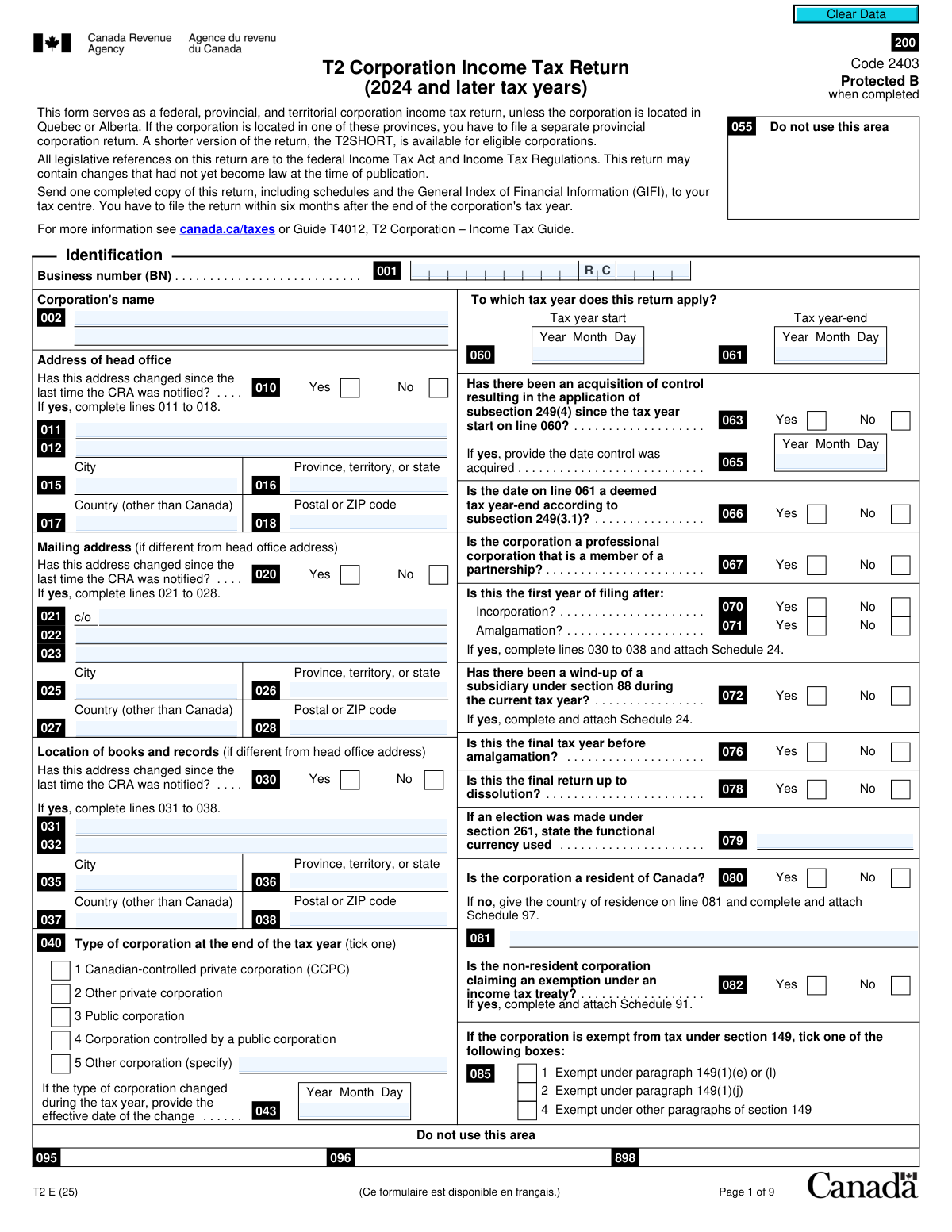
Yes! You can use AI to fill out T2 Corporation Income Tax Return
Don't type 369 fields by hand. Tell our AI about yourself, or upload your W-2 or last year's return, and it fills every field in seconds. You check it, then download, print or sign.
The AI does the filling. You just check it.
No typing into boxes, nothing to install.
What this form asks for
The AI fills all of it, from your answers or your documents.
The AI checks your answers before you download
12 checks built for this form, so a wrong date or a missing answer is caught before anyone else sees it.
Checks that the Business Number (BN) on line 001 follows the standard 9-digit numeric, 2-letter program identifier (RC), and 4-digit account number format (e.g., 123456789RC0001). This is crucial for correctly identifying the corporation and routing the return within the Canada Revenue Agency (CRA) systems. A failure in this validation would prevent the return from being processed or could lead to it being associated with the wrong account.
This validation confirms that the date entered for the tax year-end (line 061) is chronologically after the date for the tax year start (line 060). A tax year cannot end before it begins, and this check prevents fundamental logical errors in defining the reporting period. If this check fails, the entire return's financial data is invalid as it pertains to a nonsensical timeframe.
Verifies that if the 'Yes' box is checked for an address change (lines 010, 020, or 030), the corresponding address fields (lines 011-018, 021-028, or 031-038) are completed. This ensures the CRA has the most current address on file for correspondence and legal notices. Failure to provide the new address after indicating a change would result in an incomplete submission and potential missed communications from the CRA.
Checks that if 'Yes' is selected for an acquisition of control (line 063), a valid date is entered on line 065. This date is legally significant as it triggers a deemed year-end and affects the application of tax rules, such as loss carryforwards. An omission would make it impossible to correctly assess the tax implications of the control change.
This validation ensures that if the corporation is identified as a non-resident of Canada (line 080 is 'No'), the country of residence is specified on line 081. This information is essential for determining which tax treaties may apply and the corporation's overall tax obligations in Canada. Without this information, the CRA cannot process the return correctly for a non-resident entity.
Confirms that if the filer indicates this is the first year of filing after an amalgamation (line 071 is 'Yes'), the required Schedule 24 is included with the submission. Schedule 24 provides critical details about the amalgamated entities. Missing this schedule would result in an incomplete return and a request for more information, delaying the assessment.
And 6 more checks
- Requires Specification for 'Other' Corporation Type
- Validates Canadian Postal Code Format
- Validates Sum of Principal Revenue Percentages
- Verifies Taxable Income Calculation Integrity
- Ensures All Certification Fields are Completed
- Validates Language of Correspondence Code
Let AI fill out your T2
No typing. Every field filled in seconds, checked, ready to sign.
How to Fill Out T2 Online for Free in 2026
What the AI walks you through.
- Navigate to Instafill.ai and upload your T2 form or select it from the template library.
- Provide your corporation's identification details, including Business Number (BN), name, and address. Let the AI assist by auto-filling information from your secure profile.
- Answer the series of questions on pages 2 and 3 to determine which schedules are required. The AI can help identify necessary attachments based on your corporation's activities.
- Enter your financial data to calculate net income, taxable income, and any applicable deductions like the Small Business Deduction. The platform's AI performs complex calculations automatically to ensure accuracy.
- Review the summary of tax and credits, which consolidates all federal and provincial taxes, deductions, and payments to determine the final balance owing or refund.
- Complete the certification section with the authorized signing officer's information and obtain a digital signature.
- Download the completed T2 return and all accompanying schedules, ready for filing with the Canada Revenue Agency (CRA).
Common Mistakes in Completing T2
The ones the AI is built to catch.
Entering an Incorrect or Incomplete Business Number (BN)
Misclassifying the Corporation Type
Failing to Attach Required Schedules
Neglecting to Report Address Changes
Failing to Prorate the Business Limit for a Short Tax Year
Mismatching Net Income with Financial Statements
Incorrectly Carrying Forward RDTOH Balances
Omitting Tax Instalments Paid
Providing a Vague Business Activity Description
Submitting an Unsigned or Incomplete Certification
Frequently Asked Questions About T2
Is it really free for 7 days?
Can I fill other forms too?
How do I cancel?
How does the AI fill out T2?
What happens to my information?
How complex is T2 to fill out?
What is the T2 Corporation Income Tax Return form?
Who is required to file a T2 return?
When is the T2 return due?
My corporation is in Alberta. Do I still use this form?
What are the 'Schedules' listed in the Attachments section?
My corporation had no business activity this year. Do I still need to file?
What is the General Index of Financial Information (GIFI)?
What information is required in the 'Identification' section?
Is this the first year for my corporation. Is there a special instruction?
What is the difference between the T2 and the T2 Short return?
Can I use an AI tool to help fill out my T2 form?
How can I fill out the T2 form online?
The T2 PDF I downloaded is not fillable. What should I do?
Where do I send the completed T2 return?
Get your T2 filled out by AI
$0 today. Cancel before Nov 1 and you pay nothing.
Other forms like this one
income forms: Form SSA-44, Medicare Income-Related Monthly Adjustment Amount - Life-Changing Event, Form 1040-X, Amended U.S. Individual Income Tax Return, Form 1040-C, U.S. Departing Alien Income Tax Return, Form 4137, Social Security and Medicare Tax on Unreported Tip Income, Form 8960, Net Investment Income Tax, Form 1042-S, Foreign Person’s U.S. Income, Form 990-T, Exempt Org Business Income Tax Return, Form 945, Annual Return of Withheld Federal Income Tax, Form 568, LLC Income Return, Form FTB 3514, California Earned Income Tax Credit, Form 1099-INT, Interest Income, Form 1120-S, U.S. Income Tax Return for an S Corporation, Form 1065, U.S. Return of Partnership Income, Form 1040, U.S. Individual Income Tax Return, Form FL-150, Income and Expense Declaration, Form 122A-1, Chapter 7 Statement of Current Monthly Income, Arizona Form 285-I, Individual Income Tax Disclosure/Representation Authorization Form, Form SSA-8000-BK, Application for Supplemental Security Income (SSI), Judicial Council of California Form FL-150, Income and Expense Declaration, Form 1120-S (2025), U.S. Income Tax Return for an S Corporation
income tax forms: Form 1040-X, Amended U.S. Individual Income Tax Return, Form 1040-C, U.S. Departing Alien Income Tax Return, Form 4137, Social Security and Medicare Tax on Unreported Tip Income, Form 8960, Net Investment Income Tax, Form 990-T, Exempt Org Business Income Tax Return, Form 945, Annual Return of Withheld Federal Income Tax, Form FTB 3514, California Earned Income Tax Credit, Form 1120-S, U.S. Income Tax Return for an S Corporation, Form 1040, U.S. Individual Income Tax Return, Arizona Form 285-I, Individual Income Tax Disclosure/Representation Authorization Form, Form 1120-S (2025), U.S. Income Tax Return for an S Corporation, Form 1120 (2025), U.S. Corporation Income Tax Return, 2023 Schedule IL-E/EIC, Illinois Exemption and Earned Income Tax Credit (Illinois Department of Revenue), 2023 Form IL-1040-X, Amended Individual Income Tax Return (Illinois Department of Revenue), Form APL-505, Taxpayer’s Earned Income Tax Credit Protest, Form 1120-H, U.S. Income Tax Return for Homeowners Associations, Form 1040, U.S. Individual Income Tax Return (2025), Form 1040-X, Amended U.S. Individual Income Tax Return, Form TC-40, Utah Individual Income Tax Return, Form T101, Statement of Resource Expenses
Let AI fill out your T2
Your trial starts once a card is added. You pay nothing before Nov 1.
Our AI already knows this form, all 369 fields of it. Skip the typing: tell it about yourself, or upload what you have, and it fills the whole form in seconds.
- AI fills every field on all 9 pages, checkboxes included
- No typing into boxes: answer a few questions, or upload your W-2 or last year's return, an old copy of this form, a photo of a document
- The AI checks the answers; you review and change anything before you download
- Download the finished PDF, print it, or sign it online
- Encrypted, and never used to train AI
Cancel before Nov 1 and you pay nothing.
A card is needed to start the trial. Cancel in two clicks from your account.
Terms · Privacy