Yes! You can use AI to fill out Form APL-505, Taxpayer’s Earned Income Tax Credit Protest
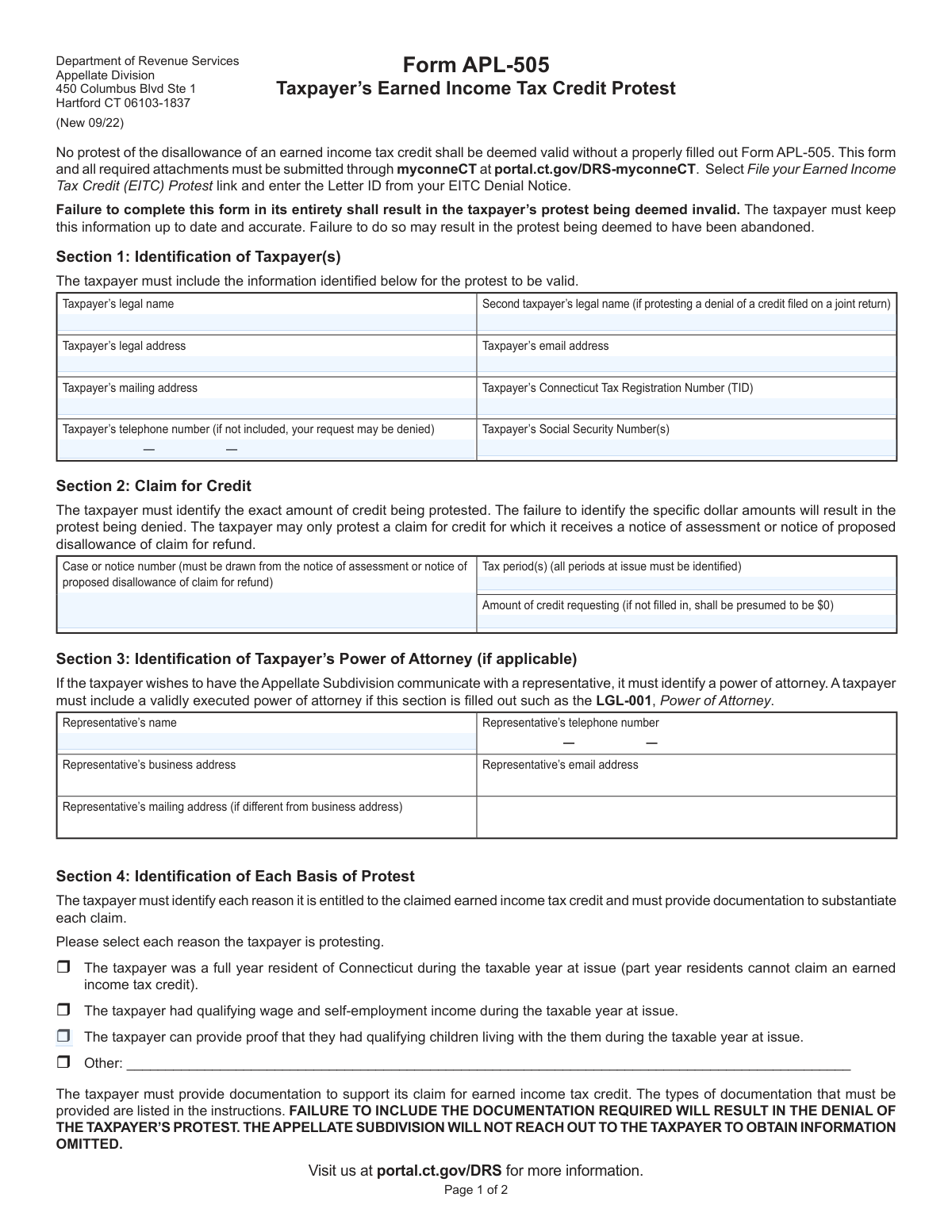
Form APL-505 is a Connecticut DRS Appellate Division form that a taxpayer must submit to challenge (protest) a notice of assessment or a notice of proposed disallowance of an EITC claim/refund. It requires the taxpayer to identify the case/notice number, tax period(s), the exact dollar amount of credit being protested, and the specific basis for the protest, along with supporting documentation. The form is important because an EITC protest is not considered valid without a properly completed APL-505 and required attachments, and missing details (like the specific dollar amount or documentation) can result in denial or abandonment of the protest. Today, this form can be filled out quickly and accurately using AI-powered services like Instafill.ai, which can also convert non-fillable PDF versions into interactive fillable forms.
Our AI automatically handles information lookup, data retrieval, formatting, and form filling.
It takes less than a minute to fill out APL-505 using our AI form filling.
Securely upload your data. Information is encrypted in transit and deleted immediately after the form is filled out.
Form specifications
| Form name: | Form APL-505, Taxpayer’s Earned Income Tax Credit Protest |
| Number of pages: | 1 |
| Filled form examples: | Form APL-505 Examples |
| Language: | English |
| Categories: | income forms |
Instafill Demo: filling out a legal form in seconds
How to Fill Out APL-505 Online for Free in 2026
Are you looking to fill out a APL-505 form online quickly and accurately? Instafill.ai offers the #1 AI-powered PDF filling software of 2026, allowing you to complete your APL-505 form in just 37 seconds or less.
Follow these steps to fill out your APL-505 form online using Instafill.ai:
- 1 Go to Instafill.ai and upload Form APL-505 (or select it from the form library) and start an AI-guided fill session.
- 2 Enter taxpayer identification details from Section 1 (legal name(s), addresses, email, phone, CT Tax Registration Number (TID), and Social Security Number(s)).
- 3 Complete Section 2 by entering the case/notice number, tax period(s), and the exact dollar amount of EITC credit being protested (pulled from the DRS notice).
- 4 If using a representative, fill Section 3 with the power of attorney information and upload a valid executed POA (e.g., LGL-001) as an attachment.
- 5 Select each applicable basis for protest in Section 4 and provide a clear written explanation of entitlement to the EITC, letting the AI help draft a concise, consistent narrative.
- 6 Upload and list all supporting documents (e.g., notice being protested, W-2s/paystubs, CT-EITC SEQ and business records if self-employed, residency proof, and qualifying child documentation) and check the required attachment affirmations in Section 5.
- 7 Complete Section 6 affirmation, add printed names, signatures, and dates, then download the finalized packet for submission through myconneCT (File your Earned Income Tax Credit (EITC) Protest link using the Letter ID from the EITC Denial Notice).
Our AI-powered system ensures each field is filled out correctly, reducing errors and saving you time.
Why Choose Instafill.ai for Your Fillable APL-505 Form?
Speed
Complete your APL-505 in as little as 37 seconds.
Up-to-Date
Always use the latest 2026 APL-505 form version.
Cost-effective
No need to hire expensive lawyers.
Accuracy
Our AI performs 10 compliance checks to ensure your form is error-free.
Security
Your personal information is protected with bank-level encryption.
Frequently Asked Questions About Form APL-505
Form APL-505 is used to protest Connecticut DRSās denial or disallowance of a Connecticut Earned Income Tax Credit (EITC) claim. It is required for an EITC protest to be considered valid by the Appellate Division.
You must file Form APL-505 if you received a Notice of Assessment or a Notice of Proposed Disallowance of Claim for Refund related to CT EITC and you want to protest it. If the EITC was claimed on a joint return, include both taxpayersā information and signatures where applicable.
Noāthis form and all required attachments must be submitted through myconneCT. Use the āFile your Earned Income Tax Credit (EITC) Protestā link and enter the Letter ID from your EITC Denial Notice.
DRS states that failure to complete the form in its entirety will result in the protest being deemed invalid. Missing required fields (like the credit amount or contact information) can lead to denial.
You must provide your legal name, address(es), email, phone number, Connecticut Tax Registration Number (TID), and Social Security Number(s). If the protest relates to a joint return, include the second taxpayerās legal name and information as applicable.
You must list the case/notice number from your notice, the tax period(s) at issue, and the exact dollar amount of credit you are protesting. If you do not identify the specific dollar amount, the protest will be denied (and if the amount is left blank, it may be presumed to be $0).
The case/notice number must be taken from the Notice of Assessment or Notice of Proposed Disallowance. The Letter ID is found on your EITC Denial Notice and is entered in myconneCT when you file the protest.
Yes, but DRS will only communicate with a representative if you identify a power of attorney and include a valid executed POA (such as Form LGL-001). Provide the representativeās name, contact details, and addresses in Section 3.
You must check each basis for your protest (full-year CT residency, qualifying wage/self-employment income, qualifying children living with you, or āOtherā) and provide documentation supporting each selected reason. DRS warns that it will not contact you to obtain missing informationāomissions can result in denial.
You must provide a copy of your January and December utility bills and any other evidence showing whether you moved in or out of Connecticut. Part-year residents cannot claim the CT EITC, so residency documentation is critical.
For wages, provide Form W-2 or the last paystub from each employer for the tax year at issue (for you and your spouse if applicable). If self-employed, complete Form CT-EITC SEQ and include business records covering two months of the tax year.
For each child claimed, provide the long-form birth certificate and any required proof of relationship (for example, for nieces/nephews, grandchildren, adopted/foster children). You must also provide proof the child lived with you during the tax year, such as school, medical, childcare (not a relative), or social service records showing names, address, and dates.
Yes. The form instructs you to attach all supporting documents to Form APL-505 even if they were previously provided to the Audit Division, and to list all documents you are submitting.
You must attach (1) a copy of the notice you are protesting and (2) copies of all documentary evidence you want the Appellate Subdivision to consider. You must affirm these are attached by checking the boxes in Section 5.
YesāAI tools can help organize your information and auto-fill fields; services like Instafill.ai use AI to accurately populate form fields and save time. If your PDF is flat/non-fillable, Instafill.ai can convert it into an interactive fillable form and then help you complete it for submission through myconneCT.
Compliance APL-505
Validation Checks by Instafill.ai
1
Requires Taxpayer Legal Name to be Present and Non-Placeholder
Validates that the taxpayerās legal name field is completed with a plausible full name (not blank, not 'N/A', not only initials or symbols). This is essential to identify the protesting party and match the protest to DRS records. If missing or clearly invalid, the submission should be rejected as incomplete/invalid.
2
Validates Joint Return Consistency for Second Taxpayer Fields
Checks that the second taxpayerās legal name and spouse signature/name fields are provided when the protest relates to a joint return, and are omitted (or explicitly marked not applicable) when not joint. This prevents mismatches between the protest and the underlying filing status. If joint indicators are present but spouse fields are missing (or vice versa), the system should flag the submission for correction.
3
Validates Taxpayer Social Security Number Format and Count
Ensures SSN(s) are provided in a valid 9-digit format (e.g., ###-##-#### or #########), and that the number of SSNs aligns with whether one or two taxpayers are listed. Correct SSNs are critical for identity matching and case association. If SSN format is invalid or the count does not match the taxpayer entries, the submission should fail validation.
4
Validates Connecticut Tax Registration Number (TID) Presence and Format
Checks that the Connecticut Tax Registration Number (TID) is present and conforms to expected formatting rules (length/character set) used by the agency. The TID is a key identifier for linking the protest to the taxpayerās account. If missing or malformed, the system should block submission or require correction before filing.
5
Validates Taxpayer Contact Information Completeness (Email and Phone)
Verifies that the taxpayer email address is present and matches standard email syntax, and that a telephone number is provided in a valid phone format (e.g., 10 digits with optional separators). The form states the phone number omission may result in denial, and contact details are needed for procedural communications. If email/phone are missing or invalid, the system should prompt correction and may prevent submission.
6
Validates Address Completeness and Logical Separation (Legal vs Mailing)
Ensures the legal address and mailing address fields are complete (street, city, state, ZIP) and that the mailing address is either provided or explicitly indicated as same as legal address. Accurate addresses are required for notices and to support residency-related claims. If required address components are missing or state/ZIP are invalid, the submission should be rejected or returned for completion.
7
Requires Case/Notice Number and Validates Format Against Notice Standards
Checks that the case or notice number is provided and matches the expected pattern/length used on a notice of assessment or proposed disallowance (e.g., alphanumeric with specific prefixes). This is necessary to tie the protest to an eligible notice and the correct dispute record. If absent or not in a recognized format, the protest should be treated as invalid and not accepted.
8
Validates Tax Period(s) Entry and Parsability
Ensures tax period(s) are provided for all periods at issue and are in an accepted format (e.g., tax year YYYY, or period start/end dates). This prevents ambiguity about which assessment/disallowance is being protested. If the period is missing, unparseable, or contradictory (e.g., end before start), the system should require correction before submission.
9
Requires Specific Dollar Amount for Credit Requested and Validates Numeric Rules
Validates that the 'Amount of credit requesting' is explicitly entered as a numeric currency amount (no text), is not negative, and uses valid precision (e.g., two decimals). The form states failure to identify specific dollar amounts will result in denial, and blank may be presumed $0, which can unintentionally waive the claim. If missing or invalid, the system should block submission and require an explicit amount confirmation.
10
Ensures At Least One Basis of Protest is Selected and 'Other' is Described
Checks that at least one checkbox in Section 4 is selected, and if 'Other' is selected, the accompanying text explanation is non-empty and meaningful. The agency requires each basis to be identified to avoid waiver of issues. If no basis is selected or 'Other' lacks detail, the submission should fail validation and request completion.
11
Validates Residency Basis Consistency (Full-Year CT Resident Requirement)
If the taxpayer selects the full-year Connecticut residency basis, the system should require the taxable year at issue to be specified and ensure the claim does not indicate part-year residency elsewhere in the submission. The instructions state part-year residents cannot claim the credit, so inconsistent residency assertions undermine eligibility. If residency basis conflicts with provided addresses/period statements or indicates part-year residency, the system should flag for correction or require additional clarification.
12
Requires Narrative Explanation of Entitlement to the Credit
Validates that the free-text explanation field is completed with a minimum amount of substantive content (not blank, not only 'see attached'). This explanation is necessary for the Appellate Subdivision to understand the dispute and evaluate the claim. If missing or clearly non-responsive, the submission should be rejected as incomplete.
13
Requires Document List Field to be Completed and Match Attachments
Checks that the taxpayer lists all documents being submitted and that the list is not empty when attachments are indicated. This supports the formās waiver language and ensures the record is complete for review. If the list is blank or does not correspond to uploaded attachments, the system should prompt the filer to reconcile the list and uploads before acceptance.
14
Validates Mandatory Attachments Affirmation and Presence of Files
Ensures both attachment affirmation checkboxes are checked and that actual files are uploaded: (1) the notice being protested and (2) documentary evidence the taxpayer wants considered. The form explicitly states missing required documentation will result in denial and that the Appellate Subdivision will not follow up for omissions. If either checkbox is unchecked or required files are missing, the system should prevent submission.
15
Validates Power of Attorney (POA) Section Completeness and POA Document Upload
If any representative fields are filled, validates that all representative contact fields are complete (name, phone, address, email) and that a valid executed POA document (e.g., LGL-001) is attached. This ensures the agency can legally communicate with the representative and protects taxpayer confidentiality. If representative info is partial or POA is missing, the system should reject the representative designation and require correction.
16
Validates Affirmation Signatures and Date Signed Fields
Checks that the taxpayer printed name, signature, and date signed are present, and if a spouse is included for a joint protest, spouse printed name, signature, and date signed are also present. Dates must be valid calendar dates and not in the future. If signatures or dates are missing/invalid, the protest should be deemed invalid and not accepted for filing.
Common Mistakes in Completing APL-505
People often write a narrative like āIām owed the EITCā but fail to enter the exact dollar amount being protested in Section 2. This form explicitly states that not identifying the specific dollar amount will result in the protest being denied (and a blank amount is presumed to be $0). Avoid this by copying the exact credit amount from the notice and entering it as a specific number (e.g., 1,234.00), and double-checking it matches your supporting documents; AI-powered tools like Instafill.ai can help ensure required numeric fields are completed and formatted correctly.
A common error is entering a number from a different letter, a tax return, or an internal reference instead of the case/notice number drawn from the Notice of Assessment or Notice of Proposed Disallowance. The instructions also require filing through myconneCT and entering the Letter ID from the EITC Denial Noticeāmissing or mistyping it can prevent proper routing and delay or invalidate the protest. To avoid this, copy the identifiers directly from the notice (not from memory) and confirm they match the tax period and issue being protested; Instafill.ai can reduce transcription errors by extracting and validating IDs from uploaded notices.
Taxpayers frequently list only one period when multiple periods are on the notice, or they accidentally enter the filing year instead of the taxable year. If all periods at issue are not identified, the protest may be treated as incomplete or may only apply to the period listed, leaving other periods unresolved. Prevent this by reviewing the notice carefully and listing every tax period exactly as shown (e.g., 2023, 2022) and ensuring your attachments cover each period.
Section 1 requires specific identifying information, and people commonly omit the Connecticut Tax Registration Number (TID), phone number, or one spouseās information when the EITC was filed on a joint return. The form warns that missing the phone number may lead to denial and that failure to complete the form in its entirety can make the protest invalid. Avoid this by completing every identification field, ensuring names match the tax return exactly, and including both taxpayersā legal names and SSNs for joint filers; Instafill.ai can flag missing required fields before submission.
Many filers enter an old address, mix up legal and mailing addresses, or provide an email they donāt monitor, then miss time-sensitive requests. The form states the taxpayer must keep information up to date and that failure may result in the protest being deemed abandoned. To avoid this, confirm your current legal and mailing addresses, use a reliable email, and update myconneCT contact details as needed; automated form tools like Instafill.ai can standardize address formatting and reduce omissions.
Taxpayers often list a representative in Section 3 but forget to include a properly executed power of attorney, or they provide incomplete representative contact information. Without a valid POA, DRS may refuse to communicate with the representative, causing delays and missed deadlines. Avoid this by attaching the signed LGL-001 (or other valid POA) whenever Section 3 is completed and ensuring the representativeās name, phone, email, and addresses are complete and consistent.
A frequent misunderstanding is claiming CT EITC while being a part-year resident, even though the form states part-year residents cannot claim the earned income tax credit. Others check boxes that donāt match their situation (e.g., claiming qualifying children without having the required residency/relationship documents). This mismatch can lead to denial because the Appellate Division evaluates the protest based on the stated bases and supporting evidence. Avoid this by selecting only the reasons that truly apply and aligning each checked box with the exact documentation listed in the instructions; Instafill.ai can help by prompting for the correct evidence based on selected reasons.
People commonly submit the form without the required attachments (utility bills, W-2s/paystubs, CT-EITC SEQ for self-employment, birth certificates, school/medical records, etc.) or assume documents previously sent to Audit will be reused. The form explicitly states failure to include required documentation will result in denial and that the Appellate Subdivision will not reach out to obtain omitted information. Avoid this by using the Section 4 instructions as a checklist and attaching every required item for each basis and each child, even if you sent it before; Instafill.ai can help ensure all required attachments are identified and packaged for submission.
Common mistakes include sending short-form birth certificates instead of the long version, omitting relationship proof for nieces/nephews/grandchildren, or providing unacceptable residency proof (e.g., report cards, records missing address/dates, or childcare records from a relative). Incomplete or nonconforming child documentation can cause the child to be disallowed, reducing or eliminating the credit and leading to protest denial. Avoid this by following the child documentation list precisely: long-form birth certificate, any required relationship documents, and third-party records showing the childās name, parent/guardian, address, and dates lived with you.
Taxpayers often leave the explanation blank or write a short statement like āI qualifyā without tying facts to the checked bases of protest, and they forget to list all documents being submitted. Section 6 warns that failing to list an issue or identify evidence can waive that issue/evidence later, which can severely limit your ability to argue your case. Avoid this by writing a clear, period-specific explanation that addresses each checked box and by listing every attachment (including previously provided items) in the document list; Instafill.ai can help structure responses and ensure the document list matches the uploaded files.
On joint returns, people frequently forget the spouseās printed name, signature, or date, or they sign but donāt date the form. An unsigned or partially executed affirmation can make the submission invalid or delay processing because DRS cannot treat it as a properly filed protest. Avoid this by confirming both taxpayers sign and date in Section 6 when applicable and that the printed names match the signatures; validation tools like Instafill.ai can flag missing signature/date fields before submission.
Saved over 80 hours a year
āI was never sure if my IRS forms like W-9 were filled correctly. Now, I can complete the forms accurately without any external help.ā
Kevin Martin Green
Your data stays secure with advanced protection from Instafill and our subprocessors

Robust compliance program
Transparent business model
Youāre not the product. You always know where your data is and what it is processed for.
ISO 27001, HIPAA, and GDPR
Our subprocesses adhere to multiple compliance standards, including but not limited to ISO 27001, HIPAA, and GDPR.
Security & privacy by design
We consider security and privacy from the initial design phase of any new service or functionality. Itās not an afterthought, itās built-in, including support for two-factor authentication (2FA) to further protect your account.
Fill out APL-505 with Instafill.ai
Worried about filling PDFs wrong? Instafill securely fills form-apl-505-taxpayers-earned-income-tax-credit-protest forms, ensuring each field is accurate.



