Yes! You can use AI to fill out Form F11182, Direct Deposit Authorization
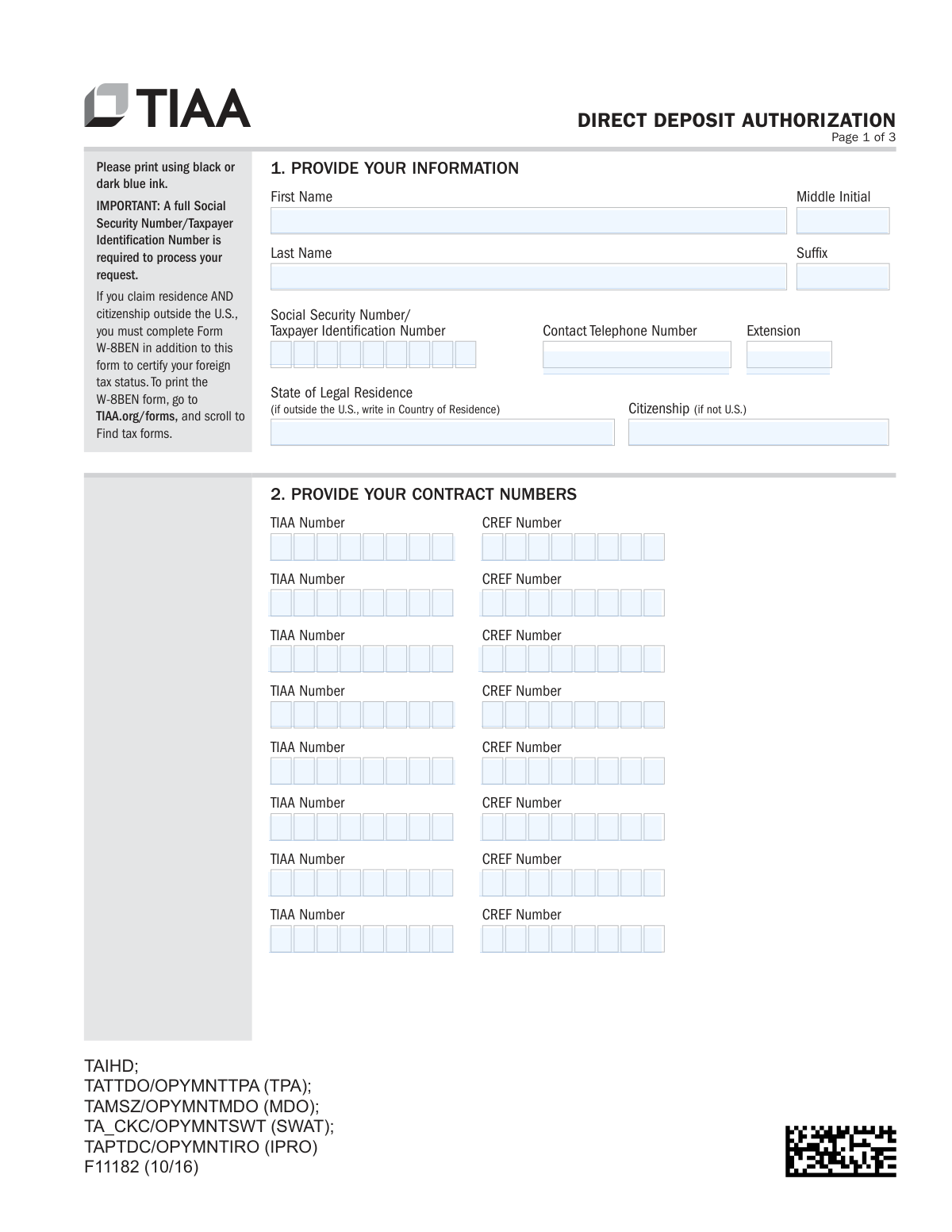
Form F11182 is a Direct Deposit Authorization document provided by TIAA for its clients. It allows individuals to set up, change, or confirm the bank account information for receiving payments electronically, ensuring faster and more secure access to funds compared to paper checks. This form is crucial for anyone wanting to streamline their payment process from TIAA retirement or investment accounts. Today, this form can be filled out quickly and accurately using AI-powered services like Instafill.ai, which can also convert non-fillable PDF versions into interactive fillable forms.
F11182 is part of the
payroll forms, authorization forms, employee forms, direct deposit forms and banking authorization forms categories on Instafill.
Rather not fill this in by hand? Instafill is an online form filler that completes PDF forms automatically — upload the blank form, answer a few questions, and the AI fills every field.
Form specifications
| Form name: | Form F11182, Direct Deposit Authorization |
| Number of pages: | 1 |
| Language: | English |
Our AI automatically handles information lookup, data retrieval, formatting, and form filling.
It takes less than a minute to fill out F11182 using our AI form filling.
Securely upload your data. Information is encrypted in transit and deleted immediately after the form is filled out.
Instafill Demo: How to fill out PDF forms in seconds with AI
How to Fill Out F11182 Online for Free in 2026
Are you looking to fill out a F11182 form online quickly and accurately? Instafill.ai offers the #1 AI-powered PDF filling software of 2026, allowing you to complete your F11182 form in just 37 seconds or less.
Follow these steps to fill out your F11182 form online using Instafill.ai:
- 1 Navigate to Instafill.ai and upload the TIAA Direct Deposit Authorization form or select it from their template library.
- 2 Provide your personal details in Section 1, including your full name, Social Security Number/TIN, and contact information.
- 3 Enter all applicable TIAA and CREF contract numbers in Section 2 to identify the accounts for which you are authorizing direct deposit.
- 4 In Section 3, choose your payment instruction: use a bank account already on file, or provide details for a new checking or savings account, ensuring you attach the required documentation like a voided check.
- 5 Carefully read the certification, then digitally sign and date the form in Section 4 to authorize the direct deposit agreement.
- 6 Review all entered information for accuracy, then download the completed form to mail, fax, or upload it to TIAA as instructed.
Our AI-powered system ensures each field is filled out correctly, reducing errors and saving you time.
Why Choose Instafill.ai for Your Fillable F11182 Form?
Speed
Complete your F11182 in as little as 37 seconds.
Up-to-Date
Always use the latest 2026 F11182 form version.
Cost-effective
No need to hire expensive lawyers.
Accuracy
Our AI performs 10 compliance checks to ensure your form is error-free.
Security
Your personal information is protected with bank-level encryption.
Frequently Asked Questions About F11182
This form is used to authorize TIAA to send payments directly into your checking or savings account. It allows you to set up a new direct deposit, change your existing bank information, or confirm the details on file.
Anyone who receives payments from TIAA and wishes to have those funds electronically deposited into their bank account should complete this form.
You must provide your personal information including your full Social Security Number, your TIAA and/or CREF contract numbers, and your bank account details. A full SSN or Taxpayer ID Number is mandatory for processing.
For a new account, you must submit either an original voided check, an original letter from your bank with specific account details and a signature guarantee, or a bank-generated deposit setup form. Please note that starter checks and deposit slips are not acceptable.
For direct deposits, funds are usually available within two business days after TIAA receives all required documentation. If you opt for a mailed check, it may take 8-10 business days to arrive.
You can upload the form online through your TIAA.org account, use the TIAA mobile app, or send it via standard or overnight mail. Faxing is only permitted if you are using a bank account already on file with TIAA.
Yes, if you claim both residence and citizenship outside of the United States, you must also complete and submit Form W-8BEN to certify your foreign tax status.
If you don't have a check, you can provide an original letter from your bank or a bank-generated deposit setup form. The document must contain your name, address, account and routing numbers, and account type.
If you do not select a payment method, or if TIAA is unable to validate the bank information you provide, a paper check will automatically be mailed to the current address on file.
For security reasons, TIAA cannot send a check to a mailing address that has been changed within the last 14 days. You should call TIAA directly to discuss your payment options in this situation.
No, faxes are not acceptable for setting up a new direct deposit account because original documentation (like a voided check) is required. You must mail or upload the form and supporting documents.
Yes, services like Instafill.ai use AI to auto-fill form fields accurately and save time. This can help you complete the form more efficiently and reduce the chance of errors.
To fill this form online, upload the PDF to the Instafill.ai platform. The AI will make the fields interactive, allowing you to type your information, and then you can download the completed form to print and sign.
If your PDF is not fillable, you can use a tool like Instafill.ai. It can convert flat, non-fillable PDFs into interactive forms that you can easily complete on your computer.
Compliance F11182
Validation Checks by Instafill.ai
1
Validates SSN/TIN is a complete 9-digit number
This check ensures the Social Security Number or Taxpayer Identification Number field contains exactly 9 digits. This is a mandatory field for processing financial requests and is required for tax reporting purposes as stated on the form. Failure to provide a complete and valid number will result in the rejection of the form submission.
2
Ensures First and Last Name are provided
This validation verifies that both the 'First Name' and 'Last Name' fields are filled out. A full name is essential for correctly identifying the account holder and matching them to the contract numbers provided. Incomplete name information can lead to processing delays or misapplication of funds.
3
Confirms Signature is Present and Dated
This check verifies that the signature field has been signed and that the 'Today’s Date' field is fully completed (mm/dd/yyyy). The signature provides legal authorization for TIAA to act on the instructions, and the date establishes when this authorization was given. A missing signature or date renders the entire form invalid and will cause the request to be rejected.
4
Ensures Signature Date is not a future date
This validation compares the provided signature date against the current processing date to ensure it is not in the future. A future-dated signature is not legally valid as it authorizes an action before the consent was actually given. Such forms will be rejected and must be re-signed with the correct, current date.
5
Ensures a single Payment Instruction is selected
This validation checks that the user has selected one, and only one, option from Section 3 (Direct Deposit on file, New Direct Deposit, or Mail a check). If no option or multiple options are selected, the form is ambiguous and cannot be processed. As per the form's note, the default action is to mail a check, but the submission should be flagged for review to confirm intent.
6
Validates Account Type is selected for new Direct Deposit
If the user selects 'Direct Deposit to my new Checking or Savings Account,' this check ensures that they have also specified the account type by selecting either 'Checking Account' or 'Savings Account'. This information is required by the financial institution to correctly process the deposit. Failure to specify the account type will halt the setup of the new direct deposit.
7
Verifies documentation is provided for new Direct Deposit
When a new bank account is specified for direct deposit, this validation confirms that the required documentation (a voided check, bank letter, or bank-generated form) has been included with the submission. The form explicitly states this is required to validate bank information. Without this documentation, the request cannot be fulfilled, and a check will be mailed to the address on file instead.
8
Verifies at least one Contract Number is provided
This check ensures that at least one TIAA Number or CREF Number has been entered in Section 2. The direct deposit authorization must be linked to one or more specific contracts. If no contract numbers are provided, the system does not know which account(s) the payment instructions apply to, making the form unusable.
9
Flags non-U.S. residents/citizens for W-8BEN requirement
This check identifies if the user has listed a country of residence outside the U.S. and has indicated non-U.S. citizenship. The form states that in this case, a Form W-8BEN is also required to certify foreign tax status. This validation flags the submission for manual review to ensure the W-8BEN is present, preventing potential tax compliance issues.
10
Validates faxed submissions are only for existing bank information
This rule checks the submission method. If the form was received via fax, it verifies that the payment instruction selected is 'Direct Deposit to my bank account already on file'. The form explicitly prohibits faxing for new bank account setups, so a violation would result in the rejection of the request.
11
Checks for recent address changes when mailing a check
If the user requests payment via a mailed check, this validation queries the account holder's record for any address changes within the last 14 days. The form notes that for security reasons, checks cannot be sent to a recently changed address. A positive match would flag the request for manual intervention or a mandatory phone call with the client to discuss options.
12
Validates Contact Telephone Number format
This check verifies if the provided phone number follows a standard 10-digit format. While not always mandatory for processing, a valid phone number is crucial for contacting the individual if there are questions or issues with their authorization request. An invalid format may prevent successful communication and delay processing.
Common Mistakes in Completing F11182
The form explicitly states a full Social Security or Taxpayer Identification Number is required for processing. Applicants may leave this blank due to privacy concerns or simple oversight, but its absence will halt the authorization process entirely. To avoid this, ensure the full, correct number is entered, as this is a mandatory field for identity verification and tax purposes.
When setting up a new bank account, the form requires specific documentation like an original voided check or a detailed bank letter. A common error is submitting unacceptable items like starter checks, deposit slips, or a bank letter missing required details like a signature guarantee. This mistake leads to rejection of the direct deposit request, and the payment defaults to a mailed check, delaying access to funds.
The instructions clearly state that faxes are only acceptable if using banking information already on file. Many people miss this detail and attempt to fax the form with documentation for a new account. This will result in the request being rejected, as original documents must be mailed or uploaded for security and verification purposes when establishing a new payment destination.
A missing signature or date is one of the most frequent reasons for form rejection. An unsigned form is legally invalid and cannot be processed, forcing the institution to return it and significantly delaying the direct deposit setup. Always double-check the signature block on page 3 before submitting.
Non-U.S. citizens who also reside outside the U.S. are required to submit a separate W-8BEN form to certify their foreign tax status. This is often missed because it's a separate document mentioned in a side note on the first page. Failure to include it will lead to processing delays and potential tax withholding issues until the correct documentation is received.
Applicants often forget to list all their applicable TIAA and/or CREF contract numbers in Section 2, especially if they have multiple contracts. This omission can result in payments from unlisted contracts not being included in the direct deposit setup, causing them to be issued via check instead. It's crucial to gather all contract numbers before filling out the form.
In Section 3, some individuals fail to check any box, assuming the form's purpose implies direct deposit. The form states that if no selection is made, a check will be automatically mailed to the address on file. This results in an unwanted delay and a different payment method than intended, defeating the purpose of the form.
The instructions specify that 'ALL numbered pages' must be returned, even those left blank. People often assume they only need to send the pages they filled out to save paper or time. Submitting an incomplete set can cause the entire package to be flagged as incomplete, leading to processing delays while the missing pages are requested.
The form must be printed in black or dark blue ink for proper scanning. Illegible handwriting can lead to critical data entry errors for names, contract numbers, or bank details, causing rejection or misdirected payments. Since this is a non-fillable PDF, using a tool like Instafill.ai to convert it into a fillable version can prevent handwriting legibility issues and ensure the information is clear.
Saved over 80 hours a year
“I was never sure if my IRS forms like W-9 were filled correctly. Now, I can complete the forms accurately without any external help.”
Kevin Martin Green
Your data stays secure with advanced protection from Instafill and our subprocessors




Robust compliance program
Transparent business model
You’re not the product. You always know where your data is and what it is processed for.
ISO 27001, HIPAA, and GDPR
Our subprocesses adhere to multiple compliance standards, including but not limited to ISO 27001, HIPAA, and GDPR.
Security & privacy by design
We consider security and privacy from the initial design phase of any new service or functionality. It’s not an afterthought, it’s built-in, including support for two-factor authentication (2FA) to further protect your account.
Fill out F11182 with Instafill.ai
Worried about filling PDFs wrong? Instafill securely fills form-f11182-direct-deposit-authorization forms, ensuring each field is accurate.
