Yes! You can use AI to fill out Form ADOPT-330, Request for Appointment of Confidential Intermediary

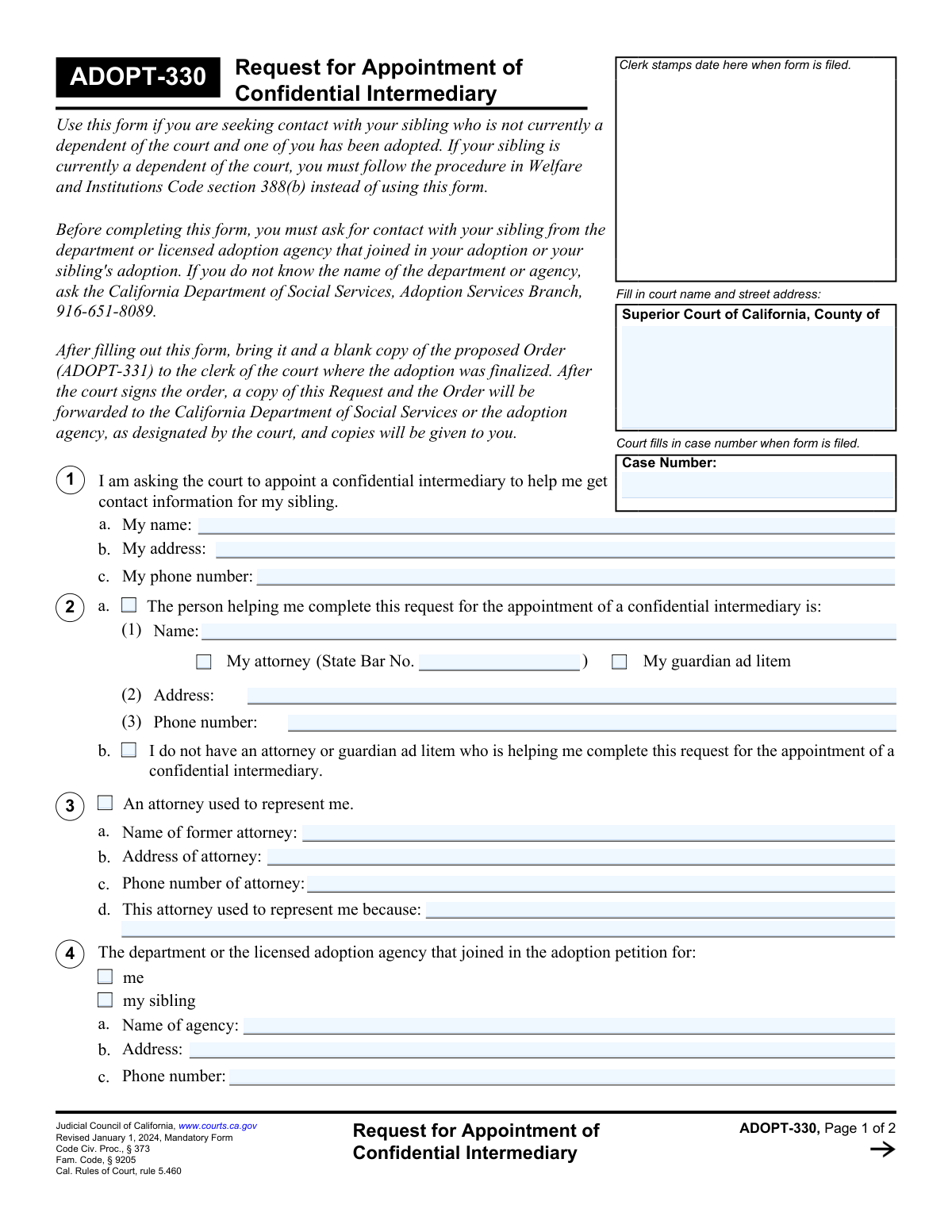
Form ADOPT-330, Request for Appointment of Confidential Intermediary, is a legal document filed with a California Superior Court to initiate the process of reconnecting with a separated sibling. It is used by individuals who do not have contact information for a brother or sister, often due to past adoptions or foster care placements, and formally asks the court to appoint a neutral third party to locate the sibling and facilitate contact. Today this form can be filled out quickly and accurately using AI-powered services like Instafill.ai, which can also convert non-fillable PDF versions into interactive fillable forms.
Our AI automatically handles information lookup, data retrieval, formatting, and form filling.
It takes less than a minute to fill out ADOPT-330 using our AI form filling.
Securely upload your data. Information is encrypted in transit and deleted immediately after the form is filled out.

Form specifications

Form name: Form ADOPT-330, Request for Appointment of Confidential Intermediary
Number of fields: 58
Number of pages: 2
Language: English
main-image

Instafill Demo: How to fill out PDF forms in seconds with AI

How to Fill Out ADOPT-330 Online for Free in 2026

Are you looking to fill out a ADOPT-330 form online quickly and accurately? Instafill.ai offers the #1 AI-powered PDF filling software of 2026, allowing you to complete your ADOPT-330 form in just 37 seconds or less.
Follow these steps to fill out your ADOPT-330 form online using Instafill.ai:
  1. 1 Navigate to Instafill.ai and upload or select Form ADOPT-330.
  2. 2 Provide the court details, your personal information as the applicant, and the case number if one exists.
  3. 3 Specify your legal representation status, providing details for any current or former attorneys or indicating if you are self-represented.
  4. 4 Provide information about the adoption agency that handled your or your sibling's case, if applicable.
  5. 5 Fill in all known information about your sibling, including their name, potential address, and their adoption or court dependency status.
  6. 6 Complete the declarations section by checking the appropriate boxes regarding waivers, your age, and your request for a confidential intermediary.
  7. 7 Carefully review the entire form, then electronically sign and date it before downloading the completed document for filing with the appropriate California court.

Our AI-powered system ensures each field is filled out correctly, reducing errors and saving you time.

Why Choose Instafill.ai for Your Fillable ADOPT-330 Form?

Speed

Complete your ADOPT-330 in as little as 37 seconds.

Up-to-Date

Always use the latest 2026 ADOPT-330 form version.

Cost-effective

No need to hire expensive lawyers.

Accuracy

Our AI performs 10 compliance checks to ensure your form is error-free.

Security

Your personal information is protected with bank-level encryption.

Frequently Asked Questions About Form ADOPT-330

This form is used to ask a California Superior Court to appoint a 'confidential intermediary' to help you find and potentially contact a sibling from whom you were separated, often due to adoption or the foster care system.

You should fill out this form if you are an adoptee, or were a dependent of the court, and wish to find a sibling from whom you have been separated.

A confidential intermediary is a neutral person appointed by the court to access sealed records, locate your sibling, and determine if they are willing to have contact with you.

No, you are not required to have a lawyer. However, the form includes sections to provide information if you are receiving assistance from an attorney or guardian ad litem.

If either you or your sibling is under 18, special rules apply. You will need to indicate whether you have consent from a parent, guardian, or the court to make contact.

Fill in all the information you know to the best of your ability. The purpose of appointing a confidential intermediary is to help locate your sibling and find this missing information.

The case number is the official number assigned by the court for the original adoption or dependency case. If you don't know it, you may need to contact the court clerk in the county where the proceedings took place.

These are California Department of Social Services forms where a sibling can state their preference about being contacted. You must indicate whether you have already submitted one of these to the relevant adoption agency.

You must declare that, to your knowledge, no order exists preventing contact with your sibling. If such an order exists or has existed, you may not be eligible to use this process and should seek legal advice.

You must file this form with the Superior Court of California in the county where the adoption or dependency case was handled, as indicated in the 'Court Information' section.

Yes, services like Instafill.ai use AI to help you accurately auto-fill form fields from your saved profile, which can save you significant time and reduce errors.

You can use a service like Instafill.ai to fill out this form online. Simply upload the form to the platform, and it will become an interactive, fillable document that you can complete, download, and print.

If you have a non-fillable PDF, you can use a tool like Instafill.ai. It can convert flat, non-interactive PDFs into fillable forms that you can easily complete on your computer.

Compliance ADOPT-330
Validation Checks by Instafill.ai

1
Ensures Case Number is Present and Valid
This validation confirms that the 'Case Number' field in the Court Information section is not empty. It also checks if the number matches the expected format for the specified court, which is crucial for correctly identifying and filing the document. A missing or incorrectly formatted case number will cause the form to be rejected by the court clerk, delaying the entire process.
2
Validates Phone Number Format
This check verifies that all phone number fields ('Applicant's Phone Number', 'Representative Phone Number', etc.) adhere to a standard format, such as (XXX) XXX-XXXX or XXX-XXX-XXXX. Proper formatting ensures the data is clean and usable for communication purposes. If the format is invalid, the system will prompt the user to correct it, preventing future contact issues.
3
Conditional Requirement for Legal Representative Details
If the 'Person Helping Complete Request' box is checked, this validation ensures that the 'Representative Name', 'Representative Address', and 'Representative Phone Number' fields are all filled out. This is important for identifying and contacting the individual assisting the applicant. Failure to provide these details when required will result in an incomplete submission and require the user to go back and fill in the missing information.
4
State Bar Number Requirement for Attorneys
This check is triggered if the 'My Attorney' box is checked. It validates that the 'State Bar Number' field is not empty and contains a valid number format. The State Bar number is a unique identifier required for verifying an attorney's credentials and is essential for legal filings. An invalid or missing number will prevent the form from being processed correctly.
5
Mutually Exclusive Selection for Legal Representation
This validation ensures that the user cannot check both 'Person Helping Complete Request' and 'No Attorney or Guardian Ad Litem Assisting' simultaneously. These two options are logically contradictory. If both are selected, the form is ambiguous, and the user must be prompted to choose only one to clarify their representation status.
6
Conditional Requirement for Former Attorney Information
If the 'An attorney used to represent me' box is checked, this validation confirms that the 'Former Attorney Name', 'Address', 'Phone Number', and 'Reason for Representation' fields are completed. This information provides necessary context for the court regarding the applicant's legal history. An incomplete section will trigger an error, forcing the user to provide the required details or uncheck the box.
7
Conditional Requirement for Adoption Agency Details
This check verifies that if either the 'me' or 'my sibling' box is checked in the Adoption Agency Information section, then the 'Agency Name', 'Agency Address', and 'Agency Phone Number' fields must be filled. This information is critical for the court to contact the relevant agency. If the boxes are checked but the details are missing, the submission will be flagged as incomplete.
8
Applicant Name Consistency Across Form
This validation compares the 'Applicant's Name' field with the 'Your Name' field in the Case Information section and the 'Declarant's Printed Name' in the declaration. It ensures the applicant's name is consistent throughout the document, which is vital for legal validity and preventing identity confusion. A mismatch will require the user to correct the discrepancy before submission.
9
Conditional Requirement for Minor Sibling Details
If the 'My sibling is under the age of 18 years' box is checked, this validation ensures that the 'Sibling Used to Live With' and 'Sibling Currently Lives With' fields are filled out. This information is crucial for matters involving a minor, as it helps the court understand the sibling's living situation and potential guardians. Failure to provide this information will result in an error.
10
Conditional Requirement for Minor Applicant Consent Status
This check is activated if the 'I am under 18' box is checked in the Declarations section. It validates that for both 'Parent/guardian consent' and 'Court consent', one of the corresponding 'Yes' or 'No' options has been selected. This confirms the applicant has addressed the necessary consent requirements for a minor to file this request, and failure to answer will block submission.
11
Declaration Date Validity
This validation ensures that the 'Declaration Date' is a valid calendar date and is not set in the future. A legal declaration must be dated on or before the day of submission. An invalid or future date would render the declaration legally unsound, so the system must reject it and prompt for a correction.
12
Completeness of Helper's Information
This check ensures that if 'Person Helping Complete Request' is checked, the 'Helper's Printed Name' and 'Date Helper Assisted' fields are also filled out. This provides a clear record of who assisted the applicant and when the assistance was provided. Missing this information compromises the transparency of the form's completion process.
13
Exclusive Choice for Sibling Status
This validation confirms that for the 'Sibling Adoption Status' group, exactly one of the 'Yes', 'No', or 'Unknown' options is selected. The same logic applies to the 'Sibling Court Dependency Status' group. This ensures there is no ambiguity about the sibling's status, which is a key piece of information for the court's decision-making process.
14
Conditional Logic for Waiver Declarations
This check ensures that the 'Submitted waiver form AD 904A/B' or 'Agency sent no waiver letter' checkboxes can only be selected if the 'Agency Name' field in section 4 has been filled out. These declarations are directly related to an agency, so referencing them without specifying the agency is a logical error. The system should prevent this to ensure the declaration is contextually valid.

Common Mistakes in Completing ADOPT-330

Incomplete or Incorrect Court Information

Applicants often enter a partial court name or an incorrect case number. This usually happens when they are unsure of the exact official name of the superior court for their county or misread the case number from other documents. An error here can lead to the form being rejected or misrouted to the wrong department, causing significant processing delays.

Contradictory Selections in Legal Representation

Users frequently make conflicting choices in the 'Legal Representation' section, such as checking both 'Person Helping Complete Request' and 'No Attorney or Guardian Ad Litem Assisting'. This confusion arises from the section's complex conditional logic. Such contradictions make it impossible for the court clerk to understand the applicant's representation status, often resulting in the form being returned for correction.

Missing Details for a Checked Box

A common error is checking a box to indicate a certain condition but then failing to provide the required follow-up information. For example, an applicant might check 'An attorney used to represent me' but leave the former attorney's name and address fields blank. This forces the court to issue a request for more information, halting the progress of the petition until the missing details are supplied.

Forgetting Header Information on Subsequent Pages

On multi-page forms, people often forget to fill out the header fields like 'Your Name' and 'Case Number' on the second page. If the pages of the printed document become separated during handling or scanning, the second page becomes unidentifiable. This can render the entire submission incomplete and invalid, requiring a full resubmission.

Ignoring Conditional Fields for Minors

When an applicant indicates their sibling is under 18, they sometimes overlook the mandatory fields that follow, such as who the sibling currently lives with. This information is legally crucial for cases involving minors to ensure their welfare and proper notification. Omitting these details will cause the court to pause the request until the information is provided and verified.

Failing to Attach Required Documentation

In the 'Declarations' section, an applicant might check a box like 'Agency sent no waiver letter' without physically attaching a copy of that letter to the submission. This declaration requires proof, and without the attached document, the statement is unsubstantiated. The court cannot proceed with this part of the request, and it will be considered incomplete.

Incomplete Declarations for Minor Applicants

Applicants under the age of 18 may check the 'I am under 18' box but then fail to complete the required follow-up questions about parental or court consent. Consent is a strict legal prerequisite for a minor's petition to be heard by the court. An incomplete consent section will lead to an automatic rejection of the form until it is properly completed.

Omitting the Helper's Declaration

If an individual receives assistance filling out the form, both the applicant and the helper often forget that the helper must complete their own section, including their name and the date of assistance. This declaration is a formal part of the submission, and its absence makes the form technically incomplete. To avoid this, ensure any person assisting you also signs in the designated 'Helper's Information' section.

Using Informal Names or Abbreviations

Applicants may use nicknames, initials, or abbreviations for names and addresses instead of the full, legal information. Legal documents require precise data that can be matched against official records for verification. Using informalities can create discrepancies that lead to processing delays or outright rejection of the form.

Forgetting to Date and Sign the Declaration

Forgetting to enter the date and printed name in the 'Applicant's Declaration' section is one of the most common and critical errors. An undated or unsigned declaration is legally invalid and will be immediately rejected by the court clerk. Always double-check the signature and date fields as the final step before submitting the form.

Neglecting Digital Privacy After Completion

When using a fillable PDF on a public or shared computer, users often forget to clear their sensitive data using the 'Clear This Form' button after printing. This oversight can expose highly confidential information related to adoption, legal cases, and personal identity to subsequent users. To prevent this, always clear the form or ensure the file is securely deleted from the machine.

Incorrectly Filling Out Conditional Fields

Users sometimes fill in information in sections that are not applicable to them, creating confusion. For instance, someone without legal help might mistakenly enter their own information in the 'Representative Name' field. To prevent this, read all instructions like 'Fill only if...' carefully. AI-powered tools like Instafill.ai can help by automatically hiding or disabling irrelevant fields based on your answers, and can also convert flat PDFs into fillable forms.
Saved over 80 hours a year

“I was never sure if my IRS forms like W-9 were filled correctly. Now, I can complete the forms accurately without any external help.”

Kevin Martin Green

Your data stays secure with advanced protection from Instafill and our subprocessors

Robust compliance program

Transparent business model

You’re not the product. You always know where your data is and what it is processed for.

ISO 27001, HIPAA, and GDPR

Our subprocesses adhere to multiple compliance standards, including but not limited to ISO 27001, HIPAA, and GDPR.

Security & privacy by design

We consider security and privacy from the initial design phase of any new service or functionality. It’s not an afterthought, it’s built-in, including support for two-factor authentication (2FA) to further protect your account.

Fill out ADOPT-330 with Instafill.ai

Worried about filling PDFs wrong? Instafill securely fills form-adopt-330-request-for-appointment-of-confidential-intermediary forms, ensuring each field is accurate.