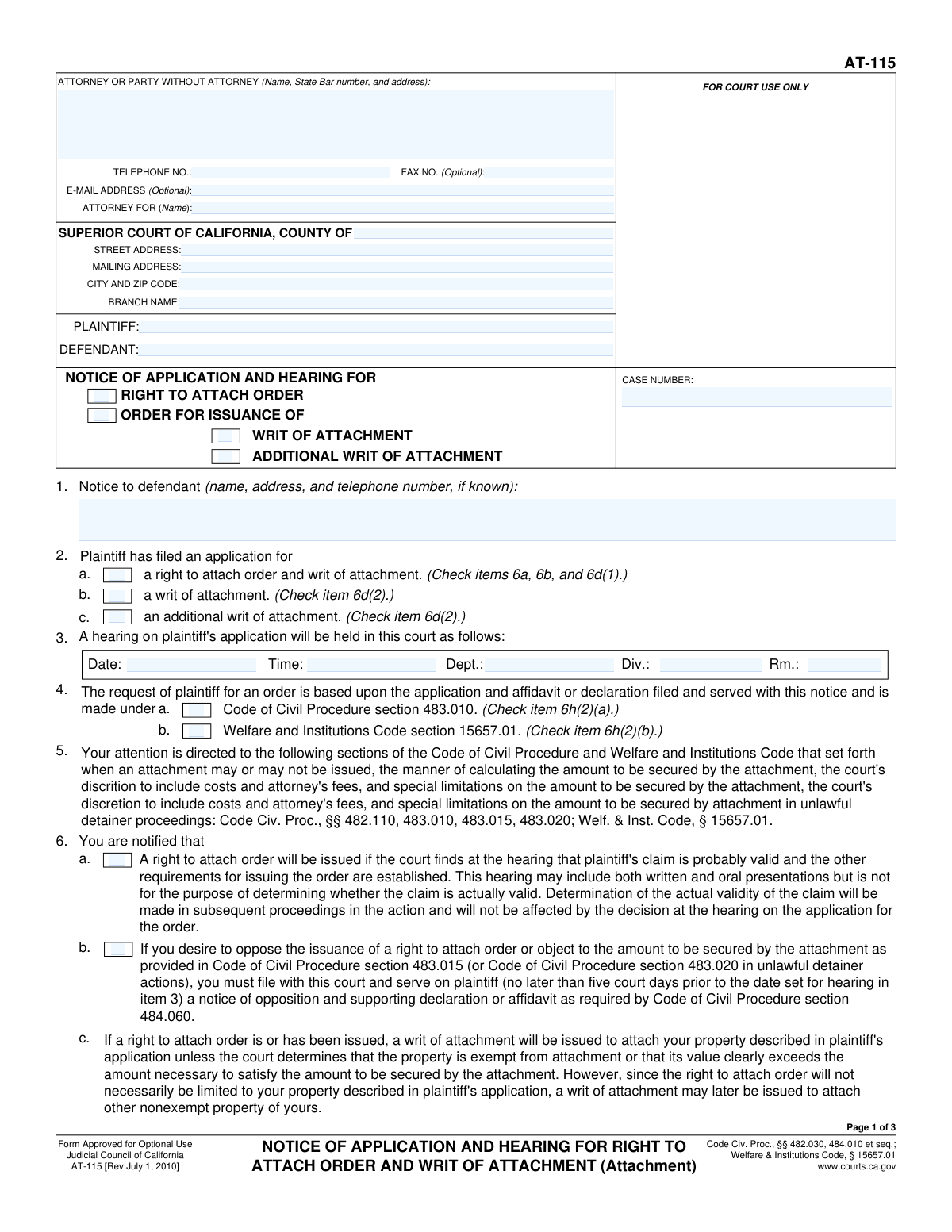
Yes! You can use AI to fill out Form AT-115, Notice of Application and Hearing for Right to Attach Order and Writ of Attachment
Form AT-115, the Notice of Application and Hearing for Right to Attach Order and Writ of Attachment, is a crucial legal document used in California civil court proceedings. It officially informs a defendant that a plaintiff has applied for a court order to attach (seize) the defendant's assets to secure a potential judgment, and it provides the details of the court hearing. Today, this form can be filled out quickly and accurately using AI-powered services like Instafill.ai, which can also convert non-fillable PDF versions into interactive fillable forms.
Our AI automatically handles information lookup, data retrieval, formatting, and form filling.
It takes less than a minute to fill out AT-115 using our AI form filling.
Securely upload your data. Information is encrypted in transit and deleted immediately after the form is filled out.
Form specifications
| Form name: | Form AT-115, Notice of Application and Hearing for Right to Attach Order and Writ of Attachment |
| Number of fields: | 41 |
| Number of pages: | 3 |
| Language: | English |
| Categories: | ACH forms |
Instafill Demo: How to fill out PDF forms in seconds with AI
How to Fill Out AT-115 Online for Free in 2026
Are you looking to fill out a AT-115 form online quickly and accurately? Instafill.ai offers the #1 AI-powered PDF filling software of 2026, allowing you to complete your AT-115 form in just 37 seconds or less.
Follow these steps to fill out your AT-115 form online using Instafill.ai:
- 1 Navigate to Instafill.ai and upload your Form AT-115 or select it from their template library.
- 2 Provide the court and case information, including the county, court address, and case number.
- 3 Enter the full details for the plaintiff, defendant, and their respective attorneys.
- 4 Check the appropriate boxes to indicate the type of notice and application being made, such as for a Right to Attach Order or a Writ of Attachment.
- 5 Input the specific hearing information, including the date, time, and department or division.
- 6 Carefully review all the information populated by the AI for accuracy and completeness, making any necessary edits.
- 7 Date the form, provide the printed name of the plaintiff or attorney, and proceed with filing and serving the document as required by court rules.
Our AI-powered system ensures each field is filled out correctly, reducing errors and saving you time.
Why Choose Instafill.ai for Your Fillable AT-115 Form?
Speed
Complete your AT-115 in as little as 37 seconds.
Up-to-Date
Always use the latest 2026 AT-115 form version.
Cost-effective
No need to hire expensive lawyers.
Accuracy
Our AI performs 10 compliance checks to ensure your form is error-free.
Security
Your personal information is protected with bank-level encryption.
Frequently Asked Questions About Form AT-115
This form, titled 'Notice of Application and Hearing for Right to Attach Order and Writ of Attachment,' is used to officially notify a defendant that a plaintiff has asked the court for permission to seize their property. It also provides the date, time, and location of the court hearing where this request will be considered.
The plaintiff (the party who initiated the lawsuit) or their attorney is responsible for completing this form, filing it with the court, and serving it on the defendant.
A 'Right to Attach Order' is the judge's official permission for you to seize the defendant's assets. The 'Writ of Attachment' is the subsequent document that directs a law enforcement officer, like a sheriff, to actually execute the seizure of specific property.
You will need your case number, the full name and address of the court, the names of the plaintiff and defendant, and the specific hearing date, time, and department number assigned by the court clerk.
The hearing information is assigned by the court clerk when you file your application for the attachment order. You must obtain these details from the court before you can complete and serve this notice form.
This is a time-sensitive legal notice, and you should seek legal advice from an attorney immediately. The form explains how you can file documents to oppose the attachment and protect your property, but there are strict deadlines.
Check the box that matches the grounds for your lawsuit. Select 'Code of Civil Procedure section 483.010' for claims based on a contract, or 'Welfare and Institutions Code section 15657.01' for claims related to financial elder abuse.
After the defendant is properly served, they have a specific amount of time to file a response with the court to oppose your request. A hearing will then take place on the scheduled date, where a judge will decide whether to grant the attachment order.
Yes, services like Instafill.ai use AI to auto-fill form fields accurately with your case information. This can help you save time and reduce the chance of making clerical errors.
Simply upload the AT-115 form to the Instafill.ai platform. The AI will identify all the fields, and you can enter your case details once to have the service automatically and accurately populate the form for you.
You can use a service like Instafill.ai, which is designed to convert flat, non-fillable PDFs into interactive forms. This allows you to easily type your information directly into the correct fields online.
An 'Additional Writ of Attachment' is requested if you need to attach more of the defendant's property after the initial writ has been issued. This might happen if you discover new assets or if the value of the initially attached property is insufficient.
Yes, this notice is part of a larger package. It must be filed and served along with the 'Application for Right to Attach Order' (Form AT-105) and any supporting declarations or evidence for your claim.
Compliance AT-115
Validation Checks by Instafill.ai
1
Case Number Consistency Across Form
This check verifies that the 'Case Number' entered in the header, the 'AT-115' section, and on 'Page 3' are all identical. Maintaining a consistent case number is critical for ensuring the document is correctly filed and associated with the proper legal action. If the numbers do not match, the form submission will be rejected to prevent filing errors.
2
Hearing Date is in the Future
This validation ensures that the 'Hearing Date' provided is a valid date and occurs after the current date. Scheduling a hearing for a past date is a logical impossibility and would render the notice invalid. A failed validation will prompt the user to enter a future date for the hearing.
3
Notice Type Dependency for Writs
This rule enforces the logical dependency within the 'Notice Type' section. The checkboxes for 'Writ of Attachment' or 'Additional Writ of Attachment' can only be selected if the 'Order for Issuance Of' checkbox is also selected. This is important because a writ is issued pursuant to an order, making the order a prerequisite. An error message will appear if a writ is selected without the corresponding order.
4
Application Type Mutual Exclusivity
This check ensures that only one of the 'Application Type' checkboxes is selected at a time ('Right to attach order and writ of attachment', 'Writ of Attachment', or 'Additional Writ of Attachment'). These options represent distinct legal requests that are mutually exclusive on this form. Allowing multiple selections would create ambiguity in the application's intent, so the user will be forced to choose only one.
5
Conditional Logic for Claim of Exemption
This validation enforces the rule that the 'Include Claim in Opposition...' checkbox can only be checked if the 'Application Type' is 'a right to attach order and writ of attachment.'. This ensures that procedural options available to the defendant are only presented when relevant to the specific application being filed by the plaintiff. The checkbox will be disabled or an error will be thrown if this condition is not met.
6
Conditional Logic for Filing Claim of Exemption
This rule validates that the 'File and Serve Claim with Court and Plaintiff' checkbox can only be selected if the 'Application Type' is 'a writ of attachment.'. This check maintains procedural correctness by linking the defendant's response options directly to the plaintiff's specific legal action. If the condition is not met, the user will be prevented from selecting this option.
7
State Bar Number Format
This validation checks that if a 'State Bar number' is provided, it consists only of numeric digits. While the field is optional, any data entered must conform to the expected format for a valid State Bar number. This prevents data entry errors and ensures the integrity of attorney identification data.
8
Attorney Role Specification
This check ensures that if an attorney's name is entered in the 'Attorney or Party Information' section, the 'Attorney For Name' field must also be completed. It is legally insufficient to list an attorney without specifying which party they represent in the action. A failure will result in a required field error, prompting the user to identify the client.
9
Plaintiff and Defendant Name Completeness
This validation confirms that the 'Plaintiff Name' and 'Defendant Name' fields are not empty. These fields are fundamental to the legal document, as they identify the primary parties to the action. The form cannot be considered complete or valid without this essential information, and submission will be blocked until both are provided.
10
Short Title Consistency
This check verifies that the 'Short Title' of the case is consistent across all sections where it is requested (e.g., 'AT-115' section and 'Page 3'). A consistent short title is necessary for quick identification and proper document management within the court system. Mismatched titles will trigger an error to ensure uniformity before submission.
11
Valid Telephone Number Format
This rule validates that the 'Telephone Number' field follows a standard North American phone number format (e.g., NPA-NXX-XXXX). Proper formatting ensures the contact information is usable and can be correctly parsed by automated systems. An invalid format will trigger an error message requesting the user to correct the entry.
12
Valid Email Address Format
This validation ensures that if an 'Email Address' is provided, it conforms to the standard email format (e.g., '[email protected]'). Although the field is optional, incorrect formatting for provided data can lead to communication failures. This check prevents the submission of invalid contact information.
13
Legal Basis Dependency Check
This rule ensures the detailed checkbox for 'Code of Civil Procedure section 483.010' (the one with the long description) can only be checked if the summary checkbox for 'Code of Civil Procedure section 483.010' under 'Legal Basis for Order' is also checked. This creates a logical hierarchy and prevents the user from selecting a detailed legal justification without first indicating the general legal basis. An error will be shown if the dependency is violated.
14
Court County Validation
This validation checks the 'County Name' against a predefined list of the 58 official counties in California. This ensures that a valid jurisdiction is specified for the Superior Court of California. Submitting a form with an incorrect or misspelled county name could lead to it being rejected or filed in the wrong location.
Common Mistakes in Completing AT-115
Users often enter the case number with incorrect formatting, omit leading or trailing characters, or enter it inconsistently on different pages of the form. This error can lead to filing rejections or significant delays as the court clerk cannot match the document to the correct case file. To avoid this, carefully copy the exact case number from a court-issued document and ensure it is identical on all pages where it is required.
Attorneys filling out the form on behalf of a client frequently forget to include their State Bar number in the 'Attorney Information' section. This number is a required identifier for legal professionals, and its absence can cause the form to be flagged as incomplete or rejected by the court clerk. Always ensure the State Bar number is entered correctly to validate the attorney's standing.
Filers often confuse the court's mailing address with its physical street address or enter the main county courthouse address when the case is assigned to a specific branch. This can result in documents being misrouted, causing missed deadlines and filing delays. Always verify the correct street address, mailing address, and specific branch name for your case on the court's official website before completing these fields.
Users may enter nicknames, abbreviations, or incomplete legal names for the Plaintiff or Defendant (e.g., 'Mike Smith' instead of 'Michael J. Smith'). Legal documents require the full, official names of all parties as they appear in the original complaint and other case filings. Using incorrect names can create legal ambiguity, procedural defects, and potential grounds for the opposing party to challenge the filing.
The form contains several checkboxes with specific instructions, such as 'Fill only if 'Order for Issuance Of' is checked.' People frequently ignore this dependent logic, either checking a box when its prerequisite is not met or failing to check it when required. This creates an internally inconsistent and legally deficient document, which can lead to automatic rejection. AI-powered tools like Instafill.ai can help prevent this by enforcing these rules automatically during the filling process.
The form has multiple related checkboxes for the type of notice and application (e.g., 'Right to Attach Order,' 'Writ of Attachment,' 'Additional Writ of Attachment'). Users often get confused and check boxes that are contradictory or do not accurately reflect the specific legal action being sought. This is a critical error that can invalidate the notice or application, requiring a corrected re-filing.
Filers sometimes leave the Hearing Date, Time, and Department/Room number fields blank, assuming the information will be assigned later by the court. However, this form serves as a *notice* of a hearing, so this information is essential for the document to be valid and to properly inform the defendant. You must obtain a hearing date from the court *before* completing and serving this form.
The form requires the filer to select the specific legal code section that authorizes the attachment (e.g., Code of Civil Procedure § 483.010 or Welfare and Institutions Code § 15657.01). Choosing the wrong section, or failing to choose one, undermines the entire legal argument of the application. This is a substantive legal error, not just a clerical one, and is a common reason for a judge to deny the application at the hearing.
Fields like 'Short Title' and 'Case Number' appear on multiple pages of the document. A common mistake is to fill them out inconsistently or to miss filling them out on subsequent pages. This can lead to pages being misplaced or the document being seen as unprofessional and incomplete. Using a tool that auto-populates recurring information, like Instafill.ai, can ensure perfect consistency across the entire document.
The date field on the final page, typically near the signature line, is one of the most commonly overlooked fields on legal forms. An undated legal document can be considered incomplete or invalid by the court, potentially leading to its rejection upon filing and forcing the filer to start the process over. Always perform a final review to ensure the document is dated correctly before submission.
Saved over 80 hours a year
“I was never sure if my IRS forms like W-9 were filled correctly. Now, I can complete the forms accurately without any external help.”
Kevin Martin Green
Your data stays secure with advanced protection from Instafill and our subprocessors

Robust compliance program
Transparent business model
You’re not the product. You always know where your data is and what it is processed for.
ISO 27001, HIPAA, and GDPR
Our subprocesses adhere to multiple compliance standards, including but not limited to ISO 27001, HIPAA, and GDPR.
Security & privacy by design
We consider security and privacy from the initial design phase of any new service or functionality. It’s not an afterthought, it’s built-in, including support for two-factor authentication (2FA) to further protect your account.
Fill out AT-115 with Instafill.ai
Worried about filling PDFs wrong? Instafill securely fills form-at-115-notice-of-application-and-hearing-for-right-to-attach-order-and-writ-of-attachment forms, ensuring each field is accurate.