
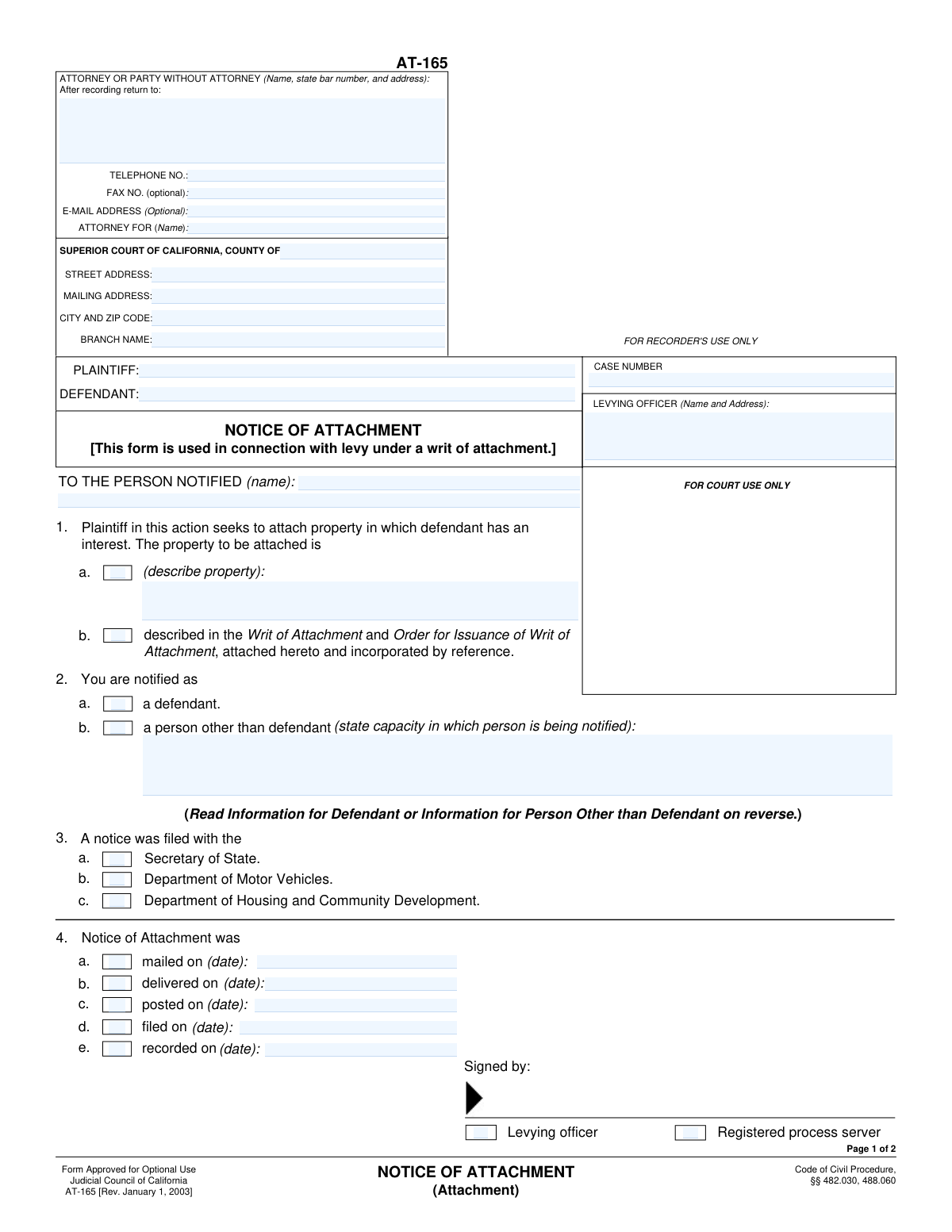
Yes! You can use AI to fill out Form AT-165, Notice of Attachment
Don't type 41 fields by hand. Tell our AI about yourself, or upload a document you already have, and it fills every field in seconds. You check it, then download, print or sign.
The AI does the filling. You just check it.
No typing into boxes, nothing to install.
What this form asks for
The AI fills all of it, from your answers or your documents.
The AI checks your answers before you download
13 checks built for this form, so a wrong date or a missing answer is caught before anyone else sees it.
This check ensures that the 'Case Number' field is not empty and conforms to a standard format expected by the court system. The case number is a critical unique identifier for the entire legal action, and its absence or incorrect format would make the document impossible to file or associate with the correct case. If validation fails, the user should be prompted to enter a valid case number before submission.
This validation verifies that if the 'Property described directly' checkbox is selected, the corresponding 'Property Description' text area is filled out. It is logically inconsistent to indicate a direct description is being provided without actually providing one. Failure to provide the description would make the attachment notice legally insufficient, so the form should prevent submission until the description is entered.
This check ensures that the user selects only one of the two property description methods: either 'Property described directly' or 'Property described in Writ of Attachment'. The property can only be described in one primary location for clarity and legal precision. If both are checked, the form should display an error asking the user to choose only one method.
This validation ensures that if the 'Notified as Other Person' checkbox is selected, the 'Capacity of Notified Person' text field is not empty. This is crucial for defining the legal standing of the person being notified (e.g., 'Garnishee', 'Trustee'). Without this information, the notice may be legally invalid, so the form must require this field to be completed when applicable.
This check validates that a user can only select one of the notification status checkboxes: 'Notified as Defendant' or 'Notified as Other Person'. A person being notified cannot simultaneously be the defendant and another party in a different capacity for the purpose of this notice. The system should enforce this exclusivity to prevent ambiguous or contradictory information.
This validation confirms that both the 'Plaintiff Name' and 'Defendant Name' fields have been completed. These fields identify the primary parties to the lawsuit and are fundamental to the document's validity. An incomplete submission would be rejected by the court, so the form must ensure these names are provided.
And 7 more checks
- Attorney Telephone Number Format
- Conditional Date Field for Notice Method
- At Least One Notice Method Selection
- Mutually Exclusive Signatory Role
- State Bar Number Format
- Completeness of Notified Person's Address
- Court Information Completeness
Let AI fill out your AT-165
No typing. Every field filled in seconds, checked, ready to sign.
How to Fill Out AT-165 Online for Free in 2026
What the AI walks you through.
- Navigate to Instafill.ai and upload or select the Form AT-165.
- Enter the case information, including the case number, court details, and the names of the plaintiff and defendant.
- Provide the contact information for the attorney or the party filing the notice without legal representation.
- Identify the person being notified by entering their full name and address, and specify their role in the case (e.g., defendant).
- Describe the property being attached, either directly on the form or by referencing an attached Writ of Attachment.
- Indicate how, where, and when the notice was served by checking the appropriate boxes (e.g., mailed, delivered, filed with the Secretary of State) and providing the dates.
- Review all the information for accuracy, then use the platform to save or print the completed form for filing and service.
Common Mistakes in Completing AT-165
The ones the AI is built to catch.
Entering an Incorrect or Incomplete Case Number
Providing an Ambiguous or Contradictory Property Description
Failing to Specify the Capacity of a Notified Person
Using Incorrect or Inconsistent Court Information
Omitting Key Attorney or Party Contact Details
Mismatching Date Entries with Action Checkboxes
Misspelling or Abbreviating Party Names
Neglecting to Indicate Where the Notice of Attachment was Filed
Attempting to Manually Fill a Non-Fillable PDF
Incorrect Signatory Designation
Frequently Asked Questions About AT-165
Is it really free for 7 days?
Can I fill other forms too?
How do I cancel?
How does the AI fill out AT-165?
What happens to my information?
How complex is AT-165 to fill out?
What is the purpose of this Notice of Attachment form?
Who needs to fill out this form?
What information do I need before I start filling out this form?
How do I describe the property being attached on the form?
Who is the 'Person Notified'?
When do I need to specify the 'Capacity of Notified Person'?
What is the difference between the 'Mailed', 'Delivered', 'Posted', and 'Filed' dates?
Where might this Notice of Attachment need to be filed?
Is it mandatory to provide an email address and fax number?
What is a 'Levying Officer'?
Can AI tools help me complete this form?
How can I fill out this Notice of Attachment form online?
What can I do if my PDF version of this form is not fillable?
Get your AT-165 filled out by AI
$0 today. Cancel before Oct 30 and you pay nothing.
Other forms like this one
ACH forms: ACH Funding Authorization Form, Form G-1650, Authorization for ACH Transactions, ACORD 140 (2014/12), Property Section (Attach to ACORD 125), Oregon Practitioner Credentialing Application (including Attachment A: Professional Liability Action Detail), Hauptantrag Bürgergeld (HA) – Antrag auf Bürgergeld nach dem Zweiten Buch Sozialgesetzbuch (SGB II), Commonwealth of Massachusetts Department of Industrial Accidents Form 110, Employee’s Claim, Commonwealth of Massachusetts Department of Industrial Accidents (DIA) Form 110, Employee’s Claim, Inventory and Appraisal Attachment (Judicial Council of California Form DE-161, GC-041), Zwangsvollstreckung – Antrag auf Erlass eines Pfändungs- und Überweisungsbeschlusses (PfüB) nach §§ 828 ff. ZPO (mit Anlagen/Modulen für Gläubiger, Schuldner, Drittschuldner und Forderungen), T-RENA Teilnahme- und Leistungsnachweis (Gruppenleistungen / Einzelleistungen) – Formular der Deutschen Rentenversicherung, Form SC-100A, Other Plaintiffs or Defendants (Attachment to Plaintiff's Claim and ORDER to Go to Small Claims Court), Principal Financial Group Notice of Data Breach, Direct Rollover Request for Appalachian Regional Healthcare, Inc. Voluntary Plan, Massachusetts Collaborative — CT/CTA/MRI/MRA Prior Authorization Form, Confirmation of Teaching Evidence, ACH and Electronic Funds Transfer Instructions and Agreement, ACH Authorization Agreement (FRM-ACH-02-20), Pershing Advisor Solutions LLC ACH Authorization Agreement, ACH Authorization Agreement, Huntington Beach Chamber of Commerce New Investor Packet and Application
Let AI fill out your AT-165
Your trial starts once a card is added. You pay nothing before Oct 30.
Our AI already knows this form, all 41 fields of it. Skip the typing: tell it about yourself, or upload what you have, and it fills the whole form in seconds.
- AI fills every field on both pages, checkboxes included
- No typing into boxes: answer a few questions, or upload a document you already have, an old copy of this form, a photo of a document
- The AI checks the answers; you review and change anything before you download
- Download the finished PDF, print it, or sign it online
- Encrypted, and never used to train AI
Cancel before Oct 30 and you pay nothing.
A card is needed to start the trial. Cancel in two clicks from your account.
Terms · Privacy