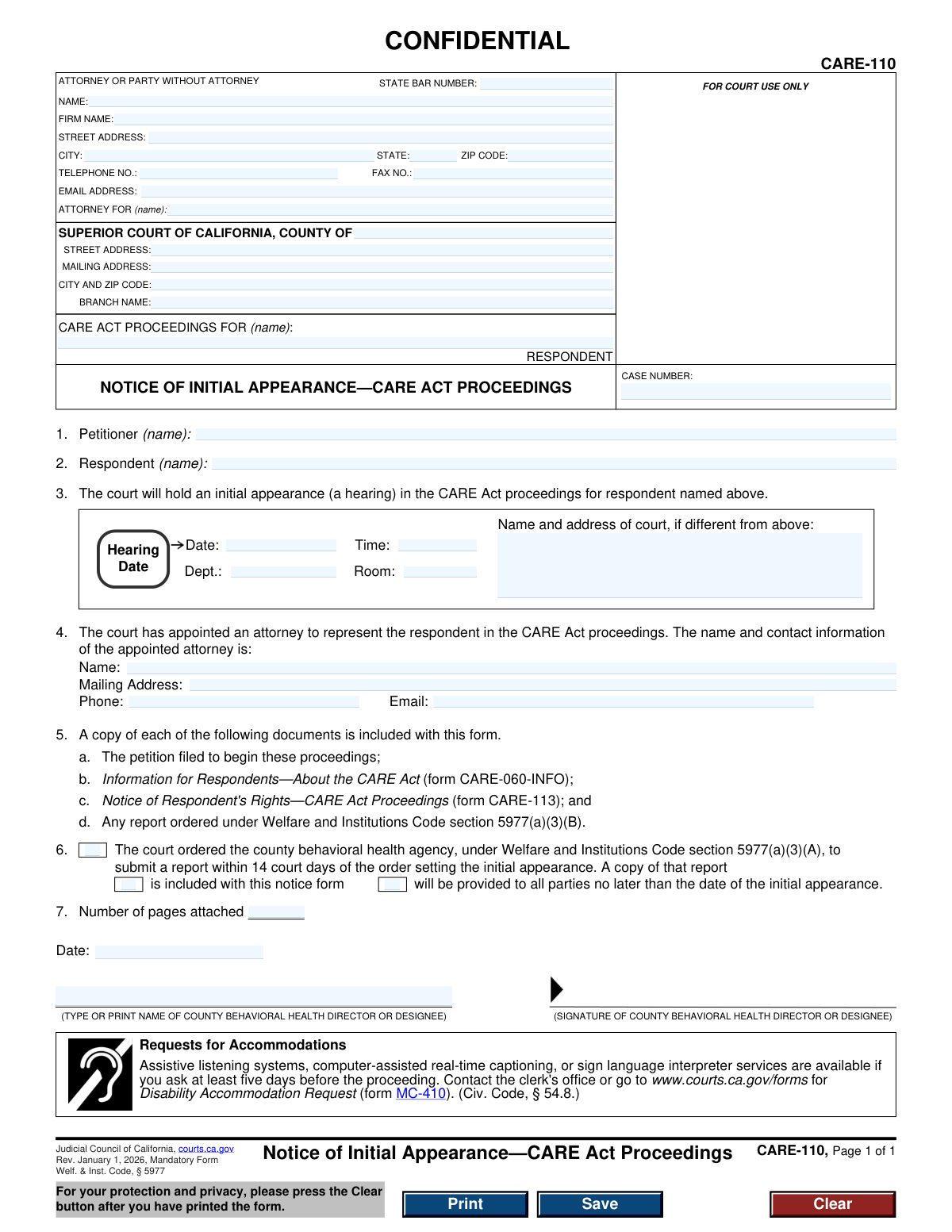
Yes! You can use AI to fill out Form CARE-110, Notice of Initial Appearance—CARE Act Proceedings
Form CARE-110, Notice of Initial Appearance—CARE Act Proceedings, is a legal document used in the California court system to formally inform an individual (the respondent) about the date, time, and location of their first court hearing under the CARE Act. This notice is crucial as it ensures the respondent is aware of the proceedings, their rights, and the contact information for their court-appointed attorney. Today, this form can be filled out quickly and accurately using AI-powered services like Instafill.ai, which can also convert non-fillable PDF versions into interactive fillable forms.
CARE-110 is part of the
California court forms category on Instafill.
Our AI automatically handles information lookup, data retrieval, formatting, and form filling.
It takes less than a minute to fill out CARE-110 using our AI form filling.
Securely upload your data. Information is encrypted in transit and deleted immediately after the form is filled out.
Form specifications
| Form name: | Form CARE-110, Notice of Initial Appearance—CARE Act Proceedings |
| Number of fields: | 38 |
| Number of pages: | 1 |
| Language: | English |
Instafill Demo: How to fill out PDF forms in seconds with AI
How to Fill Out CARE-110 Online for Free in 2026
Are you looking to fill out a CARE-110 form online quickly and accurately? Instafill.ai offers the #1 AI-powered PDF filling software of 2026, allowing you to complete your CARE-110 form in just 37 seconds or less.
Follow these steps to fill out your CARE-110 form online using Instafill.ai:
- 1 Navigate to Instafill.ai and upload or select the CARE-110 form.
- 2 Enter the attorney or party information, including name, firm, address, and State Bar Number.
- 3 Specify the Superior Court of California county, address, and branch name for the proceeding.
- 4 Input the respondent's name in the case title and provide the official case number.
- 5 Fill in the petitioner and respondent names, followed by the specific hearing date, time, department, and room number.
- 6 Provide the name and contact information of the court-appointed attorney and check the boxes corresponding to all documents included with the notice.
- 7 Review all entered information for accuracy, then date and sign the form as the County Behavioral Health Director or designee before submission.
Our AI-powered system ensures each field is filled out correctly, reducing errors and saving you time.
Why Choose Instafill.ai for Your Fillable CARE-110 Form?
Speed
Complete your CARE-110 in as little as 37 seconds.
Up-to-Date
Always use the latest 2026 CARE-110 form version.
Cost-effective
No need to hire expensive lawyers.
Accuracy
Our AI performs 10 compliance checks to ensure your form is error-free.
Security
Your personal information is protected with bank-level encryption.
Frequently Asked Questions About Form CARE-110
This form, the 'Notice of Initial Appearance,' is a legal notice from the court. It informs you that a CARE Act case has been started and tells you the date, time, and location of your first court hearing.
No, you do not need to fill out this form. It is completed by the county behavioral health agency and sent to you (the Respondent) to provide official notice of a court hearing.
The initial appearance is your first court hearing in the CARE Act proceeding. At this hearing, the judge will review the case, confirm you have a lawyer, and explain your rights.
The court has appointed this attorney to represent you for free throughout the CARE Act proceedings. You should contact them as soon as possible to discuss your case.
If you cannot attend the scheduled hearing, you must immediately contact the court-appointed attorney listed in Section 4 of the notice. They will advise you on the proper steps to take.
As stated in Section 5, you should also receive the petition that started the case, an information sheet (CARE-060-INFO), and a notice of your rights (CARE-113). These documents contain important information about the case.
The court ordered the county behavioral health agency to prepare a report for the case. This notice will tell you if that report is attached or if it will be provided to you before or at the hearing.
The 'Petitioner' is the person or entity who filed the case with the court. The 'Respondent' is the person the CARE Act case is about, which is the person receiving this notice.
You must ask for accommodations at least five days before the hearing. Contact the clerk's office or use the 'Disability Accommodation Request' (form MC-410) to make your request.
Since this is a notice for you to read, you don't need to fill it out. However, for other court forms you may need to complete, AI-powered services like Instafill.ai can help auto-fill your information accurately and save time.
To use Instafill.ai, you upload a court form, and its AI identifies the fields. After you provide your information once, the tool automatically populates it across the form, making the process quick and easy.
Services like Instafill.ai can solve this problem. You can upload a 'flat' or non-fillable PDF, and the platform will convert it into an interactive, fillable form that you can complete and save online.
Compliance CARE-110
Validation Checks by Instafill.ai
1
Respondent Name Consistency
This check ensures the respondent's name in the case caption at the top of the form matches the respondent's name listed in section 2. Mismatched names can cause confusion and lead to incorrect case file association. If validation fails, the system should flag the discrepancy for manual review to ensure the correct individual is identified throughout the document.
2
Valid Future Hearing Date
Validates that the 'Hearing Date' in section 3 is a real, correctly formatted date that occurs in the future. This is critical as the purpose of the form is to provide notice of an upcoming event. A past or invalid date would make the notice legally deficient and require re-issuance, causing delays in the proceedings.
3
Exclusive Selection for County Report Status
This check verifies that exactly one of the two options in section 6 is selected, indicating whether the county behavioral health report 'is included' or 'will be provided'. Selecting both or neither option creates ambiguity about the status of a key piece of evidence. A validation failure would require the user to make a single, definitive choice before submission.
4
State Bar Number Format
Ensures the 'STATE BAR NUMBER' field contains a valid, numeric-only value, typically conforming to the format of the California State Bar (e.g., a 6-digit number). This validates the credentials of the attorney filing the form and ensures they are in good standing. An invalid format could indicate a data entry error or an unauthorized filer.
5
Signature Date Logical Validity
Validates that the 'Date' in the signature block is a valid date that is not in the future. This date authenticates when the notice was signed and prepared. A future date is logically impossible and would invalidate the document's timeline, so the system should reject submissions with a future signature date.
6
Required Signatory Printed Name
This check ensures that the printed name of the County Behavioral Health Director or Designee who is signing the form is not empty. The signature is legally binding, but the printed name is necessary for clear identification of the signatory. A missing name would make it difficult to verify the signer's identity and authority, potentially compromising the form's validity.
7
Case Number Presence
Verifies that the 'CASE NUMBER' field is not empty. Since this is a notice for an appearance in an existing proceeding, a case number must have been assigned by the court. A missing case number prevents the document from being correctly filed and associated with the proper CARE Act case, leading to processing delays or rejection by the court clerk.
8
Valid Email Address Format
This check confirms that any email address entered on the form (for the attorney/party and the appointed attorney) follows the standard '[email protected]' format. Correct email addresses are essential for electronic communication and service of documents between the court, parties, and attorneys. An invalid format would cause communication failures and missed notifications.
9
Standard Phone Number Format
Validates that all telephone number fields are entered in a recognizable U.S. phone number format (e.g., 10 digits, possibly with dashes or parentheses). This ensures that parties can be reached for case-related matters. If the format is incorrect, the system should prompt the user to correct it to prevent communication issues.
10
Completeness of Case Parties
Ensures that the names of the Petitioner (section 1) and the Respondent (section 2) are both filled in. These fields identify the primary parties in the CARE Act proceeding and are fundamental to the document's purpose. A failure to provide these names would render the notice incomplete and meaningless, requiring rejection of the form.
11
Numeric Attachment Page Count
This validation checks that the 'Number of pages attached' field in section 7 contains a non-negative integer (0 or greater). This count is used by the court clerk to verify that all parts of the submission have been received. An invalid entry, such as text or a negative number, would cause confusion and require manual correction.
12
Valid ZIP Code Format
This check ensures that all ZIP code fields contain either a 5-digit or 9-digit (ZIP+4) numeric format. Correct ZIP codes are crucial for ensuring legal notices and other correspondence sent via mail are delivered to the correct court and party addresses. An invalid format would be flagged for correction to prevent mail delivery failures.
13
Required Court County
Verifies that the 'COUNTY OF' field in the court information section is filled out. This specifies the legal jurisdiction for the case and is a mandatory piece of information for routing the document to the correct Superior Court. A missing county name would result in the form being rejected as it cannot be filed.
14
Valid Hearing Time Format
This check ensures the 'Time' field for the hearing in section 3 is in a valid time format, such as HH:MM AM/PM. An unambiguous time is essential for the respondent and their attorney to know exactly when to appear in court. An invalid or unclear time would make the notice defective and could lead to a party missing the hearing.
Common Mistakes in Completing CARE-110
Users often enter the respondent's name differently in the main case caption ('CARE ACT PROCEEDINGS FOR (name):') and in Section 2 ('Respondent (name):'). This can happen due to typos or using a nickname in one field and a legal name in another. Such inconsistencies can create legal ambiguity, potentially leading to challenges in the validity of the notice and delays in the proceedings. To avoid this, always use the full, correct legal name of the respondent as it appears on the initial petition and double-check that it is identical in all fields. AI-powered tools like Instafill.ai can help by auto-populating recurring fields, ensuring consistency across the document.
The case number is the single most important identifier for court filings, yet it is frequently omitted or transcribed incorrectly. This mistake often occurs when manually copying the number from another document or when the number has not yet been assigned, but the form is prepared prematurely. An incorrect or missing case number will cause the court clerk to reject the filing, leading to critical delays and potentially missed deadlines for noticing the parties. Always verify the case number from the court's conformed copy of the petition before filling out this notice.
In Section 3, filers sometimes enter incomplete or vague hearing details, such as leaving the time, department, or room number blank, or writing 'TBD'. The entire purpose of this form is to provide notice of a specific hearing, so this information must be complete and accurate. Incomplete details can result in parties appearing at the wrong time or place, or not at all, forcing the court to reschedule the hearing. Before completing this section, confirm all hearing details with the court clerk or the official court calendar.
In the top 'ATTORNEY OR PARTY' section, the 'ATTORNEY FOR (name):' field is often filled out incorrectly. Since this form is prepared by the County Behavioral Health agency, the attorney listed is typically the county counsel representing the agency or the petitioner, not the respondent. Users mistakenly list the respondent's name here, causing confusion about legal representation. This can lead to improper communication and procedural errors. Ensure this field correctly identifies the party the attorney represents in the proceedings.
Section 7 requires the user to state the 'Number of pages attached'. It's a common oversight to forget to update this number after adding or removing documents from the service packet. An incorrect count can cause confusion for the recipient, who may believe they have not received all the required documents, leading to unnecessary follow-up and potential claims of improper service. To prevent this, make it the final step to count all attached pages and enter the total in Section 7 just before signing.
Section 6 provides two checkboxes to indicate whether the county behavioral health report 'is included' or 'will be provided' later. Filers may check the wrong box due to misunderstanding the report's current status or simple oversight. Checking 'is included' when the report is not attached can invalidate the service, while checking 'will be provided' when it is attached can cause recipients to overlook it. This error sets false expectations and can disrupt the case timeline. Always confirm the report's status before making a selection.
An unsigned or undated legal notice is generally considered invalid. In the rush to complete and file paperwork, the signature of the County Behavioral Health Director (or designee) and the date are frequently forgotten. This simple mistake can nullify the entire document, requiring it to be re-issued and re-served, which can cause significant delays and may violate statutory notice periods. To avoid this, establish a final review process where checking for a signature and date is a mandatory step before distribution. If the form is a non-fillable PDF, a tool like Instafill.ai can convert it to a fillable version, making it easier to add a date and prepare for a digital or physical signature.
Section 4 requires the contact information for the respondent's court-appointed attorney. The county agency filling out the form may rely on an outdated internal list, resulting in an incorrect name, phone number, or email address. This is a critical error as it prevents the respondent and other parties from contacting their legal counsel, potentially violating the respondent's right to counsel. Always verify the appointed attorney's details directly from the court order of appointment for the specific case before completing this section.
Many courthouses have different addresses for physical location (Street Address) and mail (Mailing Address). Users often enter the same address in both fields or use the wrong one for the intended purpose. This can lead to mail being returned or filings being delayed if sent to a location that does not process mail. It is essential to look up the specific addresses for the correct Superior Court branch and use them appropriately in the designated fields.
The 'STATE BAR NUMBER' field is mandatory for any attorney listed at the top of a California Judicial Council form. This number is a unique identifier and is required for proper record-keeping and verification by the court. Forgetting to include it or entering it incorrectly is a common data entry error that can lead to the clerk's office having to follow up, delaying the filing process. Using a tool like Instafill.ai can help by saving attorney profiles, including their bar number, to ensure it is automatically and correctly populated every time.
Saved over 80 hours a year
“I was never sure if my IRS forms like W-9 were filled correctly. Now, I can complete the forms accurately without any external help.”
Kevin Martin Green
Your data stays secure with advanced protection from Instafill and our subprocessors
Robust compliance program
Transparent business model
You’re not the product. You always know where your data is and what it is processed for.
ISO 27001, HIPAA, and GDPR
Our subprocesses adhere to multiple compliance standards, including but not limited to ISO 27001, HIPAA, and GDPR.
Security & privacy by design
We consider security and privacy from the initial design phase of any new service or functionality. It’s not an afterthought, it’s built-in, including support for two-factor authentication (2FA) to further protect your account.
Fill out CARE-110 with Instafill.ai
Worried about filling PDFs wrong? Instafill securely fills form-care-110-notice-of-initial-appearancecare-act-proceedings forms, ensuring each field is accurate.