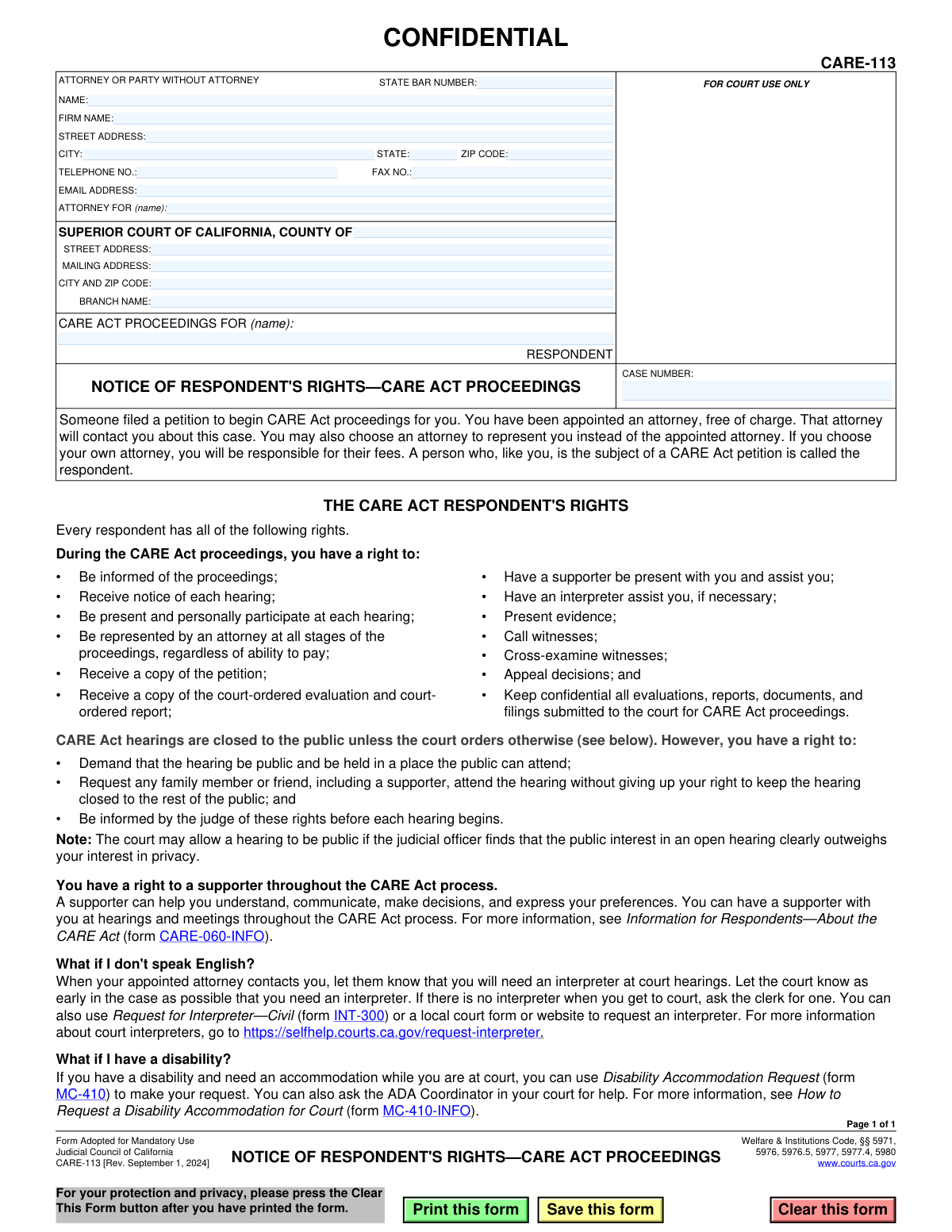
Yes! You can use AI to fill out Form CARE-113, Notice of Respondent's Rights—CARE Act Proceedings
Form CARE-113 is a mandatory legal notice used in the Superior Court of California to formally advise a person (the respondent) of their specific rights under the Community Assistance, Recovery, and Empowerment (CARE) Act. This document is essential for ensuring due process, as it details the respondent's right to legal representation, participation in hearings, and confidentiality. Today, this form can be filled out quickly and accurately by court staff or attorneys using AI-powered services like Instafill.ai, which can also convert non-fillable PDF versions into interactive fillable forms.
CARE-113 is part of the
California court forms category on Instafill.
Our AI automatically handles information lookup, data retrieval, formatting, and form filling.
It takes less than a minute to fill out CARE-113 using our AI form filling.
Securely upload your data. Information is encrypted in transit and deleted immediately after the form is filled out.
Form specifications
| Form name: | Form CARE-113, Notice of Respondent's Rights—CARE Act Proceedings |
| Number of fields: | 23 |
| Number of pages: | 1 |
| Language: | English |
Instafill Demo: How to fill out PDF forms in seconds with AI
How to Fill Out CARE-113 Online for Free in 2026
Are you looking to fill out a CARE-113 form online quickly and accurately? Instafill.ai offers the #1 AI-powered PDF filling software of 2026, allowing you to complete your CARE-113 form in just 37 seconds or less.
Follow these steps to fill out your CARE-113 form online using Instafill.ai:
- 1 Navigate to Instafill.ai and upload or select Form CARE-113.
- 2 Use the AI assistant to populate the attorney or party information, including name, State Bar number, and contact details.
- 3 Enter the specific Superior Court of California county, address, and branch details where the case is filed.
- 4 Input the respondent's full name and the official case number assigned by the court in the designated fields.
- 5 Review the pre-filled informational section detailing the respondent's rights to ensure it is the correct and current version.
- 6 Carefully check all entered information for accuracy before finalizing the document.
- 7 Download, print, and serve the completed Form CARE-113 on the respondent as required by the CARE Act proceedings.
Our AI-powered system ensures each field is filled out correctly, reducing errors and saving you time.
Why Choose Instafill.ai for Your Fillable CARE-113 Form?
Speed
Complete your CARE-113 in as little as 37 seconds.
Up-to-Date
Always use the latest 2026 CARE-113 form version.
Cost-effective
No need to hire expensive lawyers.
Accuracy
Our AI performs 10 compliance checks to ensure your form is error-free.
Security
Your personal information is protected with bank-level encryption.
Frequently Asked Questions About Form CARE-113
Form CARE-113, 'Notice of Respondent's Rights,' is an official court document that informs you of your legal rights because someone has filed a petition to start CARE Act proceedings for you. It is a notice for you to read, not a form for you to fill out.
The 'respondent' is the person who is the subject of a CARE Act petition. If you have received this notice, you are the respondent in the case.
No, you will be appointed an attorney free of charge to represent you at all stages of the proceedings. You may choose to hire your own attorney instead, but you would be responsible for paying their fees.
You have the right to be present at all hearings, be represented by an attorney, receive copies of the petition and reports, and have a supporter present. You can also present evidence, call and cross-examine witnesses, and appeal court decisions.
No, hearings are confidential and closed to the public to protect your privacy. However, you have the right to demand the hearing be public or request that specific family members or friends attend.
A supporter is someone you choose to help you understand the process, communicate, and make decisions. You have the right to have a supporter with you at hearings and meetings throughout the CARE Act process.
You should read this notice carefully to understand your rights. An attorney will be appointed for you and will contact you to discuss the case.
In addition to this notice of your rights, you have the right to receive a copy of the CARE Act petition filed against you. You will also receive copies of any court-ordered evaluations and reports.
You have the right to an interpreter at court hearings. You should let your appointed attorney know you need one, or you can ask the court clerk directly.
You can request an accommodation, such as a sign language interpreter or accessible seating, by using Form MC-410, 'Disability Accommodation Request.' You can also ask the court's ADA Coordinator for help.
While this specific form is a notice for you to read, an attorney filling it out can use AI services like Instafill.ai to accurately populate the court and party information. For respondents, AI can help you understand the document, but your appointed attorney is your primary resource.
You can upload any CARE Act form to Instafill.ai to fill it out online. The platform uses AI to identify and auto-fill fields for names, addresses, and case numbers, saving time and improving accuracy.
Services like Instafill.ai can convert flat, non-fillable PDFs into interactive, fillable forms. Simply upload the document, and the platform will make the fields editable online so you don't have to print it.
Compliance CARE-113
Validation Checks by Instafill.ai
1
Validate State Bar Number Format
This check ensures the State Bar Number field contains a numeric value, typically up to 6 digits, consistent with California's format. It is crucial for verifying the attorney's credentials and active status with the State Bar. An invalid or incorrectly formatted number can lead to the rejection of the filing and delays in the legal process.
2
Ensure Attorney or Party Name is Provided
This validation confirms that the 'NAME' field for the attorney or party without an attorney is not empty. This is a fundamental requirement for identifying the filer of the legal document. A missing name makes the document invalid and will result in its immediate rejection by the court clerk.
3
Validate Completeness of Filer's Address
This check ensures that if any part of the filer's address (Street, City, State, Zip) is entered, all components are present. A complete and accurate address is mandatory for official service of documents and court correspondence. An incomplete address can lead to missed notices, hearings, or deadlines, severely impacting the case.
4
Validate ZIP Code Format
This validation verifies that the ZIP Code field contains a valid 5-digit or 9-digit (ZIP+4) numeric format. Correct ZIP codes are essential for the proper and timely delivery of mail by the postal service. An invalid format can cause critical legal documents to be delayed, misrouted, or returned as undeliverable.
5
Validate Email Address Format
This check ensures that the value entered in the 'EMAIL ADDRESS' field conforms to the standard email format (e.g., [email protected]). In modern legal practice, email is a primary method for communication and electronic service of documents. An invalid email address will cause communication failures and may lead to missed deadlines or information.
6
Ensure Court County is Specified
This validation confirms that the 'COUNTY OF' field is filled out, specifying the jurisdiction of the Superior Court. This information is critical for routing the document to the correct courthouse and legal system. Failure to specify the county will result in the document being rejected as it cannot be filed.
7
Ensure Respondent's Name is Provided
This check verifies that the name of the respondent, under 'CARE ACT PROCEEDINGS FOR (name)', has been entered. The respondent's name is the primary identifier linking the notice to a specific individual and their case. A form submitted without the respondent's name is legally meaningless and will be rejected.
8
Validate Case Number Format
This validation checks that the 'CASE NUMBER' field, if filled, adheres to the specific format used by the California Superior Court system. The case number is the unique identifier for a legal proceeding, and its accuracy is paramount for associating the document with the correct court file. An incorrectly formatted case number can cause the document to be misfiled or rejected.
9
Validate Telephone Number Format
This check ensures the 'TELEPHONE NO.' field follows a standard 10-digit format, with or without common separators like parentheses or hyphens. A valid phone number is essential for court staff or other parties to make contact regarding the case. An invalid number can hinder communication and delay proceedings.
10
Cross-Validate Court City and ZIP
This validation checks the 'CITY AND ZIP CODE' field for the court to ensure it contains both a city name and a valid ZIP code. This field is critical for ensuring any mail sent to the court is addressed correctly. An error here could lead to misdirected filings and significant delays.
11
Logical Check on 'Attorney For' Field
This check compares the name in the 'ATTORNEY FOR (name)' field with the respondent's name. Typically, the attorney listed would be representing the respondent, so these names should match. A mismatch could indicate a significant clerical error that needs correction before filing to avoid confusion about legal representation.
12
Validate State Abbreviation
This check ensures the 'STATE' field in the filer's address contains a valid two-letter U.S. state or territory abbreviation. Using standardized abbreviations is crucial for mailability and data consistency. While the form is for California, the filer could be out-of-state, so validating against a standard list is important.
13
Conditional Requirement for Attorney Information
This validation rule makes attorney-specific fields like 'FIRM NAME' and 'STATE BAR NUMBER' required only if the filer is identified as an attorney. If a State Bar Number is entered, the system should then mandate that the attorney's name and firm are also provided. This ensures complete information is captured for legal professionals while not blocking self-represented parties.
14
Validate Court Branch Name
This check verifies that if a county has multiple court branches, the 'BRANCH NAME' field is filled in. Specifying the correct branch is essential for ensuring the document is filed at the right location and assigned to the correct judicial officers. Omitting this information for a multi-branch court can lead to processing delays or rejection.
Common Mistakes in Completing CARE-113
Attorneys sometimes mistype their state bar number, or a self-represented party (pro se) mistakenly fills in this field. An incorrect number can cause filing delays due to failed identity verification by the court clerk. Attorneys should double-check their number for accuracy, while parties without an attorney must leave this field blank.
This field requires specifying the party being represented, but filers sometimes leave it blank or use unclear terms. This ambiguity can create confusion for the court about who the filing party is and on whose behalf the document is submitted. To prevent this, the field should clearly state the respondent's full name or simply 'Respondent' to ensure the record is clear.
Filers often enter the main county courthouse address instead of the specific branch address handling CARE Act proceedings. This common error can lead to the document being misfiled, rejected, or significantly delayed in reaching the correct department. Always verify the exact street address, mailing address, and branch name on the court's official website before completing this section.
The case number is the unique identifier for the entire proceeding, but manual transcription errors are frequent. A single incorrect digit can cause the document to be filed in the wrong case or rejected by the clerk, halting progress. It is essential to carefully copy the exact case number from the initial petition or other official court documents to avoid this critical error.
The respondent's name in the 'CARE ACT PROCEEDINGS FOR' field must be spelled identically across all legal documents. Minor variations, misspellings, or the omission of a middle name can create confusion and potential legal challenges regarding identity. Ensure the name entered here perfectly matches the name used on the original petition filed with the court.
Forgetting to include a direct phone number or email address is a frequent oversight. The court and other parties rely on this information for timely communication, including hearing notices and updates. Missing contact details can lead to missed deadlines and a lack of information, negatively impacting the respondent's ability to participate in their case.
When this form is printed and filled out by hand, illegible writing can make names, addresses, and case numbers impossible for court clerks to read accurately. This often leads to data entry errors, misfiling, or outright rejection of the form. To prevent this, it is best to type the information directly into a fillable PDF; tools like Instafill.ai can convert non-fillable PDFs into fillable versions to ensure all entries are clear and legible.
Many courts use a different address for mail (like a P.O. Box) than their physical street address. Filers often mistakenly enter the same address in both fields or use the wrong one for mailing. This can cause mailed documents to be returned or lost, leading to missed filings. Always check the court's website to confirm the distinct addresses for physical location and mail correspondence.
Data fields for ZIP codes, phone numbers, and fax numbers often have specific formatting requirements that are easily missed during manual entry. Incorrect formats can be rejected by electronic filing systems or cause mail to be returned. Using AI-powered form filling tools like Instafill.ai can help prevent these mistakes by automatically validating and formatting data correctly as it is entered.
Saved over 80 hours a year
“I was never sure if my IRS forms like W-9 were filled correctly. Now, I can complete the forms accurately without any external help.”
Kevin Martin Green
Your data stays secure with advanced protection from Instafill and our subprocessors
Robust compliance program
Transparent business model
You’re not the product. You always know where your data is and what it is processed for.
ISO 27001, HIPAA, and GDPR
Our subprocesses adhere to multiple compliance standards, including but not limited to ISO 27001, HIPAA, and GDPR.
Security & privacy by design
We consider security and privacy from the initial design phase of any new service or functionality. It’s not an afterthought, it’s built-in, including support for two-factor authentication (2FA) to further protect your account.
Fill out CARE-113 with Instafill.ai
Worried about filling PDFs wrong? Instafill securely fills form-care-113-notice-of-respondents-rightscare-act-proceedings forms, ensuring each field is accurate.