Yes! You can use AI to fill out Form CARE-115, Notice of Hearing—CARE Act Proceedings

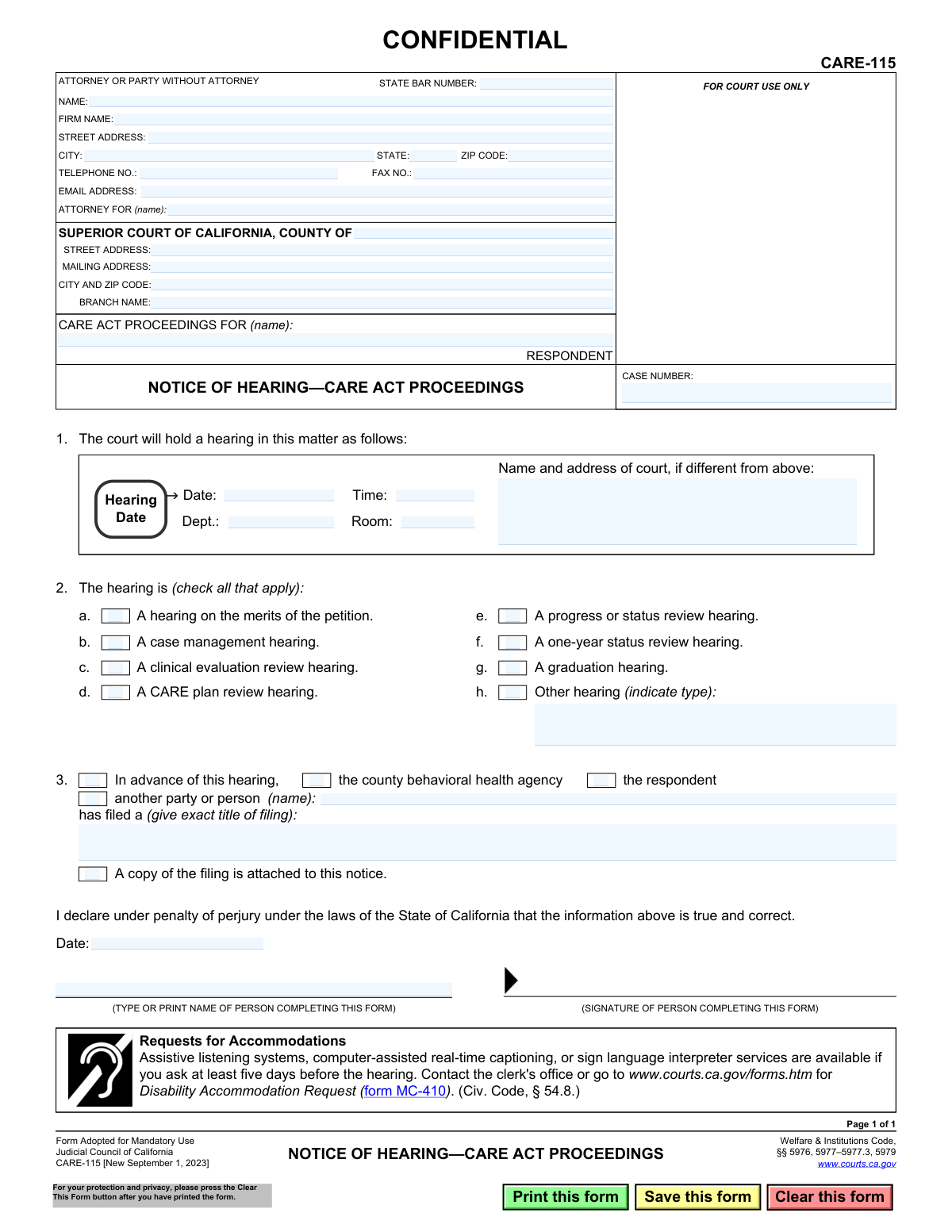
The CARE-115, Notice of Hearing—CARE Act Proceedings, is a legal form used in the California court system to formally notify a respondent and other involved parties about a scheduled court hearing related to the Community Assistance, Recovery, and Empowerment (CARE) Act. This act provides services for individuals with severe mental health and substance use disorders. Today, this form can be filled out quickly and accurately using AI-powered services like Instafill.ai, which can also convert non-fillable PDF versions into interactive fillable forms.
CARE-115 is part of the California court forms category on Instafill.
Our AI automatically handles information lookup, data retrieval, formatting, and form filling.
It takes less than a minute to fill out CARE-115 using our AI form filling.
Securely upload your data. Information is encrypted in transit and deleted immediately after the form is filled out.

Form specifications

Form name: Form CARE-115, Notice of Hearing—CARE Act Proceedings
Number of fields: 45
Number of pages: 1
Language: English
main-image

Instafill Demo: How to fill out PDF forms in seconds with AI

How to Fill Out CARE-115 Online for Free in 2026

Are you looking to fill out a CARE-115 form online quickly and accurately? Instafill.ai offers the #1 AI-powered PDF filling software of 2026, allowing you to complete your CARE-115 form in just 37 seconds or less.
Follow these steps to fill out your CARE-115 form online using Instafill.ai:
  1. 1 Navigate to Instafill.ai and upload or select the CARE-115 form to begin.
  2. 2 Enter the attorney or party information, including name, State Bar number, firm name, and contact details.
  3. 3 Provide the specific Superior Court information, including the county, address, and branch name.
  4. 4 Input the name of the respondent for the CARE Act proceedings and the corresponding case number.
  5. 5 Specify the hearing details by entering the date, time, and location, and check the boxes to indicate the type of hearing being held.
  6. 6 If applicable, indicate which party has filed a document in advance of the hearing and provide the title of that filing.
  7. 7 Review all entered information for accuracy, then date and sign the form to declare the information is true and correct before filing.

Our AI-powered system ensures each field is filled out correctly, reducing errors and saving you time.

Why Choose Instafill.ai for Your Fillable CARE-115 Form?

Speed

Complete your CARE-115 in as little as 37 seconds.

Up-to-Date

Always use the latest 2026 CARE-115 form version.

Cost-effective

No need to hire expensive lawyers.

Accuracy

Our AI performs 10 compliance checks to ensure your form is error-free.

Security

Your personal information is protected with bank-level encryption.

Frequently Asked Questions About Form CARE-115

This form officially notifies you of a scheduled court hearing related to a CARE Act case. It provides the essential details, including the date, time, location, and the specific reason for the hearing.

You likely received this form because you are a party involved in a CARE Act proceeding, such as the respondent or their attorney. The court uses this notice to ensure all parties are aware of an upcoming hearing.

The 'respondent' is the individual for whom the CARE Act proceedings have been initiated. Their case is the subject of the court hearing.

Section 2 of the form specifies the purpose of the hearing. A checked box will indicate if it is for a CARE plan review, a clinical evaluation, or another type of proceeding.

This section indicates that another party has filed a document with the court, such as a report or evaluation. A copy of that filing should be attached to this notice for your review before the hearing.

Yes, as a party to the case, your attendance at the scheduled hearing is generally required. If you are unable to attend, you should contact the court clerk or your attorney as soon as possible.

To request a disability-related accommodation, you should contact the clerk's office at least five days before the hearing. You may need to fill out a 'Disability Accommodation Request' (form MC-410).

Form CARE-115 is typically completed by the court clerk or an attorney representing one of the parties in the case. Its purpose is to provide official notice to all involved individuals.

The person filling out the form must provide their contact information, including name, address, and State Bar number if they are an attorney, as well as the court and case details.

You should go to the court address specified in the box in Section 1 for your hearing. This field is used when a hearing is held at a different location from the court's main address.

Yes, services like Instafill.ai use AI to auto-fill form fields accurately and save time. This can be particularly helpful for ensuring all required information is entered correctly.

You can use a service like Instafill.ai to fill out the form online. Simply upload the document, and the platform will make the fields interactive so you can type in your information and then save or print the completed form.

If you have a non-fillable or 'flat' PDF, you can use a tool like Instafill.ai. It can convert the document into an interactive, fillable form that you can easily complete on your computer.

Compliance CARE-115
Validation Checks by Instafill.ai

1
Case Number Presence and Format
Verifies that the 'CASE NUMBER' field is not empty and follows the expected format for the court jurisdiction. This is critical for ensuring the notice is correctly associated with the existing case file in the court's system. A missing or incorrectly formatted case number could lead to filing rejection or misdirection of the document.
2
Future Hearing Date
Ensures the 'Hearing Date' provided in section 1 is a valid, future date. A notice of hearing is, by definition, for an upcoming event. This check prevents the creation of a logically invalid notice with a past date, which would cause confusion and be legally ineffective.
3
Hearing Type Selection
Validates that at least one checkbox is selected in section 2, 'The hearing is (check all that apply)'. The purpose of the hearing must be clearly identified for all parties involved. If no hearing type is selected, the notice is incomplete and fails to inform the recipient of the nature of the proceeding.
4
Conditional 'Other hearing' Description
Checks that if the 'Other hearing' checkbox (2h) is selected, the corresponding text field to indicate the type of hearing is filled out. This ensures that selecting 'Other' provides the necessary specific information. A failure means the notice is ambiguously defined, defeating the purpose of the 'Other' option.
5
Respondent Name Is Required
Ensures the 'CARE ACT PROCEEDINGS FOR (name): RESPONDENT' field is populated. The respondent is the central subject of the proceedings, and their name is the primary identifier for the case. A form submitted without the respondent's name is fundamentally incomplete and cannot be processed.
6
Declaration Date Validity
Validates that the 'Date' field in the declaration section is a valid date and is not in the future. The signature date attests to the truthfulness of the information on that day. An invalid or future date would undermine the legal validity of the declaration under penalty of perjury.
7
Completer's Name Is Required
Verifies that the 'TYPE OR PRINT NAME OF PERSON COMPLETING THIS FORM' field is not empty. This is required for accountability and to identify the declarant who is signing the form under penalty of perjury. Without this name, the declaration is anonymous and legally insufficient.
8
Email Address Format
Checks that the value entered in the 'EMAIL ADDRESS' field is in a valid format (e.g., contains an '@' symbol and a domain). This ensures that the provided email is syntactically correct for electronic communication and service. An invalid format would prevent the court or other parties from contacting the filer via email.
9
ZIP Code Format
Validates that the 'ZIP CODE' field contains a valid 5-digit or 9-digit (ZIP+4) numerical format. Correct formatting is essential for ensuring mail delivery to the attorney or party. An incorrect ZIP code can lead to significant delays or failure in the delivery of important legal documents.
10
Hearing Time Format
Ensures the 'Time' field for the hearing is in a valid time format (e.g., HH:MM AM/PM or 24-hour format). A clear and unambiguous time is essential for the respondent and other parties to know when to appear. An invalid format could lead to a party missing the hearing.
11
Conditional 'Another Party' Name
In section 3, if the 'another party or person' checkbox is selected, this check ensures the corresponding name field is filled in. This is necessary to identify the specific person or entity that filed the document being referenced. Failure to provide the name makes the information incomplete and potentially confusing.
12
Filing Title Requirement
Validates that if any party is checked in section 3, the 'give exact title of filing' text field is completed. This provides essential context for the hearing by identifying the specific motion, report, or document being discussed. Without the title, recipients would not know what document the hearing pertains to.
13
Court County Is Required
Verifies that the 'COUNTY OF' field is filled out to specify the Superior Court's jurisdiction. This is a fundamental piece of information for identifying the correct court and venue for the proceeding. A missing county makes it impossible to determine where the case is being heard.
14
State Bar Number Format
If a value is entered in the 'STATE BAR NUMBER' field, this check validates that it is a numeric value. While not always required (for parties without attorneys), if an attorney is listed, their bar number is their primary professional identifier. Ensuring it's in the correct format helps with verification.

Common Mistakes in Completing CARE-115

Incorrect or Incomplete Court Information

Filers often enter a generic county courthouse address instead of the specific street address and branch name where the hearing is scheduled. This mistake happens due to unfamiliarity with court divisions and can cause the notice to be misrouted or delayed. To prevent this, always verify the exact branch name and address from prior court communications or the court's official website.

Entering an Incorrect Case Number

Transposing digits or misreading the case number is a frequent error that has serious consequences. An incorrect case number will prevent the court clerk from associating the notice with the correct case file, rendering the filing ineffective until it is corrected and re-filed. Always double-check the case number against the initial petition or other official court documents before submission.

Ambiguous Hearing Type Selection

In Section 2, filers may check the wrong box, forget to check any box, or check "Other" without providing a required description. This creates confusion for the court and all parties about the hearing's specific purpose. Carefully review the case status to select the precise hearing type(s) that apply, ensuring clarity and proper preparation.

Omitting Details of an Accompanying Filing

Section 3 requires specifying who filed a related document and the document's exact title, but filers often leave these fields blank. For example, one might check "another party or person" but forget to write in the name. This omission leaves the court and respondent guessing about the context of the hearing, so it's crucial to be precise and complete.

Forgetting to Attach Referenced Documents

The form includes a checkbox indicating a copy of another filing is attached, and a common mistake is to check this box but forget to include the actual document. This makes the notice legally incomplete and can require re-serving all parties, significantly delaying the legal process. Always create a checklist to ensure all referenced attachments are included with the final submission.

Invalid or Missing Signature and Date

An unsigned or undated form is legally invalid and will be rejected by the court clerk, yet this is a common oversight made in haste. The signature and date are required to declare the information true under penalty of perjury. Performing a final review to ensure the form is properly signed and dated is a critical step before filing.

Illegible Handwritten Information

When a form is printed and filled out by hand, poor handwriting can make critical information like names, dates, and case numbers unreadable. This leads to data entry errors by court staff, misdirected mail, and potential rejection of the form. If the form is a non-fillable PDF, AI-powered tools like Instafill.ai can convert it into a fillable version to ensure all entries are typed and perfectly legible.

Incorrect 'Attorney For' Designation

The 'ATTORNEY FOR (name):' field must clearly state which party the filer represents, but people sometimes leave it blank, write 'Self' when they are an attorney, or list the wrong party. This can cause confusion about legal representation and who is responsible for the filing. The field should contain the name of the client or state 'In Pro Per' if you are representing yourself without an attorney.

Incomplete Hearing Details in Section 1

Filers sometimes provide the hearing date and time but neglect to fill in the Department ('Dept.') or Room number. This forces the recipient to search for the specific location upon arriving at the courthouse, causing unnecessary stress and potential tardiness. To avoid this, always include all available location details to ensure parties can easily find the correct courtroom.

Using Inconsistent Party Names

The respondent's name in the caption must be written exactly as it appears on the initial petition and other official case documents. Using nicknames, abbreviations, or slight misspellings can create ambiguity and issues with case file consolidation by the court clerk. You can prevent this by copying the name directly from a previous official filing. AI form-filling tools like Instafill.ai can help by saving and reusing consistent party information across all related case documents.
Saved over 80 hours a year

“I was never sure if my IRS forms like W-9 were filled correctly. Now, I can complete the forms accurately without any external help.”

Kevin Martin Green

Your data stays secure with advanced protection from Instafill and our subprocessors

Robust compliance program

Transparent business model

You’re not the product. You always know where your data is and what it is processed for.

ISO 27001, HIPAA, and GDPR

Our subprocesses adhere to multiple compliance standards, including but not limited to ISO 27001, HIPAA, and GDPR.

Security & privacy by design

We consider security and privacy from the initial design phase of any new service or functionality. It’s not an afterthought, it’s built-in, including support for two-factor authentication (2FA) to further protect your account.

Fill out CARE-115 with Instafill.ai

Worried about filling PDFs wrong? Instafill securely fills form-care-115-notice-of-hearingcare-act-proceedings forms, ensuring each field is accurate.