Yes! You can use AI to fill out Form CARE-119, Notice of Dismissal
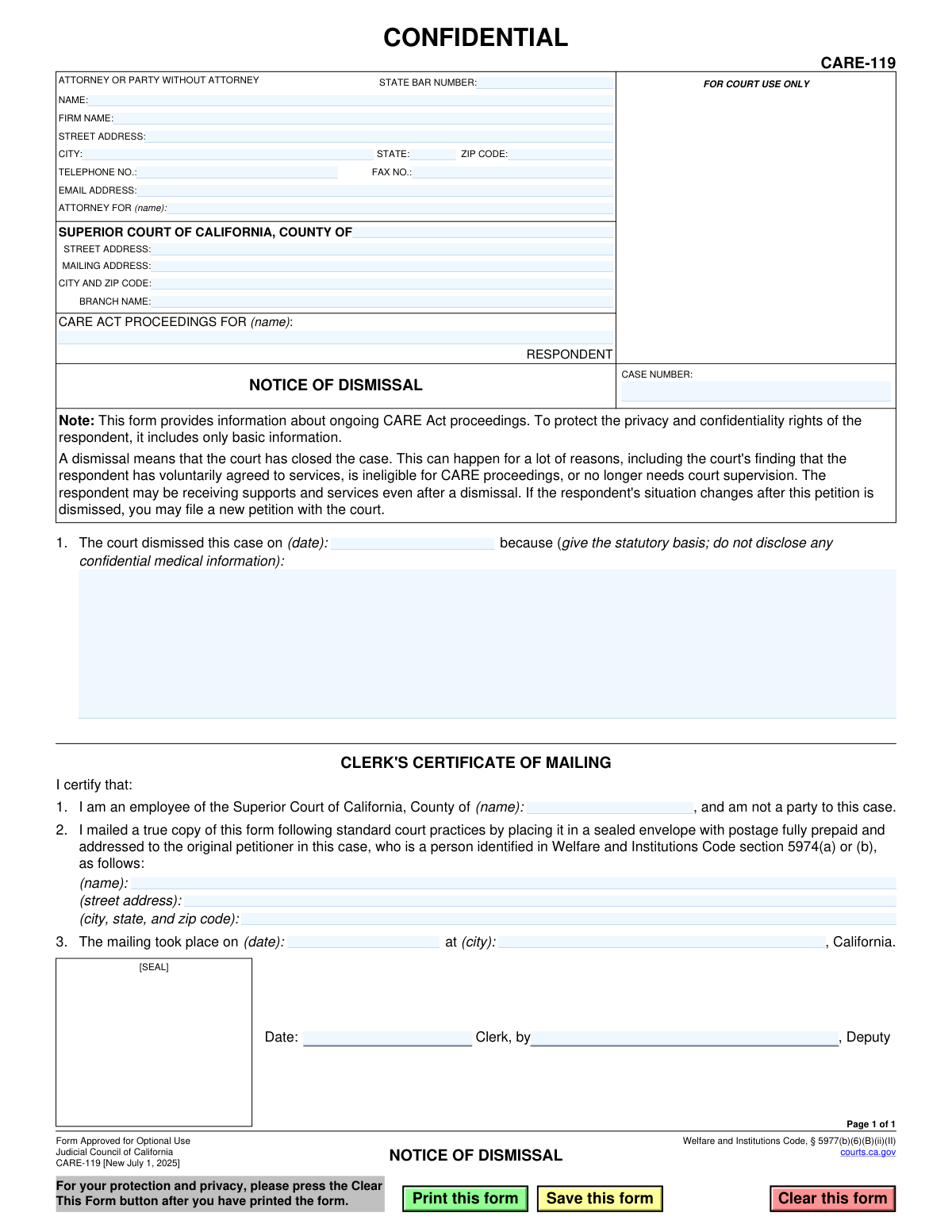
This form, officially titled Notice of Dismissal, is used within the Superior Court of California to formally close a CARE Act case. It provides basic information about the dismissal, such as the date and the statutory reason, while protecting the respondent's confidential information. A dismissal indicates the court has closed the case for reasons like the respondent voluntarily accepting services or no longer requiring court supervision. Today, this form can be filled out quickly and accurately using AI-powered services like Instafill.ai, which can also convert non-fillable PDF versions into interactive fillable forms.
CARE-119 is part of the
California court forms category on Instafill.
Our AI automatically handles information lookup, data retrieval, formatting, and form filling.
It takes less than a minute to fill out CARE-119 using our AI form filling.
Securely upload your data. Information is encrypted in transit and deleted immediately after the form is filled out.
Form specifications
| Form name: | Form CARE-119, Notice of Dismissal |
| Number of fields: | 31 |
| Number of pages: | 1 |
| Language: | English |
Instafill Demo: How to fill out PDF forms in seconds with AI
How to Fill Out CARE-119 Online for Free in 2026
Are you looking to fill out a CARE-119 form online quickly and accurately? Instafill.ai offers the #1 AI-powered PDF filling software of 2026, allowing you to complete your CARE-119 form in just 37 seconds or less.
Follow these steps to fill out your CARE-119 form online using Instafill.ai:
- 1 Navigate to Instafill.ai and upload or select the CARE-119, Notice of Dismissal form.
- 2 Enter the attorney or party information, including name, State Bar number, firm name, and contact details.
- 3 Provide the specific Superior Court of California information, including the county, address, and branch name.
- 4 Input the respondent's name and the official case number assigned to the CARE Act proceeding.
- 5 Fill in the date the case was dismissed and provide the statutory basis for the dismissal, ensuring no confidential medical information is disclosed.
- 6 The Clerk of the Court will complete the 'Clerk's Certificate of Mailing' section, detailing to whom and when the notice was mailed.
- 7 Review all entered information for accuracy before the clerk signs, dates, and applies the court seal to finalize the notice.
Our AI-powered system ensures each field is filled out correctly, reducing errors and saving you time.
Why Choose Instafill.ai for Your Fillable CARE-119 Form?
Speed
Complete your CARE-119 in as little as 37 seconds.
Up-to-Date
Always use the latest 2026 CARE-119 form version.
Cost-effective
No need to hire expensive lawyers.
Accuracy
Our AI performs 10 compliance checks to ensure your form is error-free.
Security
Your personal information is protected with bank-level encryption.
Frequently Asked Questions About Form CARE-119
This form is used by the California Superior Court to officially notify the original petitioner that a CARE Act case has been closed or 'dismissed'. It provides the date and the legal reason for the dismissal.
The court clerk completes and certifies this form. It is then mailed to the original petitioner in the CARE Act case to inform them of the case's dismissal.
A dismissal means the court has closed the case. This can happen because the respondent has voluntarily agreed to services, is ineligible for CARE proceedings, or no longer needs court supervision.
Not necessarily. The form states that the respondent may still be receiving supports and services even after a case is dismissed.
Yes, the form explicitly states that if the respondent's situation changes after the dismissal, you may file a new petition with the court.
To protect the respondent's privacy and confidentiality rights, the form only includes basic information and the statutory basis for dismissal, not confidential medical details.
Section 1 is completed by the court and includes the date the case was dismissed and the legal (statutory) reason for the dismissal, without revealing confidential information.
This is a section where the court clerk certifies that they have mailed a true copy of the Notice of Dismissal to the original petitioner on a specific date. This serves as the official record of notification.
No, as the petitioner, you are the recipient of this notice. The form is completed and sent by the court to inform you of a decision that has already been made.
You should keep this notice for your records as it is the official confirmation that the case is closed. If you have questions about the dismissal, you may need to consult with an attorney or review the case file at the courthouse.
While you don't fill out this specific notice yourself, AI-powered services like Instafill.ai can be very helpful for other legal forms. They can auto-fill your repetitive information like name and address, saving you time and reducing errors.
You can upload your form to Instafill.ai, and its AI will identify the fields. You can then quickly fill in your information, which the platform can save to help you complete future forms even faster.
If you have a non-fillable PDF, you can use a service like Instafill.ai to convert it into an interactive, fillable form. This can be useful for saving a digital copy with your own notes or for record-keeping.
Compliance CARE-119
Validation Checks by Instafill.ai
1
Validates Case Number Format
Ensures the Case Number field conforms to the standard format used by the California Superior Court. This is critical for correctly identifying and associating the document with the proper case file in the court's records system. An incorrectly formatted number could lead to filing rejection or misfiling of the notice.
2
Requires Respondent's Name
Verifies that the 'CARE ACT PROCEEDINGS FOR (name)' field, which identifies the respondent, is not empty. The respondent is the central party to the proceeding, and their name is essential for the legal validity of the notice. A form submitted without this information is incomplete and cannot be processed.
3
Ensures Dismissal Date is a Valid Past or Present Date
Checks that the dismissal date in section 1 is a valid calendar date and is not set in the future. A dismissal is a past event, so a future date is a logical impossibility and indicates a data entry error. This validation ensures the temporal accuracy and legal integrity of the court's recorded action.
4
Requires Statutory Basis for Dismissal
Validates that the reason for dismissal field is not blank. The form requires the statutory basis for the court's decision to be provided. Omitting this information makes the notice incomplete and fails to provide the legally required justification for closing the case.
5
Scans Dismissal Reason for Confidential Medical Information
Performs a keyword scan on the dismissal reason text field to detect and flag terms that may constitute confidential medical information, which is explicitly forbidden by the form's instructions. This check is a safeguard to protect the respondent's privacy rights under law. A potential violation would trigger a manual review before the form is finalized.
6
Validates State Bar Number is Numeric
Ensures that the State Bar Number field contains only numeric digits. California State Bar numbers are unique numerical identifiers for attorneys. Entering non-numeric characters would render the number invalid, preventing proper identification and verification of the attorney's credentials.
7
Validates Attorney Email Address Format
Verifies that the value entered in the Email Address field follows the standard '[email protected]' format. A valid email address is crucial for ensuring that electronic communications and case notifications from the court are successfully delivered. An invalid format could lead to critical communication failures.
8
Ensures ZIP Code is a Valid 5 or 9-Digit Format
Checks that all ZIP code fields on the form contain a valid 5-digit or 9-digit (ZIP+4) numeric format. A correct and properly formatted ZIP code is essential for the timely and accurate delivery of legal notices via postal mail. An invalid format could result in returned mail and significant delays.
9
Validates Mailing Date is On or After Dismissal Date
Performs a logical check to ensure the 'mailing took place on' date in the Clerk's Certificate is on or after the case dismissal date. It is chronologically impossible to mail a notice of dismissal before the dismissal has officially occurred. This validation prevents logical errors and ensures the sequence of events is plausible.
10
Validates Clerk's Signature Date is On or After Mailing Date
Ensures the Clerk's signature date is on or after the date the mailing took place. The clerk is certifying a past action (the mailing), so they cannot sign the certification before the mailing has occurred. This check upholds the integrity and legal validity of the Clerk's Certificate of Mailing.
11
Requires Superior Court County Name
Verifies that the 'COUNTY OF' field in the court information section is filled out. This specifies the exact Superior Court jurisdiction for the case. Without this information, the document is ambiguous and cannot be correctly filed or associated with a specific court.
12
Ensures Clerk's County Matches Court County
Compares the county name in the main court information block with the county name in the Clerk's Certificate of Mailing. As the clerk is an employee of that specific court, these two values must be identical. A mismatch indicates a significant data entry error that could invalidate the certificate.
13
Requires Completeness of Petitioner Mailing Address
Checks that the recipient's name, street address, and city/state/zip code are all filled out in the Clerk's Certificate of Mailing section. A complete address is legally required to certify that the notice was properly mailed to the original petitioner. Any missing component would render the proof of service invalid.
14
Validates State Field is a 2-Letter Abbreviation
Ensures the 'STATE' field in any address block contains a valid two-letter U.S. state or territory abbreviation. Using a standardized format prevents ambiguity and is required for mail processing systems. This check improves data quality and ensures mailability.
Common Mistakes in Completing CARE-119
The 'CLERK'S CERTIFICATE OF MAILING' section is reserved exclusively for court personnel to complete after the form is filed. Attorneys or parties often mistakenly fill in this section themselves, which invalidates the certificate and requires the form to be resubmitted. This entire section, including the signature and date lines at the bottom, should be left blank when the form is initially filed with the court.
The form explicitly warns filers to 'not disclose any confidential medical information' when stating the reason for dismissal. Despite this, filers may inadvertently include details about a diagnosis or treatment, violating the respondent's privacy rights and leading to the form's rejection. The reason for dismissal must be strictly limited to the legal or 'statutory basis,' such as 'Respondent has voluntarily agreed to services.'
In section 1, the form requires the 'statutory basis' for dismissal, not a general explanation. Simply writing 'case closed' or 'respondent no longer needs help' is insufficient and will likely be rejected by the court clerk for being legally inadequate. The filer must reference the specific section of the Welfare and Institutions Code that justifies the dismissal, which requires precise legal knowledge.
The case number is the primary identifier for the court file, and even a single incorrect digit can cause the document to be rejected or misfiled into an entirely different case. This error often happens due to typos or transcribing from memory. To prevent this, always double-check the case number against official court documents before submission. AI-powered tools like Instafill.ai can help by saving and accurately auto-filling correct case numbers across related documents.
Filers often enter the main county courthouse address instead of the specific branch where the case is being heard. This can lead to the document being misfiled or significantly delayed in reaching the correct department. Always verify the exact street address, mailing address, and branch name for the specific court handling the CARE Act proceedings before filling out the form.
The respondent's full legal name must be entered precisely as it appears on other court documents in the 'CARE ACT PROCEEDINGS FOR' field. Using nicknames, initials, or misspelling the name can create legal ambiguity, cause indexing problems in the court's system, and lead to administrative delays in processing the dismissal. Carefully copy the name from the original petition or other official court records.
Attorneys filing this form sometimes forget to include their State Bar Number. This is a mandatory piece of information for any attorney appearing before the court. Its omission can lead to the filing being rejected, as the clerk cannot verify the attorney's standing. Parties representing themselves should leave this field blank.
The form includes a 'Clear This Form' button for privacy protection, especially when using a shared or public computer. Forgetting to press this after printing leaves sensitive case information, like the respondent's name and case number, accessible to the next user. This creates a significant privacy breach. Always use the clear button or close the file without saving to protect confidential data.
While this is a fillable PDF, some users may print it and fill it out by hand. Illegible handwriting for critical information like names, addresses, and the case number can make it impossible for the court clerk to process the document accurately. This will almost certainly result in rejection and require refiling. To avoid this, fill the form out electronically before printing. If the form is a flat PDF, a tool like Instafill.ai can make it fillable.
This field clarifies who the filing party is representing. An attorney might forget to list their client's name, or a self-represented individual might leave it blank, causing confusion. To avoid this, an attorney should enter their client's name, while a party without an attorney should enter their own name again, often followed by 'Self-Represented' or 'In Pro Per'.
Saved over 80 hours a year
“I was never sure if my IRS forms like W-9 were filled correctly. Now, I can complete the forms accurately without any external help.”
Kevin Martin Green
Your data stays secure with advanced protection from Instafill and our subprocessors
Robust compliance program
Transparent business model
You’re not the product. You always know where your data is and what it is processed for.
ISO 27001, HIPAA, and GDPR
Our subprocesses adhere to multiple compliance standards, including but not limited to ISO 27001, HIPAA, and GDPR.
Security & privacy by design
We consider security and privacy from the initial design phase of any new service or functionality. It’s not an afterthought, it’s built-in, including support for two-factor authentication (2FA) to further protect your account.
Fill out CARE-119 with Instafill.ai
Worried about filling PDFs wrong? Instafill securely fills form-care-119-notice-of-dismissal forms, ensuring each field is accurate.