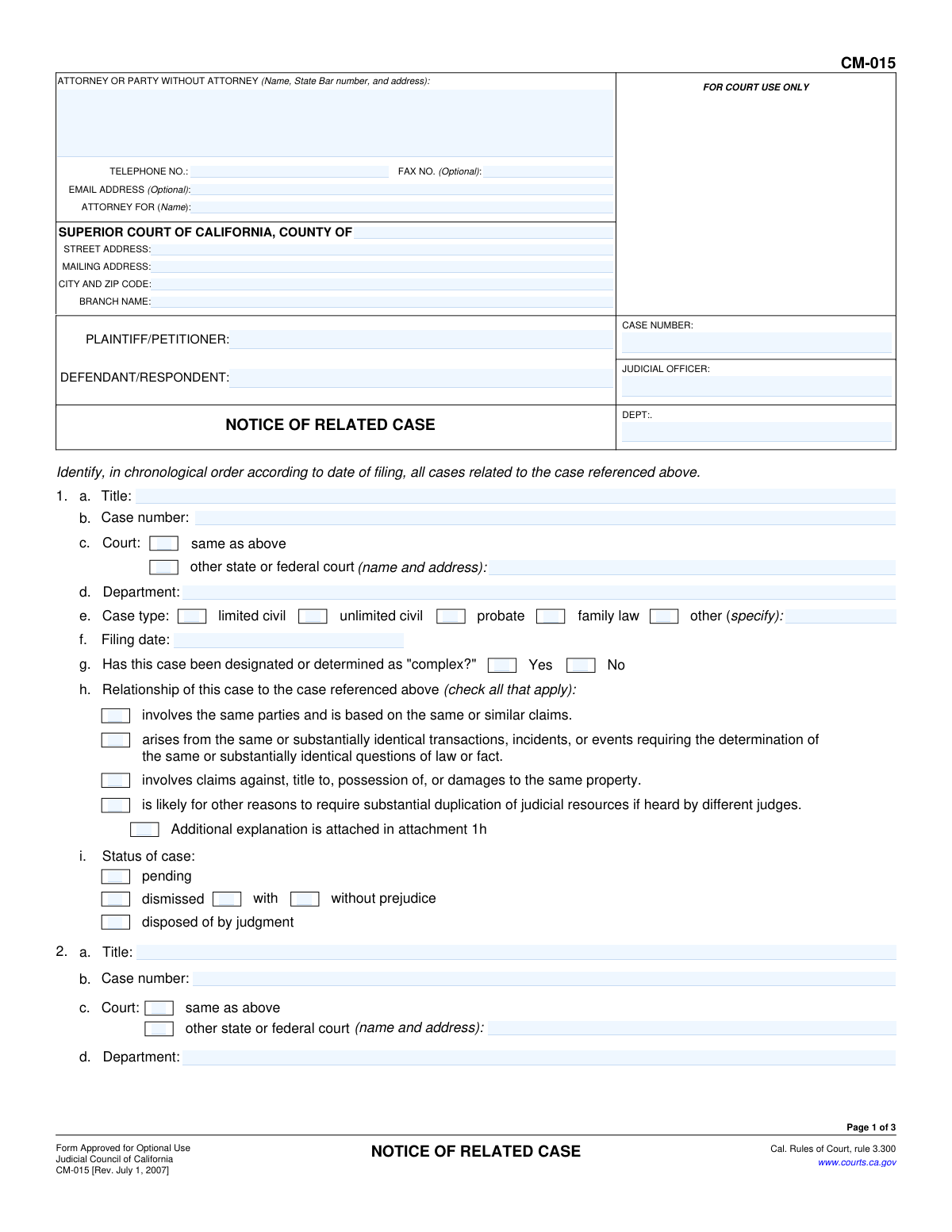
Yes! You can use AI to fill out Form CM-015, Notice of Related Case
Form CM-015, Notice of Related Case, is a legal document filed in the Superior Court of California to notify the court and all parties of other cases that may be related to the current lawsuit. This is crucial for judicial economy, as it allows the court to potentially consolidate cases or assign them to the same judge, preventing conflicting rulings and saving resources. Today, this form can be filled out quickly and accurately using AI-powered services like Instafill.ai, which can also convert non-fillable PDF versions into interactive fillable forms. Filing this notice ensures compliance with California Rules of Court, rule 3.300.
CM-015 is part of the
California court forms category on Instafill.
Our AI automatically handles information lookup, data retrieval, formatting, and form filling.
It takes less than a minute to fill out CM-015 using our AI form filling.
Securely upload your data. Information is encrypted in transit and deleted immediately after the form is filled out.
Form specifications
| Form name: | Form CM-015, Notice of Related Case |
| Number of fields: | 129 |
| Number of pages: | 1 |
| Language: | English |
Instafill Demo: How to fill out PDF forms in seconds with AI
How to Fill Out CM-015 Online for Free in 2026
Are you looking to fill out a CM-015 form online quickly and accurately? Instafill.ai offers the #1 AI-powered PDF filling software of 2026, allowing you to complete your CM-015 form in just 37 seconds or less.
Follow these steps to fill out your CM-015 form online using Instafill.ai:
- 1 Navigate to Instafill.ai and upload or select the CM-015 Notice of Related Case form.
- 2 Provide your personal or attorney information, including name, State Bar number, address, and contact details in the top section.
- 3 Enter the court information, case caption (plaintiff/petitioner and defendant/respondent), and the case number for the primary case.
- 4 For each related case, provide its title, case number, court, filing date, and status. Use the AI assistant to accurately describe the relationship between the cases by checking the appropriate boxes.
- 5 Review all the information entered by the AI for accuracy, then e-sign and date the form.
- 6 Complete the 'Proof of Service' section to document that all parties in each related case have been notified, then download or print the completed form for filing with the court.
Our AI-powered system ensures each field is filled out correctly, reducing errors and saving you time.
Why Choose Instafill.ai for Your Fillable CM-015 Form?
Speed
Complete your CM-015 in as little as 37 seconds.
Up-to-Date
Always use the latest 2026 CM-015 form version.
Cost-effective
No need to hire expensive lawyers.
Accuracy
Our AI performs 10 compliance checks to ensure your form is error-free.
Security
Your personal information is protected with bank-level encryption.
Frequently Asked Questions About Form CM-015
This form is used to notify the court that your case is connected to other legal cases. This helps the court manage the cases efficiently, potentially by assigning them to the same judge to save judicial resources and avoid conflicting rulings.
Any party or their attorney in a California Superior Court case who knows about or is involved in another related case is required to file and serve this notice.
You will need the case title, case number, court, filing date, and current status for your primary case and all related cases. You also need the names and mailing addresses of all parties in all the cases for the Proof of Service section.
A case is considered related if it involves the same parties and similar claims, arises from the same events or transactions, concerns the same property, or is likely to require a duplication of judicial resources if heard by different judges.
The form provides space for three cases. If you have more, check the box for 'Additional related cases are described in Attachment 4' and attach extra pages with the required information for each additional case.
No, if you are a party in the case, you cannot complete the Proof of Service. It must be filled out and signed by a person who is at least 18 years old and not a party to the action after they have mailed the notice.
A copy of the completed Notice of Related Case must be mailed to all known parties in your case and in every related case you have listed on the form.
After the form is filed and served, the court will review the information. A judge will then determine if the cases are officially related and may issue an order to assign them to a single judge for future proceedings.
Yes, services like Instafill.ai use AI to help you accurately auto-fill form fields with your saved information, which can save time and reduce the risk of errors.
You can use a service like Instafill.ai to upload the CM-015 PDF and fill it out on your computer. The platform allows you to type directly into the fields, save your progress, and print the completed form for filing.
If you have a non-fillable or 'flat' PDF, you can upload it to a service like Instafill.ai. Their technology can convert the document into an interactive, fillable form that you can complete and print from your browser.
This means you should list the related cases starting with the one that was filed first, based on its filing date. This helps the court understand the timeline of the related legal actions.
Compliance CM-015
Validation Checks by Instafill.ai
1
Ensures Primary Case Number is Provided
This check verifies that the 'CASE NUMBER' field at the top of the form is filled. This number is the primary identifier for the case to which other cases are being related, and its absence makes the entire filing ambiguous. If the case number is missing, the form cannot be correctly filed or associated with the proper court record.
2
Requires Filer Information
This validation ensures that the 'ATTORNEY OR PARTY WITHOUT ATTORNEY' block, including name and address, is completed. This information identifies the person or firm filing the notice, which is essential for all court communications and record-keeping. A submission without this information is incomplete and cannot be officially processed or served.
3
Validates Specification for 'Other' Case Type
This validation ensures that if the 'other' checkbox is selected for 'Case type' in any related case section, the corresponding 'specify' text field is not empty. This is crucial for court clerks to properly categorize and understand the nature of the related case. A failure would mean the form is submitted with incomplete information, potentially causing processing delays or rejection.
4
Requires Court Details if Not Same as Primary Case
This check validates that if the 'other state or federal court' checkbox is selected for a related case, the corresponding 'name and address' field is filled in. This information is essential for the court to locate and verify the records of the related case, which is impossible if it's in a different jurisdiction without these details. Failure to provide this information would make the entry for that related case useless and incomplete.
5
Requires Dismissal Type for 'Dismissed' Cases
This check confirms that if the 'dismissed' option is selected for a related case's status, one of the sub-options ('with prejudice' or 'without prejudice') is also selected. The distinction is legally significant, indicating whether the case can be refiled, and is essential for a complete record. An incomplete selection would render the status information ambiguous and require manual follow-up.
6
Verifies Related Case Filing Date Validity
This validation checks that the 'Filing date' for each related case is a valid date in a recognized format (e.g., MM/DD/YYYY) and is not a date in the future. Accurate dates are essential for the court to understand the history of the litigation and verify the chronological ordering. An invalid or future date would be rejected as it is logically impossible and indicates a data entry error.
7
Ensures a Reason for Relatedness is Selected
For each related case listed, this check verifies that at least one checkbox under section 'h' ('Relationship of this case...') is selected. This provides the legal and factual basis for why the cases should be considered related by the court. Without this justification, the notice is incomplete and fails to meet its primary purpose, likely leading to rejection.
8
Validates 'Number of pages attached' Field
This check ensures that if any checkbox indicating an attachment is selected (e.g., 'Additional explanation is attached'), the 'Number of pages attached' field contains a number greater than zero. This prevents confusion and ensures that court staff are aware they need to look for and process additional documents. A mismatch could lead to attached documents being overlooked, rendering the filing incomplete.
9
Confirms Signature Section is Completed
This validation confirms that the signature date and the typed or printed name of the party or attorney are both filled out on page 2. A signature and date are required to attest to the truthfulness of the document's contents under penalty of perjury. A missing signature or date invalidates the notice, making it legally ineffective until corrected.
10
Verifies Server is Not a Party to the Action
This is a critical check to ensure the person signing the Proof of Service (the declarant) is not one of the parties listed as 'PLAINTIFF/PETITIONER' or 'DEFENDANT/RESPONDENT'. Court rules require service to be performed by a neutral non-party. A violation of this rule invalidates the proof of service, meaning the notice was not legally served and the filing is defective.
11
Validates Proof of Service Declaration Date
This check verifies that the date the declarant signs the Proof of Service is on or after the date the notice was mailed. A person cannot truthfully declare under penalty of perjury that they mailed something on a future date. This logical check prevents clerical errors and ensures the integrity of the service declaration.
12
Ensures Proof of Service Completeness
This validation ensures that if the Proof of Service section is used, all mandatory components are complete: the server's address, a selected mailing method, the date and city of mailing, and the full details for at least one person served. Incomplete proof of service is legally insufficient and can be challenged, potentially requiring the notice to be re-served. This check prevents the submission of a defective proof of service.
Common Mistakes in Completing CM-015
A very common and critical error is when the person filing the notice (the party or their attorney) also signs the Proof of Service on page 3. The form explicitly states that the server must be a non-party to the action who is at least 18 years old. This mistake invalidates the service, can cause the entire filing to be rejected, and results in significant delays as the process must be repeated correctly. To avoid this, the notice must be mailed and the Proof of Service must be signed by a qualified third person, such as a legal assistant, professional process server, or another adult who is not involved in the case.
The case number is the primary identifier for any court filing, and this form requires numbers for both the primary and all related cases. Transposing digits, omitting leading zeros, or entering a number from the wrong case are frequent mistakes. An incorrect case number can cause the notice to be misfiled or rejected outright, preventing the court from properly linking the cases. Always double-check every digit against official court documents before submission.
In section 'h' for each related case, the filer must check one or more boxes to provide the legal basis for relating the cases. Simply listing a case is not enough; the filer must specify *why* it's related according to the criteria provided (e.g., same parties, same transactions). Forgetting to check these boxes or choosing a justification that doesn't apply can lead a judge to disregard the notice. Carefully review the facts and check all applicable boxes to create a strong justification for consolidation or coordination.
The Plaintiff/Petitioner and Defendant/Respondent names must be written exactly as they appear in the official case caption on all pages. Filers often use abbreviations, misspell names, or omit 'et al.' when it's part of the official title. These inconsistencies can create confusion and lead to data entry errors or rejection by the court clerk. To prevent this, copy the names precisely from a filed complaint or other official court document. AI-powered tools like Instafill.ai can help by storing and auto-populating these names consistently across all related forms.
When identifying the court for each case, filers often provide incomplete information, such as omitting the 'BRANCH NAME' for the Superior Court or failing to list the full address for an 'other state or federal court'. This ambiguity forces court clerks to do extra research, causing processing delays. To ensure smooth processing, always provide the complete and specific court name, county, branch, and address as required.
Section 'i' requires the current status of each related case, but filers often guess or use outdated information. A common error is failing to specify whether a 'dismissed' case was 'with' or 'without prejudice,' a crucial legal distinction. Incorrect status information can mislead the court and affect judicial assignments. Before filing, verify the current and exact status of each related case using the court's public online records.
An unsigned or undated legal document is invalid and will be rejected by the court clerk. This simple oversight is surprisingly common, especially when filers are in a hurry. This mistake requires the filer to correct the form and refile it, potentially missing important deadlines. Always perform a final review to ensure the party or attorney has signed and dated page 2 before submission.
The form includes checkboxes to indicate when attachments are being used for additional explanations or to list more cases. Filers frequently make one of two mistakes: they include an attachment but forget to check the corresponding box on the form, or they check the box but forget to include the attachment itself. It is also common to forget to state the 'Number of pages attached'. These errors cause confusion and can result in the court not considering the attached information. Always ensure attachments are both referenced on the form and physically included with the submission.
This Judicial Council form is often available as a non-fillable PDF, requiring it to be printed and completed by hand. This leads to problems with illegible handwriting, which can cause court clerks to make data entry errors on critical information like names and case numbers, leading to delays or rejection. To avoid this, it is best to use a tool like Instafill.ai that can convert the non-fillable PDF into an interactive form, ensuring all information is typed, clear, and accurate.
Saved over 80 hours a year
“I was never sure if my IRS forms like W-9 were filled correctly. Now, I can complete the forms accurately without any external help.”
Kevin Martin Green
Your data stays secure with advanced protection from Instafill and our subprocessors
Robust compliance program
Transparent business model
You’re not the product. You always know where your data is and what it is processed for.
ISO 27001, HIPAA, and GDPR
Our subprocesses adhere to multiple compliance standards, including but not limited to ISO 27001, HIPAA, and GDPR.
Security & privacy by design
We consider security and privacy from the initial design phase of any new service or functionality. It’s not an afterthought, it’s built-in, including support for two-factor authentication (2FA) to further protect your account.
Fill out CM-015 with Instafill.ai
Worried about filling PDFs wrong? Instafill securely fills form-cm-015-notice-of-related-case forms, ensuring each field is accurate.