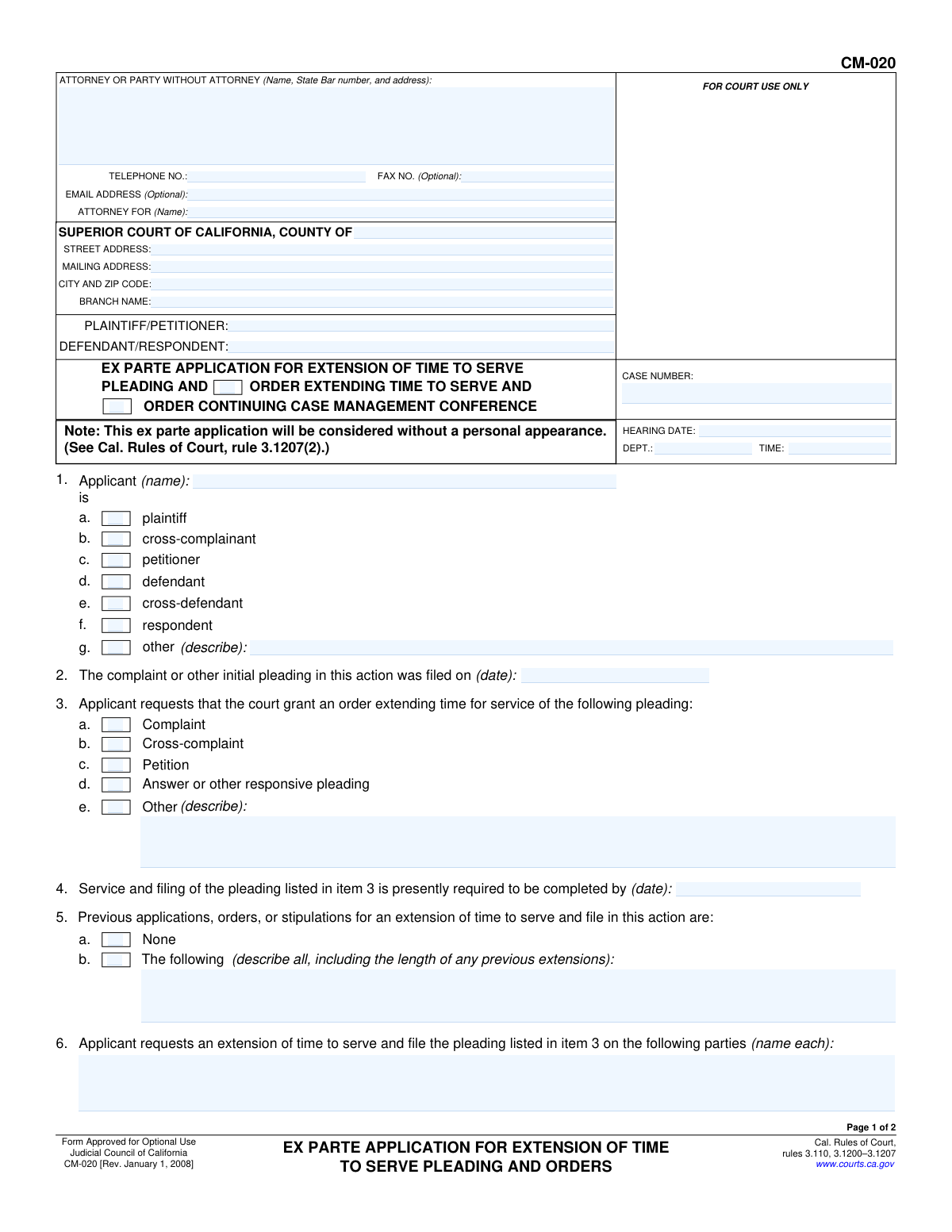
Yes! You can use AI to fill out Form CM-020, Ex Parte Application for Extension of Time to Serve Pleading and Orders

The Ex Parte Application for Extension of Time to Serve Pleading and Orders, or Form CM-020, is a legal document filed in California Superior Court to ask a judge for additional time to formally deliver (serve) a pleading to other parties in a lawsuit. It is crucial for parties who are facing difficulties in meeting statutory deadlines for service, as failure to serve on time can lead to case dismissal. Today, this form can be filled out quickly and accurately using AI-powered services like Instafill.ai, which can also convert non-fillable PDF versions into interactive fillable forms.
CM-020 is part of the California court forms category on Instafill.
Our AI automatically handles information lookup, data retrieval, formatting, and form filling.
It takes less than a minute to fill out CM-020 using our AI form filling.
Securely upload your data. Information is encrypted in transit and deleted immediately after the form is filled out.

Form specifications

Form name: Form CM-020, Ex Parte Application for Extension of Time to Serve Pleading and Orders
Number of fields: 68
Number of pages: 1
Language: English
main-image

Instafill Demo: How to fill out PDF forms in seconds with AI

How to Fill Out CM-020 Online for Free in 2026

Are you looking to fill out a CM-020 form online quickly and accurately? Instafill.ai offers the #1 AI-powered PDF filling software of 2026, allowing you to complete your CM-020 form in just 37 seconds or less.
Follow these steps to fill out your CM-020 form online using Instafill.ai:
  1. 1 Navigate to Instafill.ai and upload or select the Form CM-020.
  2. 2 Provide the court and case information, including the county, case number, and names of the plaintiff and defendant.
  3. 3 Identify the applicant and specify which pleading (e.g., Complaint, Cross-complaint) requires an extension for service.
  4. 4 Use the AI assistant to clearly explain the reasons service has not been completed and describe the efforts made so far.
  5. 5 State the requested new date by which you will complete service and filing.
  6. 6 Detail the notice provided to other parties regarding this ex parte application, or explain why notice was not required.
  7. 7 Review the completed form for accuracy, then download the document to be signed and filed with the court.

Our AI-powered system ensures each field is filled out correctly, reducing errors and saving you time.

Why Choose Instafill.ai for Your Fillable CM-020 Form?

Speed

Complete your CM-020 in as little as 37 seconds.

Up-to-Date

Always use the latest 2026 CM-020 form version.

Cost-effective

No need to hire expensive lawyers.

Accuracy

Our AI performs 10 compliance checks to ensure your form is error-free.

Security

Your personal information is protected with bank-level encryption.

Frequently Asked Questions About Form CM-020

This form is used to ask a California court for more time to formally deliver a legal document, known as a pleading, to another party in your case. It is an "ex parte" request, meaning it is typically decided by a judge without a formal court hearing.

Any party in a lawsuit (plaintiff, defendant, petitioner, etc.) who cannot meet the legal deadline for serving a pleading on other parties should fill out this form to request a court-ordered extension.

No, a personal appearance is typically not required. The form explicitly states that the application will be considered by a judicial officer without a hearing, based on the written information you provide.

You must clearly identify yourself, the pleading that needs an extension, and the new deadline you are requesting. Most importantly, you must provide detailed explanations in Items 7 and 8 about your efforts to serve the document and the specific reasons why an extension is necessary.

In this section, you need to describe the specific, diligent efforts you have already made to serve the document. This could include detailing attempts by a process server, difficulties in locating the other party, or other valid reasons for the delay.

You are generally required to inform the other parties or their attorneys that you are submitting this request to the court. In Item 10, you must describe who you notified, when and how you did so, their response, and whether you expect them to oppose your request.

You must disclose any previous extensions in Item 5 of the form. Be sure to describe all prior applications, orders, or agreements, as this information is important for the judge's decision.

A judge will review your application and either grant or deny your request in the 'Order' section on the second page. You are then required to serve a copy of the completed application and the judge's order on all other parties in the case.

It might. If the court grants your extension, it may also reschedule the Case Management Conference to a later date, which will be specified in the judge's order.

Yes, services like Instafill.ai use AI to help you accurately auto-fill form fields, which can save time and reduce errors. However, AI cannot provide the legal advice or specific factual reasons needed for narrative sections like Items 7 and 8.

You can upload the CM-020 PDF to the Instafill.ai platform. The AI will make the document interactive, allowing you to easily click and type your information into the correct fields directly on the web.

You can use a service like Instafill.ai, which is designed to convert flat, non-fillable PDFs into interactive, fillable forms. This allows you to type your information neatly before printing and filing.

If your explanations for Items 7, 8, or 10 are too long, you can check the 'Continued on Attachment' box. Then, write or type the rest of your explanation on a separate page, label it clearly with the corresponding item number, and attach it to the form.

If your request is denied, the original deadline for serving the pleading remains in effect. You must act immediately to comply with that deadline to avoid potential negative consequences in your case, such as a dismissal.

Compliance CM-020
Validation Checks by Instafill.ai

1
Case Number Consistency Across Pages
This check ensures that the 'CASE NUMBER' entered on Page 1 is identical to the 'CASE NUMBER' entered on Page 2. Maintaining consistency is critical for document integrity, ensuring that all pages of the submission are correctly associated with the same legal case. A mismatch could lead to the second page being misfiled or the entire document being rejected.
2
Applicant Role Selection and Specification
Validates that at least one checkbox is selected in Item 1 to identify the applicant's role (e.g., plaintiff, defendant). If the 'other' checkbox is selected, this check also ensures the corresponding description field is filled. This is necessary to clearly establish the identity and standing of the party making the application, and failure to specify can result in rejection for ambiguity.
3
Logical Pleading Filing Date
Verifies that the date entered in Item 2, 'The complaint or other initial pleading in this action was filed on', is a valid date format and is not a future date. This date establishes the baseline for all time calculations on the form. An invalid or future date would make the request logically impossible and would be rejected by the court clerk.
4
Current Service Deadline Chronology
This validation checks that the current service deadline date in Item 4 is chronologically after the initial pleading filing date from Item 2. A deadline cannot precede the date the document was filed. This logical check prevents nonsensical applications and ensures the timeline of events presented to the court is accurate.
5
Proposed Extension Date Logic
Ensures the proposed new service deadline in Item 9 is a date that occurs after the current service deadline specified in Item 4. The purpose of an extension is to move a deadline to a future date, so requesting a new deadline that is on or before the current one is a logical error. Such an error would lead to immediate rejection of the application.
6
Conditional 'Other' Pleading Description
This check is triggered if the 'Other' checkbox is selected in Item 3. It verifies that the accompanying text field, which describes the pleading, is not empty. The court needs to know exactly which document the extension applies to, and failing to describe an 'Other' pleading type makes the application incomplete and unenforceable.
7
Conditional Previous Extensions Description
Validates that if the applicant checks 'The following' in Item 5 to indicate previous extensions, the corresponding description text box is filled out. The court requires a complete history of prior extensions to assess the diligence of the applicant and the reasonableness of the current request. Omitting this detail when indicated will result in the application being deemed incomplete.
8
Completeness of Justification for Non-Service
Verifies that the text area for Item 7, which explains why the pleading has not yet been served, is not empty. This justification is the core of the application, providing the factual basis for the court to grant the extension. An empty or missing explanation means the applicant has provided no reason for their request, guaranteeing its denial.
9
Attachment Count Correlation
This check cross-references the 'Continued on Attachment' checkboxes (for items 7, 8, and 10) with the 'Number of pages attached' field (Item 11). If any 'Continued on Attachment' box is checked, this validation ensures the number of pages is greater than zero. This prevents claims of attached information that is not actually present, which would cause confusion and likely lead to rejection.
10
Notice of Application Logic
Ensures that in Item 10, either the 'has been provided' or 'is not required' option is selected, and that the corresponding narrative field is filled out. If notice was given, the details are required; if it was not required, the reason is required. This is a critical procedural rule, and failure to properly complete this section can result in the ex parte application being denied for improper notice.
11
Signature Date Presence and Validity
This validation confirms that the 'Date' field in the signature block is filled with a valid, non-future date. A dated signature is required to attest that the information was true and correct at the time of signing. An unsigned or undated form, or one with a future date, is not legally valid and will be rejected.
12
Attorney or Party Identification
Ensures the 'ATTORNEY OR PARTY WITHOUT ATTORNEY' field at the top of the form is not empty. This field identifies the filer of the document, which is essential for all court correspondence and records. A form without this information cannot be processed as the court would not know who submitted it.
13
Email Address Format Validation
Checks that if a value is entered into the 'EMAIL ADDRESS (Optional)' field, it conforms to a standard email format (e.g., [email protected]). While optional, if an invalid email is provided, it can cause failures in electronic communication and service notifications from the court. This check ensures any provided contact information is usable.
14
Case Parties Completeness
Verifies that the 'PLAINTIFF/PETITIONER' and 'DEFENDANT/RESPONDENT' fields are both populated. These names define the primary parties to the lawsuit and are essential for identifying the specific case the form pertains to. Missing party information would make it impossible for the court clerk to file the document in the correct case file.

Common Mistakes in Completing CM-020

Improper or Undocumented Notice to Opposing Parties

Applicants often misunderstand or fail to comply with the strict notice requirements for ex parte applications (Cal. Rules of Court, rules 3.1200–3.1207). They may provide notice too late, use an improper method, or fail to thoroughly document who was notified, when, how, and what their response was in Item 10. This is a primary reason for immediate denial, as it violates the procedural rights of the other parties. To avoid this, carefully review the rules of court and meticulously record every detail of the notice provided; AI-powered tools like Instafill.ai can help ensure all required fields related to notice are completed before submission.

Insufficient Justification for Failure to Serve

In Item 7, applicants provide vague or conclusory reasons for not completing service, such as 'could not locate the defendant.' This happens because they fail to document specific, diligent efforts. The court requires a detailed account of all attempts made, including dates, locations visited, and process server reports. An insufficient explanation will lead the court to believe there was a lack of diligence, resulting in the application being denied. Always provide a chronological narrative of your service attempts.

Failure to Disclose Previous Extensions

In Item 5, applicants sometimes check 'None' for previous extensions when there have been prior court orders or informal stipulations with opposing counsel. This may happen due to oversight or an attempt to hide repeated delays. Failing to disclose all prior extensions can be viewed as misleading the court and will almost certainly lead to denial of the current request and damage the applicant's credibility. Always review the case file thoroughly and accurately report all previous extensions.

Missing Signature or Date on Declaration

The declaration under penalty of perjury at the bottom of page 2 is frequently left unsigned or undated. This often occurs due to simple oversight when rushing to file the document. An unsigned or undated declaration renders the entire application invalid and is equivalent to not filing it at all, causing it to be rejected by the court clerk. Always perform a final check to ensure the signature and date fields are completed. Using a form-filling tool can often flag required signature fields to prevent this error.

Incorrect or Inconsistent Case Information

Entering the wrong case number or misspelling party names in the header is a common data entry error. A frequent mistake is failing to ensure the 'CASE NAME' and 'CASE NUMBER' on Page 2 exactly match the information on Page 1. This can cause filing errors, delays, and confusion, as the document may be misrouted or not associated with the correct case file. Using a tool like Instafill.ai can auto-populate consistent information across all pages of a document to prevent these discrepancies.

Vague Justification for Requesting an Extension

The explanation in Item 8, which details why an extension should be granted, is often too generic, stating something like 'more time is needed.' This happens when the applicant doesn't articulate a specific, compelling reason (e.g., a key witness is unavailable, a new address has been located). The court needs to see 'good cause' for the extension, and a weak justification will result in denial. Be specific about why the extra time is necessary and how it will be used to complete service.

Forgetting Attachments or Mismatching Page Count

Applicants often check boxes like 'Continued on Attachment 7' but then forget to include the actual attachment with the filing. Another common error is incorrectly stating the 'Number of pages attached' in Item 11. This creates confusion and leaves the court with an incomplete application, which may be denied or continued until the missing information is provided. Always double-check that all referenced attachments are included and that the page count in Item 11 is accurate.

Using Incorrect or Miscalculated Dates

Applicants frequently enter the wrong date for the initial pleading filing (Item 2) or miscalculate the current service deadline (Item 4). These errors can stem from misreading the court docket or misunderstanding deadline calculation rules. Since these dates form the legal basis for the extension request, getting them wrong undermines the entire application and can lead to its rejection. Carefully verify all dates against the official court record before filling out the form.

Incomplete Attorney or Party Information

The top section of the form requires the filer's name, address, and, if an attorney, their State Bar number. Pro se litigants (parties without an attorney) often get confused about what to enter, while attorneys may forget their bar number. Leaving this section incomplete or filling it out incorrectly can lead to the form's rejection by the clerk for being improperly formatted. Ensure all personal or firm details are entered fully and accurately. If the form is a flat PDF, tools like Instafill.ai can convert it into a fillable version, making it easier to enter this information cleanly.

Requesting an Unreasonably Long Extension

In Item 9, an applicant might request a new service deadline that is excessively far in the future without adequate justification. This often happens when the applicant is trying to buy as much time as possible, but it can appear to the court as an attempt to stall the case. An unreasonable request without extraordinary circumstances detailed in Item 8 is likely to be denied or granted for a much shorter period than requested. The new date should be realistic and directly tied to the time needed to overcome the service obstacles described.
Saved over 80 hours a year

“I was never sure if my IRS forms like W-9 were filled correctly. Now, I can complete the forms accurately without any external help.”

Kevin Martin Green

Your data stays secure with advanced protection from Instafill and our subprocessors

Robust compliance program

Transparent business model

You’re not the product. You always know where your data is and what it is processed for.

ISO 27001, HIPAA, and GDPR

Our subprocesses adhere to multiple compliance standards, including but not limited to ISO 27001, HIPAA, and GDPR.

Security & privacy by design

We consider security and privacy from the initial design phase of any new service or functionality. It’s not an afterthought, it’s built-in, including support for two-factor authentication (2FA) to further protect your account.

Fill out CM-020 with Instafill.ai

Worried about filling PDFs wrong? Instafill securely fills form-cm-020-ex-parte-application-for-extension-of-time-to-serve-pleading-and-orders forms, ensuring each field is accurate.