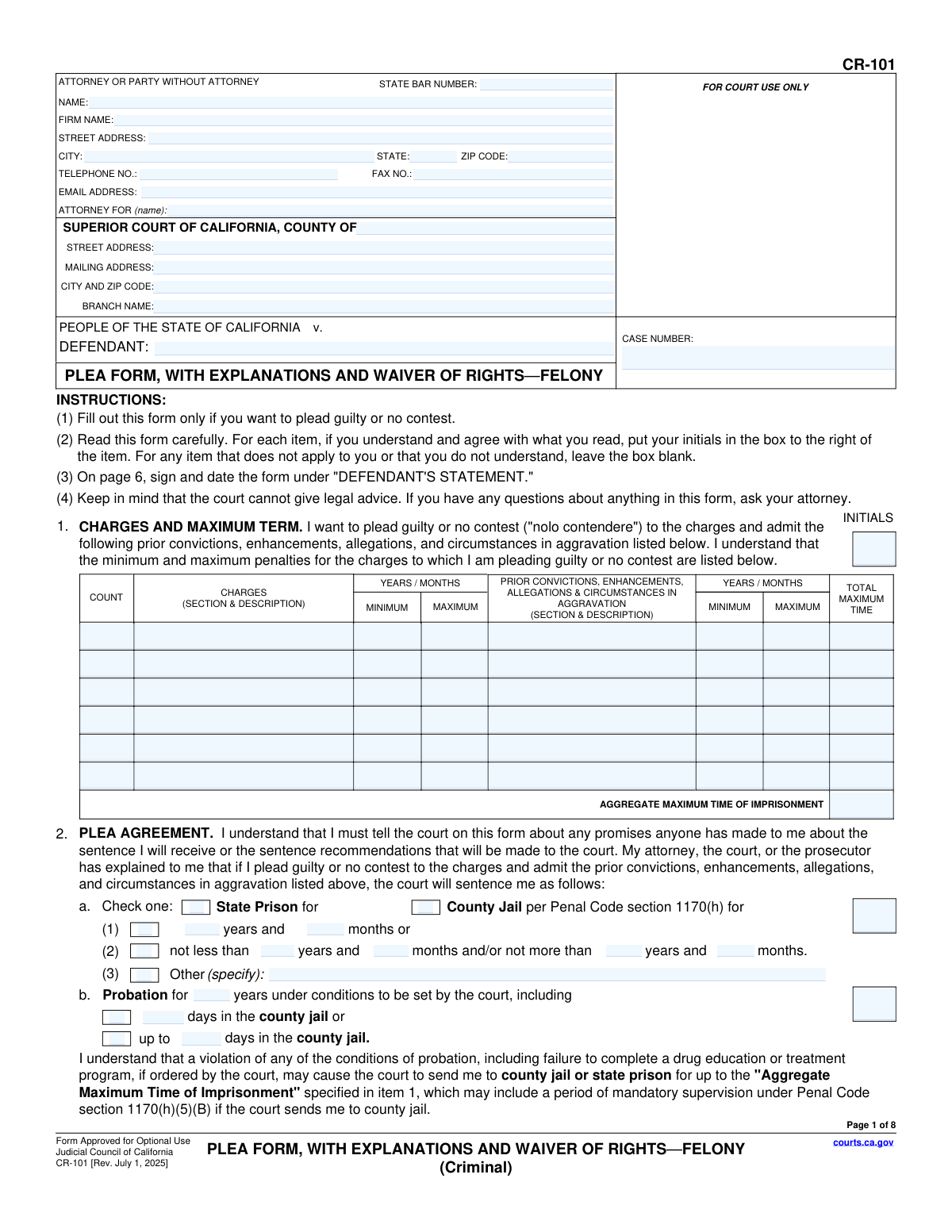
Yes! You can use AI to fill out Form CR-101, Plea Form, With Explanations and Waiver of Rights—Felony (Criminal)
California Form CR-101, the Plea Form for felonies, is a critical document used in criminal court proceedings for a defendant to officially plead guilty or no contest. It outlines the charges, the plea agreement, the potential consequences, and the constitutional rights being waived, ensuring the defendant's plea is knowing and voluntary. Today, this form can be filled out quickly and accurately using AI-powered services like Instafill.ai, which can also convert non-fillable PDF versions into interactive fillable forms.
CR-101 is part of the
California court forms category on Instafill.
Our AI automatically handles information lookup, data retrieval, formatting, and form filling.
It takes less than a minute to fill out CR-101 using our AI form filling.
Securely upload your data. Information is encrypted in transit and deleted immediately after the form is filled out.
Form specifications
| Form name: | Form CR-101, Plea Form, With Explanations and Waiver of Rights—Felony (Criminal) |
| Number of fields: | 226 |
| Number of pages: | 1 |
| Language: | English |
Instafill Demo: How to fill out PDF forms in seconds with AI
How to Fill Out CR-101 Online for Free in 2026
Are you looking to fill out a CR-101 form online quickly and accurately? Instafill.ai offers the #1 AI-powered PDF filling software of 2026, allowing you to complete your CR-101 form in just 37 seconds or less.
Follow these steps to fill out your CR-101 form online using Instafill.ai:
- 1 Navigate to Instafill.ai and upload or select the CR-101 Plea Form.
- 2 Use the AI assistant to automatically populate your personal details, attorney information, and case number into the header.
- 3 In consultation with your attorney, detail the charges, plea agreement terms, and any fines or restitution in the appropriate sections.
- 4 Carefully review each section explaining the consequences of your plea (e.g., immigration, driver's license, firearm rights) and initial the corresponding boxes to acknowledge your understanding.
- 5 Go through the waiver of constitutional rights section, initialing each right you are giving up, such as the right to a jury trial and the right to remain silent.
- 6 After a thorough review with your legal counsel, electronically sign and date the Defendant's Statement to finalize the form.
- 7 Download the completed form to share with your attorney for review and submission to the court.
Our AI-powered system ensures each field is filled out correctly, reducing errors and saving you time.
Why Choose Instafill.ai for Your Fillable CR-101 Form?
Speed
Complete your CR-101 in as little as 37 seconds.
Up-to-Date
Always use the latest 2026 CR-101 form version.
Cost-effective
No need to hire expensive lawyers.
Accuracy
Our AI performs 10 compliance checks to ensure your form is error-free.
Security
Your personal information is protected with bank-level encryption.
Frequently Asked Questions About Form CR-101
This form is used by a defendant in a California felony criminal case to formally enter a plea of 'guilty' or 'no contest'. It documents the plea agreement, explains the consequences, and confirms the defendant is knowingly waiving their constitutional rights.
This form must be completed by a defendant who has decided, with the advice of their attorney, to plead guilty or no contest to felony charges instead of going to trial. It should not be filled out otherwise.
A 'no contest' (nolo contendere) plea is treated the same as a 'guilty' plea for the criminal conviction and sentencing. The key difference, as noted in Section 3a, is that a no contest plea generally cannot be used against you as an admission of guilt in a separate civil case.
Waiving your rights means you are voluntarily giving up key constitutional protections, including the right to a jury trial, the right to confront witnesses, and the right to remain silent. This is a necessary step to enter a plea, and you must initial the form to show you understand and agree to this.
If you are not a U.S. citizen, the form warns that a guilty or no contest plea can have severe consequences. These may include deportation, being denied admission to the U.S. in the future, or being denied naturalization (citizenship).
Initialing each box confirms to the court that you have read, understood, and agree to that specific point, whether it's a term of the plea, a consequence, or a right you are waiving. It is crucial for ensuring your plea is legally considered voluntary and intelligent.
Do not initial or sign any part of the form you do not understand. The instructions clearly state that you should ask your attorney for clarification on any questions you have about the form or your case.
According to Section 6e, the court can withdraw its approval of the plea agreement. If this happens, you will be allowed to withdraw your guilty or no contest plea and your case will proceed as if you had not entered a plea.
No. As stated in Section 3k, a felony conviction results in a lifetime ban under federal and state law from owning, purchasing, or possessing firearms, firearm parts, and ammunition.
Besides you (the defendant), your attorney, the district attorney, and the judge must all sign the form. If an interpreter assists you, they must also sign to certify that they accurately translated the form's contents for you.
Yes, services like Instafill.ai use AI to accurately auto-fill form fields like your name, case number, and address, which saves time and helps avoid errors. However, you must personally review and understand all legal waivers and consequences with your attorney.
You can upload the CR-101 PDF to the Instafill.ai platform. It will make the document interactive, allowing you to type your information, check boxes, and place your initials and signature electronically before printing for submission.
Services like Instafill.ai can convert flat, non-fillable PDFs into interactive forms. Simply upload your version of the CR-101, and the platform will make it possible for you to complete it on your computer.
The court needs to ensure you are pleading to the correct offense based on the facts of the case. This section allows you or your attorney to state the facts that support the plea or refer to documents like the police report or preliminary hearing transcript.
Compliance CR-101
Validation Checks by Instafill.ai
1
Case Number Consistency Across Pages
This check verifies that the Case Number entered in the header of page 1 matches the Case Number on all subsequent pages (2-8). This is a critical data integrity check to ensure all pages belong to the same case file and prevent misfiling. If the numbers are inconsistent, the document could be rejected or cause significant administrative confusion.
2
Attorney State Bar Number Requirement
This validation ensures that if the 'ATTORNEY FOR (name)' field is populated, the 'STATE BAR NUMBER' field must also be filled. The State Bar Number is a unique identifier that validates an attorney's authority to represent the defendant. Failure to provide this number when an attorney is listed could call into question the validity of the legal representation and the plea itself.
3
Sentence Time Logical Consistency
For each charge or enhancement listed in the table in Item 1, this validation ensures the 'MAXIMUM' time entered is greater than or equal to the 'MINIMUM' time. This prevents logical errors in the sentencing data that would make the plea agreement details nonsensical. An invalid range would render the agreement unenforceable and require correction before the court can accept the plea.
4
Aggregate Maximum Time Calculation
This check verifies that the 'AGGREGATE MAXIMUM TIME OF IMPRISONMENT' value is the correct sum of all 'MAXIMUM' time values listed in the table in Item 1. This total is a critical piece of information that the defendant must understand, as it represents the absolute maximum penalty. An incorrect total could mislead the defendant and invalidate their 'knowing and intelligent' waiver of rights.
5
Exclusive Plea Selection
This validation ensures that in Item 9, 'THE PLEA', either the 'GUILTY' checkbox or the 'NO CONTEST' checkbox is selected, but not both. The defendant's plea is the fundamental purpose of the form, and any ambiguity is impermissible. If neither or both options are selected, the plea is legally invalid and cannot be processed by the court.
6
Plea Agreement Sentence Specificity
This check validates that if a sentencing option is checked in Item 2a (e.g., 'State Prison'), the corresponding text fields for years and months are filled out. This ensures the terms of the sentence are specific and not left ambiguous. An incomplete selection would make the core of the plea bargain unenforceable and subject to dispute.
7
Restitution and Fines Amount Format
This validation checks that all monetary fields in Item 2e, 'Restitution, Statutory Fees, and Assessments', contain either a valid numerical currency value or the specific text 'TBD'. This ensures clarity on the defendant's financial obligations. Submitting non-standard entries could cause processing errors and delays in the court's financial and legal departments.
8
Factual Basis for Plea Requirement
This check ensures that in Item 9, a factual basis for the plea is established by either describing the facts in 9a(1) or by checking one or more documents in 9a(2). A judge cannot accept a guilty or no contest plea without a factual basis in the record. An omission here would compel the judge to reject the plea until the requirement is met.
9
Correlate Initials with Section Completion
This check verifies that for every section where the defendant provides information or waives a right, the corresponding 'INITIALS' box is filled. The initials serve as crucial evidence that the defendant has reviewed, understood, and acknowledged specific parts of the agreement. Missing initials can be used to argue that the waiver was not knowing or voluntary, potentially invalidating those sections of the plea.
10
Defendant Signature and Date Presence
This validation verifies that the 'SIGNATURE OF DEFENDANT' field is signed and the adjacent 'Date' field is filled out in the 'DEFENDANT'S STATEMENT' section. The defendant's dated signature is the ultimate confirmation of their agreement to the plea and waiver of rights. Without a signature and date, the entire form is legally non-binding and will be rejected by the court.
11
Interpreter Statement Completeness
This check ensures that if either the 'Spanish' or 'Other' checkbox is marked in the 'INTERPRETER'S STATEMENT' section, then the interpreter's name, signature, and date fields are also completed. If 'Other' is checked, the language must be specified. This is vital for the legal record to prove the defendant fully understood the document, which is a constitutional requirement for a valid plea.
12
District Attorney Concurrence Selection
This validation ensures that in the 'DISTRICT ATTORNEY'S STATEMENT', either the 'agree' or 'do not agree' checkbox is selected. This indicates the prosecution's official position on the negotiated plea, which is a two-party agreement. The form is incomplete without this input, as the court needs to know if the plea bargain has the consent of the state.
13
'Other (specify)' Field Completion
This rule validates that whenever an 'Other' checkbox is selected throughout the form (e.g., in items 2a, 2e, 3d), the adjacent 'specify' text field is not empty. This prevents incomplete or ambiguous entries where a choice is indicated but not defined. Failure to specify makes the selection meaningless and would require clarification, delaying the acceptance of the plea.
Common Mistakes in Completing CR-101
This extensive form requires the defendant to initial dozens of boxes to confirm they understand and agree to each point. Due to the form's length and complexity, people often inadvertently miss one or more boxes. A single missing initial can invalidate the entire plea agreement, causing significant delays and requiring the form to be completed and filed again.
The case number must be entered correctly at the top of all eight pages. It is a frequent error for this number to be mistyped, entered inconsistently across pages, or omitted from later pages. This creates administrative problems, can lead to filing rejections, and may delay the case. Using a tool like Instafill.ai can auto-populate this repetitive information accurately across all pages after a single entry, eliminating this risk.
Item 1 requires precise details about criminal charges, including the specific penal code section and potential sentences. Errors such as transposing numbers in the code section, providing a vague description, or misstating the minimum/maximum years can render the plea invalid. These details must be copied exactly from official court documents, as any discrepancy can lead to the judge rejecting the plea.
Section 2 details the sentence with multiple, often mutually exclusive, options like State Prison (2a(1)), County Jail (2a(2)), or Probation (2b). A common error is checking multiple contradictory boxes or failing to fill in the required years/months for the selected option. This ambiguity makes the agreement unenforceable and will be rejected by the court, forcing the parties to clarify the terms and resubmit the form.
In section 2e, restitution amounts are often unknown at the time of the plea, and the form instructs to use 'TBD' (to be determined). A common mistake is leaving these fields blank or entering '$0' instead of 'TBD,' which could be legally misinterpreted as no restitution being owed. This can lead to future legal disputes and complications in enforcing the victim's right to restitution.
Item 3j explicitly warns non-U.S. citizens that a plea can result in deportation, exclusion from admission, or denial of naturalization. A grave mistake is initialing this section without fully grasping these severe and often permanent consequences. The court must ensure the defendant understands this specific risk, and overlooking it can have life-altering ramifications that are difficult to reverse.
Item 9 requires the defendant to provide a factual basis for the plea, either by describing the events or stipulating to documents. A common mistake is writing a vague or incomplete description of the actions that constitute the crime. If the stated facts do not legally satisfy all elements of the charged offense, the judge cannot accept the plea, leading to delays while the statement is corrected.
Page 7 requires dated signatures from the defendant, their attorney, and others. A simple but frequent mistake is forgetting to sign, signing in the wrong section, or entering the wrong date. An unsigned or improperly dated form is invalid and will be rejected by the court clerk, halting the entire plea process until all required signatures are correctly obtained.
This form is often provided as a flat, non-fillable PDF, forcing individuals to print and complete it by hand. This frequently results in illegible handwriting, especially in the detailed tables and text fields, which can lead to data entry errors by court staff and potential rejection of the form. To prevent this, AI-powered tools like Instafill.ai can convert the flat PDF into a fillable format, allowing users to type responses clearly.
As part of a plea bargain, the prosecution often agrees to dismiss other charges, which must be explicitly listed in item 2g. An easy mistake is to forget to list all the counts that are being dismissed as part of the agreement. This omission can lead to confusion and future legal challenges if the court record does not accurately reflect the full scope of the bargain.
Saved over 80 hours a year
“I was never sure if my IRS forms like W-9 were filled correctly. Now, I can complete the forms accurately without any external help.”
Kevin Martin Green
Your data stays secure with advanced protection from Instafill and our subprocessors
Robust compliance program
Transparent business model
You’re not the product. You always know where your data is and what it is processed for.
ISO 27001, HIPAA, and GDPR
Our subprocesses adhere to multiple compliance standards, including but not limited to ISO 27001, HIPAA, and GDPR.
Security & privacy by design
We consider security and privacy from the initial design phase of any new service or functionality. It’s not an afterthought, it’s built-in, including support for two-factor authentication (2FA) to further protect your account.
Fill out CR-101 with Instafill.ai
Worried about filling PDFs wrong? Instafill securely fills form-cr-101-plea-form-with-explanations-and-waiver-of-rightsfelony-criminal forms, ensuring each field is accurate.