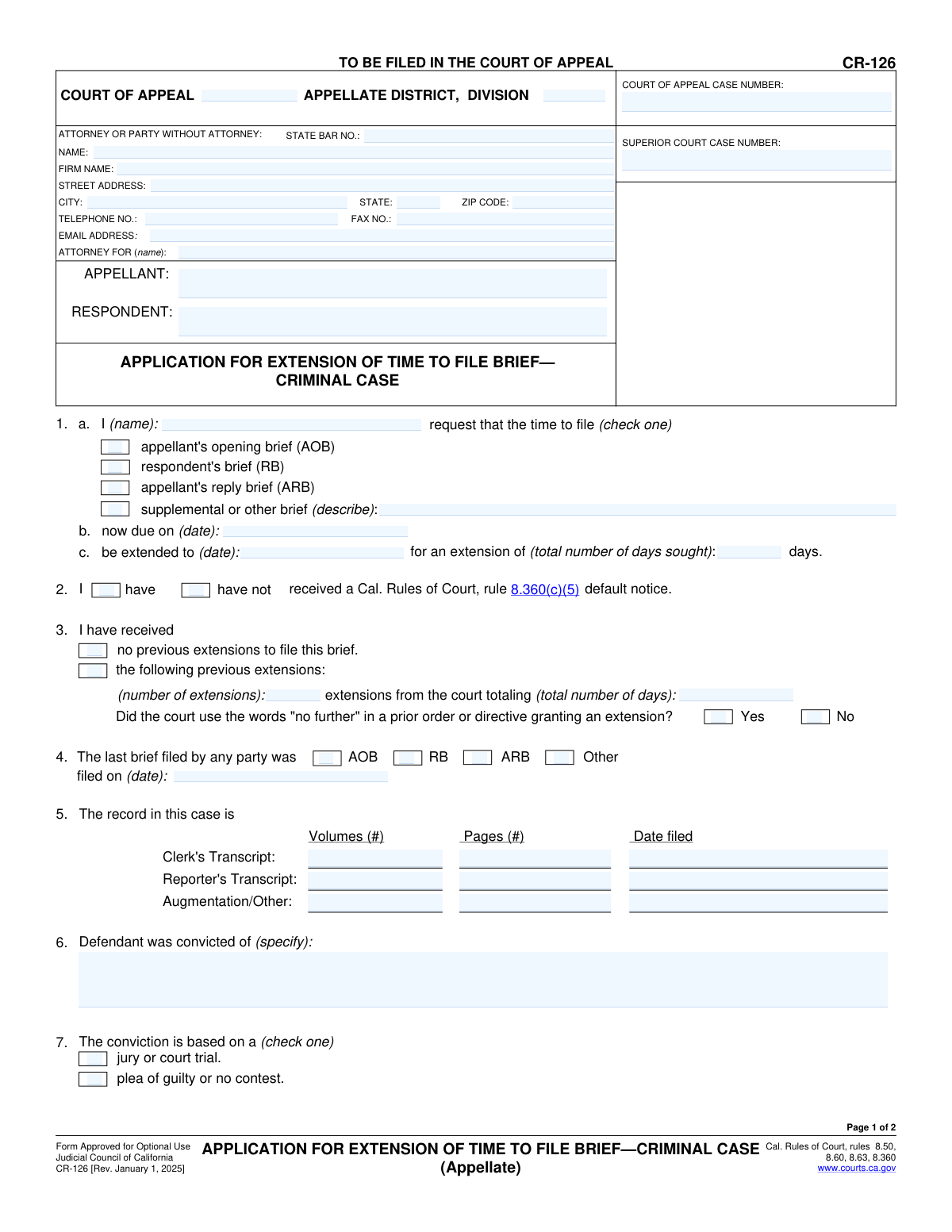
Yes! You can use AI to fill out Form CR-126, Application for Extension of Time to File Brief—Criminal Case (Appellate)

Form CR-126, Application for Extension of Time to File Brief—Criminal Case (Appellate), is a legal document filed in the California Court of Appeal to formally request more time to submit a legal brief. It is essential for attorneys or parties representing themselves to manage court deadlines and avoid penalties for late filings in the criminal appeals process. Today this form can be filled out quickly and accurately using AI-powered services like Instafill.ai, which can also convert non-fillable PDF versions into interactive fillable forms.
CR-126 is part of the California court forms category on Instafill.
Our AI automatically handles information lookup, data retrieval, formatting, and form filling.
It takes less than a minute to fill out CR-126 using our AI form filling.
Securely upload your data. Information is encrypted in transit and deleted immediately after the form is filled out.

Form specifications

Form name: Form CR-126, Application for Extension of Time to File Brief—Criminal Case (Appellate)
Number of fields: 79
Number of pages: 1
Language: English
main-image

Instafill Demo: How to fill out PDF forms in seconds with AI

How to Fill Out CR-126 Online for Free in 2026

Are you looking to fill out a CR-126 form online quickly and accurately? Instafill.ai offers the #1 AI-powered PDF filling software of 2026, allowing you to complete your CR-126 form in just 37 seconds or less.
Follow these steps to fill out your CR-126 form online using Instafill.ai:
  1. 1 Navigate to Instafill.ai and upload or select the CR-126 form.
  2. 2 Enter the Court of Appeal information and the details for the attorney or party filing the application.
  3. 3 Provide the appellate and superior court case numbers, and identify the appellant and respondent.
  4. 4 Specify which brief requires an extension, its current due date, and the new requested date.
  5. 5 Detail any previous extensions, the case record size, and the nature of the conviction and punishment.
  6. 6 Clearly state the reasons for needing the extension, addressing the factors required by the California Rules of Court.
  7. 7 Review the completed application, sign the declaration, and download the form for filing with the court and serving on other parties.

Our AI-powered system ensures each field is filled out correctly, reducing errors and saving you time.

Why Choose Instafill.ai for Your Fillable CR-126 Form?

Speed

Complete your CR-126 in as little as 37 seconds.

Up-to-Date

Always use the latest 2026 CR-126 form version.

Cost-effective

No need to hire expensive lawyers.

Accuracy

Our AI performs 10 compliance checks to ensure your form is error-free.

Security

Your personal information is protected with bank-level encryption.

Frequently Asked Questions About Form CR-126

This form is used to formally request more time (an extension) to file a brief in a criminal appeal case with the California Court of Appeal.

This form should be completed by an attorney or a party representing themselves (pro se) in a criminal appeal who needs more time to meet a brief's filing deadline.

You must state specific facts showing good cause, such as the complexity of the case, the size of the record, conflicting professional duties, or a personal emergency. The court will evaluate your reasons based on factors listed in the California Rules of Court.

You must disclose all previous extensions in Section 3 of the form. If a prior court order stated 'no further' extensions, you must explain the exceptional circumstances that justify your new request.

Yes, a proof of service is required, as stated in Section 11. It is a separate form that proves you have sent a copy of this application to all other parties in the case, ensuring they are aware of your request.

The completed application must be filed directly with the Court of Appeal district and division that is handling your criminal appeal case.

This information, including the number of pages in the clerk's and reporter's transcripts, helps the court understand the size and complexity of the case. This context is crucial for the court to decide if your requested extension is reasonable.

No, the 'ORDER' section on page 2 is for court use only. The Presiding Justice will complete and sign this section to either grant or deny your application for an extension.

Yes, services like Instafill.ai use AI to accurately auto-fill form fields from your records. This can save you significant time and help prevent common errors when completing legal forms.

Simply upload the CR-126 PDF to the Instafill.ai platform. The AI will make the form interactive, allowing you to easily type in your information or use the AI to auto-populate fields with your saved data.

If you have a non-fillable or 'flat' PDF, you can use a service like Instafill.ai. It can convert the flat PDF into an interactive, fillable form online so you can type your information directly into the fields.

You must provide your contact information (or your attorney's), the Court of Appeal district and division, and the case numbers for both the Court of Appeal and the Superior Court.

The appellant (the party who is appealing) files the AOB to argue why the lower court's decision was wrong. The respondent (the other party) then files the RB to argue in support of the lower court's decision.

The court will review your application and the reasons provided. The Presiding Justice will then issue an order, found at the bottom of page 2, either granting or denying your request for an extension.

Compliance CR-126
Validation Checks by Instafill.ai

1
Validate Extension Date Logic
This check ensures that the requested new due date in section 1c is chronologically after the current due date in section 1b. An extension must move the deadline to a future date. If the requested date is on or before the current due date, the application is invalid and should be rejected with an error prompting the user to correct the date.
2
Ensure Case Numbers are Provided
Verifies that both the 'Court of Appeal Case Number' and 'Superior Court Case Number' fields are filled. These numbers are essential for the court clerk to identify the case and correctly file the document. A failure in this check would prevent the form from being submitted, highlighting the required fields.
3
Conditional Requirement for 'Other Brief' Description
This validation checks that if the 'supplemental or other brief' checkbox is selected in section 1a, the corresponding text field describing the brief is not empty. This context is necessary for the court to understand the request. If the box is checked and the description is missing, an error will prompt the user to provide the required information.
4
Validate Total Days Requested
Ensures the 'total number of days sought' in section 1c is a positive integer. It can also perform a logical check to see if this number corresponds to the difference between the new requested date and the current due date. This prevents typographical errors and ensures the request is clear and unambiguous.
5
Conditional Requirement for Previous Extension Details
If the applicant indicates in section 3 that they have received 'the following previous extensions,' this check validates that the number of extensions and the total number of days are both filled in with numeric values. This information is critical for the court to assess the history of the case's timeliness. Missing this data would trigger an error.
6
Mandatory Selection for Default Notice Status
Verifies that in section 2, one and only one of the checkboxes ('have' or 'have not') regarding receipt of a default notice is selected. This status is a key factor in the court's decision-making process. The form should not be considered complete until this selection is made.
7
Mandatory Selection for Conviction Basis
Ensures that in section 7, the user has selected one of the options to indicate whether the conviction was based on a 'jury or court trial' or a 'plea of guilty or no contest.' This provides essential context about the nature of the appeal. Failure to select an option will result in a validation error.
8
Completeness of Reason for Extension
This check confirms that a reason for the extension is provided in section 10. If the 'below' option is checked, it validates that the corresponding text area is not empty. This is the primary justification for the request, and its absence makes the application incomplete. An error message will appear if the selected option and the provided text are inconsistent.
9
Validate State Bar Number Format
Checks if the 'State Bar No.' field contains only numeric characters, as is standard for bar numbers. This helps ensure the attorney can be correctly identified in the court's records. If an attorney is filing, this field should be required; if a party is filing without an attorney, it may be optional.
10
Ensure Declaration is Dated and Signed
Verifies that the 'Date' and 'TYPE OR PRINT NAME' fields in the declaration section are both filled out. The date confirms when the declaration was made, and the printed name identifies the signatory. An unsigned or undated application is legally invalid, so this check is critical before submission.
11
Mandatory Selection for Bail Status
Validates that in section 9, one of the checkboxes ('is' or 'is not') for the defendant's bail status is selected. This information can affect the urgency and scheduling of the appeal. The form is incomplete without this mandatory selection.
12
Validate Record Transcript Pages and Volumes
This check ensures that if any values are entered into the 'Volumes' or 'Pages' fields in section 5 for the Clerk's or Reporter's Transcripts, those values are positive integers. This maintains data integrity and prevents non-numeric or nonsensical entries. An error would be flagged for any non-integer input.
13
Completeness of Party Names
Verifies that the 'APPELLANT' and 'RESPONDENT' fields in the header section are filled out. These names are fundamental to identifying the parties involved in the appeal. The form cannot be correctly filed without this information, so a validation failure would block submission.
14
Validate Last Brief Filed Date
Ensures the 'filed on (date)' field in section 4 is a valid date and is not a date in the future. This date provides a timeline of the case proceedings. An invalid or future date would be a logical error and should be corrected before submission.

Common Mistakes in Completing CR-126

Providing Vague or Insufficient Reasons for Extension

In section 10, applicants often provide generic reasons like 'attorney is busy' or 'need more time to review the record,' which are insufficient for the court. The court requires a detailed declaration of good cause that addresses specific factors from the California Rules of Court, such as case complexity, competing obligations, or personal emergencies. A weak justification is a primary reason for denial, which can result in the brief being overdue. To avoid this, provide a thorough, honest, and specific explanation, referencing the record size (from section 5) and any potential prejudice to the parties.

Failing to Attach Proof of Service

A frequent and fatal error is forgetting to attach a proof of service as required by section 11. Applicants, especially those without legal representation, may not realize that they must formally notify all other parties of the extension request and prove to the court that they have done so. An application filed without a proof of service is considered incomplete and will be rejected by the clerk, potentially causing the applicant to miss their filing deadline entirely. Always complete and attach the appropriate Proof of Service form (e.g., APP-009) with every application.

Inconsistent Case Information

Applicants often make typos in the Court of Appeal or Superior Court case numbers or fail to copy the exact party names (Appellant/Respondent) consistently on both pages of the form. This happens due to manual data entry errors and can cause the filing clerk to reject the document or create significant delays while the court locates the correct file. To prevent this, meticulously double-check all case numbers and names against official court documents. AI-powered form-filling tools like Instafill.ai can autofill this information consistently across all required fields, eliminating such errors.

Miscalculating Extension Dates and Days

In section 1, filers frequently make errors calculating the total number of days requested for the extension, or the requested end date does not align with the number of days sought. This occurs from miscounting calendar days or simple arithmetic mistakes. An inconsistent request forces the court to guess the filer's intent, which could lead to a shorter extension than needed or a rejection of the application for clarification. Always use a calendar to carefully count the days and ensure the 'now due on', 'be extended to', and 'total number of days' fields are all consistent with each other.

Omitting or Guessing Case Record Details

Section 5 requires the specific number of volumes and pages for the Clerk's and Reporter's Transcripts, which applicants often leave blank or estimate. The court uses this data to assess the complexity of the appeal and determine if the length of the requested extension is reasonable. Missing or inaccurate information weakens the justification for the extension and may lead to skepticism from the court. Before filling out the form, refer to the transcript indexes or the notice of record completion to find the exact page and volume counts.

Incorrectly Disclosing Previous Extensions

In section 3, applicants may forget, miscalculate, or fail to disclose prior extensions, especially if the court previously ordered 'no further' extensions. The court maintains its own detailed records, and any discrepancy will damage the applicant's credibility and likely result in an immediate denial of the current request. Always review the case docket and prior court orders to accurately report the number and total days of all previous extensions to maintain credibility with the court.

Forgetting the Signature and Date

An unsigned or undated declaration under penalty of perjury is legally invalid. In the rush to file, the signature and date fields on page 2 are surprisingly easy to miss. The court clerk will reject an unsigned application, which can be disastrous if the brief's filing deadline is imminent, leaving no time to refile. Before submitting, perform a final review of the entire document, paying special attention to the signature block to ensure it is properly signed and dated.

Submitting a Messy or Illegible Form

Although this is a fillable PDF, some individuals print it and fill it out by hand, resulting in illegible entries. Poor handwriting can lead to data entry errors by court staff, misinterpretation of critical information like dates or case numbers, or outright rejection of the form. Using the fillable fields ensures clarity, professionalism, and accuracy. If you only have a flat, non-fillable version of a form, tools like Instafill.ai can convert it into a fillable one, preventing legibility issues.

Failing to Check the Correct Boxes

This form contains numerous checkboxes that are critical for defining the request, such as the type of brief being filed (section 1), receipt of a default notice (section 2), or the basis of the conviction (section 7). Filers may check the wrong box or forget to check one at all, creating ambiguity and requiring the court to seek clarification. This slows down the process and delays the court's order. Carefully read each question and double-check that you have selected the correct option for each set of checkboxes.
Saved over 80 hours a year

“I was never sure if my IRS forms like W-9 were filled correctly. Now, I can complete the forms accurately without any external help.”

Kevin Martin Green

Your data stays secure with advanced protection from Instafill and our subprocessors

Robust compliance program

Transparent business model

You’re not the product. You always know where your data is and what it is processed for.

ISO 27001, HIPAA, and GDPR

Our subprocesses adhere to multiple compliance standards, including but not limited to ISO 27001, HIPAA, and GDPR.

Security & privacy by design

We consider security and privacy from the initial design phase of any new service or functionality. It’s not an afterthought, it’s built-in, including support for two-factor authentication (2FA) to further protect your account.

Fill out CR-126 with Instafill.ai

Worried about filling PDFs wrong? Instafill securely fills form-cr-126-application-for-extension-of-time-to-file-briefcriminal-case-appellate forms, ensuring each field is accurate.