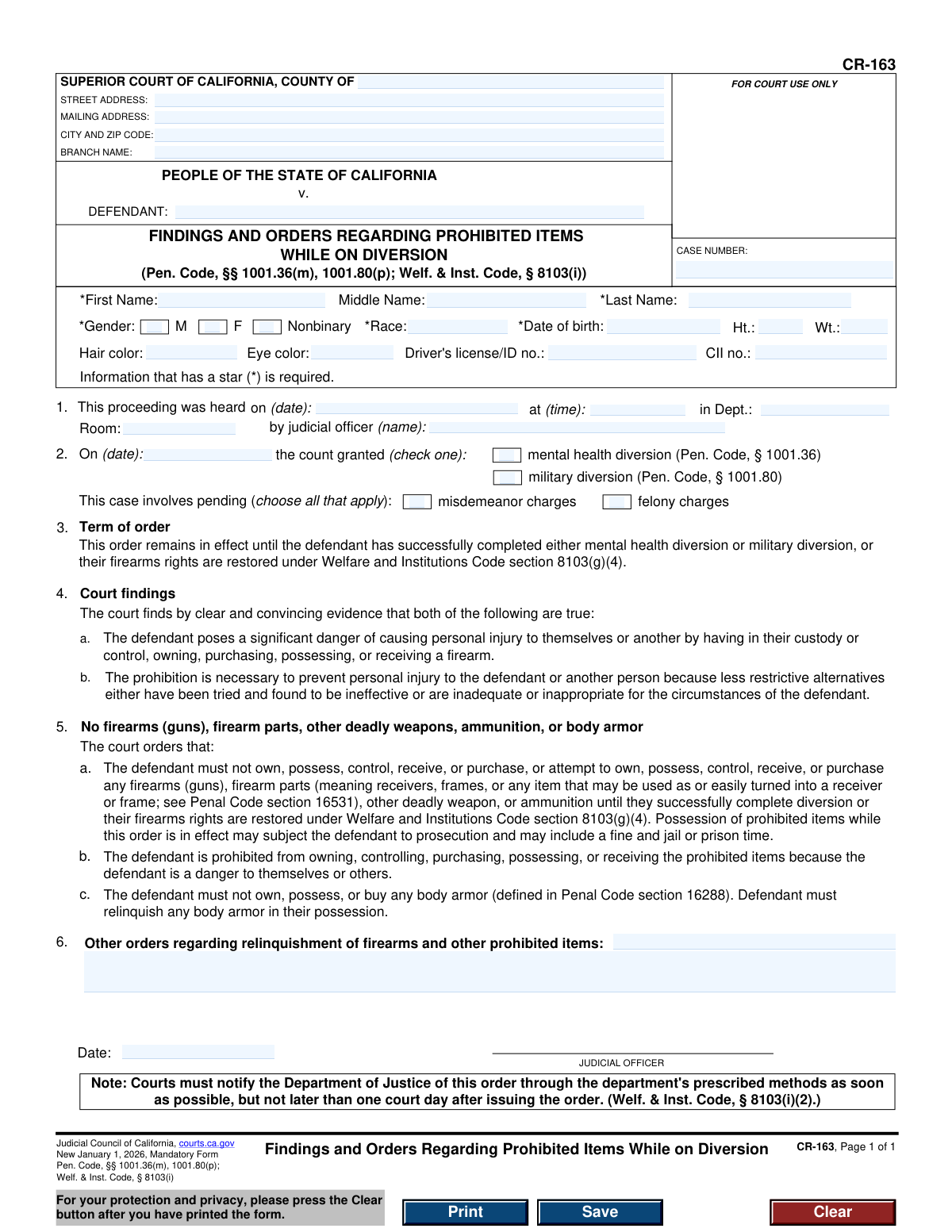
Yes! You can use AI to fill out Form CR-163, Findings and Orders Regarding Prohibited Items While on Diversion
Form CR-163, Findings and Orders Regarding Prohibited Items While on Diversion, is a mandatory California court form used when a defendant is granted mental health or military diversion. It documents the court's findings that the defendant poses a danger and orders the prohibition of firearms, deadly weapons, and body armor to ensure public safety. Today, this form can be filled out quickly and accurately using AI-powered services like Instafill.ai, which can also convert non-fillable PDF versions into interactive fillable forms.
CR-163 is part of the
California court forms category on Instafill.
Our AI automatically handles information lookup, data retrieval, formatting, and form filling.
It takes less than a minute to fill out CR-163 using our AI form filling.
Securely upload your data. Information is encrypted in transit and deleted immediately after the form is filled out.
Form specifications
| Form name: | Form CR-163, Findings and Orders Regarding Prohibited Items While on Diversion |
| Number of fields: | 37 |
| Number of pages: | 1 |
| Language: | English |
Instafill Demo: How to fill out PDF forms in seconds with AI
How to Fill Out CR-163 Online for Free in 2026
Are you looking to fill out a CR-163 form online quickly and accurately? Instafill.ai offers the #1 AI-powered PDF filling software of 2026, allowing you to complete your CR-163 form in just 37 seconds or less.
Follow these steps to fill out your CR-163 form online using Instafill.ai:
- 1 Navigate to Instafill.ai and upload or select Form CR-163.
- 2 Enter the court and case information, including the county, court address, and case number in the header section.
- 3 Provide the defendant's personal details, such as full name, date of birth, gender, race, and other identifying information.
- 4 Input the specifics of the court hearing, including the date, time, department, and the name of the judicial officer.
- 5 Indicate the date the diversion was granted and check the appropriate boxes for the type of diversion (mental health or military) and the charges (misdemeanor or felony).
- 6 The judicial officer will complete the court findings and orders sections, detailing the prohibitions and any other specific orders.
- 7 Review all entered information for accuracy before the judicial officer signs and dates the form to make it official.
Our AI-powered system ensures each field is filled out correctly, reducing errors and saving you time.
Why Choose Instafill.ai for Your Fillable CR-163 Form?
Speed
Complete your CR-163 in as little as 37 seconds.
Up-to-Date
Always use the latest 2026 CR-163 form version.
Cost-effective
No need to hire expensive lawyers.
Accuracy
Our AI performs 10 compliance checks to ensure your form is error-free.
Security
Your personal information is protected with bank-level encryption.
Frequently Asked Questions About Form CR-163
The CR-163 form is a court order issued by a judge. It documents the court's finding that a person on mental health or military diversion is prohibited from owning or possessing firearms, ammunition, and other deadly weapons because they pose a danger to themselves or others.
A judicial officer (a judge) completes and signs this form after a court hearing. The defendant does not fill out this form, but they are the subject of the order and must comply with its terms.
You would be subject to this order if you were granted mental health or military diversion for a criminal charge. The court must find clear and convincing evidence that prohibiting you from possessing firearms is necessary to prevent injury.
The order remains in effect until you successfully complete your diversion program or until your firearm rights are restored through a separate legal process, as outlined in the Welfare and Institutions Code.
You are prohibited from owning, possessing, controlling, or purchasing any firearms, firearm parts (like receivers or frames), other deadly weapons, ammunition, and body armor.
Possessing any of the prohibited items while this order is in effect is a crime that can subject you to new prosecution, including fines and jail or prison time. It will also likely result in the termination of your diversion program.
You must relinquish any prohibited items in your possession immediately. The court may issue specific instructions on how and where to turn in your items, which may be written in section 6 of the form or in a separate order.
This information is required for proper identification and to ensure the order is accurately entered into the California Department of Justice's law enforcement database, which tracks individuals prohibited from owning firearms.
Both are programs that allow criminal proceedings to be postponed for treatment or rehabilitation. Mental health diversion (Penal Code § 1001.36) is for defendants with specific mental health disorders, while military diversion (Penal Code § 1001.80) is for current or former members of the U.S. military.
The order states that rights can be restored after the successful completion of diversion or under Welfare and Institutions Code section 8103(g)(4). You should consult with an attorney to understand the specific legal process for petitioning the court to restore your rights.
While the court fills out this form, AI-powered services like Instafill.ai can be very helpful for managing your copy. You can use them to securely store the document, understand its terms, and keep track of important legal information.
You can upload your copy of the CR-163 to Instafill.ai to create a secure digital record. The platform allows you to easily access and review the court's orders and deadlines related to your diversion program from anywhere.
Since this is a completed court order, you don't need to fill it out. However, if you wish to add your own notes or manage it digitally, Instafill.ai can convert flat, non-fillable PDFs into interactive forms for your personal record-keeping.
Compliance CR-163
Validation Checks by Instafill.ai
1
Case Number Presence and Format
This check ensures the 'CASE NUMBER' field is not empty and conforms to the standard format used by the court system. The case number is a unique identifier crucial for filing, tracking, and referencing the case correctly. If the case number is missing or malformed, the document cannot be correctly associated with its legal proceeding, leading to significant administrative and legal errors.
2
Required Defendant Name Fields
Validates that the 'First Name' and 'Last Name' fields for the defendant are both completed, as indicated by the asterisk (*). A complete legal name is essential for accurately identifying the individual subject to the court order. Failure to provide a complete name could render the order unenforceable or lead to mistaken identity.
3
Date of Birth Validity and Logic
This check verifies that the 'Date of birth' is a valid calendar date, is in the past, and represents a plausible age for a defendant. This information is a key personal identifier used by law enforcement and the Department of Justice. An invalid or future date would invalidate the record and prevent proper identification and background checks.
4
Exclusive Gender Selection
Ensures that exactly one option from the 'Gender' choices (M, F, Nonbinary) is selected. As a required field for identification, a single, specific selection is necessary for demographic and statistical records. The system should reject submissions with no selection or multiple selections to maintain data integrity.
5
Required Race Field Completion
This validation confirms that the 'Race' field, marked as required, is not left blank. This demographic information is collected for statistical purposes as required by law and court policy. An incomplete submission would fail this check, requiring the user to provide the information before the form can be processed.
6
Hearing Date Presence and Format
Verifies that the hearing date in Section 1 is provided and formatted as a valid date (e.g., MM/DD/YYYY). This date establishes the official record of when the proceeding took place. An absent or incorrectly formatted date would make the legal timeline of the case ambiguous and could invalidate the order.
7
Hearing Time Format
Checks that the hearing time entered in Section 1 follows a valid time format (e.g., HH:MM AM/PM). The time is a critical component of the official court record, specifying the exact moment of the proceeding. If the format is invalid, it can cause confusion and scheduling conflicts, and the form submission should be flagged for correction.
8
Exclusive Diversion Type Selection
This check ensures that exactly one of the two diversion types in Section 2 ('mental health diversion' or 'military diversion') is selected. The legal basis for the order depends on which diversion program was granted. The form is invalid if neither or both options are checked, as it creates a logical contradiction.
9
Minimum Charge Type Selection
Validates that at least one charge type in Section 2 ('misdemeanor charges' or 'felony charges') is selected. The nature of the pending charges is a fundamental aspect of the case that must be documented. A form submitted without this information is incomplete and must be rejected until the charge type is specified.
10
Logical Date Chronology: Diversion vs. Hearing
This validation compares the diversion grant date from Section 2 with the hearing date from Section 1. The date the diversion was granted must be on or before the date of the hearing where this order is being issued. This ensures the chronological integrity of the legal process, as the order cannot be based on a future event.
11
Judicial Officer Signature Date Presence
Ensures the 'Date' field next to the Judicial Officer's signature line is filled out. This date signifies when the order was officially signed and put into effect. An order without a signature date is legally incomplete and unenforceable, so the form must be rejected if this field is empty.
12
Logical Date Chronology: Hearing vs. Signature
This check confirms that the Judicial Officer's signature date is on or after the hearing date listed in Section 1. An order cannot be signed before the proceeding it documents has occurred. This validation prevents logical impossibilities and ensures the procedural correctness of the court record.
13
Court County Presence
Validates that the 'COUNTY OF' field is completed to identify the specific Superior Court's jurisdiction. This is essential for establishing the legal authority of the order and for proper filing within the California court system. A form without a specified county is jurisdictionally ambiguous and cannot be processed.
14
Judicial Officer Name Presence
This check ensures the name of the 'judicial officer' in Section 1 is provided. The identity of the presiding officer is required to establish the order's authority and authenticity. A missing name would call the validity of the entire order into question, making the form submission invalid.
Common Mistakes in Completing CR-163
Users often mistakenly enter their own home address in the fields for 'STREET ADDRESS', 'MAILING ADDRESS', and 'CITY AND ZIP CODE'. These fields are intended for the specific Superior Court branch where the case is being heard. This error can cause the document to be misrouted or rejected, leading to significant delays in processing. To avoid this, carefully copy the exact address of the courthouse branch from official court notices or its website.
The 'CASE NUMBER' is the primary identifier for a legal proceeding, and entering it incorrectly is a frequent mistake. People may transpose digits, omit letter prefixes, or enter a number from a different legal matter. An incorrect case number can lead to the form being filed in the wrong case or not being filed at all, potentially resulting in non-compliance with court orders. Always double-check the case number against official court documents before entering it.
Providing a nickname, an initial instead of a full middle name, or a slightly misspelled name in the 'DEFENDANT' fields is a common error. The name on this legal form must exactly match the name used in all other court records for the case to ensure proper identification. Discrepancies can cause confusion and delays in record-keeping and background checks. Ensure the full, legal name is used as it appears on the original charging documents.
The form clearly marks required fields like 'First Name', 'Last Name', 'Gender', 'Race', and 'Date of birth' with an asterisk (*). Filers sometimes overlook these indicators and submit an incomplete form, which is a primary reason for rejection. An incomplete submission requires correction and resubmission, delaying the legal process. It is crucial to review the form specifically for all starred fields before considering it complete.
In Section 2, the user must check one box to indicate whether the court granted 'mental health diversion' or 'military diversion'. A common mistake is checking the wrong box, checking both, or leaving it blank. This error fundamentally misrepresents the court's order and will cause the form to be immediately rejected. The correct diversion program as stated by the judge during the hearing must be accurately selected.
Section 2 also requires the user to specify whether the case involves 'misdemeanor charges' or 'felony charges' by checking all that apply. People often forget to select an option or are unsure of their charge classification and select the wrong one. This information is critical for determining the scope and enforcement of the order. If unsure, this information can be found on other legal documents related to the case, such as the complaint.
The form requires several dates, including 'Date of birth', the hearing date in Section 1, and the diversion grant date in Section 2. Users frequently enter dates in an incorrect format (e.g., DD-MM-YYYY instead of the standard US MM/DD/YYYY) or write them illegibly. Inconsistent or incorrect dates can lead to confusion and processing errors. Using a clear MM/DD/YYYY format for all date fields is essential for accuracy.
Self-represented litigants may mistakenly try to fill out sections intended for court personnel, such as Section 1 ('This proceeding was heard on...') or the 'JUDICIAL OFFICER' signature block. This information is officially recorded by the court clerk or judge. Filling these sections incorrectly can invalidate the document. These fields should be left blank for the court to complete.
Fields for 'Driver's license/ID no.' and 'CII no.' are crucial for positive identification by law enforcement and the Department of Justice. Individuals often leave these fields blank even when they possess the relevant ID, or they may transpose numbers. Omitting this data can slow down background checks and the updating of state records. It is vital to enter these numbers carefully and completely if they are available.
The form includes a 'Clear' button and a warning to protect privacy, as it contains highly sensitive personal and legal information. When using a public or shared computer, users often forget to press this button after printing. This oversight can lead to a serious privacy breach, leaving personal data like date of birth, driver's license number, and case details accessible to the next user. Always use the 'Clear' function to erase your information from the form.
Saved over 80 hours a year
“I was never sure if my IRS forms like W-9 were filled correctly. Now, I can complete the forms accurately without any external help.”
Kevin Martin Green
Your data stays secure with advanced protection from Instafill and our subprocessors
Robust compliance program
Transparent business model
You’re not the product. You always know where your data is and what it is processed for.
ISO 27001, HIPAA, and GDPR
Our subprocesses adhere to multiple compliance standards, including but not limited to ISO 27001, HIPAA, and GDPR.
Security & privacy by design
We consider security and privacy from the initial design phase of any new service or functionality. It’s not an afterthought, it’s built-in, including support for two-factor authentication (2FA) to further protect your account.
Fill out CR-163 with Instafill.ai
Worried about filling PDFs wrong? Instafill securely fills form-cr-163-findings-and-orders-regarding-prohibited-items-while-on-diversion forms, ensuring each field is accurate.