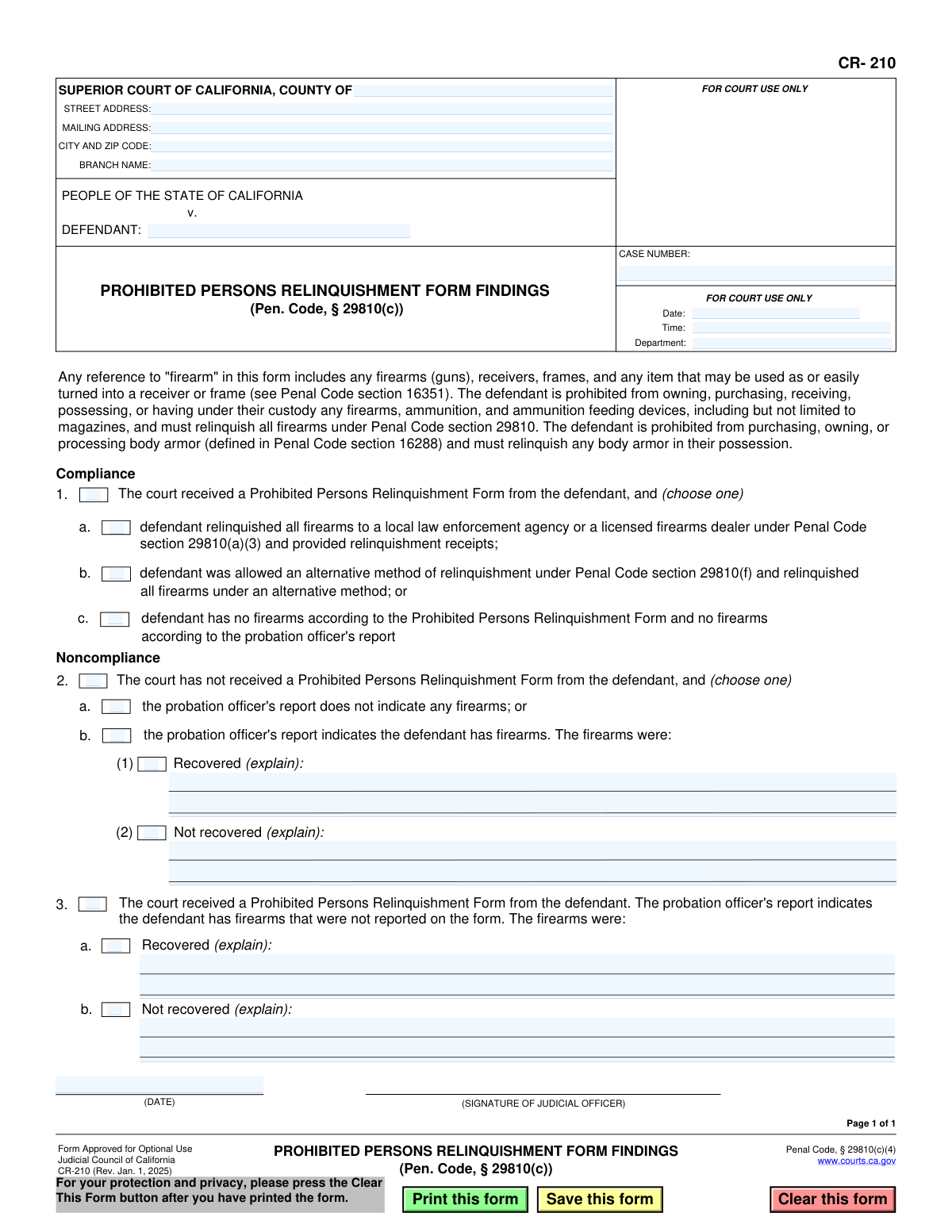
Yes! You can use AI to fill out Form CR-210, Prohibited Persons Relinquishment Form Findings (Pen. Code, § 29810(c))

Form CR-210, Prohibited Persons Relinquishment Form Findings, is a legal document used by the Superior Court of California to record the court's findings on whether a defendant, who is prohibited from owning firearms, has complied with the relinquishment requirements under Penal Code section 29810. This form is crucial for tracking compliance and ensuring that firearms are properly surrendered by individuals legally barred from possessing them. Today, this form can be filled out quickly and accurately using AI-powered services like Instafill.ai, which can also convert non-fillable PDF versions into interactive fillable forms.
CR-210 is part of the California court forms category on Instafill.
Our AI automatically handles information lookup, data retrieval, formatting, and form filling.
It takes less than a minute to fill out CR-210 using our AI form filling.
Securely upload your data. Information is encrypted in transit and deleted immediately after the form is filled out.

Form specifications

Form name: Form CR-210, Prohibited Persons Relinquishment Form Findings (Pen. Code, § 29810(c))
Number of fields: 32
Number of pages: 1
Language: English
main-image

Instafill Demo: How to fill out PDF forms in seconds with AI

How to Fill Out CR-210 Online for Free in 2026

Are you looking to fill out a CR-210 form online quickly and accurately? Instafill.ai offers the #1 AI-powered PDF filling software of 2026, allowing you to complete your CR-210 form in just 37 seconds or less.
Follow these steps to fill out your CR-210 form online using Instafill.ai:
  1. 1 Navigate to Instafill.ai and upload or select the CR-210 form.
  2. 2 Enter the specific court information, including the county, branch name, and full address.
  3. 3 Input the case details, such as the defendant's name and the official case number.
  4. 4 Fill in the hearing information: date, time, and department number.
  5. 5 Indicate the defendant's status by checking the appropriate box for compliance (Section 1) or noncompliance (Sections 2 or 3).
  6. 6 If noncompliance is noted, provide detailed explanations in the text fields regarding the status of the firearms (e.g., recovered or not recovered).
  7. 7 Once all findings are documented, the judicial officer dates and signs the form to certify the court's findings before it is filed.

Our AI-powered system ensures each field is filled out correctly, reducing errors and saving you time.

Why Choose Instafill.ai for Your Fillable CR-210 Form?

Speed

Complete your CR-210 in as little as 37 seconds.

Up-to-Date

Always use the latest 2026 CR-210 form version.

Cost-effective

No need to hire expensive lawyers.

Accuracy

Our AI performs 10 compliance checks to ensure your form is error-free.

Security

Your personal information is protected with bank-level encryption.

Frequently Asked Questions About Form CR-210

This form is used by the court to officially document its findings on whether a defendant has complied with the legal requirement to relinquish firearms, ammunition, and body armor after being prohibited from possessing them.

No, this form is for court use only and is completed by a judicial officer (a judge). It is based on information you provide on a separate form, the 'Prohibited Persons Relinquishment Form', and the probation officer's report.

This form is used because you have been convicted of an offense that makes you a 'prohibited person' under the law. The court is legally required to verify that you have turned in any firearms, ammunition, and body armor you may possess.

Relinquishing means you must legally surrender any firearms you own or possess to a local law enforcement agency or a licensed firearms dealer. You must obtain and provide a receipt to the court as proof of relinquishment.

You must relinquish all firearms (including frames and receivers), ammunition, ammunition feeding devices (like magazines), and any body armor in your possession or control.

This means the court is satisfied that you have either properly relinquished all prohibited items and provided proof, or that you did not possess any such items to begin with. This is a positive finding for your case.

A noncompliance finding means the court believes you have failed to relinquish your firearms as required. This can lead to serious consequences, including further court hearings and potential new criminal charges.

The court uses the probation officer's report to cross-reference the information you provide on your own relinquishment form. Discrepancies between your form and the report can lead to a finding of noncompliance.

Yes, that is a separate form that you, the defendant, must complete and submit to the court. Form CR-210 is the court's finding based on the information you provide on your relinquishment form.

Yes. While the court fills out Form CR-210, you can use AI-powered services like Instafill.ai for the 'Prohibited Persons Relinquishment Form' that you must complete. These tools can help auto-fill your information accurately and save time.

You can use a service like Instafill.ai to fill out your form online. Simply upload the form to their platform, and it will become an interactive, fillable document you can complete from any device.

If you have a flat, non-fillable PDF, services like Instafill.ai can convert it into an interactive, fillable form. This allows you to easily type your information directly onto the document before printing it for submission.

A judicial officer, such as a judge, is the only person who signs this form. Their signature makes the findings an official court record in your case file.

Compliance CR-210
Validation Checks by Instafill.ai

1
Validates Case Number Format
This check ensures the Case Number field is not empty and conforms to the standard format used by California courts. The case number is a critical identifier for linking the form to the correct legal proceeding. If the format is incorrect, the document may be rejected by the court's filing system or misrouted, causing significant delays.
2
Ensures a Single Primary Finding is Selected
This validation confirms that exactly one of the main sections (1, 2, or 3) is selected. The form represents a single, definitive finding by the court regarding the defendant's relinquishment status. Selecting none, or more than one, would create an ambiguous and legally invalid record, so the user must be forced to choose one.
3
Validates Mutually Exclusive Choice in Section 1
If the 'Compliance' section (1) is chosen, this check ensures that only one of the sub-options (1a, 1b, or 1c) is selected. These options describe different and mutually exclusive scenarios for how the defendant complied with the relinquishment order. Selecting multiple options would create a contradiction in the court's findings.
4
Validates Mutually Exclusive Choice in Section 2
If the 'Noncompliance' section (2) is chosen, this check ensures that only one of the sub-options (2a or 2b) is selected. These options represent distinct reasons for noncompliance (no firearms indicated vs. firearms indicated). An invalid selection would make the court's finding unclear and require correction.
5
Requires Explanation for Recovered Firearms in Section 2b
This validation rule checks that if the 'Recovered' checkbox (2b(1)) is selected, the corresponding explanation text field is not empty. The explanation is mandatory to provide details on how and where the firearms were recovered, which is essential for the case record. Failure to provide this information would render the finding incomplete.
6
Requires Explanation for Unrecovered Firearms in Section 2b
This validation rule ensures that if the 'Not recovered' checkbox (2b(2)) is selected, the corresponding explanation text field is filled out. The court must document why the firearms were not recovered, which is critical information for law enforcement and future proceedings. An empty field would create a significant gap in the official record.
7
Requires Explanation for Unreported Recovered Firearms in Section 3a
This check verifies that if the 'Recovered' checkbox in section 3a is selected, the explanation field is populated. This section deals with firearms found by a probation officer but not declared by the defendant. The explanation is vital for documenting the discrepancy and the recovery details.
8
Requires Explanation for Unreported Unrecovered Firearms in Section 3b
This validation ensures that if the 'Not recovered' checkbox in section 3b is selected, the explanation field is not left blank. This scenario is of high importance as it indicates known firearms are missing. The explanation must detail the circumstances for the record and for any subsequent enforcement actions.
9
Ensures Defendant Name is Provided
This is a completeness check to verify that the 'DEFENDANT' field is not empty. The defendant's name is a primary identifier for the case and the subject of the court's order. A form without a defendant name is meaningless and cannot be processed or filed correctly.
10
Validates Judicial Officer's Signature Date
This check ensures the date entered for the judicial officer's signature is a valid calendar date and is not set in the future. This date authenticates the findings and establishes the official date of the order. An invalid or future date would compromise the legal validity of the document.
11
Verifies Signature Date is On or After Hearing Date
This logical check compares the signature date with the hearing date. The judicial officer's findings would logically be signed on or after the hearing where the matter was discussed. A signature date before the hearing date would be a logical error and could invalidate the form, prompting the user to correct one of the dates.
12
Validates California County Name
This check validates that the 'COUNTY OF' field contains a valid name from the official list of 58 California counties. This ensures proper jurisdiction is recorded and prevents filing errors due to misspellings or incorrect county names. If the entry is invalid, the user should be prompted to select from a predefined list.
13
Ensures Required Header Information is Complete
This validation verifies that essential header fields, such as 'COUNTY OF', 'DEFENDANT', and 'CASE NUMBER', are all filled in. This information is the minimum required to identify the case and court. Submitting a form with missing header data would make it impossible to file correctly.
14
Validates Mutually Exclusive Choice in Section 3
If the 'Noncompliance - Form Received, but Incomplete' section (3) is chosen, this check ensures that only one of the sub-options (3a or 3b) is selected. These options describe whether the unreported firearms were recovered or not, which are mutually exclusive outcomes. Selecting both or neither would result in an incomplete or contradictory finding.

Common Mistakes in Completing CR-210

Omitting or Transposing the Case Number

The case number is the most critical piece of information for linking this form to the correct court file. Users often forget to enter it or make typographical errors, such as transposing digits. An incorrect or missing case number can lead to the document being misfiled or rejected, delaying the legal process and creating significant administrative work to locate and correct the error. Always double-check the case number against the official court file before finalizing the form.

Making Contradictory Checkbox Selections

This form requires the user to select findings from one of three mutually exclusive sections. A common error is checking a box in Section 1 (e.g., '1a. defendant relinquished all firearms') and also a box in Section 2 (e.g., '2. The court has not received a... Form'). This creates a logical contradiction that invalidates the court's findings and requires the form to be corrected and re-processed. Only one primary section (1, 2, or 3) should be chosen to reflect the single, definitive outcome of the hearing.

Providing Vague or Incomplete Explanations

The text fields following options like 'Recovered (explain)' or 'Not recovered (explain)' require specific details, not just a one-word answer. Users often write generic phrases like 'gun found' or 'not located'. This is insufficient for a legal record. A proper explanation should include details such as the type of firearm, who recovered it, the date of recovery, and any relevant report numbers to create a clear and defensible court record.

Confusing 'No Form Submitted' with 'Inaccurate Form Submitted'

A frequent point of confusion is the difference between Section 2 and Section 3. Section 2 applies when the defendant has failed to submit the relinquishment form entirely. Section 3 applies when the defendant has submitted a form, but it is found to be inaccurate or incomplete when compared to the probation officer's report. Choosing the wrong section misrepresents the nature of the defendant's noncompliance, which can have different legal ramifications.

Forgetting to Select a Primary Section Checkbox

Users sometimes select a sub-option (e.g., '1a', '2b') without also checking the main box for that section ('1', '2', or '3'). While the sub-option implies the main condition, failing to check the primary box can cause automated systems to fail and can create ambiguity for human reviewers. To avoid this, ensure that the main checkbox for the relevant section is selected in addition to any required sub-options.

Using an Incomplete or Incorrect Court Address

Court personnel may rush and only fill in the county name, omitting the specific branch name, street address, and city/zip code. This can cause issues with routing, filing, and serving the document, especially in large counties with multiple courthouse locations. It is essential to provide the full, specific address of the branch where the hearing was held to ensure the document is correctly attributed and filed.

Leaving Hearing Information Blank

The 'Date', 'Time', and 'Department' fields are crucial for tying the findings to a specific court proceeding. Omitting this information makes it difficult to cross-reference the form with court transcripts or minute orders from that day. This can create problems if the findings are ever challenged or need to be reviewed. Always fill in the complete hearing information as it appears on the court's calendar.

Incorrectly Summarizing the Probation Officer's Report

This form's accuracy depends on correctly interpreting the probation officer's report. A serious error is checking box '1c' (defendant has no firearms per form and probation report) when the probation report actually indicates the defendant possesses firearms. This creates a dangerously inaccurate legal record. Carefully review the probation report and ensure the selections on the CR-210 form precisely match its findings.

Manually Filling a Non-Interactive PDF

Often, court staff only have access to a flat, non-fillable PDF of the form, leading them to print and fill it out by hand. This can result in illegible handwriting, which causes data entry errors and misinterpretation of the court's official findings. If the form is not interactive, tools like Instafill.ai can convert it into a fillable version, ensuring all entries are clear, legible, and professional.

Forgetting the Date of Signature

The date entered next to the judicial officer's signature legally establishes when the court's findings were made official. Forgetting to fill in this date creates ambiguity about when the order took effect, potentially complicating enforcement actions or appeals. This date must be entered at the time of signing to ensure the document's legal validity and chronological accuracy in the case file.
Saved over 80 hours a year

“I was never sure if my IRS forms like W-9 were filled correctly. Now, I can complete the forms accurately without any external help.”

Kevin Martin Green

Your data stays secure with advanced protection from Instafill and our subprocessors

Robust compliance program

Transparent business model

You’re not the product. You always know where your data is and what it is processed for.

ISO 27001, HIPAA, and GDPR

Our subprocesses adhere to multiple compliance standards, including but not limited to ISO 27001, HIPAA, and GDPR.

Security & privacy by design

We consider security and privacy from the initial design phase of any new service or functionality. It’s not an afterthought, it’s built-in, including support for two-factor authentication (2FA) to further protect your account.

Fill out CR-210 with Instafill.ai

Worried about filling PDFs wrong? Instafill securely fills form-cr-210-prohibited-persons-relinquishment-form-findings-pen-code-29810c forms, ensuring each field is accurate.