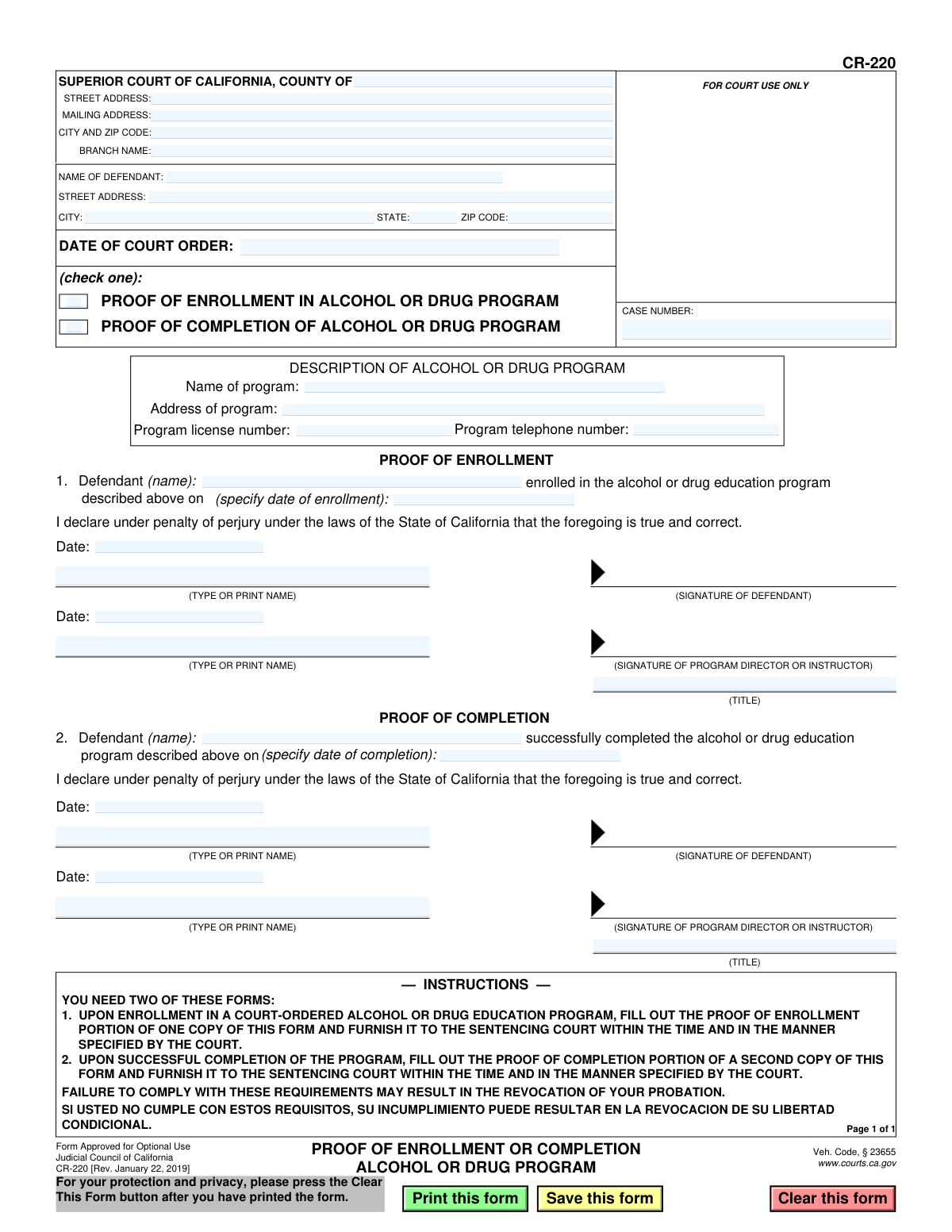
Yes! You can use AI to fill out Form CR-220, Proof of Enrollment or Completion, Alcohol or Drug Program

Form CR-220, Proof of Enrollment or Completion, is a legal document used in the California court system for defendants ordered to attend an alcohol or drug education program. It serves as official verification to the court that the individual has either enrolled in the program or successfully completed it, which is often a condition of probation or sentencing. Today, this form can be filled out quickly and accurately using AI-powered services like Instafill.ai, which can also convert non-fillable PDF versions into interactive fillable forms.
CR-220 is part of the California court forms category on Instafill.
Our AI automatically handles information lookup, data retrieval, formatting, and form filling.
It takes less than a minute to fill out CR-220 using our AI form filling.
Securely upload your data. Information is encrypted in transit and deleted immediately after the form is filled out.

Form specifications

Form name: Form CR-220, Proof of Enrollment or Completion, Alcohol or Drug Program
Number of fields: 36
Number of pages: 1
Language: English
main-image

Instafill Demo: How to fill out PDF forms in seconds with AI

How to Fill Out CR-220 Online for Free in 2026

Are you looking to fill out a CR-220 form online quickly and accurately? Instafill.ai offers the #1 AI-powered PDF filling software of 2026, allowing you to complete your CR-220 form in just 37 seconds or less.
Follow these steps to fill out your CR-220 form online using Instafill.ai:
  1. 1 Navigate to Instafill.ai and upload or select the CR-220 form.
  2. 2 Provide your personal details, court information, and case number as prompted by the AI assistant.
  3. 3 Specify the details of the alcohol or drug program, including its name, address, and license number.
  4. 4 Indicate whether you are submitting proof of enrollment or proof of completion by checking the correct box and entering the relevant date.
  5. 5 The defendant and the program director or instructor must both sign and date the form in the appropriate sections.
  6. 6 Review all the information entered by the AI for accuracy before finalizing the document.
  7. 7 Download the completed form to be furnished to the sentencing court as per the court's instructions.

Our AI-powered system ensures each field is filled out correctly, reducing errors and saving you time.

Why Choose Instafill.ai for Your Fillable CR-220 Form?

Speed

Complete your CR-220 in as little as 37 seconds.

Up-to-Date

Always use the latest 2026 CR-220 form version.

Cost-effective

No need to hire expensive lawyers.

Accuracy

Our AI performs 10 compliance checks to ensure your form is error-free.

Security

Your personal information is protected with bank-level encryption.

Frequently Asked Questions About Form CR-220

The CR-220 form serves as official proof to the court that you have either enrolled in or successfully completed a court-ordered alcohol or drug education program.

This form must be completed by any defendant who has been ordered by a California Superior Court to attend an alcohol or drug program as part of their sentence.

You need two copies because you must submit proof at two different times. The first copy is for proving your enrollment when you begin the program, and the second is for proving your completion when you finish.

You will fill out the 'Proof of Enrollment' section on one copy of the form when you first start the program. After you finish the entire program, you will fill out the 'Proof of Completion' section on a second copy of the form.

Both the defendant and the program director or instructor must sign and date the appropriate section. Your signature confirms the information is correct, and the program's signature verifies your status.

The staff at the alcohol or drug program you are attending will provide you with all their official details, including the program name, address, phone number, and license number required for the form.

Failing to submit this form by the court-specified deadline can lead to serious consequences, including the revocation of your probation.

You must submit the completed and signed form to the sentencing court that handled your case. The specific court address and case number should be written at the top of the form.

Your case number is printed on all official court documents related to your case, such as the court order or any notices you received. It is crucial to enter this number correctly on the form.

Yes, you can use AI-powered services like Instafill.ai to help you accurately fill in your information. These tools can save time and reduce the risk of errors on legal documents.

To use Instafill.ai, you upload the CR-220 PDF to the platform. The AI will automatically detect the form fields, allowing you to type your information once and have it placed correctly throughout the document.

If you have a non-fillable or 'flat' PDF, you can use a tool like Instafill.ai. It can convert the document into an interactive, fillable form so you can easily type your information before printing it for signatures.

Compliance CR-220
Validation Checks by Instafill.ai

1
Exclusive Proof Type Selection
This check ensures that exactly one of the two checkboxes, 'PROOF OF ENROLLMENT' or 'PROOF OF COMPLETION', is selected. The form is intended for one purpose per submission. If zero or both boxes are checked, the form's intent is ambiguous and it should be rejected for clarification.
2
Case Number Presence and Format
Validates that the 'CASE NUMBER' field is not empty and conforms to the expected format for the specified court jurisdiction. The case number is the primary identifier linking this document to a legal proceeding. A missing or malformed case number would prevent the form from being correctly filed, leading to processing delays or rejection.
3
Defendant Name Consistency
This validation compares the defendant's name in the header ('NAME OF DEFENDANT') with the name entered in the active section ('Defendant (name)'). The names must match exactly to ensure the proof applies to the correct individual. A mismatch could indicate a clerical error or an attempt to file for the wrong person, and the form should be flagged for manual review.
4
Court Order Date Chronology
Ensures the 'DATE OF COURT ORDER' is a valid, non-future date. This date serves as the baseline for all subsequent actions. An invalid or future date would make the timeline of events illogical, so the form must be rejected until a valid date that precedes or coincides with the submission date is provided.
5
Enrollment Date Logical Validity
If 'PROOF OF ENROLLMENT' is selected, this check verifies that the 'date of enrollment' is on or after the 'DATE OF COURT ORDER'. A person cannot be enrolled in a court-ordered program before the court has issued the order. This logical check prevents the submission of chronologically impossible information.
6
Completion Date Logical Validity
If 'PROOF OF COMPLETION' is selected, this check verifies the 'date of completion' is on or after the 'DATE OF COURT ORDER'. Furthermore, if an enrollment date is known, the completion date must be after the enrollment date. This ensures the sequence of events is logical and prevents premature or invalid claims of completion.
7
Conditional Enrollment Section Completeness
When 'PROOF OF ENROLLMENT' is checked, this validation ensures all fields within the enrollment section are filled, including defendant name, enrollment date, and the printed names for both signatures. Incomplete submissions cannot be processed and fail to provide the court with the necessary proof. The form should be rejected if this section is incomplete.
8
Conditional Completion Section Completeness
When 'PROOF OF COMPLETION' is checked, this validation ensures all fields within the completion section are filled, including defendant name, completion date, and the printed names for both signatures. A partially filled section is insufficient as legal proof of completion. The submission must be considered incomplete and rejected.
9
Program Information Completeness
Verifies that all fields under 'DESCRIPTION OF ALCOHOL OR DRUG PROGRAM' (Name, Address, License Number, Telephone Number) are filled. This information is critical for the court to verify the legitimacy and credentials of the program. Missing information would prevent verification and may lead to the rejection of the proof.
10
Program Telephone Number Format
This check validates that the 'Program telephone number' is in a recognizable format (e.g., (XXX) XXX-XXXX or XXXXXXXXXX). A valid phone number is essential for the court or probation department to contact the program for verification purposes. An invalid format would hinder this process and should be corrected before submission.
11
Signature Date Chronology
Validates that the date entered next to a signature is on or after the corresponding event date (enrollment or completion). For example, the signature date for enrollment cannot be before the enrollment date itself. This ensures the attestation was made after the event occurred, which is legally required for a declaration under penalty of perjury.
12
Printed Name for Signatories Requirement
Ensures the 'TYPE OR PRINT NAME' fields are filled out for both the defendant and the program director/instructor in the relevant section. Since signatures can be illegible, the printed name is required to unambiguously identify the signatories. A missing printed name makes the signature's origin uncertain and invalidates the attestation.
13
Court Jurisdiction Identification
This check ensures the 'COUNTY OF' field in the header is completed. This information is fundamental for routing the document to the correct Superior Court within California. Failure to specify the county will result in the document being misrouted or rejected, causing significant delays in satisfying court requirements.

Common Mistakes in Completing CR-220

Using a Single Form for Both Enrollment and Completion

The form instructions explicitly state that two separate copies are required: one for proving enrollment and a second for proving completion. A common mistake is to submit the form for enrollment and then attempt to add completion details to the same document later. This procedural error will lead to the court rejecting the completion proof, potentially causing the defendant to miss a critical deadline and face probation revocation.

Incomplete or Incorrect Court and Case Information

The header section requires precise details like the Superior Court County, branch name, and the exact case number. People often leave these fields blank, guess the information, or make typos in the case number. An incorrect case number can cause the document to be misfiled or lost, leading the court to believe the defendant failed to comply with their order.

Filling Out the Wrong Section (Enrollment vs. Completion)

This form has two main sections: 'PROOF OF ENROLLMENT' (Section 1) and 'PROOF OF COMPLETION' (Section 2). A frequent error is filling out the completion section on the enrollment form, or vice-versa. This renders the submission invalid and guarantees its rejection by the court, wasting time and risking non-compliance with court-ordered deadlines.

Missing Signatures or Dates

The form requires signatures and dates from both the defendant and the program director/instructor in the appropriate section. It is common for one of the parties to forget to sign or date the document. An unsigned or undated form is legally incomplete and will be rejected, placing the responsibility back on the defendant to get it corrected and resubmitted, often under a tight deadline.

Illegible Handwriting

When filling out a form by hand, poor penmanship can make critical information like the case number, defendant's name, or dates impossible for the court clerk to read. This can lead to processing errors, misfiling, or outright rejection of the form. To avoid this, it is best to type the information; AI-powered tools like Instafill.ai can convert this non-fillable PDF into a fillable version, ensuring all entries are clear and legible.

Omitting the Form's Purpose Checkbox

At the top of the form, there are two checkboxes to clearly indicate whether the submission is for 'PROOF OF ENROLLMENT' or 'PROOF OF COMPLETION'. Filers often overlook these boxes, creating ambiguity for the court clerk. This can slow down processing as the clerk may need to manually determine the form's purpose, or they may return it for correction.

Inconsistent Defendant Name

The defendant's name appears in multiple locations on the form, and it must match the name on the official court record. Using a nickname, a shortened name, or a different version of your name can cause the form to be flagged or rejected. This happens because the clerk cannot confidently match the submitted proof to the correct case file, potentially resulting in a non-compliance record.

Incomplete Alcohol or Drug Program Information

The form requires the full name, address, license number, and telephone number of the program for verification purposes. Defendants often provide only the name of the program, leaving out the other crucial details. Without this information, the court cannot validate the program's legitimacy, which may lead to the rejection of the proof and require the defendant to resubmit a fully completed form.

Using Ambiguous Date Formats

The form requires specific dates for enrollment and completion, but people often write them in ambiguous formats like '6/5/24'. This can be confusing and lead to data entry errors by the court. To prevent any issues, dates should always be written in a clear, full format, such as MM/DD/YYYY (e.g., 06/05/2024). AI form-filling tools like Instafill.ai can help by automatically formatting dates correctly to meet legal standards.
Saved over 80 hours a year

“I was never sure if my IRS forms like W-9 were filled correctly. Now, I can complete the forms accurately without any external help.”

Kevin Martin Green

Your data stays secure with advanced protection from Instafill and our subprocessors

Robust compliance program

Transparent business model

You’re not the product. You always know where your data is and what it is processed for.

ISO 27001, HIPAA, and GDPR

Our subprocesses adhere to multiple compliance standards, including but not limited to ISO 27001, HIPAA, and GDPR.

Security & privacy by design

We consider security and privacy from the initial design phase of any new service or functionality. It’s not an afterthought, it’s built-in, including support for two-factor authentication (2FA) to further protect your account.

Fill out CR-220 with Instafill.ai

Worried about filling PDFs wrong? Instafill securely fills form-cr-220-proof-of-enrollment-or-completion-alcohol-or-drug-program forms, ensuring each field is accurate.