
Yes! You can use AI to fill out Form CR-223, Ignition Interlock Calibration Verification
Don't type 79 fields by hand. Tell our AI about yourself, or upload a document you already have, and it fills every field in seconds. You check it, then download, print or sign.
The AI does the filling. You just check it.
No typing into boxes, nothing to install.
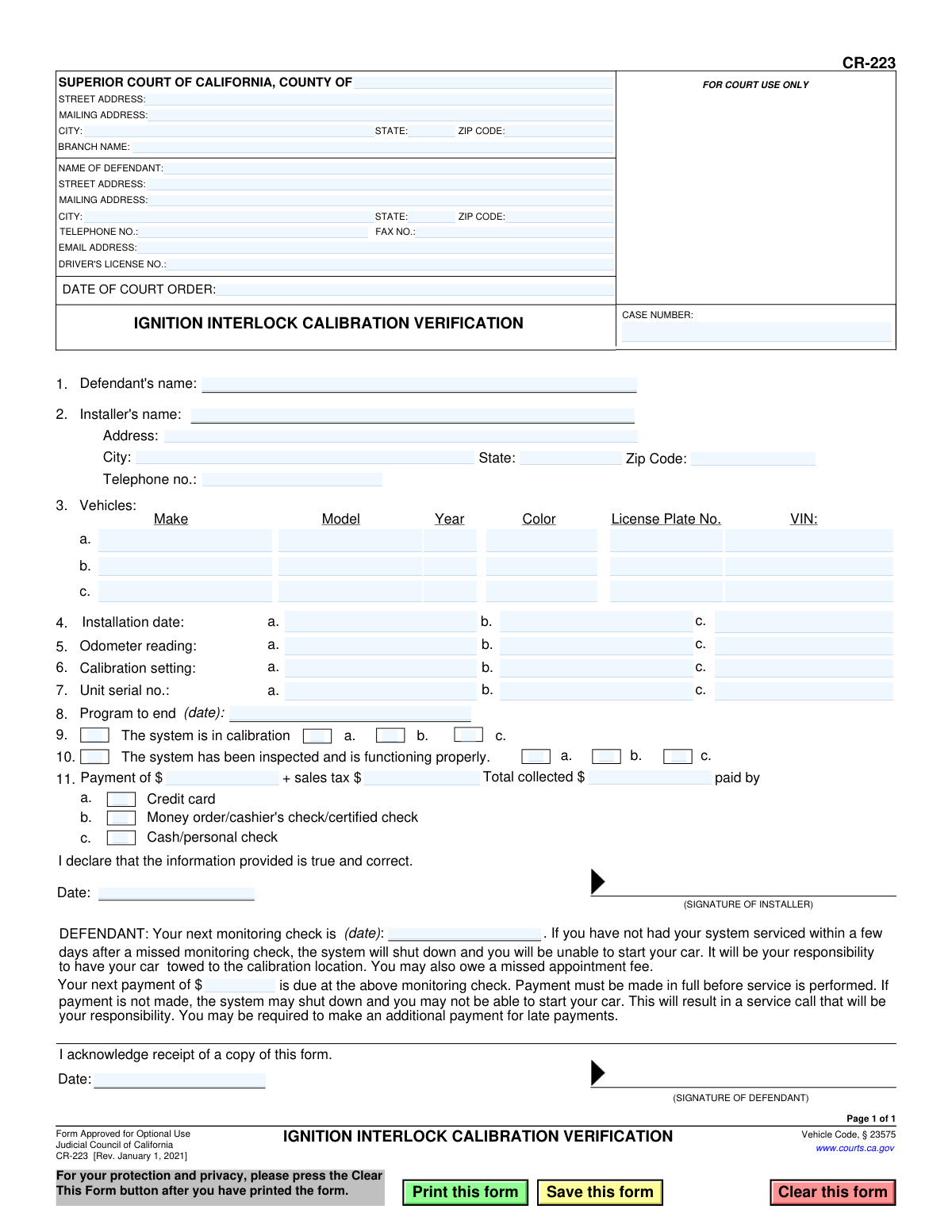
What this form asks for
The AI fills all of it, from your answers or your documents.
The AI checks your answers before you download
12 checks built for this form, so a wrong date or a missing answer is caught before anyone else sees it.
This check verifies that the Vehicle Identification Number (VIN) in section 3 is exactly 17 characters long and contains only valid alphanumeric characters, excluding I, O, and Q. It may also validate the checksum digit to ensure authenticity. This is critical for uniquely identifying the vehicle, as the VIN is the primary link between the physical car and its legal and service records.
Ensures the dates on the form follow a logical sequence: the 'Installation date' (section 4) must be on or after the 'Date of Court Order', and the 'Program to end (date)' (section 8) must be after the 'Installation date'. This validation prevents illogical entries that would invalidate the legal timeline of the court order and its fulfillment. An error here suggests a significant data entry mistake that needs correction.
Validates that the 'Total collected' amount in section 11 is the precise sum of the base payment amount and the 'sales tax' amount. This check is important for financial accuracy, ensuring correct billing for the defendant and proper accounting for the installer. If the calculation fails, it indicates a financial error that could lead to billing disputes or reconciliation problems.
If any field for a vehicle row (e.g., 'Make' in row 3a) is filled, this check mandates that all other critical fields for that same row (VIN, License Plate No., Installation date, Odometer reading, Unit serial no.) are also completed. This rule ensures that every vehicle listed on the form has a complete and actionable record. An incomplete entry for a vehicle would make the verification for that specific vehicle void.
This check validates that the 'DRIVER'S LICENSE NO.' follows the standard California format, which is typically a letter followed by seven digits. Correctly formatting this number is essential for linking the form to the defendant's official DMV record. An invalid format would cause rejection during processing by the court or DMV and delay the case.
Verifies that dates for events that have already occurred, such as the 'Date of Court Order', 'Installation date', and the installer/defendant signature dates, are not in the future. This maintains the factual integrity of the document, as it serves as a record of past actions. Allowing future dates would render the document nonsensical and legally questionable.
And 6 more checks
- Mandatory Case Number Presence
- Valid Vehicle Year Range
- Signature Date Requirement
- Next Monitoring Appointment Logic
- Odometer Reading Format
- VIN Uniqueness Validation
Let AI fill out your CR-223
No typing. Every field filled in seconds, checked, ready to sign.
How to Fill Out CR-223 Online for Free in 2026
What the AI walks you through.
- Navigate to Instafill.ai and upload or select the CR-223 form to begin.
- Use the AI-powered tool to accurately fill in the court and case information, including the county, court address, and case number.
- Provide the defendant's personal details, such as full name, address, and driver's license number.
- Enter the installer's information and the specific details for each vehicle, including make, model, VIN, installation date, and device serial number.
- The installer must verify the calibration status, confirm the system is functioning correctly, and record any payment details.
- Carefully review all entered information for accuracy before the installer and defendant sign and date the form in the designated sections.
- Download, print, or securely submit the completed and signed CR-223 form as required by the court.
Common Mistakes in Completing CR-223
The ones the AI is built to catch.
Entering an Inaccurate or Incomplete VIN
Incorrect or Mismatched Case Number
Missing Signatures or Dates
Misaligned Multi-Vehicle Information
Overlooking Future Appointment and Payment Details
Mistyping the Ignition Interlock Unit Serial Number
Forgetting to Check Key Verification Boxes
Confusing Court and Personal Address Fields
Printing and Hand-filling a Digital Form Illegibly
Frequently Asked Questions About CR-223
Is it really free for 7 days?
Can I fill other forms too?
How do I cancel?
How does the AI fill out CR-223?
What happens to my information?
How complex is CR-223 to fill out?
What is the purpose of Form CR-223, the Ignition Interlock Calibration Verification?
Who is responsible for filling out this form?
What information do I need to provide to the installer?
What happens after the form is completed and signed?
What happens if I miss my scheduled monitoring check?
What if I am late with a payment for the IID service?
Can I have the Ignition Interlock Device installed on more than one vehicle?
Who signs this form?
How is the program end date in section 8 determined?
Can I use an AI tool to help fill out this form?
How can I fill out Form CR-223 online?
The PDF of this form I have is not fillable. What should I do?
Get your CR-223 filled out by AI
$0 today. Cancel before Nov 1 and you pay nothing.
Other forms like this one
California court forms: Judicial Council of California Form SC-105, Request for Court Order and Answer (Small Claims), Judicial Council of California Form SC-120, Defendant’s Claim and ORDER to Go to Small Claims Court (Small Claims), Judicial Council of California Form SER-001, Request for Sheriff to Serve Court Papers, Judicial Council of California Form SER-001, Request for Sheriff to Serve Court Papers, Affidavit for Collection of Personal Property California Probate Code Section 13100, Form POS-040, Proof of Service—Civil, Declaration of Facts of Death (California Superior Court), declaration-of-marriage-for-court-proceeding-california-family-law, ADOPT-200, Adoption Request, ADOPT-200, Stepparent Adoption Request, ADOPT-210, Adoption Agreement, ADOPT-310, Contact After Adoption Agreement, Judicial Council of California Form ADOPT-200, Adoption Request, Form ADR-107, Mediation Attendance Sheet, Form ADR-110, Order Appointing Referee, Form ADR-109, Stipulation or Motion for Order Appointing Referee, Form ADR-102, Request for Trial De Novo After Judicial Arbitration, Form ADR-108, Referee's Report (Code Civ. Proc., §§ 638, 639), Form ADR-106, Petition to Confirm, Correct, or Vacate Contractual Arbitration Award, Form ADR-104, Rejection of Award and Request for Trial After Attorney-Client Fee Arbitration
Let AI fill out your CR-223
Your trial starts once a card is added. You pay nothing before Nov 1.
Our AI already knows this form, all 79 fields of it. Skip the typing: tell it about yourself, or upload what you have, and it fills the whole form in seconds.
- AI fills every field on the form, checkboxes included
- No typing into boxes: answer a few questions, or upload a document you already have, an old copy of this form, a photo of a document
- The AI checks the answers; you review and change anything before you download
- Download the finished PDF, print it, or sign it online
- Encrypted, and never used to train AI
Cancel before Nov 1 and you pay nothing.
A card is needed to start the trial. Cancel in two clicks from your account.
Terms · Privacy