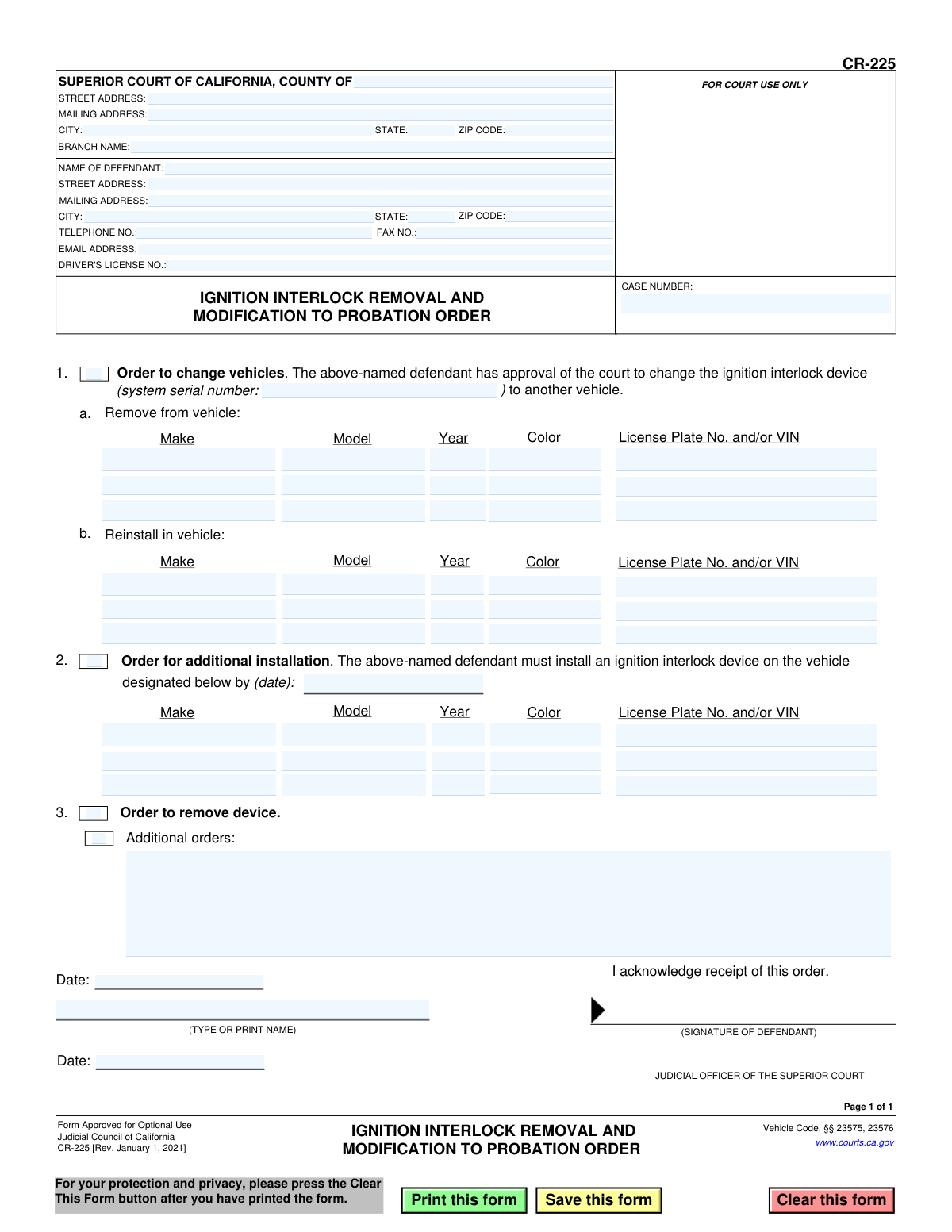
Yes! You can use AI to fill out Form CR-225, Ignition Interlock Removal and Modification to Probation Order
Form CR-225 is a legal document used in the Superior Court of California to issue an order modifying a defendant's probation concerning an ignition interlock device. It is used to authorize the removal of a device, its transfer to another vehicle, or the installation of an additional device as per Vehicle Code §§ 23575 and 23576. Today, this form can be filled out quickly and accurately using AI-powered services like Instafill.ai, which can also convert non-fillable PDF versions into interactive fillable forms.
CR-225 is part of the
California court forms category on Instafill.
Our AI automatically handles information lookup, data retrieval, formatting, and form filling.
It takes less than a minute to fill out CR-225 using our AI form filling.
Securely upload your data. Information is encrypted in transit and deleted immediately after the form is filled out.
Form specifications
| Form name: | Form CR-225, Ignition Interlock Removal and Modification to Probation Order |
| Number of fields: | 77 |
| Number of pages: | 1 |
| Language: | English |
Instafill Demo: How to fill out PDF forms in seconds with AI
How to Fill Out CR-225 Online for Free in 2026
Are you looking to fill out a CR-225 form online quickly and accurately? Instafill.ai offers the #1 AI-powered PDF filling software of 2026, allowing you to complete your CR-225 form in just 37 seconds or less.
Follow these steps to fill out your CR-225 form online using Instafill.ai:
- 1 Navigate to Instafill.ai and upload or select the CR-225 form.
- 2 Provide the court and case information, including the county, court address, and case number.
- 3 Enter the defendant's full name, address, contact information, and driver's license number.
- 4 Select the appropriate order by checking the box for changing vehicles, ordering an additional installation, or ordering the removal of the device.
- 5 If applicable, provide the specific details for the vehicles involved, including make, model, year, color, and license plate or VIN.
- 6 Review all the auto-filled information for accuracy, then have the defendant sign and date the form to acknowledge receipt of the order.
- 7 Download, print, and file the completed form with the court as required.
Our AI-powered system ensures each field is filled out correctly, reducing errors and saving you time.
Why Choose Instafill.ai for Your Fillable CR-225 Form?
Speed
Complete your CR-225 in as little as 37 seconds.
Up-to-Date
Always use the latest 2026 CR-225 form version.
Cost-effective
No need to hire expensive lawyers.
Accuracy
Our AI performs 10 compliance checks to ensure your form is error-free.
Security
Your personal information is protected with bank-level encryption.
Frequently Asked Questions About Form CR-225
Form CR-225 is a California court order used to request and grant permission to modify an Ignition Interlock Device (IID) requirement. This includes moving the device to a different vehicle, installing it on an additional vehicle, or removing it completely.
This form is for defendants on probation who are required by the court to use an IID and need to make a change. A judge must sign the form to make the change official.
Section 1 is used when you are changing vehicles, meaning you are removing the IID from one car and reinstalling it on another. Section 2 is for when you need to install an IID on an additional vehicle, without removing it from another.
To have the device permanently removed, you must get a court order. The judge will check the box for Section 3, "Order to remove device," which authorizes the removal once you have met the conditions of your probation.
You will need your personal details, case number, driver's license number, and the IID system serial number. You also need the make, model, year, color, and license plate or VIN for all vehicles involved.
You must use Form CR-225 to get a court order before moving the device. You will fill out Section 1 to document the removal from the sold vehicle and the reinstallation in your new vehicle.
The form must be filed with the Superior Court in the county handling your case. It is not valid until it has been signed by a judicial officer.
Yes, the defendant signs the form to acknowledge receipt and understanding of the court's order. The judicial officer also signs to make the order official.
Yes, services like Instafill.ai use AI to auto-fill form fields accurately and save time. This can help you quickly populate your personal, case, and court information.
Upload the CR-225 PDF to Instafill.ai, and its AI will fill in your saved information. You can then complete the vehicle-specific sections, review, and download the form for submission.
If you have a non-fillable PDF, you can use a tool like Instafill.ai. It can convert flat, non-fillable PDFs into interactive forms that you can easily complete on your computer.
This space is for the judge to write in any specific instructions or conditions that are not covered by the standard options on the form. This section is completed by the court, not by you.
Compliance CR-225
Validation Checks by Instafill.ai
1
Case Number Presence and Format
This check verifies that the 'CASE NUMBER' field is not empty and follows the court's standard format. The case number is a unique identifier crucial for linking the document to the correct legal proceedings. If this field is missing or improperly formatted, the form cannot be correctly filed or processed, leading to significant administrative delays.
2
Court County Completeness
Ensures the 'COUNTY OF' field is filled out, specifying the jurisdiction of the Superior Court. This is a mandatory field as it determines which court has authority over the case and where the document should be officially recorded. A submission without the county is legally incomplete and will be rejected.
3
Defendant Name Completeness
Validates that the 'NAME OF DEFENDANT' field is populated with the full name of the individual. This is the most critical piece of identifying information on the form, as the order directly applies to this person. An order without a defendant's name is unenforceable and invalid.
4
Driver's License Number Format
This check ensures the 'DRIVER'S LICENSE NO.' field is entered and follows the specific format for a California driver's license (e.g., one letter followed by seven numbers). Correct formatting is essential for cross-referencing with DMV records and ensuring the order is applied to the correct individual's driving record. An invalid format could lead to clerical errors or rejection by the DMV.
5
Mandatory Order Selection
Verifies that at least one of the primary order checkboxes (1, 2, or 3) has been selected. The purpose of the form is to request a specific action, and without a selection, the court does not know what is being ordered. A form submitted without a selected order is ambiguous and will be returned for clarification.
6
Conditional Requirement for Vehicle Change (Order 1)
If checkbox 1, 'Order to change vehicles,' is selected, this validation ensures that the ignition interlock 'system serial number' and the vehicle details for both removal (1a) and reinstallation (1b) are completely filled out. This information is necessary for the service provider to correctly transfer the device and for the court to maintain an accurate record. Failure to provide these details makes the order incomplete and non-actionable.
7
Conditional Requirement for Additional Installation (Order 2)
If checkbox 2, 'Order for additional installation,' is selected, this check confirms that the installation deadline date and the new vehicle's details are provided. The deadline creates a legally enforceable timeframe for compliance, and the vehicle details specify where the device must be installed. An order missing this information is vague and cannot be enforced.
8
Installation Deadline Date Validity
This validation checks that the date provided in section 2 is a valid date and is in the future. An order with a past or invalid date is impossible to comply with and legally nonsensical. This check prevents the issuance of defective orders and ensures the defendant is given a reasonable and valid deadline.
9
Vehicle Year Format and Plausibility
Ensures that the 'Year' field for any vehicle listed is a 4-digit number and falls within a plausible range (e.g., 1950 to the current year + 2). This prevents simple data entry errors like typing '23' instead of '2023' or entering a nonsensical value. Accurate vehicle information is required for proper identification.
10
Unique Vehicle Identifier Requirement
For every vehicle specified in sections 1a, 1b, or 2, this check verifies that either the 'License Plate No.' or the 'VIN' (Vehicle Identification Number) is provided. At least one of these unique identifiers is essential to unambiguously identify the vehicle in question for legal and administrative purposes. A vehicle described only by make, model, and color is not sufficiently identified.
11
Defendant Acknowledgment Date Presence
Validates that the date field next to the defendant's signature is filled out. This date serves as legal proof of when the defendant acknowledged receipt of the court's order. The absence of this date can create ambiguity about when the defendant was officially notified, potentially complicating enforcement actions.
12
Judicial Officer Signature Date Presence
This check ensures the date field next to the 'JUDICIAL OFFICER' signature line is completed. This date is critical as it establishes the official date the order was issued and became effective. An undated order is not legally valid and will be rejected during processing.
13
Logical Date Sequence
Verifies that the 'Judicial Officer's Signature Date' is on or after the 'Defendant's Acknowledgment Date'. It is not logically possible for a judge to sign an order after the defendant has already acknowledged it on a later date. This check prevents chronological errors that could call the document's validity into question.
14
Defendant Printed Name Requirement
Ensures the '(TYPE OR PRINT NAME)' field for the defendant is completed. A printed name is required to clarify the identity of the signatory, as signatures can often be illegible. This prevents any dispute over who signed the acknowledgment and is a standard requirement for legal documents.
Common Mistakes in Completing CR-225
Defendants often forget to include their court case number or enter it with typos. This number is essential for the court clerk to correctly file the document and associate it with the defendant's legal proceedings. Without the correct case number, the form will be rejected, causing significant delays in the modification of the probation order. To avoid this, double-check the case number on previous court documents before filling out the form.
The form has two distinct sections at the top: one for the Superior Court's information and one for the Defendant's information. A common error is for the defendant to enter their own personal address and contact details into the fields reserved for the court. This can lead to official correspondence being misdirected or the form being rejected for improper completion. Always ensure the court's address is in the top-left block and your personal information is in the block labeled 'NAME OF DEFENDANT'.
When requesting to change a vehicle (Section 1), the form requires the serial number of the existing ignition interlock device (IID). People often leave this field blank because they don't know where to find the number. This information is critical for tracking the specific device and ensuring compliance. The serial number can usually be found on the device itself or on the installation paperwork provided by the IID company.
The form asks for vehicle details including Make, Model, Year, Color, and 'License Plate No. and/or VIN'. Many people provide only the license plate number, which can change, or they mistype the 17-character Vehicle Identification Number (VIN). An incorrect VIN can invalidate the order and create problems with the DMV and the IID installer. It is crucial to accurately copy the VIN directly from the vehicle's registration or dashboard plate to ensure the order is applied to the correct vehicle.
The form presents three distinct actions: changing a vehicle (Section 1), adding a vehicle (Section 2), and removing the device entirely (Section 3). A frequent mistake is checking the boxes for multiple, conflicting actions, such as requesting to both change and remove the device. This makes the request ambiguous and legally nonsensical, guaranteeing its rejection by the court. You must carefully select only the one checkbox that corresponds to the single action you are requesting from the court.
Forgetting to sign the form or write the date of signature is one of the most common and easily avoidable mistakes. An unsigned legal document is invalid and has no legal effect. This oversight will result in the immediate rejection of your request, forcing you to restart the process. Always review the form one last time before submission to ensure you have signed and dated it in the designated area.
If the form is printed and filled out by hand, illegible handwriting can render it useless. Critical information like the case number, VIN, and names must be perfectly clear. If a clerk or judge cannot read the information, they will reject the form rather than guess at the details. To prevent this, print legibly in block letters or use a fillable PDF version of the form. AI-powered tools like Instafill.ai can convert flat, non-fillable PDFs into fillable versions to ensure all entries are typed and clear.
When requesting an order for an additional installation (Section 2), the form includes a field for the date by which the installation must be completed. Defendants sometimes leave this date blank, not realizing it's a key part of the court order they are proposing. Leaving this field empty creates an incomplete order that the court cannot approve. You should propose a reasonable date, which the judge can then approve or modify.
In the 'NAME OF DEFENDANT' field, individuals sometimes use a nickname or a shortened version of their name. This is a legal document that must match your official court records and driver's license. Using an incorrect name can lead to filing errors and questions about your identity. Always use your full, legal name as it appears on government-issued identification and in the court's case file.
The vehicle sections ask for the 'License Plate No. and/or VIN'. Some people provide both to be thorough, but they accidentally provide a VIN for one car and a license plate for another, or one of the numbers contains a typo. This mismatch creates a conflict and can lead to the order being applied to the wrong vehicle or being rejected outright. If you provide both, triple-check that they correspond to the exact same vehicle. Using a tool like Instafill.ai can help validate data formats to reduce the chance of typos in long strings like a VIN.
Saved over 80 hours a year
“I was never sure if my IRS forms like W-9 were filled correctly. Now, I can complete the forms accurately without any external help.”
Kevin Martin Green
Your data stays secure with advanced protection from Instafill and our subprocessors
Robust compliance program
Transparent business model
You’re not the product. You always know where your data is and what it is processed for.
ISO 27001, HIPAA, and GDPR
Our subprocesses adhere to multiple compliance standards, including but not limited to ISO 27001, HIPAA, and GDPR.
Security & privacy by design
We consider security and privacy from the initial design phase of any new service or functionality. It’s not an afterthought, it’s built-in, including support for two-factor authentication (2FA) to further protect your account.
Fill out CR-225 with Instafill.ai
Worried about filling PDFs wrong? Instafill securely fills form-cr-225-ignition-interlock-removal-and-modification-to-probation-order forms, ensuring each field is accurate.