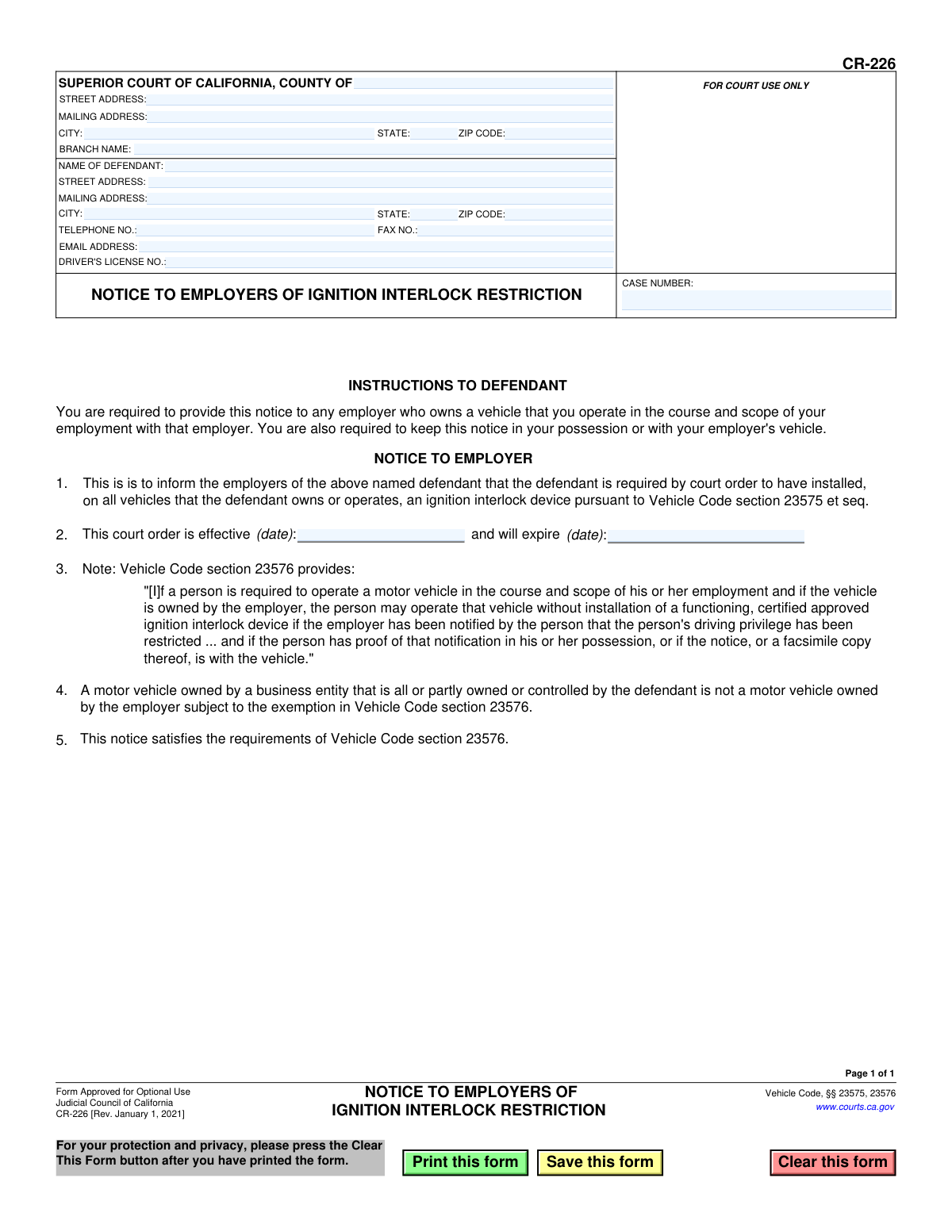
Yes! You can use AI to fill out Form CR-226, Notice to Employers of Ignition Interlock Restriction
Form CR-226 is a legal document required in California for individuals whose driving privileges are restricted due to a court order mandating an ignition interlock device. It serves as formal notification to an employer, allowing the employee to operate an employer-owned vehicle without the device, as permitted by Vehicle Code section 23576. Today, this form can be filled out quickly and accurately using AI-powered services like Instafill.ai, which can also convert non-fillable PDF versions into interactive fillable forms.
CR-226 is part of the
California court forms category on Instafill.
Our AI automatically handles information lookup, data retrieval, formatting, and form filling.
It takes less than a minute to fill out CR-226 using our AI form filling.
Securely upload your data. Information is encrypted in transit and deleted immediately after the form is filled out.
Form specifications
| Form name: | Form CR-226, Notice to Employers of Ignition Interlock Restriction |
| Number of fields: | 24 |
| Number of pages: | 1 |
| Language: | English |
Instafill Demo: How to fill out PDF forms in seconds with AI
How to Fill Out CR-226 Online for Free in 2026
Are you looking to fill out a CR-226 form online quickly and accurately? Instafill.ai offers the #1 AI-powered PDF filling software of 2026, allowing you to complete your CR-226 form in just 37 seconds or less.
Follow these steps to fill out your CR-226 form online using Instafill.ai:
- 1 Navigate to Instafill.ai and upload or select Form CR-226, Notice to Employers of Ignition Interlock Restriction.
- 2 Provide the Superior Court information, including the county, address, and branch name.
- 3 Enter the defendant's personal information, such as full name, address, and driver's license number.
- 4 Input the court-assigned case number in the designated field.
- 5 Specify the effective and expiration dates for the court-ordered ignition interlock restriction.
- 6 Review all the information auto-filled by the AI for accuracy and make any necessary edits.
- 7 Download and print the completed form to provide to your employer and keep a copy in your possession as required.
Our AI-powered system ensures each field is filled out correctly, reducing errors and saving you time.
Why Choose Instafill.ai for Your Fillable CR-226 Form?
Speed
Complete your CR-226 in as little as 37 seconds.
Up-to-Date
Always use the latest 2026 CR-226 form version.
Cost-effective
No need to hire expensive lawyers.
Accuracy
Our AI performs 10 compliance checks to ensure your form is error-free.
Security
Your personal information is protected with bank-level encryption.
Frequently Asked Questions About Form CR-226
This form officially notifies your employer that you are under a court order requiring an ignition interlock device (IID) on vehicles you operate. It also serves as proof of this notification, which is necessary to legally operate an employer-owned vehicle without an IID.
Any defendant who is court-ordered to have an IID and operates a vehicle owned by their employer as part of their job must use this form. You are required to provide this notice to your employer.
Yes, if you operate a vehicle owned by your employer in the course of your employment, you are required by law to provide them with this notice. You must also keep a copy with you or in the vehicle.
Yes, under Vehicle Code section 23576, this notice allows you to operate an employer-owned vehicle without an IID installed, provided you have proof of the notification (this form) in your possession or in the vehicle.
No, the exemption does not apply to vehicles owned by a business that is all or partly owned or controlled by you. In that situation, the vehicle is not considered 'owned by the employer' for this exemption and must have an IID installed.
You are responsible for filling in your personal details, including your name, address, and driver's license number. The court will fill in the case number and the effective start and end dates of the restriction.
You must provide the completed form to your employer. You are also required to keep a copy for your records and have it with you (or in the vehicle) whenever you are operating the employer's vehicle.
The court determines the duration of your ignition interlock restriction. A court official will enter the effective start and end dates on line 2 of the form based on the court's order.
If you fail to notify your employer, you cannot legally operate their vehicle unless it is equipped with an ignition interlock device. Doing so would be a violation of your driving restrictions and could lead to further legal consequences.
Yes, services like Instafill.ai use AI to auto-fill form fields accurately with your saved information, which saves time and helps you avoid mistakes.
You can use a service like Instafill.ai to complete this form digitally. Simply upload the form to the platform, and it will guide you through filling out the necessary fields online.
You can use Instafill.ai to solve this problem. The platform can convert flat, non-fillable PDFs into interactive forms that you can easily complete and sign on your computer or mobile device.
Compliance CR-226
Validation Checks by Instafill.ai
1
Case Number Presence and Format
This check ensures the 'CASE NUMBER' field is not empty and follows the standard format for California court cases. The case number is the primary identifier for the legal proceeding, and its absence or incorrect format would make it impossible to reference the correct court order. If this validation fails, the form cannot be processed as it cannot be linked to a specific legal action.
2
Driver's License Number Format
Validates that the 'DRIVER'S LICENSE NO.' field matches the California DMV format, which is typically a letter followed by seven digits. An incorrect or invalid driver's license number could lead to misidentification of the defendant, rendering the notice ineffective. Failure to validate could result in the notice being applied to the wrong individual or being rejected by the employer.
3
Court Order Dates Chronology
This validation confirms that the court order's expiration date is after its effective date. A logical inconsistency, such as an expiration date that precedes the effective date, indicates a data entry error and would invalidate the notice's time frame. The system should reject the submission and prompt the user to correct the dates, as the restriction period must be a positive length of time.
4
Date Format Validation
Ensures that both the effective and expiration dates for the court order are entered in a valid date format (e.g., MM/DD/YYYY). This prevents ambiguity and ensures the system can correctly interpret the start and end of the restriction period. An invalid format would cause processing errors and could lead to the notice being legally unenforceable.
5
Defendant Name Completeness
Verifies that the 'NAME OF DEFENDANT' field is filled out. A notice without the defendant's name is completely anonymous and serves no purpose, as the employer would not know which employee the restriction applies to. This is a critical field, and the form submission must be blocked if it is left blank.
6
Court County Presence
This check ensures that the 'COUNTY OF' field for the Superior Court is populated. The county is a required part of the court's identity and is necessary for establishing the jurisdiction that issued the order. Without this information, the legal authority of the notice is unclear, and the submission should be flagged as incomplete.
7
ZIP Code Format
Validates that all ZIP code fields contain either a 5-digit or 9-digit (ZIP+4) numeric value. This is important for ensuring the accuracy of both the court's and the defendant's address information for mailing and record-keeping. An incorrectly formatted ZIP code can cause delivery failures and indicates a potential data entry mistake.
8
State Abbreviation Validation
Checks that the 'STATE' fields for both the court and defendant addresses contain a valid, 2-letter postal abbreviation. While the form is for California, this check prevents invalid entries like 'Cali' or 'Califonia'. This maintains data integrity and ensures addresses are standardized and machine-readable.
9
Phone Number Format
This validation ensures the 'TELEPHONE NO.' field, if filled, conforms to a standard 10-digit North American phone number format. While optional, if data is entered, it should be valid to be useful for any follow-up or verification. An invalid format would render the provided contact information useless.
10
Email Address Syntax
Verifies that the 'EMAIL ADDRESS' field, if provided, follows the standard syntax for an email address (e.g., [email protected]). Correct syntax is essential for ensuring that any electronic communication is deliverable. The system should flag entries that do not meet this format to prevent communication errors.
11
Plausible Restriction Duration
This logical check calculates the duration between the effective and expiration dates of the court order. It flags submissions where the duration is unusually short (e.g., less than a month) or excessively long (e.g., more than 10 years), which may indicate a typo in the year. This acts as a safeguard to catch significant data entry errors that might otherwise go unnoticed.
12
Address Field Group Completeness
Ensures that if any part of a street address is entered (e.g., 'STREET ADDRESS'), then the corresponding 'CITY', 'STATE', and 'ZIP CODE' fields must also be completed. This prevents partial, unusable addresses from being submitted for either the court or the defendant. A validation failure would require the user to either complete the address block or clear it entirely.
Common Mistakes in Completing CR-226
Defendants often enter the case number incorrectly due to transcription errors or by omitting prefixes/suffixes. This number is the primary link to the court order, and an error can render the notice invalid. An employer or law enforcement officer would be unable to verify the restriction, potentially leading to the rejection of the notice and legal complications for the driver. Always double-check the case number against official court documents before filling out the form.
A frequent mistake is entering the wrong effective or expiration dates for the court order, or reversing them. This often happens when guessing or misreading the original court order. Incorrect dates invalidate the notice, as the exemption period is not accurately represented, which could lead to the defendant being in violation of their driving restrictions. To avoid this, carefully copy the exact dates from the official court order.
The defendant may use a common nickname or an incomplete version of their name instead of their full legal name as it appears on court records. This creates a mismatch between the notice, the driver's license, and the court case, which can cause an employer or law enforcement to question the form's validity. Always use your full legal name to ensure all documents are consistent and verifiable.
Some defendants mistakenly believe that simply filling out the form is sufficient. The form's instructions clearly state it must be provided to the employer, and the defendant must keep proof of notification. Failure to do so means the exemption is not legally in effect, and operating an employer's vehicle without an IID would be a violation of the court order, leading to severe penalties. The form must be delivered, and proof of delivery should be kept.
The form has two similar address blocks at the top, one for the court and one for the defendant. People in a hurry often mix these up, entering their personal information in the court section. This basic error makes the form look unprofessional and can lead to its immediate rejection, causing delays. Carefully read the heading of each section before entering information to ensure accuracy.
When the form is printed and filled out by hand, poor or rushed handwriting can make critical information like the case number or driver's license number unreadable. This can lead to misinterpretation and rejection of the form, delaying the process. To prevent this, use a fillable PDF version or print legibly in block letters. AI-powered tools like Instafill.ai can convert non-fillable PDFs into fillable versions, eliminating handwriting issues.
A simple data entry error, like transposing two digits in the driver's license number, is a common but critical mistake. This number is used for verification by law enforcement, and an incorrect number makes it impossible to link the notice to the driver's record. This can invalidate the notice and cause serious issues during a traffic stop. Carefully proofread the number against your physical license.
The defendant may fail to read or understand point #4, which states the exemption does not apply to vehicles owned by a business that the defendant owns or controls. Attempting to use this notice for their own company's vehicle is a direct violation of the law. This misunderstanding can lead to severe legal consequences, as the driver would not be legally covered by the exemption. Always read every clause on a legal form carefully.
Defendants may list the wrong court branch or provide an incomplete address for the courthouse. This can happen if they are dealing with multiple cases or are unfamiliar with the specific judicial branch that issued the order. This error complicates verification for the employer and can lead to the notice being questioned or rejected. Refer to the original court order for the exact name and address of the issuing court.
Legal forms are updated periodically, as indicated by the revision date (e.g., 'Rev. January 1, 2021'). Using an old version found through a search engine can lead to rejection by the court or employer, as it may lack current legal language or requirements. This forces the defendant to start the process over. Always download the most current version of the form directly from the official source, like the California Courts website.
The form includes separate fields for 'STREET ADDRESS' and 'MAILING ADDRESS'. Users often leave the mailing address blank if it's the same as the street address, or they only enter a P.O. Box without a physical address. Incomplete information can slow down processing or cause mail to be returned. It is best practice to fill out all fields completely; if addresses are the same, enter the information in both fields to avoid ambiguity.
Saved over 80 hours a year
“I was never sure if my IRS forms like W-9 were filled correctly. Now, I can complete the forms accurately without any external help.”
Kevin Martin Green
Your data stays secure with advanced protection from Instafill and our subprocessors
Robust compliance program
Transparent business model
You’re not the product. You always know where your data is and what it is processed for.
ISO 27001, HIPAA, and GDPR
Our subprocesses adhere to multiple compliance standards, including but not limited to ISO 27001, HIPAA, and GDPR.
Security & privacy by design
We consider security and privacy from the initial design phase of any new service or functionality. It’s not an afterthought, it’s built-in, including support for two-factor authentication (2FA) to further protect your account.
Fill out CR-226 with Instafill.ai
Worried about filling PDFs wrong? Instafill securely fills form-cr-226-notice-to-employers-of-ignition-interlock-restriction forms, ensuring each field is accurate.