
Instafill.ai
7 days free
AI form filling · 29 fields · 1 page · done in seconds

Yes! You can use AI to fill out Form CR-250, Notice and Motion for Transfer (Governmental)

Don't type 29 fields by hand. Tell our AI about yourself, or upload a document you already have, and it fills every field in seconds. You check it, then download, print or sign.
7 days free, then $19.99/month · Cancel anytime
AI fills it, no typingEncrypted, never used to train AICancel in two clicks
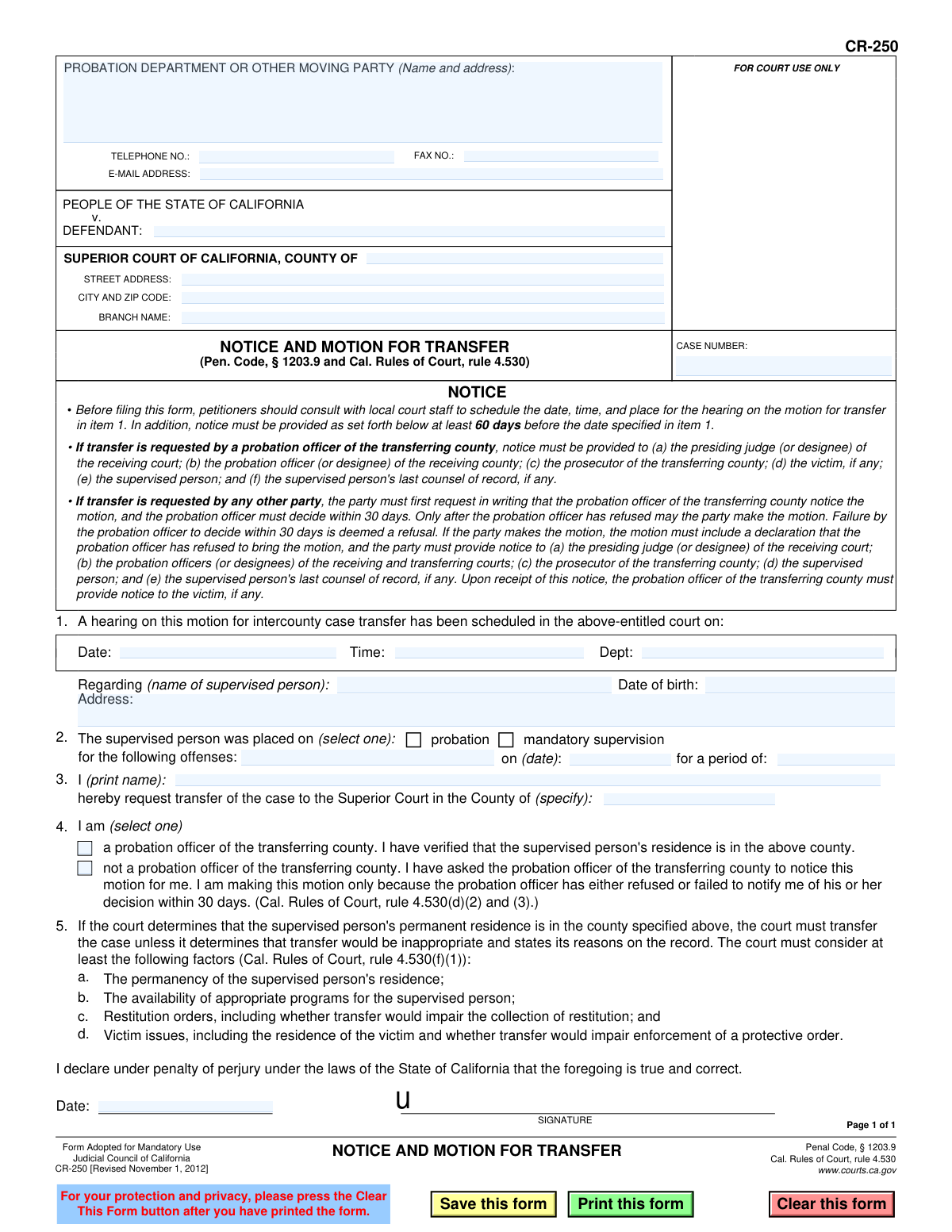
Form CR-250, Notice and Motion for Transfer (Governmental), page 1
Basic · 40/100Form Complexity Index

The AI does the filling. You just check it.

No typing into boxes, nothing to install.

Tell the AI about youAnswer a few questions in plain words, or upload a document you already have. That is all the typing there is.
AI fills every field in secondsIt puts each answer in the right box on every page, checkboxes included.
Check it and downloadReview every field, change anything, then download, print or sign the PDF.

What this form asks for

The AI fills all of it, from your answers or your documents.

Form CR-250, Notice and Motion for Transfer, is a mandatory use form in California for requesting the transfer of a case involving a supervised person (e.g., on probation) from one county's superior court to another. This is typically done when the supervised person has established permanent residence in a new county, and the motion ensures legal oversight can continue effectively. Today, this form can be filled out quickly and accurately using AI-powered services like Instafill.ai, which can also convert non-fillable PDF versions into interactive fillable forms.
Fillable fields29
Pages1
Sections9
Questions that depend on earlier answers3
Form Complexity IndexBasic, 40/100

The AI checks your answers before you download

12 checks built for this form, so a wrong date or a missing answer is caught before anyone else sees it.

Hearing Date Must Be in the Future

This check validates that the hearing date entered in item 1 is a future date. A hearing cannot be scheduled for a past date, as this would render the notice invalid and legally void. If the date is in the past or is the current day without sufficient notice time, the form submission should be rejected to prevent filing a defective motion.

Case Number Presence and Format

Ensures the 'CASE NUMBER' field is not empty and conforms to the expected format for the specific court jurisdiction. The case number is the primary identifier for the legal proceeding and is essential for correctly routing and filing the document. A missing or malformed case number will result in the document being rejected by the court clerk.

Completeness of Supervised Person's Information

Verifies that the supervised person's name, date of birth, and address in item 2 are all provided. This information is critical for correctly identifying the individual whose case is the subject of the motion. Incomplete information could lead to ambiguity, delays, or incorrect application of the court's decision.

Supervision Type Selection

This validation ensures that one of the two options in item 2, 'probation' or 'mandatory supervision', has been selected. The type of supervision is a fundamental detail of the case that dictates which legal rules and procedures apply. Failure to select an option makes the motion incomplete and ambiguous.

Supervision Start Date is a Past Date

Checks that the supervision start date entered in item 2 ('on (date):') is a valid date that occurs before the current date and the motion hearing date. A person cannot be on supervision from a future date, so this check ensures logical consistency of the provided information. An invalid date would call the entire motion's factual basis into question.

Transfer Destination County is Specified

Validates that the county name for the requested transfer in item 3 is filled in. The entire purpose of the motion is to transfer the case to a new jurisdiction, so the destination county is a mandatory piece of information. The form is meaningless without this detail and must be rejected if it is missing.

And 6 more checks
  • Logical Check for Different Origin and Destination Counties
  • Filer Name Is Provided
  • Filer Status Selection is Mandatory
  • Offenses Field is Not Empty
  • Signature Date Presence and Validity
  • Contact Telephone Number Format

Let AI fill out your CR-250

No typing. Every field filled in seconds, checked, ready to sign.

7 days free, then $19.99/month · Cancel anytime

How to Fill Out CR-250 Online for Free in 2026

What the AI walks you through.

  1. Navigate to Instafill.ai and upload or select Form CR-250, Notice and Motion for Transfer.
  2. Provide the court and case information, including the Superior Court county, branch, address, and the case number.
  3. Enter the full name, date of birth, and address of the supervised person involved in the case.
  4. Specify the details of the supervision, including the start date, the offenses, and whether it is for probation or mandatory supervision.
  5. Identify yourself as the moving party, state the county to which the transfer is requested, and provide the hearing date, time, and department.
  6. Review all the information auto-filled by the AI for accuracy, then digitally sign and date the declaration under penalty of perjury.
  7. Download the completed form to print and provide notice to all required parties as outlined in the form's instructions before filing with the court.

Common Mistakes in Completing CR-250

The ones the AI is built to catch.

Filing Without Scheduling a Hearing Date
Filers often submit this motion without first contacting the court to schedule a hearing, either leaving Section 1 blank or guessing a date. This results in an automatic rejection or dismissal of the motion, as there is no actual hearing on the court's calendar. To avoid this, you must follow the form's instructions and consult with the local court clerk to secure a valid date, time, and department for the hearing *before* filing the form.
Failing to Provide Proper and Timely Notice
The form requires providing notice to multiple parties at least 60 days before the scheduled hearing, a detail many filers miss. Submitting the motion less than 60 days before the hearing or failing to serve all parties is a common procedural error. This failure will likely cause the court to deny the motion or postpone the hearing, forcing the entire process to start over.
Incorrectly Identifying Filer Status in Section 5
A person who is not a probation officer may check the wrong box or fail to follow the required preliminary steps. The rules require them to first request in writing that the probation officer file the motion and wait up to 30 days for a decision. Filing directly without this prior step and the corresponding declaration makes the motion procedurally defective and subject to denial.
Entering Incorrect or Incomplete Case Information
Mistakes such as transposing digits in the case number or misspelling the defendant's name are frequent data entry errors. Such inaccuracies can cause the document to be rejected by the court clerk, misfiled, or delayed while the court tries to identify the correct case. This information must be copied exactly from official court documents, a task that can be automated and validated by AI-powered form-filling tools like Instafill.ai to ensure accuracy.
Omitting Required Parties from the Notice List
The notice instructions list numerous distinct parties who must be served, including judges and probation officers in both the transferring and receiving counties, the prosecutor, and the victim. Filers frequently overlook one or more of these parties, particularly the presiding judge of the receiving court or the victim. Failure to properly serve even one required party can be grounds for the court to deny the motion or continue the hearing, significantly delaying the transfer.
Providing Vague or Incomplete Offense Information
In Section 3, filers may write a generic description like 'drug charge' instead of listing the specific penal code sections and offense descriptions from the judgment of conviction. The court requires this precise information to assess the case history and relevant factors for transfer. This lack of specificity can weaken the motion or require the court to request clarification, causing unnecessary delays.
Forgetting to Sign and Date the Declaration
The signature under penalty of perjury is what gives the form its legal validity, yet it is one of the most commonly missed fields on legal documents. An unsigned or undated form is not a valid declaration and will be rejected immediately by the court clerk upon submission. This simple oversight brings the entire legal process to a halt until a properly executed form is filed.
Requesting Transfer to an Unjustified County
The legal basis for this motion is the supervised person's permanent residence in another county. A filer might mistakenly request a transfer to a county for other reasons, such as work or family convenience, without establishing permanent residency. If the court determines the specified county is not the person's permanent residence, it will deny the transfer, as the primary legal requirement for the motion has not been met.
Submitting an Illegible or Improperly Filled Form
When a fillable PDF is not used, people often print the form and fill it out by hand, leading to illegible entries that the court clerk cannot process accurately. This can cause data entry errors or outright rejection of the filing. To prevent this, it's crucial to type information directly into the fillable fields. If only a flat, non-fillable PDF is available, tools like Instafill.ai can convert it into a fillable version to ensure all entries are clear, legible, and professional.
Omitting the Supervised Person's Full Details
Leaving the date of birth or the complete current address blank in Section 2 is a frequent oversight. This information is critical for the court and probation departments to correctly identify the individual and, most importantly, to verify their residence in the county where the transfer is requested. An incomplete form can be rejected by the clerk or delay the process while the court requests the missing information.

Frequently Asked Questions About CR-250


Is it really free for 7 days?
Yes. You pay $0 today. Cancel before Nov 1 and you are never charged. Keep it, and it is $19.99 a month for 5 fills of your CR-250.
Can I fill other forms too?
This plan is for your CR-250: your own AI agent fills it as often as 5 times a month. To fill other forms and upload your own, choose a Professional plan from your account.
How do I cancel?
From your account, in two clicks, any time. No email, no call.
How does the AI fill out CR-250?
You answer a few questions in plain words, or upload a document you already have. The AI reads what you give it and puts each answer into the right field of CR-250, on every page, in seconds. It checks the answers against the form's own rules, and you review and change anything before you download, print or sign.
What happens to my information?
It is encrypted in transit and at rest, and it is never used to train AI.
How complex is CR-250 to fill out?
CR-250 has a Form Complexity Index of 40 out of 100, in the basic tier: 29 fillable fields across 1 page. Instafill.ai's AI fills it in under a minute, with every field there for you to review before you download.
What is the purpose of Form CR-250, Notice and Motion for Transfer?
This form is used to formally request that a court transfer a person's probation or mandatory supervision case from one California county to another. This is typically done when the supervised person has permanently moved to a new county.
Who is supposed to fill out this form?
A probation officer usually initiates this process. However, the supervised person or another party can file it if they first request the probation officer to do so in writing, and the officer either refuses or does not respond within 30 days.
What is the very first step I need to take before filing this form?
Before you do anything else, you must contact the Superior Court in the original county to schedule a hearing date for the transfer motion. This hearing information is required to complete Item 1 of the form.
How do I fill out the section for the hearing date and time?
You must contact the clerk of the court where the case is currently located to schedule a hearing. Once you have the date, time, and department for the hearing, you can enter that information into Item 1.
I am not the probation officer. What do I need to do before I can file this motion myself?
You must first send a written request to the probation officer in the transferring county, asking them to file the motion. You can only file the motion yourself if the officer refuses or fails to respond to your request within 30 days.
How far in advance do I need to provide notice of the hearing?
The form requires that notice of the hearing be provided to all required parties at least 60 days before the scheduled hearing date listed in Item 1.
How does the court decide whether to approve the transfer?
The court must transfer the case if the person's residence is permanent in the new county, unless it finds the transfer inappropriate. The judge will consider factors like the permanency of the new residence, availability of programs, impact on restitution collection, and victim safety.
Will the victim of the crime be notified about this transfer request?
Yes, the form states that the probation officer of the transferring county is responsible for providing notice to the victim, if any, about the proposed transfer.
What happens after I file the form?
After filing the form and notifying all parties, you must attend the court hearing you scheduled. The judge will listen to the motion and decide whether to grant or deny the transfer of the supervision case to the new county.
Can AI help me fill out this form?
Yes, AI-powered services like Instafill.ai can help you accurately auto-fill form fields using your existing information. This can save you time and help prevent common errors.
How can I fill out the CR-250 form online?
You can upload the PDF of the form to a platform like Instafill.ai. It will make the form fillable online, allowing you to type your information directly into the fields, sign it electronically, and download the completed document.
The PDF I downloaded is not fillable. What should I do?
If you have a flat, non-fillable PDF, you can use a service like Instafill.ai to convert it into an interactive, fillable form. This allows you to easily type your information instead of having to print the form and fill it out by hand.
Where do I file the completed form?
You must file the completed Notice and Motion for Transfer with the Superior Court in the county where the case is currently being supervised, which is also known as the 'transferring' county.
Encrypted in transit and at restNever used to train AIDelete your forms any time

Get your CR-250 filled out by AI

$0 today. Cancel before Nov 1 and you pay nothing.

7 days free, then $19.99/month · Cancel anytime