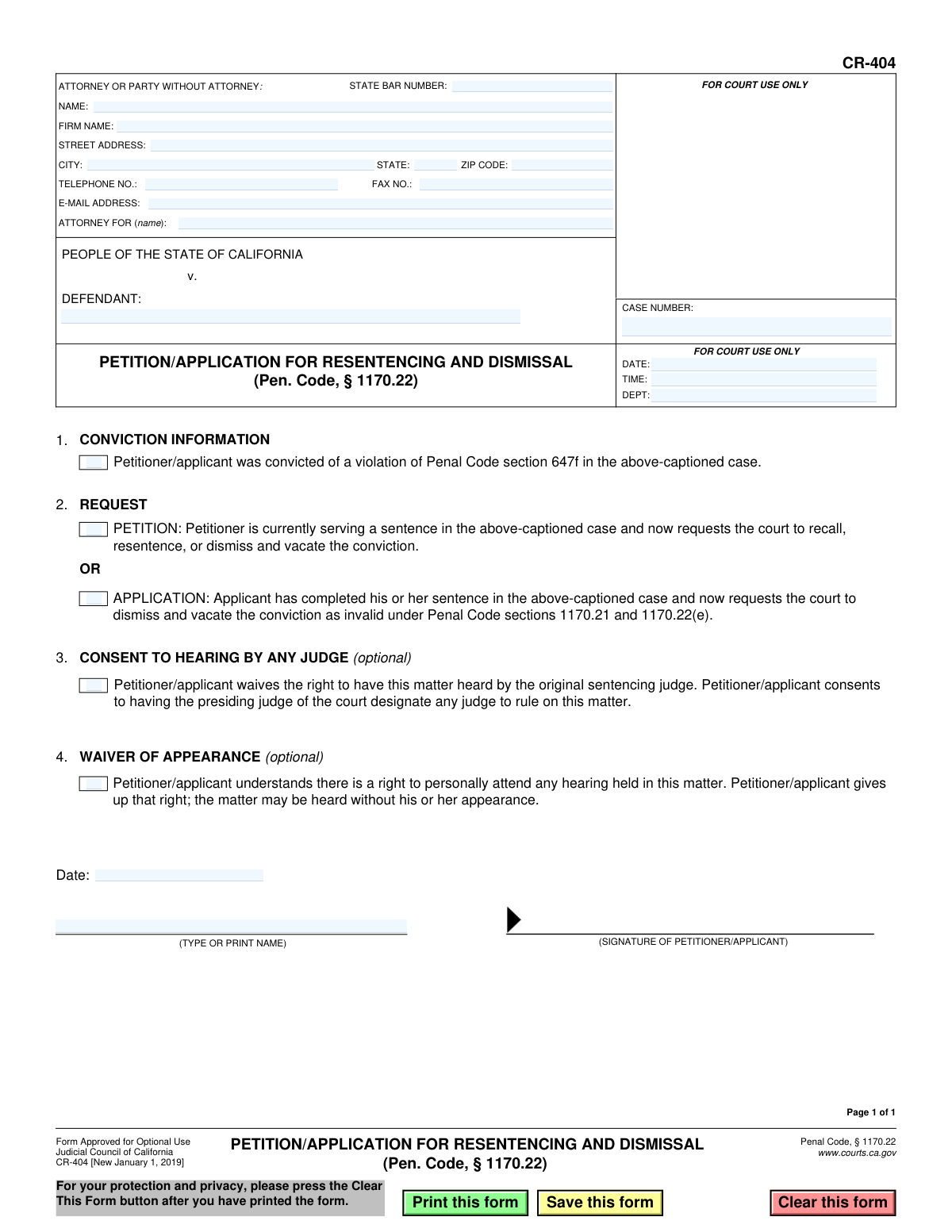
Yes! You can use AI to fill out Form CR-404, Petition/Application for Resentencing and Dismissal (Pen. Code, § 1170.22)
Form CR-404, Petition/Application for Resentencing and Dismissal, is a legal document used in California courts by individuals seeking to have their conviction under Penal Code section 647f re-evaluated. This form allows those who are either currently serving a sentence or have already completed it to request resentencing or have their conviction dismissed and vacated. Today, this form can be filled out quickly and accurately using AI-powered services like Instafill.ai, which can also convert non-fillable PDF versions into interactive fillable forms.
CR-404 is part of the
California court forms category on Instafill.
Our AI automatically handles information lookup, data retrieval, formatting, and form filling.
It takes less than a minute to fill out CR-404 using our AI form filling.
Securely upload your data. Information is encrypted in transit and deleted immediately after the form is filled out.
Form specifications
| Form name: | Form CR-404, Petition/Application for Resentencing and Dismissal (Pen. Code, § 1170.22) |
| Number of fields: | 27 |
| Number of pages: | 1 |
| Language: | English |
Instafill Demo: How to fill out PDF forms in seconds with AI
How to Fill Out CR-404 Online for Free in 2026
Are you looking to fill out a CR-404 form online quickly and accurately? Instafill.ai offers the #1 AI-powered PDF filling software of 2026, allowing you to complete your CR-404 form in just 37 seconds or less.
Follow these steps to fill out your CR-404 form online using Instafill.ai:
- 1 Navigate to Instafill.ai and upload or select the CR-404 form.
- 2 Provide your personal and attorney information in the header section. The AI can help pre-fill this from your profile.
- 3 Enter the court case details, including the defendant's name and the case number as it appears on your court records.
- 4 Confirm your conviction information by ensuring the box for Penal Code section 647f is marked.
- 5 Select your request type: choose 'PETITION' if you are currently serving a sentence, or 'APPLICATION' if your sentence is complete.
- 6 Review the optional waivers for consenting to any judge and waiving your appearance, and check the boxes if you agree.
- 7 Securely sign and date the form electronically, then download the completed document for filing with the appropriate court.
Our AI-powered system ensures each field is filled out correctly, reducing errors and saving you time.
Why Choose Instafill.ai for Your Fillable CR-404 Form?
Speed
Complete your CR-404 in as little as 37 seconds.
Up-to-Date
Always use the latest 2026 CR-404 form version.
Cost-effective
No need to hire expensive lawyers.
Accuracy
Our AI performs 10 compliance checks to ensure your form is error-free.
Security
Your personal information is protected with bank-level encryption.
Frequently Asked Questions About Form CR-404
Form CR-404, Petition/Application for Resentencing and Dismissal, is used to ask a California court to recall, resentence, or dismiss a conviction for Penal Code section 647f (public intoxication) based on a change in the law.
This form is for individuals who have been convicted of a violation of California Penal Code section 647f. You can file it whether you are still serving your sentence or have already completed it.
You should select 'Petition' if you are currently serving a sentence for the conviction. You should select 'Application' if you have already completed your sentence and are asking the court to dismiss and vacate the conviction.
You will need your personal contact information, the name of the defendant, and the case number from your original conviction. If you have an attorney, you will also need their State Bar number and contact details.
Your case number is located on any court documents you received for this case. If you cannot find it, you can contact the clerk of the court where you were convicted to obtain it.
By checking this optional box, you agree that any available judge can rule on your case, not just the original sentencing judge. This can sometimes help your case be heard more quickly.
This is optional. If you sign the waiver, you give up your right to be present at the hearing, and the judge will make a decision without you there. Consider this carefully, as you may wish to be present.
While you can file this form on your own, criminal law can be complex. It is often beneficial to consult with an attorney or a public defender to ensure the form is completed correctly and to protect your rights.
You must file the completed and signed form with the clerk of the superior court in the county where you were originally convicted. Make sure to submit it to the correct courthouse for your specific case.
After you file the form, the court will review your request. The court may set a hearing date and will ultimately issue a ruling to either grant or deny your request for resentencing or dismissal.
Yes, services like Instafill.ai use AI to auto-fill form fields accurately and save time. This can help reduce errors and make the process of completing the form faster.
To use Instafill.ai, you upload the CR-404 PDF to their platform. The AI will identify all the fields, allowing you to input your information and have the form automatically filled out for you.
If you have a non-fillable PDF, you can use a service like Instafill.ai. Their technology can convert flat, non-fillable PDFs into interactive forms that you can easily complete and sign on your computer.
Compliance CR-404
Validation Checks by Instafill.ai
1
Ensures Exclusive Request Type Selection
Validates that the user has selected either the 'PETITION' checkbox or the 'APPLICATION' checkbox in section 2, but not both. This is critical as it defines the legal nature of the request and determines how the court processes the filing. A failure would halt submission and prompt the user to select exactly one option.
2
Verifies Case Number is Provided
Checks that the 'CASE NUMBER' field is not empty. The case number is the primary identifier for the legal proceeding and is essential for the court clerk to locate the correct file. Without it, the petition cannot be associated with the original conviction and will be rejected.
3
Confirms Defendant Name is Entered
Ensures that the 'DEFENDANT' name field ('Party1') is filled out. This identifies the individual who is the subject of the petition/application. This information is fundamental for legal identification and processing the request against the correct person's record.
4
Validates State Bar Number Format
This check confirms that the 'STATE BAR NUMBER' field ('AttyBarNo_dc'), if filled, contains only numeric digits. This is important for verifying the attorney's credentials and active status with the state bar association. An invalid format could prevent verification and lead to rejection of the filing.
5
Validates Attorney/Party Email Format
Verifies that the value entered in the 'E-MAIL ADDRESS' field ('Email_ft') follows the standard '[email protected]' format. A valid email is crucial for official communication from the court regarding hearing dates and rulings. An invalid email would prevent the party from receiving critical updates.
6
Ensures Valid ZIP Code Format
Checks that the 'ZIP CODE' field ('AttyZip_ft') contains a valid 5-digit or 9-digit (ZIP+4) numeric format. A correct ZIP code is necessary for ensuring any mailed correspondence from the court is deliverable. An invalid format will cause a validation error to ensure the address is correct.
7
Validates Signature Date is Present and Not in the Future
This validation ensures the 'Date' field ('ExecutedDate_dt') in the signature block is filled with a valid date and that the date is not in the future. The signature date attests to when the document was executed, which has legal significance. A future date is logically impossible and would invalidate the attestation.
8
Requires Printed Name with Signature
Verifies that the '(TYPE OR PRINT NAME)' field ('T215') is completed alongside the signature. Since signatures can be illegible, the printed name is essential for unambiguously identifying the person signing the document. A missing printed name can create ambiguity and may cause the court to question the document's validity.
9
Validates Telephone Number Format
Checks that the 'TELEPHONE NO.' field ('Phone_ft') follows a standard North American phone number format (e.g., 10 digits, possibly with parentheses, spaces, or hyphens). This ensures the court has a reliable method of contact for urgent matters. An improperly formatted number might be unusable.
10
Logical Consistency of 'Attorney For' Field
This check compares the name entered in the 'ATTORNEY FOR (name)' field ('AttyFor_ft') with the name in the 'DEFENDANT' field ('Party1'). These names should match to ensure the attorney is explicitly representing the defendant in this specific case. A mismatch could indicate a clerical error requiring correction before filing.
11
Verifies Completeness of Attorney/Party Address
If any part of the address (Street, City, State, Zip) is entered, this validation ensures all other address fields are also completed. A partial address is unusable for mailing legal documents and notices. This check prevents submission with incomplete contact information, which could delay the case.
12
Validates State Field is a Two-Letter Abbreviation
Ensures the 'STATE' field ('AttyState_ft') in the attorney/party address block contains a valid two-letter postal abbreviation (e.g., CA, NY, TX). Using a standardized abbreviation is crucial for automated processing and mail delivery systems. This prevents errors from misspellings or non-standard entries like 'California'.
Common Mistakes in Completing CR-404
The case number is the court's primary identifier for a legal file. People often make typos, transpose digits, or omit the required prefixes or suffixes that are part of the full number. Submitting a form with an incorrect case number will cause the clerk to reject the filing or, worse, file it in the wrong case, leading to significant delays and requiring the entire process to be restarted.
Section 2 requires a critical choice: 'Petition' for those currently serving a sentence, or 'Application' for those who have completed their sentence. Filers frequently misunderstand this distinction, check the wrong box, or check both. This misrepresents their legal status and the specific relief they are seeking, which can lead to the request being denied on procedural grounds, forcing them to refile correctly.
Individuals representing themselves ('in pro per') often get confused by the attorney information section. They might leave it blank or fill it out incorrectly. A self-represented party should enter their own name, address, and contact information, and leave the 'State Bar Number' and 'Firm Name' fields blank. Errors in this section can lead to important court notices being lost or delayed.
A petition is a legal document that is invalid without a signature and date. It is a common oversight for filers to forget to sign the form before submitting it, or to type their name where a physical signature is required. An unsigned or undated form will be immediately rejected by the court clerk, halting the process until a correctly executed form is submitted.
This specific form, CR-404, is designated only for resentencing or dismissal related to a conviction under Penal Code section 647f. An individual seeking relief for any other offense who uses this form will have their petition rejected. It is crucial to ensure the form used matches the specific legal relief being sought to avoid automatic denial and wasted effort.
The top right of the form contains boxes clearly marked 'FOR COURT USE ONLY' for clerks to use for stamping dates, times, and department numbers. Applicants sometimes mistakenly write in these boxes, assuming they need to fill in all blanks. This creates correction work for court staff and can cause confusion or minor processing delays.
While not explicitly forbidden, filling out legal forms by hand often results in illegible entries for names, addresses, or case numbers. This can cause critical data entry errors by the court clerk, leading to returned mail or rejection of the document. To prevent this, forms should be typed. If the form is a non-fillable PDF, AI-powered tools like Instafill.ai can convert it into a clean, fillable version to ensure perfect legibility.
Section 4 allows the filer to waive their right to personally attend the hearing. People may check this box for convenience without fully understanding the implications. Waiving an appearance means they cannot answer a judge's questions or provide context in person, which could be disadvantageous and potentially lead to a less favorable outcome.
The form requires both a signature and a typed or printed name below it. The printed name ensures the signer's identity is clear, even if the signature is stylized or illegible. A common mistake is to sign the form but forget to print the name, leaving the court to guess at the identity and potentially returning the document for correction.
By checking the box in Section 3, the filer agrees to let any available judge rule on their matter, not just the original sentencing judge. While this can significantly speed up the hearing process, the original judge may have important context about the case. Filers often check this without weighing the trade-off between speed and the potential benefit of having the original judge preside.
Saved over 80 hours a year
“I was never sure if my IRS forms like W-9 were filled correctly. Now, I can complete the forms accurately without any external help.”
Kevin Martin Green
Your data stays secure with advanced protection from Instafill and our subprocessors
Robust compliance program
Transparent business model
You’re not the product. You always know where your data is and what it is processed for.
ISO 27001, HIPAA, and GDPR
Our subprocesses adhere to multiple compliance standards, including but not limited to ISO 27001, HIPAA, and GDPR.
Security & privacy by design
We consider security and privacy from the initial design phase of any new service or functionality. It’s not an afterthought, it’s built-in, including support for two-factor authentication (2FA) to further protect your account.
Fill out CR-404 with Instafill.ai
Worried about filling PDFs wrong? Instafill securely fills form-cr-404-petitionapplication-for-resentencing-and-dismissal-pen-code-117022 forms, ensuring each field is accurate.