
Instafill.ai
7 days free
AI form filling · 43 fields · 1 page · done in seconds

Yes! You can use AI to fill out Form CR-405, Order After Petition/Application for Resentencing and Dismissal (Pen. Code, § 1170.22)

Don't type 43 fields by hand. Tell our AI about yourself, or upload a document you already have, and it fills every field in seconds. You check it, then download, print or sign.
7 days free, then $19.99/month · Cancel anytime
AI fills it, no typingEncrypted, never used to train AICancel in two clicks
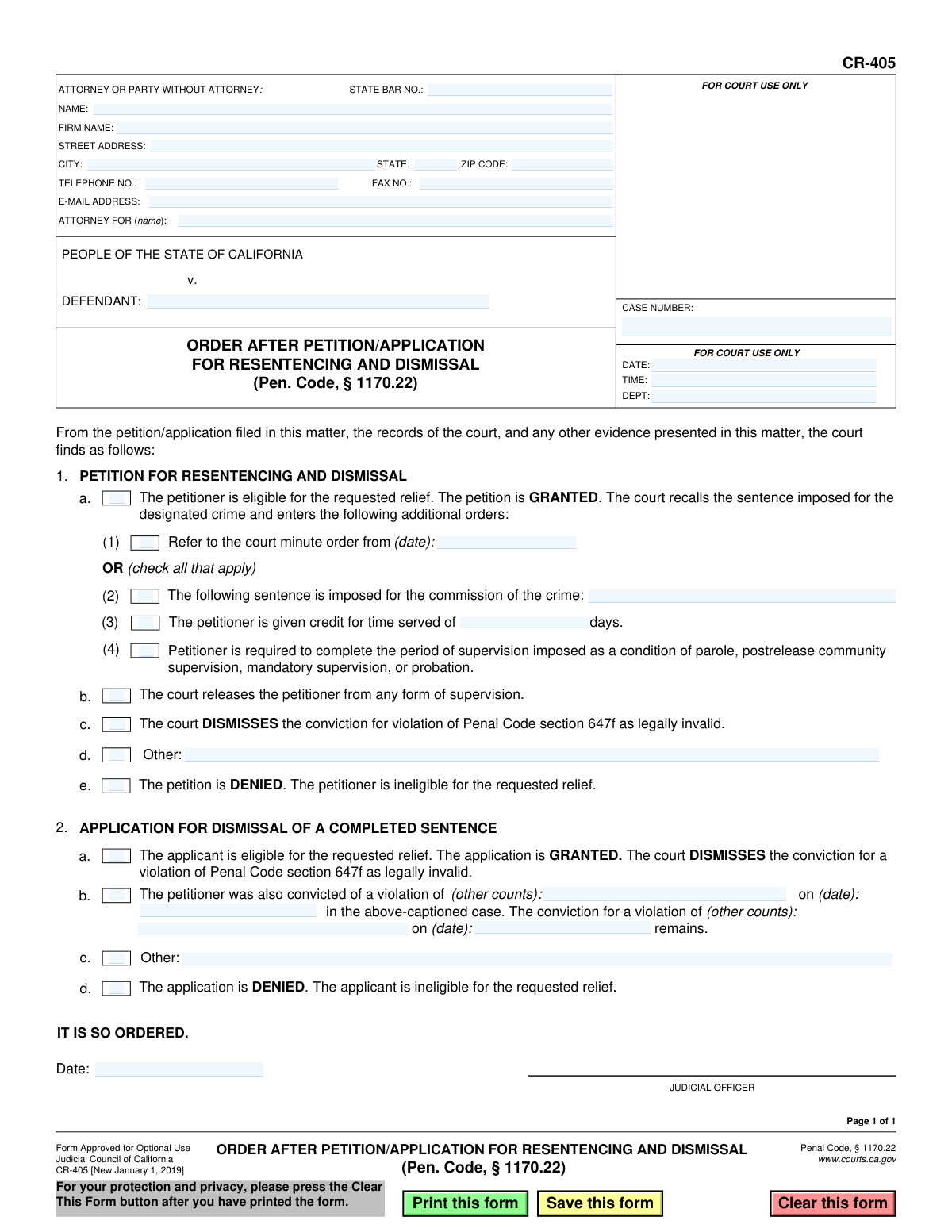
Form CR-405, Order After Petition/Application for Resentencing and Dismissal (Pen. Code, § 1170.22), page 1
Basic · 38/100Form Complexity Index

The AI does the filling. You just check it.

No typing into boxes, nothing to install.

Tell the AI about youAnswer a few questions in plain words, or upload a document you already have. That is all the typing there is.
AI fills every field in secondsIt puts each answer in the right box on every page, checkboxes included.
Check it and downloadReview every field, change anything, then download, print or sign the PDF.

What this form asks for

The AI fills all of it, from your answers or your documents.

Form CR-405, Order After Petition/Application for Resentencing and Dismissal, is a legal document used by the California courts to formalize a judge's ruling on a request to resentence a defendant or dismiss a conviction under Penal Code section 1170.22. It specifies whether the petition is granted or denied and details the resulting orders, such as a new sentence, release from supervision, or dismissal of the conviction. Today, this form can be filled out quickly and accurately using AI-powered services like Instafill.ai, which can also convert non-fillable PDF versions into interactive fillable forms.
Fillable fields43
Pages1
Form Complexity IndexBasic, 38/100

The AI checks your answers before you download

14 checks built for this form, so a wrong date or a missing answer is caught before anyone else sees it.

Case Number Presence and Format

Validates that the 'CASE NUMBER' field is not empty and conforms to the standard format for the jurisdiction. The case number is the primary identifier for the legal proceeding, and its absence or incorrect format would make it impossible to file the document or associate it with the correct court record. A failure would trigger an error prompting the user to enter a valid case number.

Attorney State Bar Number Format

Checks if the 'STATE BAR NO.' field contains a valid, numeric California State Bar number. This validation confirms the identity and credentials of the attorney of record. An invalid entry could indicate a typo or an unauthorized individual, so this check is crucial for maintaining the integrity of legal representation. If the field is filled, it must be a number.

Mutually Exclusive Order Basis

Ensures that only one of the checkboxes in section 1, 'PETITION FOR RESENTENCING' or 'APPLICATION FOR DISMISSAL', is selected. The order is based on one of these two distinct legal actions. Selecting both would create an ambiguous and legally invalid order, so the system should prevent this logical contradiction.

Mutually Exclusive Order Outcome

Validates that the order is not marked as both 'GRANTED' (section 2.a or 2.b) and 'DENIED' (section 2.d or 2.e) simultaneously. A petition or application can only have one outcome. This check prevents the creation of a logically impossible and unenforceable court order.

Petition Outcome Consistency

If the 'PETITION FOR RESENTENCING' checkbox (section 1) is selected, this check ensures that the outcome selected is either 'The petition is GRANTED' (2.a) or 'The petition is DENIED' (2.d). Selecting an outcome related to an 'application' would be a logical error. This maintains consistency between the type of request and the court's ruling.

Application Outcome Consistency

If the 'APPLICATION FOR DISMISSAL' checkbox (section 1) is selected, this check ensures that the outcome selected is either 'The application is GRANTED' (2.b) or 'The application is DENIED' (2.e). Selecting an outcome related to a 'petition' would be incorrect. This rule enforces logical consistency on the form.

And 8 more checks
  • Valid Date Format
  • Email Address Format Validation
  • Zip Code Format Validation
  • Conditional Requirement for 'Other' Details
  • Conditional Minute Order Date
  • Judicial Officer Date Presence
  • Credit for Time Served Must Be Numeric
  • Conditional Requirement for Additional Conviction Details

Let AI fill out your CR-405

No typing. Every field filled in seconds, checked, ready to sign.

7 days free, then $19.99/month · Cancel anytime

How to Fill Out CR-405 Online for Free in 2026

What the AI walks you through.

  1. Navigate to Instafill.ai and upload or select the Form CR-405.
  2. Provide the case details, including the defendant's name, case number, and attorney information in the designated fields.
  3. Indicate whether the order pertains to a 'Petition for Resentencing' or an 'Application for Dismissal' by checking the appropriate box.
  4. Select the court's finding, checking the box for either 'GRANTED' or 'DENIED' based on the judicial officer's decision.
  5. If the petition/application is granted, complete the subsequent sections detailing the new sentence, credit for time served, supervision status, or dismissal of the conviction.
  6. Enter the date of the order and the name of the presiding judicial officer.
  7. Review all the information entered for accuracy before saving, printing, or submitting the completed form as required by the court.

Common Mistakes in Completing CR-405

The ones the AI is built to catch.

Entering an Incorrect or Incomplete Case Number
The case number is the primary identifier for the legal proceeding. People often transpose digits, omit leading zeros, or forget prefixes/suffixes specific to the court. An incorrect case number can lead to the document being rejected by the clerk, filed in the wrong case, or significant delays in processing the order. To avoid this, double-check the case number against official court documents and use a tool like Instafill.ai, which can save and accurately populate recurring information across legal forms.
Incomplete or Incorrect Attorney/Party Information
The top section requires detailed contact information for the attorney or self-represented party. Common mistakes include omitting the State Bar number, using a P.O. Box when a street address is required, or leaving the email and phone number fields blank. This lack of information hinders the court's ability to communicate, leading to missed notifications and delays. Always fill this section out completely and ensure the information is current.
Incorrectly Identifying the 'Attorney For' Party
The form includes a field labeled 'ATTORNEY FOR (name):'. Attorneys or their staff sometimes mistakenly enter their own name or the name of their law firm in this field. This field must contain the name of the defendant they are representing. This error creates confusion on the official record about who the legal representation applies to and may require correction. The defendant's full, legal name as it appears on the case caption should be entered here.
Selecting the Wrong Type of Relief
The form distinguishes between a 'PETITION FOR RESENTENCING AND DISMISSAL' and an 'APPLICATION FOR DISMISSAL OF A COMPLETED SENTENCE'. These are legally distinct remedies. Checking the wrong box indicates a fundamental misunderstanding of the relief being sought and will likely result in the court denying the request on procedural grounds. It is crucial to understand the specific legal basis for the request before selecting the appropriate checkbox.
Making Contradictory Selections in the Order
This form requires checking boxes to construct the court's order. A frequent error is checking conflicting options, such as checking a box in the 'GRANTED' section (e.g., 2.a) and also checking a box in the 'DENIED' section (e.g., 2.d). This makes the proposed order nonsensical and legally void, forcing the court to reject it and requiring the filer to submit a corrected version. Carefully review all checked boxes to ensure they form a single, logical, and consistent order.
Failing to Specify Remaining Convictions
In cases with multiple charges, section 2.c is critical for specifying which convictions remain active after one is resentenced or dismissed. People often forget to fill this section out, leaving the legal status of other counts ambiguous. This can create major problems for the defendant's record and future legal matters. When resentencing one count, you must explicitly list the other counts and their conviction dates that are unaffected by the order.
Omitting Credit for Time Served
When a petition for resentencing is granted and a new sentence is imposed (section 2.a.1), it is essential to accurately calculate and enter the credit for time served (section 2.a.2). Forgetting to fill in the number of days or entering an incorrect amount can have severe consequences, potentially leading to the defendant serving more time than required. This figure must be carefully verified from official records before completing the form.
Using Vague Language in the 'Other' Field
The form provides 'Other:' fields to include orders not covered by the standard checkboxes. A common mistake is to write in vague, ambiguous, or legally unenforceable language. For example, writing 'Defendant to be released' without specifying conditions or timing is insufficient. Any text added here must be precise, legally sound, and clearly state the exact relief or condition being ordered to avoid future disputes or having the provision voided.
Illegible Handwriting on a Non-Fillable Form
This form is often available as a non-fillable PDF, leading many to print it and fill it out by hand. Illegible handwriting for critical information like names, dates, and case numbers is a major source of errors. This can cause court clerks to misinterpret the data, leading to filing errors, processing delays, and incorrect court records. To prevent this, use a tool like Instafill.ai, which can convert flat PDFs into fillable forms, allowing you to type information clearly and ensure legibility.
Using an Outdated Version of the Form
Legal forms are updated periodically to reflect changes in the law. This form is marked 'CR-405 [New January 1, 2019]'. Using an older, obsolete version can result in the filing being rejected because it may not contain the necessary legal language or options required by current statutes. Always check the Judicial Council website for the latest version of any form before filling it out to ensure compliance.

Frequently Asked Questions About CR-405


Is it really free for 7 days?
Yes. You pay $0 today. Cancel before Nov 1 and you are never charged. Keep it, and it is $19.99 a month for 5 fills of your CR-405.
Can I fill other forms too?
This plan is for your CR-405: your own AI agent fills it as often as 5 times a month. To fill other forms and upload your own, choose a Professional plan from your account.
How do I cancel?
From your account, in two clicks, any time. No email, no call.
How does the AI fill out CR-405?
You answer a few questions in plain words, or upload a document you already have. The AI reads what you give it and puts each answer into the right field of CR-405, on every page, in seconds. It checks the answers against the form's own rules, and you review and change anything before you download, print or sign.
What happens to my information?
It is encrypted in transit and at rest, and it is never used to train AI.
How complex is CR-405 to fill out?
CR-405 has a Form Complexity Index of 38 out of 100, in the basic tier: 43 fillable fields across 1 page. Instafill.ai's AI fills it in under a minute, with every field there for you to review before you download.
What is the purpose of Form CR-405?
Form CR-405 is a court order used by a judge to document their decision on a petition for resentencing or an application for dismissal related to a past conviction under Penal Code § 1170.22. It is not a form you fill out yourself; it is the result of a legal request you have already made.
Who fills out this form?
A judicial officer (a judge) completes and signs this form. It serves as the court's official ruling on a petition or application that was previously filed by a defendant or their attorney.
What is the difference between a 'Petition' (Section 1) and an 'Application' (Section 2)?
A 'Petition for Resentencing' is for individuals who are still serving a sentence, including probation or parole. An 'Application for Dismissal' is for individuals who have already completed their entire sentence for the conviction in question.
What does it mean if my petition is GRANTED?
If your petition is granted, the court recalls your original sentence, dismisses the conviction as legally invalid, and may give you credit for time served. The judge will also decide whether to release you from any remaining supervision like parole or probation.
What happens if my petition or application is DENIED?
If your request is denied, it means the court determined you were not eligible for relief under the law. Your original conviction and any associated sentence will remain unchanged.
How do I start the process to get this order?
You do not file Form CR-405. To begin, you must file a 'Petition for Resentencing and Dismissal' (Form CR-404) with the court; Form CR-405 is the order the judge issues in response to your petition.
I have other convictions on the same case. Will this order dismiss them too?
No, this order is specific to the conviction being addressed under Penal Code § 1170.22. The form includes a section for the judge to clarify that all other convictions in the case remain in effect.
What does 'credit for time served' mean on this order?
This means the time you have already spent in custody is counted towards your new, resentenced term. In many cases, this results in the sentence being considered complete.
Can an AI tool help me with Form CR-405?
Since you do not fill out Form CR-405, you would not use an AI tool for it. However, services like Instafill.ai can be very helpful for accurately completing the initial petition form (CR-404) that you must file to start the process.
How can I use Instafill.ai to prepare my petition?
You can upload the petition form (CR-404) to Instafill.ai, which uses AI to make the document interactive. This allows you to easily type your information into the correct fields online, ensuring accuracy before you print and file it with the court.
The petition form I found is a flat PDF and not fillable. What should I do?
You can use a service like Instafill.ai to make it fillable. Just upload the non-fillable PDF, and the platform will automatically convert it into an interactive form you can complete on your computer.
What does it mean if the judge releases me from 'any form of supervision'?
This is a very positive outcome, indicating that you are no longer required to comply with the terms of parole, postrelease community supervision, or probation for this specific conviction.
Do I need to fill out the attorney and case information at the top of the form?
No, you will not be filling out any part of this form. This information will be completed by the court or an attorney for the judge's review and signature.
Encrypted in transit and at restNever used to train AIDelete your forms any time

Get your CR-405 filled out by AI

$0 today. Cancel before Nov 1 and you pay nothing.

7 days free, then $19.99/month · Cancel anytime