Yes! You can use AI to fill out Form CR-432, Order on Petition—Incarcerated Individual Hand Crew or Institutional Firehouse Participant

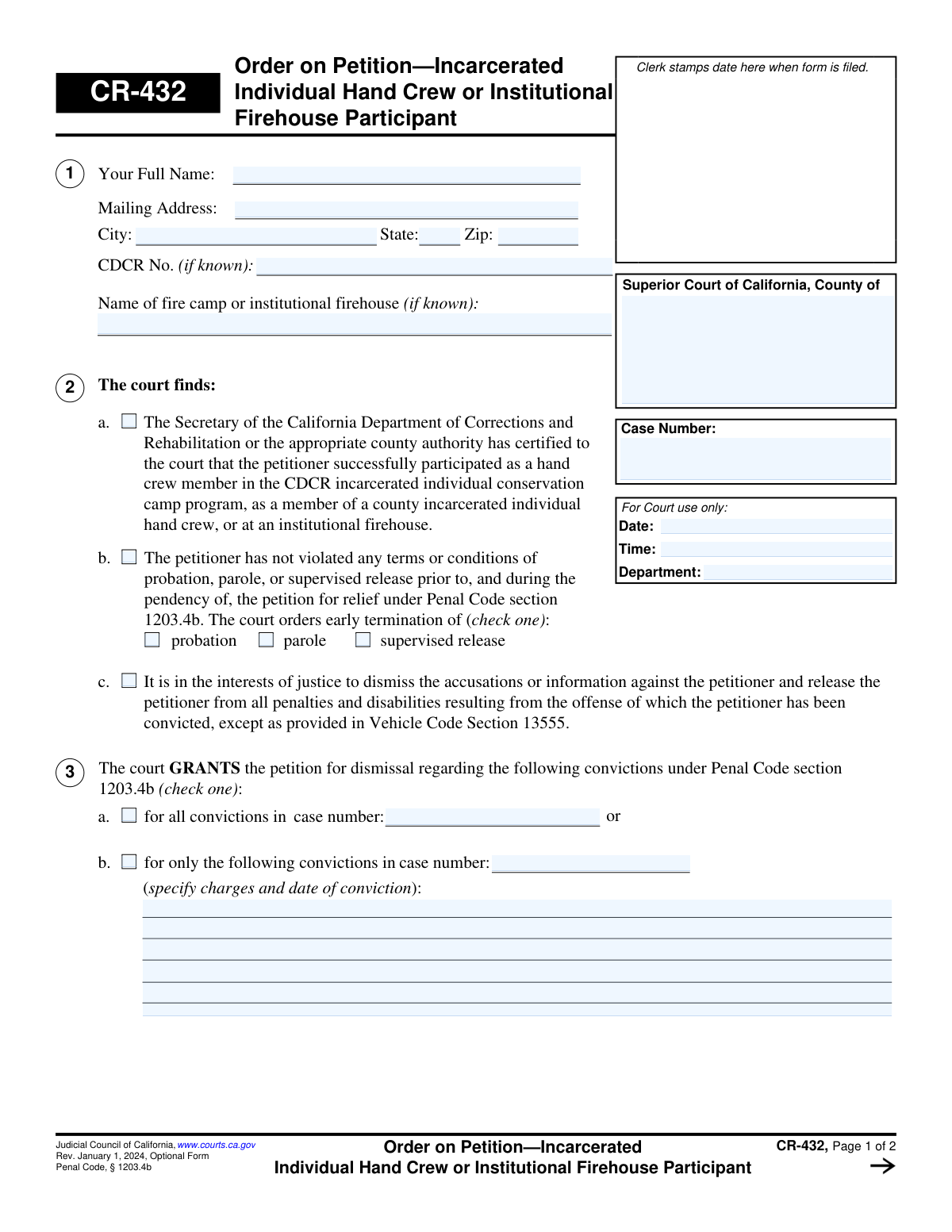
This is Form CR-432, an optional form from the Judicial Council of California, used by the Superior Court to issue an order on a petition for dismissal of convictions. It is specifically for individuals who have successfully participated in an incarcerated individual hand crew or institutional firehouse program. The form documents the court's decision to either grant the dismissal, releasing the petitioner from penalties, or deny it, stating the reasons. Today, this form can be filled out quickly and accurately using AI-powered services like Instafill.ai, which can also convert non-fillable PDF versions into interactive fillable forms.
CR-432 is part of the California court forms category on Instafill.
Our AI automatically handles information lookup, data retrieval, formatting, and form filling.
It takes less than a minute to fill out CR-432 using our AI form filling.
Securely upload your data. Information is encrypted in transit and deleted immediately after the form is filled out.

Form specifications

Form name: Form CR-432, Order on Petition—Incarcerated Individual Hand Crew or Institutional Firehouse Participant
Number of fields: 40
Number of pages: 1
Language: English
main-image

Instafill Demo: How to fill out PDF forms in seconds with AI

How to Fill Out CR-432 Online for Free in 2026

Are you looking to fill out a CR-432 form online quickly and accurately? Instafill.ai offers the #1 AI-powered PDF filling software of 2026, allowing you to complete your CR-432 form in just 37 seconds or less.
Follow these steps to fill out your CR-432 form online using Instafill.ai:
  1. 1 Navigate to Instafill.ai and upload or select the CR-432 form.
  2. 2 Provide the petitioner's full name, mailing address, and CDCR number in the designated fields.
  3. 3 Enter the Superior Court county, case number, and hearing details as prompted by the AI assistant.
  4. 4 Indicate the court's findings by checking the appropriate boxes, specifying whether the petition is granted or denied.
  5. 5 If the petition is granted, specify the case number and convictions being dismissed.
  6. 6 If the petition is denied, select the specific reasons for the denial from the provided list.
  7. 7 Review all entered information for accuracy before the judicial officer dates and signs the completed form for filing.

Our AI-powered system ensures each field is filled out correctly, reducing errors and saving you time.

Why Choose Instafill.ai for Your Fillable CR-432 Form?

Speed

Complete your CR-432 in as little as 37 seconds.

Up-to-Date

Always use the latest 2026 CR-432 form version.

Cost-effective

No need to hire expensive lawyers.

Accuracy

Our AI performs 10 compliance checks to ensure your form is error-free.

Security

Your personal information is protected with bank-level encryption.

Frequently Asked Questions About Form CR-432

Form CR-432 is the court's final decision, or 'Order,' on a petition to dismiss a conviction. It is specifically for individuals who successfully participated in an incarcerated individual hand crew or institutional firehouse program and have petitioned the court for relief.

No, you do not fill out Form CR-432. This is an order form that is completed and signed by a judicial officer after they have reviewed your petition and made a decision.

Individuals who have successfully participated in a CDCR or county incarcerated hand crew or institutional firehouse program are eligible. The court must receive certification of this participation and determine that granting the dismissal is in the interests of justice.

If your petition is granted, the court orders your original plea of guilty or nolo contendere to be withdrawn and a plea of not guilty to be entered. The court then dismisses the charges, releasing you from many penalties and disabilities resulting from that conviction.

No, it is not completely erased. You must still disclose the conviction on applications for certain jobs like peace officer or for public office, and it may be used against you in future criminal prosecutions.

A petition may be denied if the conviction was for an ineligible offense, you are currently in custody or charged with another crime, or the court didn't receive certification of your fire crew participation. The court can also deny the petition if it finds that granting it would not serve the interests of justice.

This means the denial is not permanent. You may be able to correct the issue that caused the denial (for example, resolving a pending criminal charge) and file your petition again in the future.

Not automatically. The form explicitly states that even with a dismissal, you may still be prohibited from owning, possessing, or having a firearm in your custody or control.

To begin the process, you must file Form CR-430, 'Petition for Relief—Incarcerated Individual Hand Crew or Institutional Firehouse Participant.' This CR-432 form is the court's response to that petition.

Yes, while you don't fill out this specific order form, AI-powered services like Instafill.ai can help you accurately complete the initial petition form (CR-430). These tools auto-fill your information, saving time and helping to prevent errors.

You can upload the petition form, such as Form CR-430, to the Instafill.ai platform. The AI will identify all the form fields, allowing you to type your information directly into an interactive, digital version of the document.

Services like Instafill.ai are designed to handle this. You can upload the flat, non-fillable PDF, and the platform will automatically convert it into an interactive form that you can easily fill out, save, and print.

If the court grants your petition and you are still on probation, parole, or supervised release for that conviction, the court will order its early termination as part of the dismissal.

Compliance CR-432
Validation Checks by Instafill.ai

1
Grant or Deny Exclusivity
Validates that either Section 3 (Grant) or Section 4 (Deny) is completed, but not both. This check is critical to ensure the court's order is unambiguous and legally sound. If both sections contain selections, the form submission should be rejected with an error message indicating a conflicting and invalid order.
2
Required Decision for Finalization
Ensures that upon finalization, a decision has been recorded by selecting an option in either Section 3 (Grant) or Section 4 (Deny). An order cannot be issued without a clear disposition. This check prevents the creation of incomplete legal documents that lack a definitive outcome.
3
Denial Reason Requirement
Checks that if the petition is denied (an option in Section 4 is selected), at least one reason from the list (4a through 4g) is also checked. This is necessary to inform the petitioner of the specific legal or factual basis for the denial. An order of denial without a stated reason would be incomplete and potentially subject to appeal.
4
Conditional Text for Denial Reason 'f'
Verifies that if checkbox 4f ('...not serve the interests of justice because:') is checked, the corresponding text field is not empty. The purpose of this field is to document the court's specific reasoning. An empty field would render the denial reason incomplete and invalid, so the system should prompt the user to provide the required explanation.
5
Conditional Text for Denial Reason 'g'
Verifies that if checkbox 4g ('Other:') is checked, the associated 'otherdetails' text field is filled in. This ensures that the specific 'other' reason for denial is clearly documented on the order. An error should be displayed if the checkbox is ticked but the text field is left blank, as the reason would be undefined.
6
Grant Specificity Exclusivity (Section 3a vs 3b)
Ensures that within Section 3 (Grant), the user selects either checkbox 3a (for all convictions in a case) or 3b (for only specific convictions), but not both. These options are mutually exclusive. Selecting both would create ambiguity in the scope of the dismissal, making the order difficult to interpret and execute.
7
Conditional Conviction Details for Grant (Section 3b)
Validates that if option 3b is checked (granting dismissal for only specific convictions), the associated text fields for specifying charges and conviction dates are filled. Without these details, the order is unenforceable as it is unclear which convictions are being dismissed. The form should not be submittable without this information if 3b is selected.
8
Case Number Consistency Across Pages
Confirms that the 'CaseNumber' field on Page 1 matches the 'CaseNumber' field on Page 2. This is a crucial data integrity check to ensure the entire document pertains to the same legal case. A mismatch could lead to filing errors, associating the order with the wrong case file.
9
Valid Judicial Officer Signature Date
Checks that the 'Date' field next to the Judicial Officer's signature is a valid date and is not set in the future. This date authenticates the order and establishes when it was officially made. An invalid or future date would compromise the document's legal standing and create record-keeping anomalies.
10
Petitioner Name Completeness
Ensures the 'Your Full Name' field in Section 1 is not empty. This is the primary identifier for the individual to whom the order applies. An order without the petitioner's name is fundamentally invalid and cannot be correctly filed or acted upon by any agency.
11
Case Number Presence and Format
Validates that the 'CaseNumber' field in the header is not empty and, if possible, conforms to the expected format for the court. The case number is the unique identifier for the court proceeding and is essential for filing. Submitting a form without this identifier would make it impossible to process.
12
Early Termination Single Selection (Section 2b)
If the court makes a finding under Section 2b and orders early termination, this check ensures that exactly one of the options ('probation', 'parole', or 'supervised release') is selected. Selecting none or multiple options would make the order ambiguous about what specific type of supervision is being terminated.
13
CDCR Number Format Validation
Checks if a value entered into the 'CDCR No.' field follows the standard format (e.g., a letter followed by 5 or 6 digits). Although the field is optional ('if known'), validating any entered data improves data quality and reduces lookup errors. This helps ensure correct identification within the corrections system.
14
State Abbreviation Validation
Validates that the 'State' field in the petitioner's mailing address contains a valid two-letter state abbreviation. This ensures data consistency and mailability for any correspondence sent from the court. An invalid entry could lead to returned mail and communication failures with the petitioner.

Common Mistakes in Completing CR-432

Mistaking the 'Order' Form for the 'Petition' Form

This CR-432 form is an 'Order,' which is the court's final decision, typically prepared for a judge's signature. A common mistake is for an individual to fill this out thinking it is the initial request or 'Petition.' Filing an Order form instead of a Petition form (like CR-430) will lead to rejection, as one must petition the court for relief, not order it. Always ensure you are using the correct form for the action you are trying to take.

Entering an Incorrect or Inconsistent Case Number

The case number is the primary identifier for a legal file. A typographical error or using the wrong case number will cause the document to be rejected or misfiled, delaying the legal process significantly. The case number must be entered correctly on page 1 and must be repeated identically on page 2. To avoid this, carefully copy the number from previous court documents related to the same case.

Listing the Wrong County Court

The form must be submitted to the Superior Court in the county where the original conviction occurred, not necessarily where the petitioner currently resides. Submitting the form to the wrong county court will result in its immediate rejection, wasting time and filing fees. Always verify the county of conviction from the original case documents before filling out the court information at the top of the form.

Ambiguous Specification of Dismissed Convictions

In Section 3, the form requires a precise choice between dismissing all convictions in the case (3a) or only specific ones (3b). A frequent error is checking both boxes or, when selecting 3b, failing to list the exact charges and conviction dates. This ambiguity makes the order legally unenforceable and will require correction and resubmission. To prevent this, review the judgment of conviction to obtain the precise details needed for Section 3b.

Incorrectly Completing Both Grant and Denial Sections

This form contains sections to either GRANT the petition (Section 3) or DENY it (Section 4). When preparing a proposed order for the judge, only the section reflecting the desired outcome (typically Section 3) should be completed. Filling out parts of both sections creates a contradictory and confusing document that the court will not sign, forcing the preparer to start over.

Omitting Key Petitioner Identifiers

While fields like 'CDCR No.' and 'Name of fire camp' are marked '(if known),' omitting them when the information is available can slow down the verification process. These identifiers help the court and the Department of Corrections and Rehabilitation (CDCR) confirm the petitioner's eligibility for relief. Failing to provide this data can lead to delays while the court seeks to confirm the information independently.

Providing an Unreliable Mailing Address

The mailing address provided in Section 1 is where the court will send the final, signed order and any other official correspondence. Using an incorrect, temporary, or incomplete address can result in the petitioner never receiving confirmation of the case's outcome. This can lead to significant confusion about one's legal status. Always use a stable, long-term address and double-check it for accuracy.

Using an Obsolete Version of the Form

The Judicial Council periodically updates forms to reflect changes in law; this form is marked 'Rev. January 1, 2024.' Courts often have strict rules requiring the use of the most current version. Submitting an outdated form can lead to automatic rejection by the clerk's office, forcing you to redo the paperwork and refile.

Submitting an Illegible Hand-Written Form

Court clerks must be able to read a form to process it correctly. If you find a non-fillable PDF version and fill it out by hand, illegible handwriting can cause data entry errors or lead to the form being rejected. It is always best to type the information for clarity. AI-powered tools like Instafill.ai can convert flat, non-fillable PDFs into fillable versions, ensuring your submission is clean, legible, and professional.

Petitioner Signing in the Judicial Officer's Signature Block

The signature line at the end of the form is explicitly for the 'Signature of Judicial Officer.' A petitioner or their representative should never sign in this space. Doing so invalidates the proposed order, as it creates the false appearance of an already-executed court order. The document should be submitted to the court unsigned for the judge's review and signature.
Saved over 80 hours a year

“I was never sure if my IRS forms like W-9 were filled correctly. Now, I can complete the forms accurately without any external help.”

Kevin Martin Green

Your data stays secure with advanced protection from Instafill and our subprocessors

Robust compliance program

Transparent business model

You’re not the product. You always know where your data is and what it is processed for.

ISO 27001, HIPAA, and GDPR

Our subprocesses adhere to multiple compliance standards, including but not limited to ISO 27001, HIPAA, and GDPR.

Security & privacy by design

We consider security and privacy from the initial design phase of any new service or functionality. It’s not an afterthought, it’s built-in, including support for two-factor authentication (2FA) to further protect your account.

Fill out CR-432 with Instafill.ai

Worried about filling PDFs wrong? Instafill securely fills form-cr-432-order-on-petitionincarcerated-individual-hand-crew-or-institutional-firehouse-participant forms, ensuring each field is accurate.