
Yes! You can use AI to fill out Form CR-601, Capital Case Attorney List of Appearances (Criminal)
Don't type 113 fields by hand. Tell our AI about yourself, or upload a document you already have, and it fills every field in seconds. You check it, then download, print or sign.
The AI does the filling. You just check it.
No typing into boxes, nothing to install.
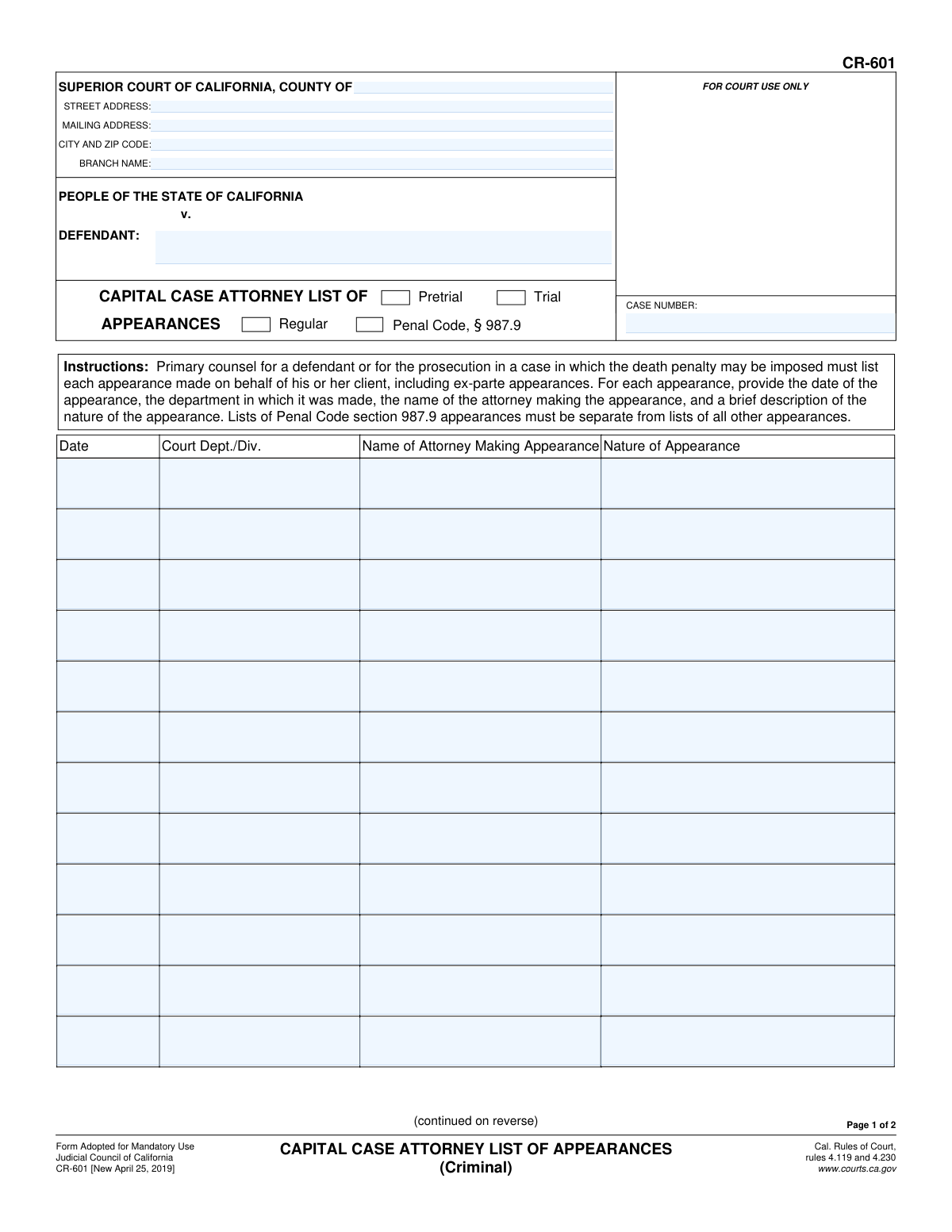
What this form asks for
The AI fills all of it, from your answers or your documents.
The AI checks your answers before you download
14 checks built for this form, so a wrong date or a missing answer is caught before anyone else sees it.
This check verifies that the 'CASE NUMBER' field is not empty on both page 1 and page 2. It should also validate the number against the expected format for California court case numbers to ensure it is a valid identifier. A missing or malformed case number is a critical failure, as it prevents the document from being correctly associated with the case file, leading to rejection.
This validation ensures that the 'DEFENDANT' name and 'CASE NUMBER' on page 2 are identical to the corresponding values on page 1. This is crucial for multi-page documents to prevent pages from being misfiled or separated. A mismatch would indicate a potential collation error and could cause the document to be rejected or processed incorrectly.
Verifies that one option is selected from the 'Pretrial/Trial' radio button group and one from the 'Regular / Penal Code, § 987.9' group. These selections classify the entire list of appearances and are required by the form's instructions. Failure to select these options makes the form incomplete and may require manual clarification, delaying processing.
For any row in the appearance list where a 'Date' is provided, this check ensures the corresponding 'Court Dept./Div.', 'Name of Attorney Making Appearance', and 'Nature of Appearance' fields are also filled. An incomplete entry is ambiguous and cannot be properly recorded. This validation ensures each logged appearance provides a complete record for court and billing purposes.
Checks that all entered dates in the appearance list are in a valid calendar date format (e.g., MM/DD/YYYY) and are not impossible dates like '02/30/2023'. Correctly formatted dates are essential for the system to process and sort the information chronologically. Invalid date formats will cause data entry errors and system rejection.
Validates that the signature date ('SigDate') is on or after the latest date listed in the appearance tables. It is logically impossible for an attorney to sign and attest to a list of appearances before they have all occurred. This check prevents data entry errors and ensures the attestation is chronologically valid.
And 8 more checks
- Signature Block Completeness
- Superior Court County Presence
- Defendant Name Presence
- Appearance Date Chronology
- Penal Code § 987.9 Separation Logic
- Court City and ZIP Code Format
- Attorney Name in Appearance Entry
- Party Representation Declaration
Let AI fill out your CR-601
No typing. Every field filled in seconds, checked, ready to sign.
How to Fill Out CR-601 Online for Free in 2026
What the AI walks you through.
- Navigate to Instafill.ai and upload or select the Form CR-601.
- Provide the court and case information, including the county, court address, party names, and case number in the header section.
- Indicate whether the appearances listed are for pretrial or trial, and if they are regular or under Penal Code § 987.9.
- For each court appearance, enter the date, the court department or division, the name of the attorney who appeared, and a brief description of the nature of the appearance.
- If you run out of space on the form, check the box to indicate that an attachment is included and prepare a separate sheet with the additional appearances.
- Review all entered information for accuracy and completeness, ensuring all appearances are correctly documented.
- Electronically sign and date the form, print your name, and specify which party you represent before saving or printing the completed document for filing.
Common Mistakes in Completing CR-601
The ones the AI is built to catch.
Mixing Regular and Penal Code § 987.9 Appearances
Forgetting to Complete the Header on Page 2
Using Vague Descriptions for 'Nature of Appearance'
Incorrect or Incomplete Case Number
Failing to Select the Appearance Type
Omitting Ex-Parte Appearances
Incomplete Signature Block Information
Improperly Attaching Continuation Pages
Handwriting on a Non-Fillable PDF
Frequently Asked Questions About CR-601
Is it really free for 7 days?
Can I fill other forms too?
How do I cancel?
How does the AI fill out CR-601?
What happens to my information?
How complex is CR-601 to fill out?
What is the purpose of Form CR-601?
Who needs to fill out this form?
What is the difference between a 'Regular' and a 'Penal Code, § 987.9' list?
Do I need to include ex-parte appearances on this form?
What information is required for each appearance listed?
How detailed should the 'Nature of Appearance' be?
What should I do if I run out of space on the form?
Do I need to use a separate form for Penal Code § 987.9 appearances?
Who signs the form?
Can I use an AI tool to help me fill out Form CR-601?
How can I fill out Form CR-601 online?
The PDF of Form CR-601 I have isn't fillable. What can I do?
Get your CR-601 filled out by AI
$0 today. Cancel before Oct 31 and you pay nothing.
Other forms like this one
California court forms: Judicial Council of California Form SC-105, Request for Court Order and Answer (Small Claims), Judicial Council of California Form SC-120, Defendant’s Claim and ORDER to Go to Small Claims Court (Small Claims), Judicial Council of California Form SER-001, Request for Sheriff to Serve Court Papers, Judicial Council of California Form SER-001, Request for Sheriff to Serve Court Papers, Affidavit for Collection of Personal Property California Probate Code Section 13100, Form POS-040, Proof of Service—Civil, Declaration of Facts of Death (California Superior Court), declaration-of-marriage-for-court-proceeding-california-family-law, ADOPT-200, Adoption Request, ADOPT-200, Stepparent Adoption Request, ADOPT-210, Adoption Agreement, ADOPT-310, Contact After Adoption Agreement, Judicial Council of California Form ADOPT-200, Adoption Request, Form ADR-107, Mediation Attendance Sheet, Form ADR-110, Order Appointing Referee, Form ADR-109, Stipulation or Motion for Order Appointing Referee, Form ADR-102, Request for Trial De Novo After Judicial Arbitration, Form ADR-108, Referee's Report (Code Civ. Proc., §§ 638, 639), Form ADR-106, Petition to Confirm, Correct, or Vacate Contractual Arbitration Award, Form ADR-104, Rejection of Award and Request for Trial After Attorney-Client Fee Arbitration
Let AI fill out your CR-601
Your trial starts once a card is added. You pay nothing before Oct 31.
Our AI already knows this form, all 113 fields of it. Skip the typing: tell it about yourself, or upload what you have, and it fills the whole form in seconds.
- AI fills every field on both pages, checkboxes included
- No typing into boxes: answer a few questions, or upload a document you already have, an old copy of this form, a photo of a document
- The AI checks the answers; you review and change anything before you download
- Download the finished PDF, print it, or sign it online
- Encrypted, and never used to train AI
Cancel before Oct 31 and you pay nothing.
A card is needed to start the trial. Cancel in two clicks from your account.
Terms · Privacy