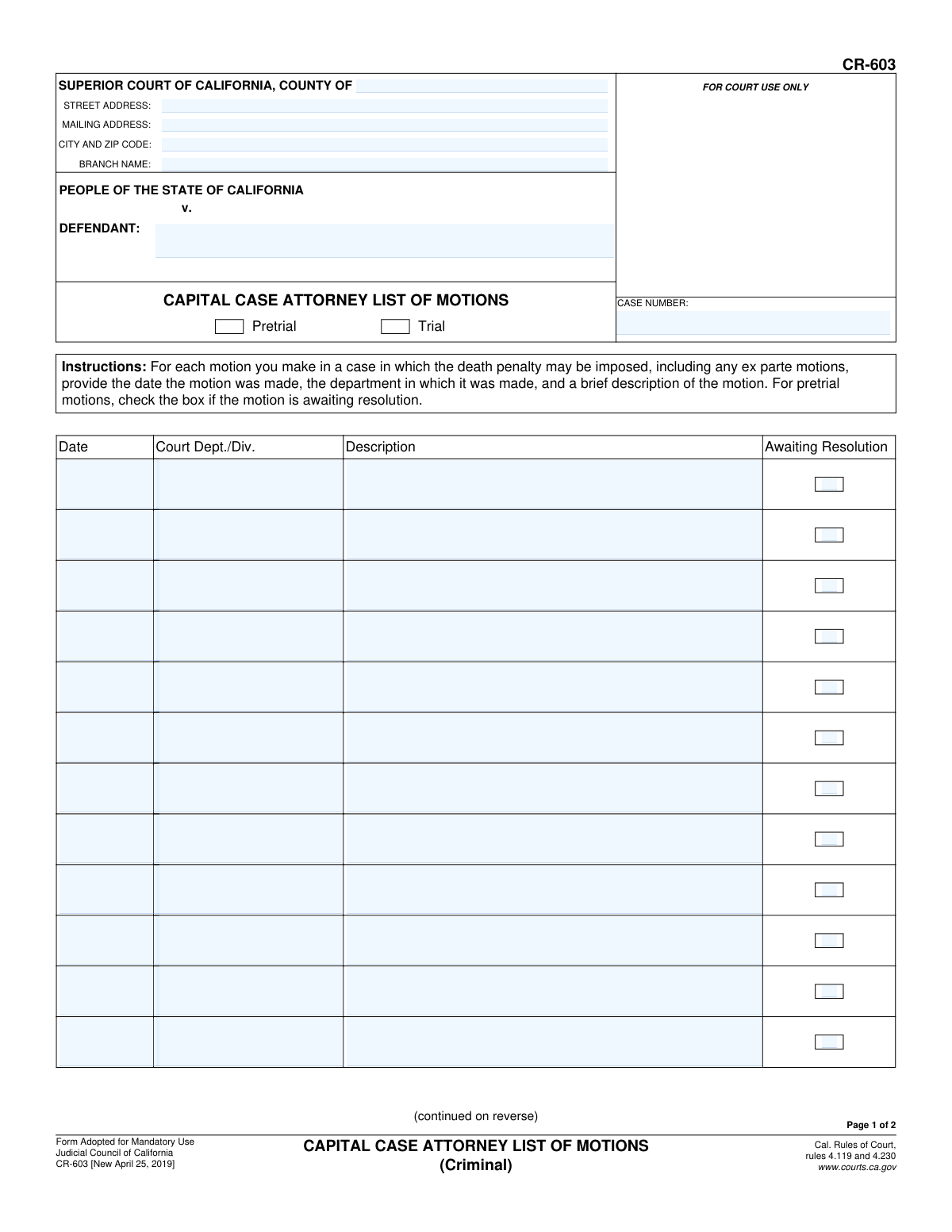
Yes! You can use AI to fill out Form CR-603, Capital Case Attorney List of Motions (Criminal)
Form CR-603, the Capital Case Attorney List of Motions, is a legal document required by the Judicial Council of California for attorneys involved in criminal cases where the death penalty may be imposed. It serves as a comprehensive log of all motions, including ex parte motions, filed during the pretrial and trial phases, ensuring a clear record for the court. Today, this form can be filled out quickly and accurately using AI-powered services like Instafill.ai, which can also convert non-fillable PDF versions into interactive fillable forms.
CR-603 is part of the
California court forms category on Instafill.
Our AI automatically handles information lookup, data retrieval, formatting, and form filling.
It takes less than a minute to fill out CR-603 using our AI form filling.
Securely upload your data. Information is encrypted in transit and deleted immediately after the form is filled out.
Form specifications
| Form name: | Form CR-603, Capital Case Attorney List of Motions (Criminal) |
| Number of fields: | 111 |
| Number of pages: | 1 |
| Language: | English |
Instafill Demo: How to fill out PDF forms in seconds with AI
How to Fill Out CR-603 Online for Free in 2026
Are you looking to fill out a CR-603 form online quickly and accurately? Instafill.ai offers the #1 AI-powered PDF filling software of 2026, allowing you to complete your CR-603 form in just 37 seconds or less.
Follow these steps to fill out your CR-603 form online using Instafill.ai:
- 1 Navigate to Instafill.ai and upload or select the CR-603 form.
- 2 Enter the court and case information, including the county, branch, defendant's name, and case number.
- 3 For each motion filed, enter the date it was made in the corresponding row.
- 4 Provide the specific court department or division where the motion was presented.
- 5 Write a concise description of the nature and purpose of each motion.
- 6 If a pretrial motion is still pending a decision, check the 'Awaiting Resolution' box.
- 7 Review all entered motion details for accuracy, then have the attorney sign, date, and specify the party they represent before filing with the court.
Our AI-powered system ensures each field is filled out correctly, reducing errors and saving you time.
Why Choose Instafill.ai for Your Fillable CR-603 Form?
Speed
Complete your CR-603 in as little as 37 seconds.
Up-to-Date
Always use the latest 2026 CR-603 form version.
Cost-effective
No need to hire expensive lawyers.
Accuracy
Our AI performs 10 compliance checks to ensure your form is error-free.
Security
Your personal information is protected with bank-level encryption.
Frequently Asked Questions About Form CR-603
Form CR-603, the Capital Case Attorney List of Motions, is used by attorneys to maintain a running list of all motions filed in a criminal case where the death penalty may be imposed. It helps the court track the procedural history and status of motions in these complex cases.
This form must be completed by the attorney representing a party in a capital criminal case in California. The attorney signs the form on behalf of the party they represent.
Yes, the instructions specify that you must provide details for each motion you make in the case. This includes any ex parte motions (motions made without all parties present).
You should check the 'Awaiting Resolution' box if a pretrial motion has been filed but the court has not yet made a final ruling on it. This helps track all pending issues before the trial begins.
If you run out of space, check the box on page 2 that says 'Check here if you need more space.' You should then attach a separate sheet of paper with the additional motions, titling the attachment 'CR-603, List of Motions'.
The description should be a brief but clear summary of the motion's purpose. For example, you could write 'Motion to Suppress Evidence' or 'Motion for a Continuance'.
Select the 'Pretrial' checkbox if you are listing motions that were filed before the trial started. Select 'Trial' for motions filed during the trial phase of the case.
This form is typically maintained as a running list throughout the case. You will likely need to update and submit it periodically as new motions are filed to keep the court record current.
The completed form should be filed with the clerk of the Superior Court where the capital case is being heard. Follow the local court's rules and procedures for filing documents.
Yes, services like Instafill.ai use AI to help you complete forms like this one accurately and efficiently. These tools can auto-fill repetitive information, such as court details and case numbers, saving you time.
You can use a service like Instafill.ai to easily complete this form online. Simply upload the CR-603 PDF, and the platform will make the fields interactive so you can type in your information and then download or print the completed document.
If you have a non-fillable or 'flat' PDF, you can use a tool like Instafill.ai to make it interactive. The service can convert the static document into a fillable form, allowing you to easily type your information into the correct fields.
Compliance CR-603
Validation Checks by Instafill.ai
1
Case Number Consistency Across Pages
This check verifies that the 'CASE NUMBER' entered on page 1 matches the 'CASE NUMBER' on page 2. Inconsistent case numbers can lead to the document being misfiled or rejected, causing significant delays in legal proceedings. If the numbers do not match, the submission should be flagged for manual review and correction.
2
Defendant Name Consistency Across Pages
Ensures the 'DEFENDANT' name on page 1 is identical to the 'DEFENDANT' name on page 2. This is crucial for maintaining document integrity and ensuring it is correctly associated with the proper case file. A mismatch could lead to confusion and incorrect record-keeping, requiring resubmission of the form.
3
Mandatory Header Information
Validates that the 'DEFENDANT' name, 'CASE NUMBER', and 'SUPERIOR COURT OF CALIFORNIA, COUNTY OF' fields are all populated. These fields are essential for identifying the case and the jurisdiction. A form missing this core information is incomplete and cannot be processed by the court clerk.
4
Case Stage Selection
Confirms that either the 'Pretrial' or 'Trial' radio button has been selected. This selection is critical as it contextualizes the listed motions and may affect how they are reviewed, particularly regarding the 'Awaiting Resolution' status. Failure to select a stage makes the form ambiguous and requires clarification from the filer.
5
Motion Row Integrity
For each row in the motions list, this check ensures that if any field (Date, Court Dept./Div., or Description) is filled, then all three of those fields must be filled. A partially completed motion entry is ambiguous and unusable for court records. This validation prevents incomplete data from being submitted, ensuring each listed motion is fully described.
6
Motion Date Format and Logic
Verifies that each 'Date' in the motions list is in a valid date format (e.g., MM/DD/YYYY) and is not a future date. The date of a motion must be in the past or present. This prevents typographical errors and ensures the chronological accuracy of the legal record.
7
Signature Block Completeness
This check ensures that the signature date, the attorney's typed or printed name, and the party they represent are all filled out on page 2. The signature block authenticates the document and legally attributes it to the filing attorney. An incomplete signature block invalidates the submission, requiring the attorney to re-submit a properly completed form.
8
Signature Date Validity
Validates that the signature date is a valid date, is not in the future, and is on or after the date of the latest motion listed on the form. The form cannot be signed before the events it documents have occurred. This logical check maintains the integrity and credibility of the timeline presented in the document.
9
Party Represented Verification
Compares the party name entered in the signature block ('attorney for (PARTY)') with the 'DEFENDANT' name in the page header. These names should match to confirm the attorney is filing on behalf of the correct party in the case. A mismatch indicates a potentially serious error that must be corrected before filing.
10
Minimum Motion Requirement
Checks that at least one complete motion has been entered on the form. The entire purpose of this form is to list motions filed in a capital case. A submission with no motions listed serves no purpose and is likely an error, so it should be flagged for review.
11
Awaiting Resolution Logic Check
Verifies that the 'Awaiting Resolution' checkbox is only used when the 'Pretrial' radio button is selected, as per the form's instructions. Checking this box for a trial motion is logically inconsistent with the form's design. This check helps enforce the specific rules of the form and prevents confusing or incorrect data entry.
12
Court Address Completeness
Ensures that if a 'STREET ADDRESS' is provided for the court, the 'CITY AND ZIP CODE' field is also populated. A partial address is insufficient for mail or identification purposes. This validation promotes the entry of complete and usable court location data.
Common Mistakes in Completing CR-603
This form requires the Defendant name and Case Number to be entered on both page 1 and page 2. Attorneys or their staff often fill this information on the first page but forget the second, or they make a typo on one page, creating a mismatch. If the pages are separated, this omission can lead to filing delays or difficulty re-associating the pages correctly. Always double-check that the header information is identical and complete on all pages of the submission.
The checkbox for 'Awaiting Resolution' is a critical piece of data for pretrial motions, indicating to the court which matters are still pending. In the process of listing numerous motions, it is easy to overlook checking this box for one or more of them. This misrepresents the procedural posture of the case and can lead to confusion during case management conferences or status hearings. A careful review of each motion's current status is necessary before finalizing the form.
The 'Description' field requires a 'brief description,' but filers sometimes use overly generic terms (e.g., 'Discovery Motion') or internal shorthand that is unclear to the court. This defeats the purpose of the list, which is to provide a clear record, and may require the clerk or judge to seek clarification, causing delays. To avoid this, use concise but specific legal terminology that clearly identifies the motion's subject matter (e.g., 'Motion to Compel Further Responses to Interrogatories').
The header requires specific court location details, including the County, Branch Name, Street Address, and Mailing Address. Filers may confuse the street and mailing addresses, use a general county address instead of the specific branch, or omit the branch name entirely. These errors can lead to the document being misrouted, delayed, or even rejected by the clerk's office. Always verify the exact and complete address for the specific court branch where the case is being heard.
Each motion is associated with a specific 'Court Dept./Div.' where it was made or heard. Attorneys, especially in busy practices, may forget to record this detail or leave it blank on the form. This omission forces court staff to manually look up the information, slowing down processing and creating potential for error. It is crucial to consult case records or the court docket to ensure this information is entered accurately for every motion listed.
The form provides instructions for attachments if more space is needed, specifying that the attachment should be titled 'CR-603, List of Motions'. A common mistake is to use a generic attachment, forget the title, or fail to include the case number and defendant name on the attachment itself. This significantly increases the risk of the additional pages being lost or misfiled, rendering the submission incomplete. Following the attachment instructions precisely is essential for a complete and valid filing.
A surprising number of forms are filed with critical errors in the signature block. These include forgetting the physical signature, failing to date the signature, not typing or printing the attorney's name for clarity, or omitting the party they represent. Any of these mistakes can render the document invalid and lead to its rejection, requiring a refiling. A final, careful check of the entire signature block is a mandatory step before submission.
When a fillable version is not available, attorneys or staff may print the form and complete it by hand. Illegible handwriting, especially for complex names, dates, and motion details, can lead to critical data entry errors by court clerks. This can result in incorrect docket entries or rejection of the form. To prevent this, use a tool like Instafill.ai, which can convert a flat, non-fillable PDF into a cleanly typable and fillable version, ensuring perfect legibility.
Judicial Council forms are periodically updated, and courts mandate the use of the current version, indicated by the revision date in the footer (e.g., '[New April 25, 2019]'). Using an obsolete version of CR-603 can result in immediate rejection by the court clerk, wasting time and potentially missing filing deadlines. Before filling out any form, always verify on the official court website that you are using the most current version available.
Saved over 80 hours a year
“I was never sure if my IRS forms like W-9 were filled correctly. Now, I can complete the forms accurately without any external help.”
Kevin Martin Green
Your data stays secure with advanced protection from Instafill and our subprocessors
Robust compliance program
Transparent business model
You’re not the product. You always know where your data is and what it is processed for.
ISO 27001, HIPAA, and GDPR
Our subprocesses adhere to multiple compliance standards, including but not limited to ISO 27001, HIPAA, and GDPR.
Security & privacy by design
We consider security and privacy from the initial design phase of any new service or functionality. It’s not an afterthought, it’s built-in, including support for two-factor authentication (2FA) to further protect your account.
Fill out CR-603 with Instafill.ai
Worried about filling PDFs wrong? Instafill securely fills form-cr-603-capital-case-attorney-list-of-motions-criminal forms, ensuring each field is accurate.